Stupidity Is Not A Great Consulting Skill

Most companies don’t get that body shopping and contracting is not consulting. And today way too many consultants don’t match up to the requirements of being one. So basically these people pay way too much for too little. I have no mercy for fake consultants and companies so messed up in their political crap they fail to recognize quality and value. Just read The do’s and don’ts when engaging consultants Part I and The do’s and don’ts when engaging consultants Part II where I’ve given some rules of fist for optimizing the use of consultants. But here’s some advice to fake consultants. At least try to act professional and be nice. Because one on the main rules of long term happiness while staying employed is the fact that people not want to work with a*holes.

  • Don’t download or synchronize hacking tools while at your employer/customer.
  • If you’re an IT Pro or developer  and you cannot figure out how to expand or mount an ISO with the tools on a modern PC/OS you should realize they want to fire you on the spot for gross incompetence.
  • Playing games like a long term frustrated employee with help desk personnel regarding mundane tasks and leveraging policies or rules as excused not to get work done is annoying, immature & frowned upon.
  • Waiting until you get asked why you didn’t get work done to mention your PC got confiscated due to a security incident an the replacement was missing a tool proves you’re a dead weight.
  • Churning is nothing short of fraud. You deliver real work or get out.
  • It’s rather easy to see that the hours you telecommute are not matching your time sheets. It gets noted. At best they’ll pull a Yahoo on you.
  • When you state that optimizing parallelism in SQL Server and using multiple LUNs and data files is waste of time in an environment that’s on the record for being in the top 5 SQL server operations in the country you might perhaps realize you are being an a* hole. Yes it requires some work, the database is not designed to cater to your laziness, but for performance.
  • It’s designed and build at a great value point by skilled people who earn mediocre wages but are very good and love what they do. Do you even realize the level of your arrogance and the fact that you are now on the “do not hire list”?
  • Realize that not all people who’re working as an employee are clueless sheep that only serve to line your pockets. Most of them are good. Many of of them are great, some even excellent to exceptional. Even when not subject matter experts they’ll see through any fake expertise.

Look, when you’re dead, you don’t realize that, so for you there is no drawback, it’s all good. It’s your surroundings that notice it and have to deal with the loss, the pain. It’s the same when you are stupid. It’s the people around you that suffer. Get it?

FREE WHITE PAPER: Configuring a VEEAM Off Host Backup Proxy Server for backing up a Windows Server 2012 R2 Hyper-V cluster with a DELL Compellent SAN (Fiber Channel)

Whilst I’m attending TechEd North America 2014, being able to learn and network again with the community at large I think this is a good moment to share. So here’s a little contribution to that community: it’s a white paper on How to configure a VEEAM Off Host Backup Proxy server for backing up a Windows Server 2012 R2 Hyper-V cluster with a DELL Compellent SAN (Fiber Channel).

VEEAM Back & Replication is currently under and extensive test before we make the decision. So far it is going (very) well. And no, VEEAM or DELL did not sponsor this. It’s sharing with the community. A prosperous, successful community makes my professional live better to!

I have to applaud VEEAM for allowing such easy access to their software for trials, to their engineers for assistance and to their support forum and resources even without yet being a paying customer. This is how it should be: vendors having faith in their products both in quality and ease of use. It’s a refreshing experience as some vendors don’t want you to get your hands on new versions of their products even as a existing paying customer “because due to its complexity we might get the wrong impression”. It’s even near impossible with some to get a test license for the lab of the version you currently use with some of them. Not so with VEEAM and that’s great.

I hope you enjoy it. As you might realize I don’t have this kind of infrastructure in my home lab so some of the screenshots have been edited / blurred. I’m sure you can live with that. Otherwise feel free to provide me with the gear in a paid for data center.

The Hyper V Amigos Showcast Episode 3: Live Migration

Here’s the 3rd episode of the Hyper-V Amigos show cast. As Carsten was overwhelmed with work (running your own business is very hard work) and had some issues with his storage spaces lab due to testing we’re discussing live migration optimizations in this installment.

 Carsten Rachfahl and I had a lot of fun again, even during the second take, yes we needed one. Apparently these software thingies require me to click on “record” Smile as there is no intelligent agent yet to act on my intention.

Carsten & I discussing & showing some live migration optimizations


I have written many blog posts on this subject already and I’m sure I’ll write more. Optimizing the use of the hypervisor (Hyper-V) across the entire storage, compute/memory & networking stack is one of my specialties and I enjoy this part of my job very much. I also like to share this information as real.

I’m sure you’ll agree that Hyper-V has come a long way in short period of time and I’m pretty sure we’re going to see Microsoft continue this pace for quite a while.

I have a blog post coming out (it’s in the queue) on my 4 top recommendations for optimal live migrations but here’s a search of relevant blog posts on this topic, and we referred to some of them during our show cast:

https://blog.workinghardinit.work/?s=Live+Migration&submit=Search

When you’re done reading al these posts on live migration you’ll have earned a nice refreshing beverage of your choice Mug.

One more thing, if you like these show casts let us know! Last but not least, I’m doing a demo heavy (only) session at ITProceed on June 12th 2014. Many local experts, community members  and I will be around afterwards to discuss these technologies.

Windows XP Clients Cannot Execute Logon Scripts against a Windows Server 2012 R2 Domain Controller – Workaround

The issue

The real issue is that you are still running Windows XP. The secondary issue is that you have Windows XP clients that cannot connect to a file share (NETLOGON) on a Windows Server 2012 R2 Domain Controller. If you try manually via \domaincontrollerNetlogon it will throw an error like  "The specified network name is no longer available".  Security wise & moral pressure wise I kind of think this drives home the message you need to get off Windows XP. But I realize you’re in a pickle so here’s the workaround/fix.

Root Cause & Fix

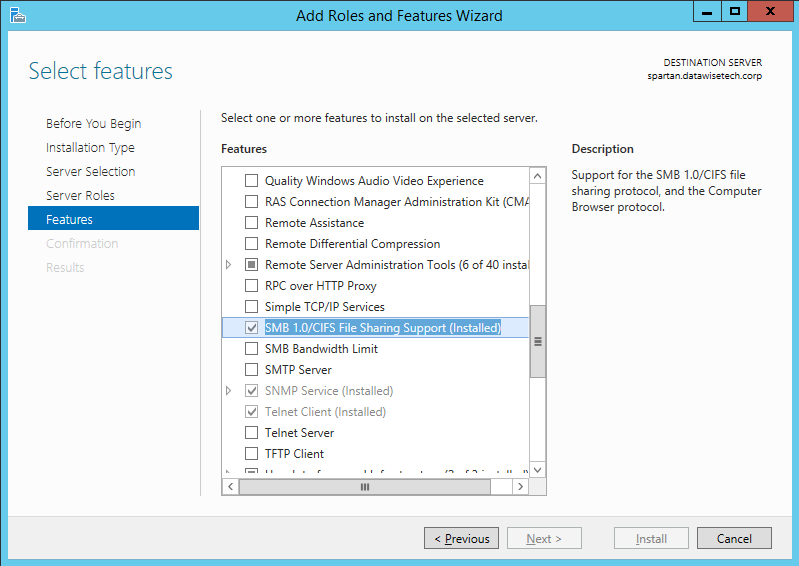
Windows XP talks SMB 1.0 and that’s it. If this is not offered by the server (file server or domain controller) we have a problem. Now if you installed new Windows Server 2012 R2 servers they do not deploy the SMB 1.0 feature by default. If you upgraded from Windows 2008 R2 (perhaps even over Windows 2012) to get to Windows 2008 (R2) this feature kept in place. Other wise you’ll need to make sure SMB 1.0 is installed, it often (always?) is. Just check.

image

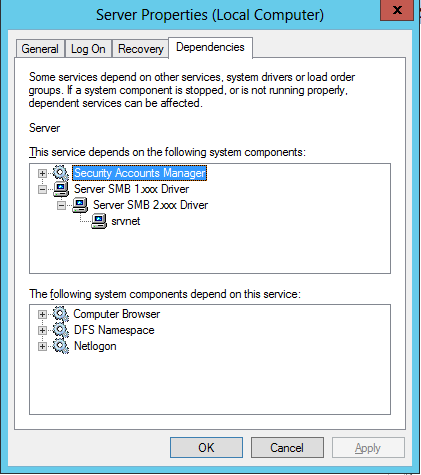
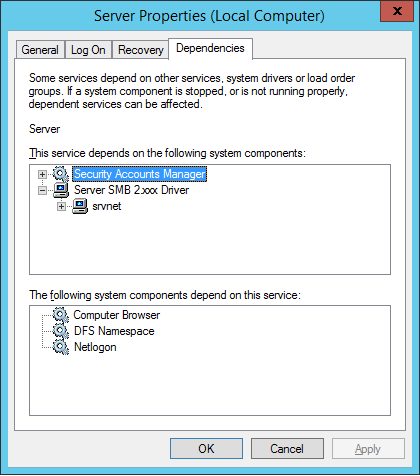
However there is a big change between Windows Server 2008 R2/Windows 2012. The LanmanServer service has a dependency set to SMB 2.0 and no longer to SMB 1.0

This is what it looks like on a Windows Server 2012 (or lower) domain controller:

image

This is what it look like on a Windows Server 2012 domain controller

image

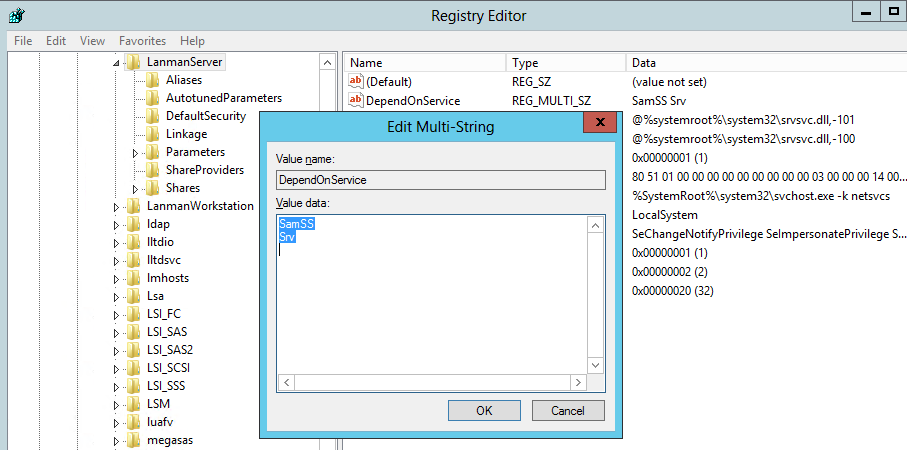
So we need to change that on Windows 2012 R2 to support Windows XP. We can do this in the registry. Navigate to

HKEY_LOCAL_MACHINESYSTEMCurrentControlSetServicesLanmanServerDependOnService

  1. Change SamSS Srv2 to SamSS Srvimage
  2. Restart the Server (Lanmanserver) service (it will restart the dependent services like netlogon, DFS Namespace, .. as well)

You’re XP clients should be able to authenticate again. You can test this by navigating to \domaincontrollerNetlogon on a XP client. This should succeed again.

If you have issues with Windows Server 2012 R2 file servers … this is also valid. When you do get rid of Windows XP. Go back to the original settings please Smile.

If you want to read more on SMB read this blog Windows Server 2012 R2: Which version of the SMB protocol (SMB 1.0, SMB 2.0, SMB 2.1, SMB 3.0 or SMB 3.02) are you using? by Jose Barreto (File Server team at Microsoft)

Finally, get off XP!

I think I said it enough on twitter and my blog Legacy Apps Preventing Your Move From Windows XP to Windows 8.1? Are you worried about HeartBleed? Good! Are you worried about still being on XP? No? Well dump SSL and use clear text authentication as XP is a free fire zone  anyway (as of April 8th 2014) and it’s just a matter of time before you’re road kill. Any company who has CIO/CTO/IT managers and other well paid functions and have let their organization be held hostage on XP (I’m not talking about a few PCs or VMs left and right) by legacy apps & ISV should realize they are the one who let this happen. Your watch. Your responsibility. No excuses.