In Defense of Switch Independent Teaming With Hyper-V

For many old timers (heck, that includes me) NIC teaming with LACP mode was the best of the best, at least when it comes to teaming options. Other modes often led to passive/active, less than optimal receiving network traffic aggregation. Basically, and perhaps over simplified, I could say the other options were only used if you had no other choice to get things to work. Which we did a lot … I used Intel’s different teaming modes for various reasons in the past (before we had MLAG, VLT, VPC, …). Trying to use LACP where possible was a good approach in the past in physical deployments and early virtualized environments when 1Gbps networking dominated the datacenter realm and Windows did not have native support for LBFO.

But even LACP, even in those days, had some drawbacks. It’s the most demanding form of teaming. For one it required switch stacking. This demands the same brand and type of switches and that means you have no redundancy during firmware upgrades. That’s bad, as the only way to work around that is to move all workload to another rack unit … if you even had the capability to do that! So even in days past we chose different models if teaming out of need or because of the above limitations for high availability. But the superiority of NIC teaming with LACP still stands for many and as modern switches support MLAG, VLT, etc. the drawback of stacking can be avoided. So does that mean LACP for NIC teaming is always the superior choice today?

Some argue it is and now they have found support in the documentation about Microsoft CPS system documentation about Microsoft CPS system. Look, even if Microsoft chose to use LACP in their solutions it’s based on their particular design and the needs of that design I do not concur that this is the best overall. It is however a valid & probably the choice for their specific setup. While I applaud the use of MLAG (when available to you a no or very low cost) to have all bases covered but it does not mean that LACP is the best choice for the majority of use cases with Hyper-V deployments. Microsoft actually agrees with me on this in their Windows Server 2012 R2 NIC Teaming (LBFO) Deployment and Management guide. They state that Switch Independent configuration / Dynamic distribution (or Hyper-V Port if on Hyper-V and if not on W2K12R2)  is the best possible default choice is for teaming in both native and Hyper-V environments. I concur, even if perhaps not that strong for native workloads (it depends). Exceptions to this:

  • Teaming is being performed in a VM (which should be rare),
  • Switch dependent teaming (e.g., LACP) is required by policy, or
  • Operation of a two-member Active/Standby team is required by policy.

In other words in 2 out of 3 cases the reason is a policy, not a technical superior solution …

Note that there are differences between Address Hash, Hyper-V Port mode & the new dynamic distribution modes and the latter has made things better in W2K12R2 in regards to bandwidth but you’ll need the read the white papers. Use dynamic as default, it is the best. Also note that LACP/Switch Dependent doesn’t mean you can send & receive to and from a VM over the aggregated bandwidth of all team members. Life is more complicated than that. So if that’s you’re main reason for switch dependent, and think you’re done => be ware Winking smile.

Switch Independent is also way better for optimization of VMQ. You have more queues available (sum-of-queues) and the IO path is very predictable & optimized.

If you don’t control the switches there’s a lot more cross team communication involved to set up teaming for your hosts. There’s more complexity in these configurations so more possibilities for errors or bugs. Operational ease is also a factor.

The biggest draw back could be that for receiving traffic you cannot get more than the bandwidth a single team member can deliver. That’s true but optimizing receiving traffic has it’s own demands and might not always be that great if the switch configuration isn’t that smart & capable. Do I ever miss the potential ability to aggregate incoming traffic. In real life I do not (yet) but in some configurations it could do a great job to optimize that when needed.

When using 10Gbps or higher you’ll rarely be in a situation where receiving traffic is higher than 10Gbps or higher and if you want to get that amount of traffic you really need to leverage DVMQ. And a as said switch independent teaming with port of dynamic mode gives you the most bang for the buck. as you have more queues available. This drawback is mitigated a bit by the fact that modern NICs have way larger number of queues available than they used to have. But if you have more than one VM that is eating close to 10Gbps in a non lab environment and you planning to have more than 2 of those on a host you need to start thinking about 40Gbps instead of aggregating a fistful of 10Gbps cables. Remember the golden rules a single bigger pipe is always better than a bunch of small pipes.

When using 1Gbps you’ll be at that point sooner and as 1Gbps isn’t a great fit for (Dynamic) VMQ anyway I’d say, sure give LACP a spin to try and get a bit more bandwidth but will it really matter? In native workloads it might but with a vSwith?  Modern CPUs eat 1Gbps NICs for breakfast, so I would not bother with VMQ. But when you’re tied to 1Gbps it’s probably due to budget constraints and you might not even have stackable, MLAG, VLT or other capable switches. But the arguments can be made, it depends (see Don’t tell me “It depends”! But it does!). But in any case I start saving for 10Gbps Smile

Today as the PC8100 series and the N4000 Series (budget 10Gbps switches, yes I know “budget” is relative but in the 10Gbps world, but they offer outstanding value for money), I tend to set up MLAG with two of these per rack. This means we have all options and needs covered at no extra cost and without sacrificing redundancy under any condition. However look at the needs of your VMs and the capability of your NICs before using LACP for teaming by default. The fact that switch independent works with any combination of budget switches to get redundancy doesn’t mean it’s only to be used in such scenarios. That’s a perk for those without more advanced gear, not a consolation price.

My best advise: do not over engineer it. Engineer it for the best possible solution for the environment at hand. When choosing a default it’s not about the best possible redundancy and bandwidth under certain conditions. It’s about the best possible redundancy and bandwidth under most conditions. It’s there that switch independent comes into it’s own, today more than ever!

There is one other very good, but luckily also a very rare case where LACP/Switch dependent will save you and switch independent won’t: dead switch ports, where the port becomes dysfunctional. So while switch independent protects against NIC, Switch, cable failures, here it doesn’t help you as it doesn’t know (it’s about link failures, not logical issues on a port).

For the majority of my Hyper-V deployments I do not use switch dependent / LACP. The situation where I did had to do with Windows NLB in combination with ICMP Multicast.

Note: You can do VLT, MLAG, stacking and still leverage switch independent teaming, LACP or static switch dependent is NOT mandatory even when possible.
Video Interview On Rolling Cluster Upgrades in Windows Server vNext

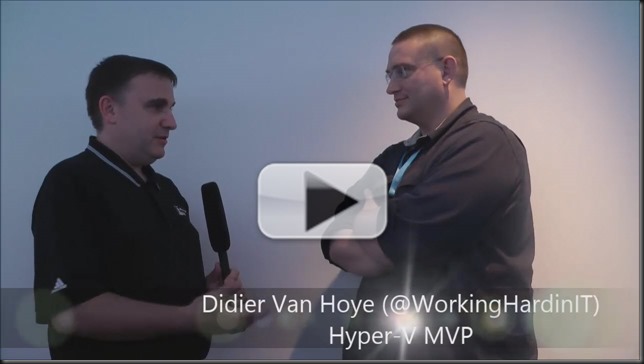
Carsten Rachfahl from Rachfahl IT-Solutions (quite possibly  Germany’s leading Hyper-V, Storage Spaces & Private cloud consultancy) and I got together in Berlin last November at the Microsoft Technical Summit 2014. Between presenting (I delivered What’s new in Failover Clustering in Windows Server 2012 R2), workshops, interviews we found some time to do a video interview.

We discussed a very welcome new capability in Windows Server vNext: “Rolling cluster updates” or “Cluster Operating System Rolling Upgrade” in Windows Server Technical Preview as Microsoft calls it. I blogged about this rather soon after the release of the Technical Preview First experiences with a rolling cluster upgrade of a lab Hyper-V Cluster (Technical Preview).

Videointerview with Didier Van Hoye about Rolling Cluster Upgrade Thumb1

We’ve been able to do rolling updates of Windows NLB for a long time and we’ve been asking for that same capability in Windows Failover Clustering for many years and now, it’s finally coming! And yes, as you will notice we like that a lot!

You need to realize that making the transition form one version to another as smooth, easy and risk free as possible is of great value to the customer as it enables them to upgrade faster and get the benefits of their investment quicker. For Microsoft it means they can have more people move to more modern environments faster which helps with support and delivering value in a secure and modern environment.

At the end we also joke around a bit about DevOps and how this is just as set of training wheels on the road to true site resilience engineering. All fun and all good. Enjoy!

Don’t Forget To Leverage The Benefits of RD Gateway On Hyper-V & RDP 8/8.1

So you upgraded your TS Gateway virtual machine on W2K8(R2) to RDS Gateway on W2K12(R2) too make sure you get the latest and the greatest functionality and cut off any signs of technology debt way in advance. Perhaps you were inspired by my blog series on how to do this, and maybe you jumped through the x86 to x64 bit hoop whilst at it. Well done.

Now when upgrading or migrating from W2K8(R2) a lot of people forget about some of the enhancements in W2K12(R2). This is especially true of you don’t notice much by doing so. That’s why I see people forget about UDP. Why? Well things will keep working as they did before Windows Server 2012 RDS Gateway over HTTP or over RPC-HTTP (legacy clients). I have seen deployments where both the Windows and the perimeter firewall rules to allow UDP over 3391 were missing. Let alone that UDP Transport over port 3391 was enabled in the transport settings.  But then you miss out on the benefits it offers (an improved user experience over less than great network connections and with graphics) as well on those of that ever more capable thingy called RemoteFX, if you use that.

For you that don’t know yet:  HTTP and UDP protocols are both used preferably by RD Gateway and are more efficient than RPC over HTTP which is better for scaling and experience under low bandwidth and bad connectivity conditions. When HTTP transport channels are up (in & outgoing traffic), two UDP side channels are set up that can be used to provide both reliable (RDP-UDP-R) and best-effort (RDP-UDP-L) delivery of data. UDP also leveraged SSL via the RD gateway because is uses Datagram Transport Layer Security (DTLS). For more info RD Gateway Capacity Planning in Windows Server 2012. Further more it proves you have no reason not to virtualize this workload and I concur!

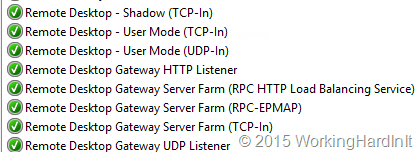
So why not set it up!?  So check you firewall rules on the RD Gateway Server and set the rules accordingly. Do the same for your perimeter firewalls or any other in between your users and your RD Gateway.

image

Under properties of your RS Gateway server you need to make sure UDP is enabled and listening on the needed IP address(es)

image

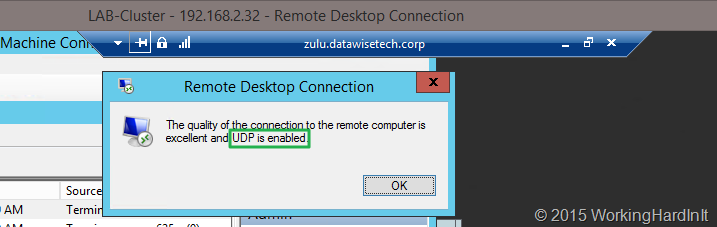
A client who connects over your RDS Gateway server, Windows Server 2012(R2) that is, and checks the network connection properties (click the “wireless NIC” like icon in the connection bar) sees the following: UDP is enabled. imageIf they don’t see UDP as enabled and they aren’t running Windows 8 or 8.1 (or W2K12R2) they can upgrade to RDP 8.1 on windows 7 or Windows Server 2008 R2! When they connect to a Windows 7 SP1 or Windows 2008R2  machine make sure you read this blog post Get the best RDP 8.0 experience when connecting to Windows 7: What you need to know as it contains some great information on what you need to do to enable RDP 8/8.1 when connecting to Windows 7 SP1 or Windows 2008 R2:

  1. “Computer ConfigurationAdministrative TemplatesWindows ComponentsRemote Desktop ServicesRemote Desktop Session HostRemote Session EnvironmentEnable Remote Desktop Protocol 8.0” should be set to “Enabled”
  2. “Computer ConfigurationAdministrative TemplatesWindows ComponentsRemote Desktop ServicesRemote Desktop Session HostConnectionsSelect RDP Transport Protocols” should be set to “Use both UDP and TCP” => Important: After the above 2 policy settings have been configured, restart your computer.
  3. Allow port traffic: If you’re connecting directly to the Windows 7 system, make sure that traffic is allowed on TCP and UDP for port 3389. If you’re connecting via Remote Desktop Gateway, make sure you use RD Gateway in Windows Server 2012 and allow TCP port 443 and UDP port 3391 traffic to the gateway

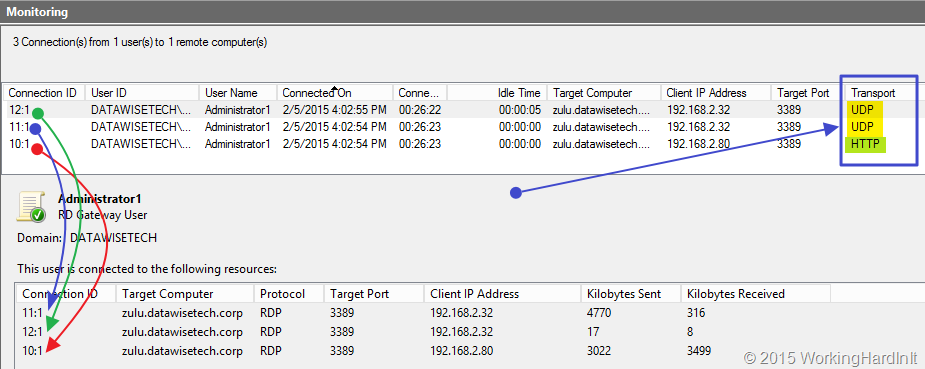
Cool you’ve done it and you verify it works. Under monitoring in the RD Gateway Manager you can see 3 connections per session: one is HTTP and the two others are UDP.

image

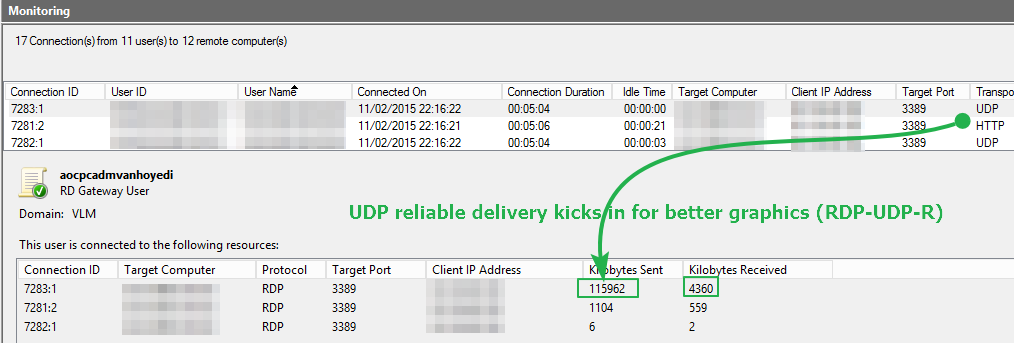
Life is good. But if you want to see the difference really well demonstrated try to connect to Windows 7 SP1 computer with RDP8 & TCP/UDP disabled and play a YouTube video, then to the same with RDP8 & TCP/UDP enabled, the difference is rather impressive. Likewise if you leverage RemoteFX in VM. The difference is very clear in experience, just try it! While you’re doing this look a the UDP “Kilobytes Sent” stats (refresh the monitoring tab, you’ll see UDP being put to work when playing a video on in your RDP session.

image

Load balancing Hyper-V Workloads With High To Continuous Availability With a KEMP Loadmaster

I’m working on some labs and projects with KEMP Loadmaster load balancing appliances (LM 2400, LM-R320) That will lead to some blog post on  load balancing several workloads, which are all on Windows Server 2012 R2  Hyper-V or integrate in to Azure. The load balancers used in the labs are the virtual appliances, depending on the needs and environment these are a very good, cost effective option for production as well and depending on the version you get they scale very well. Hence their use in cloud environments, they will not hold you back at all!

To stimulate your interest in load balancing and high availability I’ve put up a video on load balancing RD Gateway services. Consider it a teaser or introduction to more about the subject.

Why use an appliance (hardware/virtual)? Well let’s look at the 2 alternatives:

  • Round robin DNS, which is also sometimes used is just to low tech for most real life scenarios and sometimes can’t be used or is less efficient which impacts scalability and performance. On top of that it doesn’t provide health checking for failover purposes.
  • I’ve also said  before that while Windows NLB  provides layer 4 load balancing out of the box it’s pretty basic. It also often causes a lot of network grief and the implementation can be tedious. This has not improved in an ever more virtualized & cloud based world. On top of that, when network virtualization comes into play you might paint yourself into a corner as those two don’t mix. But if that’s not a concern and you’re on a budget, I’ve used it with success in the past as well.