Hyper-V Storage QoS in Windows Server 2016 Works on SOFS and on LUNs/CSVs

Introduction

I addressed storage QoS in Windows Server 2012 R2 at length in a coupe of blog posts quite a while ago:

I love the capability and I use it in real life. I also discussed where we were still lacking features and capabilities. I address the fact that there is no multiple host QoS, there is no cluster wide QoS and there is no storage wide QoS in Windows. On top of that, if there is QoS in the storage array (not many have that) most of the time this has no knowledge of Hyper-V, the cluster and the virtual machines. There is one well know exception and that GridStore, possible the only storage vendor that doesn’t treat Hyper-V as a second class citizen.

Any decent storage QoS that not only provides maximums but also minimums, does this via policies and is cluster and hypervisor even virtual machine aware. It needs to be easy to implement and mange. This is not a very common feature. And if it’s exists it’s is tied to the storage vendor, most of the time a startup or challenger.

Windows Server 2016

In Windows Server 2016 they are taking a giant step for all mankind in addressing these issues. At least in my humble opinion. You can read more here:

Basically  Microsoft enables us to define IOPs management policies for virtual machines based on virtual hard disks and  IOPs reserves and limits. These are shared by a group of virtual machines / virtual hard disks.  We can have better resource allocation between VMs, or groups of VMs. These could be high priority VMs or VMs belonging to an platinum customer /tenant. Storage QoS enhances what we already have since Windows Server 2012 R2.  It enables us to monitor and enforce performance thresholds via policies on groups of VMs or individual VMs.

Great for SLA’s but also to make sure a run away VM that’s doing way to much IO doesn’t negatively impact the other VMs and customers on the cluster. They did this via via a Centralized Policy Controller. Microsoft Research really delivered here I would dare say. A a public cloud provider they must have invested a lot in this capability.

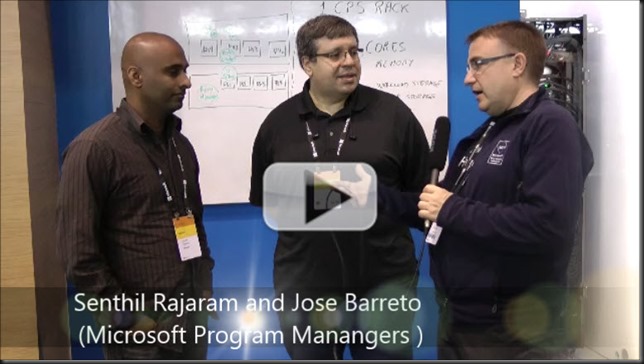
At Ignite 2015 there was a great session by Senthil Rajaram and Jose Barreto on this subject. Watch it for some more details.

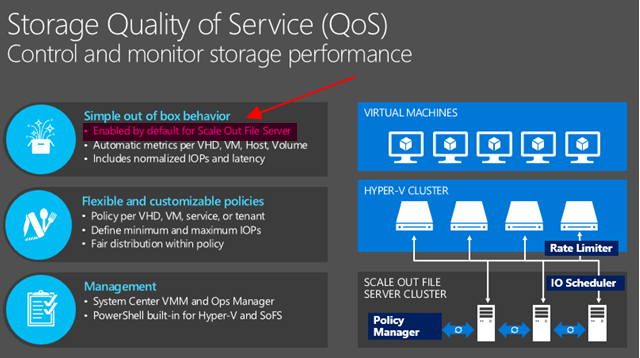
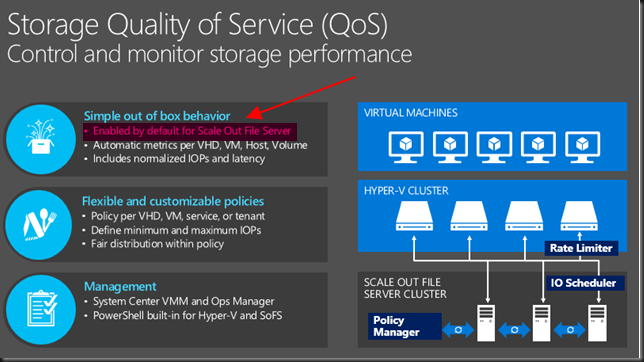
What caught my eye after  attending and watching sessions, talking to MSFT at the boot was the following marked in red.
image

So not enabled by default on non SOFS storage but can you enable it on your block level CSV Hyper-V cluster? There is a lot of focus on Microsoft providing Storage QoS for SOFS. Which ties into the “common knowledge” that virtualization and LUNs are a bad idea, you need file share and insights into the files of the virtual machines to put intelligence into the hypervisor or storage system right? Well perhaps no! I Windows Server 2016 there is now also the ability to provide it to any block level storage you use for Hyper-V. Yes your low end iSCSI SAN or your high End 16Gbps FC SAN … as long as it’s leveraging CVS (and you should!). Yes, this is what they state in an awesome interview with my Fellow Hyper-V MVP Carsten Rachfahl at Ignite 2015.
Videointerview with Jose and Senthil Storage QoS Thumb2

Senthil and Jose look happy and proud. They should be.  I’m happy and proud of them actually as to me this is huge. This information is also in the TechNet guide Storage Quality of Service in Windows Server Technical Preview

Storage QoS supports two deployment scenarios:

Hyper-V using a Scale-Out File Server This scenario requires both of the following:

  • Storage cluster that is a Scale-Out File Server clusterCompute cluster that has least one server with the Hyper-V role enabled.
  • For Storage QoS, the Failover Cluster is required on Storage, but optional on Compute. All servers (used for both Storage and Compute) must be running Windows Server Technical Preview.

Hyper-V using Cluster Shared Volumes. This scenario requires both of the following:

  • Compute cluster with the Hyper-V role enabled
  • Hyper-V using Cluster Shared Volumes (CSV) for storage

Failover Cluster is required. All servers must be running Windows Server Technical Preview.

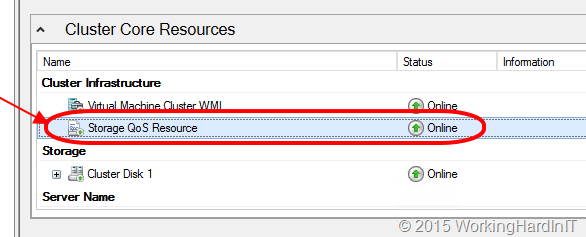
So let’s have a quick go following the TechNet guide on a lab cluster leveraging CSV over FC with a Dell Compellent.image

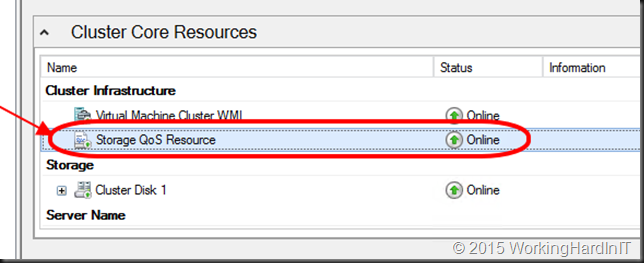
Which give me running Storage QoS Resource
image

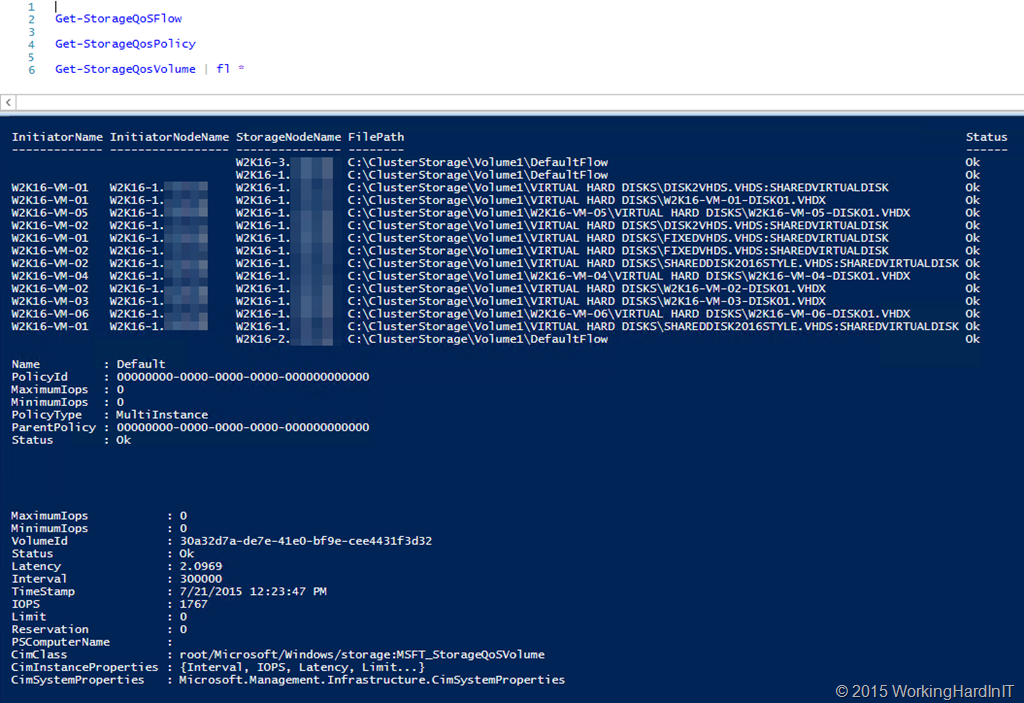
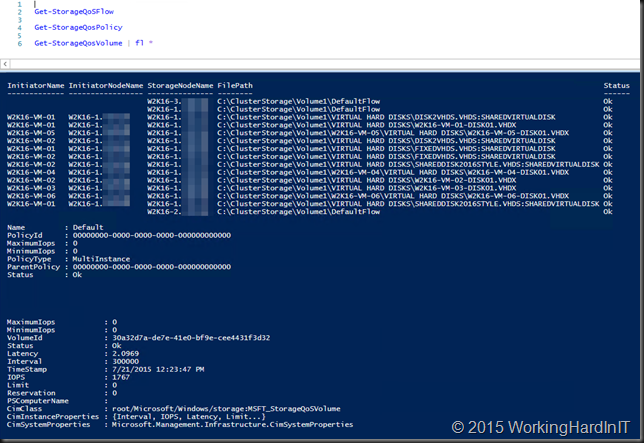
And I can play with my new PoSh Commands … Get-StorageFlowQos, Get-StorageQosPolicy and Get-StorageQosVolume …
image

The guide is full of commands, examples and tips. Go play with it. It’s great stuff Smile. I’ll blog more as I experiment.

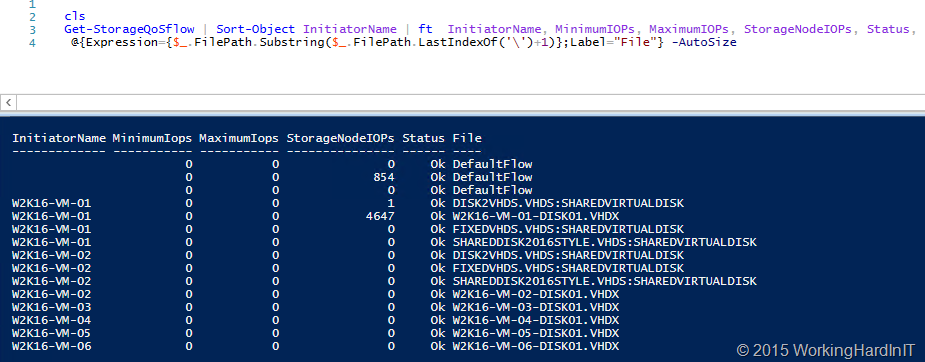
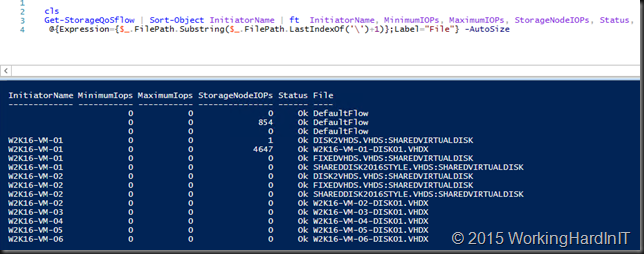
Here’s my test VMs doing absolutely nothing, bar one on which I’m generating traffic. Even without a policy set it shows the IOPS the VM is responsible for on the storage node.image
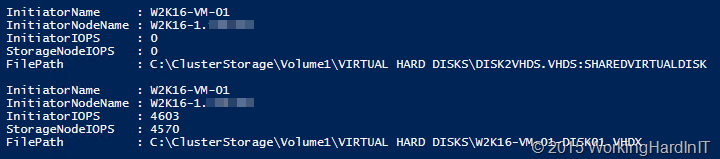
Yu can dive into this command and get details about what virtual disk on what volume are contributing to the this per storage node.
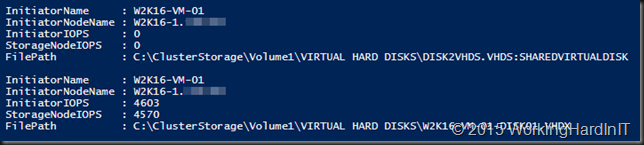
image

More later no doubt but here I just wanted to share this as to me this is very important! You can have the cookie of your choice and eat it to! So the storage can be:

  1. SOFS provided (with PCI RAID, Shared SAS, FC, FCoE, ISCI storage as backend storage) that doesn’t matter. In this case Hyper-V nodes can be clustered or stand alone
  2. The storage can be any other block level storage: iSCSI/FC/FCoE it doesn’t matter as long as you use CSVs. So yes this is clustered only. That Storage QoS Resource has to run somewhere.

You know that saying that you can’t do storage QoS on a LUN as they can’t be tweaked to the individual VM and virtual hard disks? Well, that’s been busted as myth it seems.

What’s left? Well if you have SOFS against a SAN or block level storage you cannot know if the storage is being used for other workloads that are not Hyper-V, policies are not cross cluster and stand alone hosts are a no go without SOFS. The cluster is a requirement for this to work with non SOFS Hyper-V deployments.  Also this has no deep knowledge or what’s happening inside of your storage array. So it knows how much IOPS you get, but it’s actually unaware of the total IOPS capability of the entire storage system or controller congestion etc. Is that a big show stopper? No. The focus here is on QoS for virtualization. The storage arrays storage behavior is always in flux anyway. It’s unpredictable by nature. Storage QoS is dynamic and it looks pretty darn promising to me! People this is just great. Really great and it’s very unique as far as I can say. Microsoft, you guys rock.

Out-of-Band Update MS15-078: Vulnerability in Microsoft font driver could allow remote code execution: July 16, 2015 – KB3079904

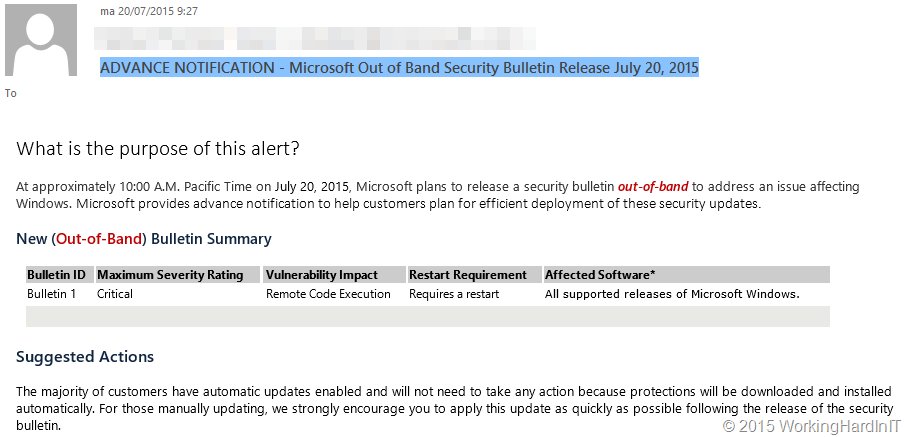
This morning at work, with a cup of coffee, I was glancing over the e-mail and was greeted by “ADVANCE NOTIFICATION – Microsoft Out of Band Security Bulletin Release July 20, 2015”

image

So Microsoft will release an emergency Out-of-Band (OOB) security update today that is valid for all windows versions and deals with a remote code execution vulnerability. It’s marked as critical but there is very little other information for the moment.

Just now it became available via MS15-078: Vulnerability in Microsoft font driver could allow remote code execution: July 16, 2015.

This security update resolves a vulnerability in Windows that could allow remote code execution if a user opens a specially crafted document or goes to an untrusted webpage that contains embedded OpenType fonts. To learn more about the vulnerability, see Microsoft Security Bulletin MS15-078.

This security update is rated Critical for all supported releases of Microsoft Windows. For more information, see the Affected Software section.

Windows Server 2012 R2 Datacenter
Windows Server 2012 R2 Standard
Windows Server 2012 R2 Essentials
Windows Server 2012 R2 Foundation
Windows 8.1 Enterprise
Windows 8.1 Pro
Windows 8.1
Windows RT 8.1
Windows Server 2012 Datacenter
Windows Server 2012 Standard
Windows Server 2012 Essentials
Windows Server 2012 Foundation
Windows 8 Enterprise
Windows 8 Pro
Windows 8
Windows RT
Windows Server 2008 R2 Service Pack 1
Windows 7 Service Pack 1
Windows Server 2008 Service Pack 2
Windows Vista Service Pack 2

The funny thing is that is shows up as important and not as critical in Windows Update.

image

Get you’re due diligence done before rolling it out but don’t delay it for to long! It’s a critical one!

Microsoft & Bromium Make Windows 10 Most Secure Endpoint Available

There was some very interesting news last week at the Microsoft World Partner Conference (WPC). Bromium and Microsoft announced a strategic partnership, Microsoft is now endorsing Bromium micro-virtualization and is aligning with Bromium in adopting a security architecture based on isolating critical information on the endpoint in Windows 10. The combination of Bromium and Windows 10 results in the most secure PC available today. You can read all about it here Bromium Partners to Bring Micro-virtualization to Windows 10

Bromium has been around for a while and I have always like the concept. Instead of trying to aim for a 100 percent secure system they acknowledge this is impossible. This means they realize that systems will get malware, zero day exploits, etc. Trying to provide complete protection is impossible. Try and you will fail. This means that we can play with a popular saying and state that “failure is not It’s a certainty”.

Just like any secured system, like a ship for example, the idea is to accept that there will be unavoidable breaches. To mitigate the risk you need to minimize the impact of these breaches. That’s what the water tight doors, the compartmentalization and isolation in ships are for. Banking on a 100 % success rate in avoiding breaches is just unrealistic. Bromium uses this same concept.

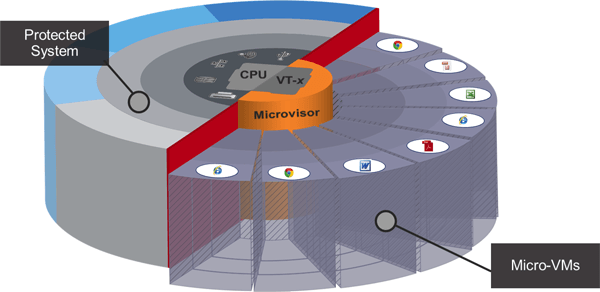
When breached It will limit the damage to as small and isolated environment. A temporary environment for that matter, something ships can’t do. Bromium runs every process on the machine in a hardware isolated micro VM, which is based on hardware virtualization technology (minimally VT-x or AMD-V).

innovations-micro-virtualization

Figure courtesy of Bromium

This goes pretty far. Not the internet browser level or e-mail client but every tab and every e-mail you open is isolated this way. If your browser tab gets compromised by a zero day exploit the infection and damage is limited to that browser tab. Or your e-mail message or you word document. All your other documents, browser tabs and word documents are protected. You get the idea. Even better when you close that word document or browser tab, the isolated micro VM in which it existed disappears together with the infection.

Figure courtesy of Bromium

This fits in well with Microsoft its own initiatives. Windows 10 leverages hardware security features such as UEFI secure boot, a Trusted Platform Module (TPM) and virtualization to provide a more secure computing environment already. Windows Server 2016 leverages the combination of hard ware technologies and the hypervisor to create a “Virtual Secure Mode” (VSM) to deliver shielded virtual machines.

While nothing is perfect it is an interesting approach as it protects against the unknown, isolates, minimizes impact and discards malware infections. It buys time to react and respond more long term to threats once they’re known while providing protection even when still unknown. Whereas anti malware only protects against known threats and is very reactive in nature.

Read more here http://www.bromium.com/products/our-technology.html and have a look here How does Bromium protect you?

Windows 10 KMS Client Setup Keys

Windows 10 build 10240 has been released to the Fast Ring. That’s what I’m running on my laptops now. There were heavy rumors yesterday that this is the to Release To Manufacturing (RTM) build and is the one to be publically available on July 29th. But there is no hard confirmation on this by Microsoft yet Build 10240 now available for Windows Insiders in Fast and Slow rings.

image

“Over the past few days we’ve been preparing our release pipelines and processes, and this build is one step closer to what customers will start to receive on 7/29 …

On Monday we announced that builds from here on will only be available through Windows Update, so to get this one you can either wait and it will be installed automatically.”

Here’s how you prepare to roll it out in your company.

In a previous blog post I wrote about the update you needed for your KMS server to be able to activate Windows 10 clients. Read about that in KB3058168: Update that enables Windows 8.1 and Windows 8 KMS hosts to activate Windows 10 You can get ready today, you have all you need.

Meanwhile Microsoft has also published the Windows 10 client KMS activation which keys can be found here Appendix A: KMS Client Setup Keys

image

Do note this is the key you use when you activate the Windows 10 Client against a KMS server. It is not the KMS license server key. That one you’ll need to obtain from your valid Microsoft licenses.

If you don’t have a KMS, the MAK key option will still be available.

Windows 10 looks set for a great start. DELL has been accepting preorders for a month now (Dell Brings Windows 10 to Life: Pre-order Today) which will be shipped to you on July 29th. Windows 7 owners could already reserve their upgrade via Windows update. The OEMs and the customers seem ready. I’ve heard of several large deployments in the works, often from organization still running Windows XP. We’re a Windows 8.1 shop but our new images are being build and will be deployed as the default image via MDT. We won’t let our investment in software assurance go to waste Winking smile