x86 Windows Server 2008 TS Gateway Migration To x64 Windows Server 2012 RD Gateway

Introduction

I was working on a little project for a company that was (still) running TS Gateway on a 32 bit  x86) version Windows 2008. The reason they did not go for x64 at the time of deployment was that they then used Microsoft Virtual Server as their virtualization platform and had been for some years.

In a number of posts I’ll be discussing some of the steps we took. You are reading the first one.

  1. x86 Windows Server 2008 TS Gateway Migration To x64 Windows Server 2012 RD Gateway
  2. Installing & using the Windows Server Migration Tools To Migrate Local Users & Groups
  3. TS/RD Gateway Export & Import (Fixing Event ID 2002 “The policy and configuration settings could not be imported to the RD Gateway server "%1"" because they are associated with local computer groups on another RD Gateway server”)

In those early days of W2K8 they had not yet switched to Hyper-V. As an early adopter I was able to show the the reliability of Hyper-V, so later they did.

One of the drawbacks of using Microsoft Virtual Server was that they could not use x64 guest VMs and that’s how they ended up with x86, which was still available for a server OS for W2K8. Since then they have move to Hyper-V and now also run Window Server 2012. Happy customers! So after more than 5 years of service and to make sure they did not keep relying on aging technology it is time to move to Windows Server 2012 RD Gateway and reap the benefits of the latest OS.

The Migration

Their is no in place upgrade from a x86 to an x64 OS. So this has to be a migration. No worries this is supported. With some insight, creativity and experience you can make this happen. The process reasonably well documented on TechNet, but not perfectly, and your starting point is right here RD Gateway Migration: Migrating the RD Gateway Role Service. These docs are for Windows Server 2008 R2 but still work for Windows Server 2012. Another challenge was we needed to also migrate their custom website used for the employees to check whether their PC is still on and if not wake it up or start it up remotely.

There are some things to take care of and I’ll address these I some later blog posts but I want you to take to heart this message. While an in place upgrade of an 32 bit X86 operating system to X64 version of that OS is not possible that doesn’t mean you’re in  a pickle and will have to start over from scratch. For many scenario’s there are migration paths and this is just one example of them, or better two combined,TS Gateway and a Website.

If You Can, You Should Attend TechEd 2013 Europe

It’s that time of the year again, when TechEd is coming closer. I’m attending the European Edition in Madrid, Spain. But I can guarantee you I will be on line a lot during the USA edition as well. At be attending the USA edition this year if I could but work, time and budget wise I can’t make that happen. This isn’t because the European edition is less, absolutely not. The reason is that at MMS2013 in Las Vegas last month we got the heads up that Microsoft will start talking publicly about the new version of Windows and I’m game for that. Windows Server 2012 is the best Windows version ever but I know what I’d like to see in there to make it even better. I’m kind of curious if anyone at MSFT follows my thinking on this subject. I hope so!

TechEdEU_250x250_7

So yes I’m a TechEd advocate, you bet! If you want to know why, read my blog post here on https://blog.workinghardinit.work/2010/06/05/why-i-find-value-in-a-conference/.

Come and learn amongst your peers, network with them and industry experts. To become competent and gain expertise you are going to have to get out there and expose your ideas, insights and thinking to your peers around the globe. That’s how it works. To those who dismiss quality conferences like this I can only say that you are wrong. To those who claim it’s a paid holiday I can only say that to a liar all other men are liars and to a thief all other men are thieves.  Enough said. Invest in knowledge and competence development, it will pay of better than some extra thousands of € in the bank!

So if you can please join me and attend TechEd. It’s a blast and a tremendous learning experience. I never ever miss attending TechEd, not even at times it wasn’t easy for me to do so. You can register here. I hope to see you there!

SMB Direct RoCE Does Not Work Without DCB/PFC

Introduction

SMB Direct RoCE Does Not Work Without DCB/PFC. “Yes”, you say, “we know, this is well documented. Thank you.” but before you sign of hear me out.

Recently I plugged to RoCE cards into some test servers and linked them to a couple of 10Gbps switches. I did some quick large file copy testing and to my big surprise RDMA kicked in with stellar performance even before I had installed the DCB feature, let alone configure it. So what’s the deal here. Does it work without DCB? Does the card fail back to iWarp? Highly unlikely. I was expecting it to fall back to plain vanilla 10Gbps and not being used at all but it was. A short shout out to Jose Barreto to discuss this helped clarify this.

DCB/PFC is a requirement RoCE

The more busy the network gets the faster the performance will drop. Now in our test scenario we had two servers  for a total of 4 RoCE ports on the network consisting of a beefy 48 port 10Gbps switches. So we didn’t see the negative results of this here.

DCB (Data Center Bridging) and Priority Flow Control are considered a requirement for any kind of RoCE deployment. RDMA with RoCE operates at the Ethernet layer. That means there is no overhead from TCP/IP, which is great for performance. This is the reason you want to use RDMA actually. It also means it’s left on it’s own to deal with Ethernet-level collisions and errors. For that it needs DCB/PFC other wise you’ll run into performance issues due to a ton of retries at the higher network layers.

The reason that iWarp doesn’t require DCB/PCF is that it works at the TCP/IP level also offloaded by using a TCP/IP stack on the NIC instead of the OS. So errors are handled by TCP/IP at a cost: iWarp results in the same benefits as RoCE but it doesn’t scale that well. Not that iWarp performance is lousy, far form! Mind you, for bandwidth management reasons,you’d be better of using DCB or some form of QoS as well.

Conclusion

So no, not configuring  DCB on your servers and the switches isn’t an option, but apparently it isn’t blocked either so beware of this. It might appear to be working fine but it’s a bad idea. Also don’t think it defaults back to iWarp mode, it doesn’t, as one card does one thing not both. There is no shortcut. RoCE RDMA does not work error free out of the box so you do have the install the DCB feature and configure it together with the switches.

Using RAMDisk To Test Windows Server 2012 Network Performance

I’m testing & playing different Windows Server 2012 & Hyper-V networking scenarios with 10Gbps, Multichannel, RDAM, Converged networking etc. Partially this is to find out what works best for us in regards to speed, reliability, complexity, supportability and cost.

Basically you have for basic resources in IT around which the eternal struggle for the prefect balance finds place. These are:

  • CPU
  • Memory
  • Networking
  • Storage

We need both the correct balance in capabilities, capacities and speed for these in well designed system. For many years now, but especially the last 2 years it very save to say that, while the sky is the limit, it’s become ever easier and cheaper to get what we need when it comes to CPU, Memory. These have become very powerful, fast and affordable relative to the entire cost of a solution.

Networking in the 10Gbps era is also showing it’s potential in quantity (bandwidth), speed (latency) and cost (well it’s getting there) without reducing the CPU or memory to trash thanks to a bunch of modern off load technologies. And basically in this case it’s these qualities we want to put to the test.

The most trouble some resource has been storage and it has been for quite a while. While SSD do wonders for many applications the balance between speed, capacity & cost isn’t that sweet as for our other resources.

In some environments were I’m active they have a need for both capacity and IOPS and as such they are in luck as next to caching a lot of spindles still equate to more IOPS. For testing the boundaries of one resource one needs to make sure non of the others hit theirs. That’s not easy as for performance testing can’t always have a truck load of spindles on a modern high speed SAN available.

RAMDisk to ease the IOPS bottleneck

To see how well the 10Gbps cards with and without Teaming, Multichannel, RDMA are behaving and what these configuration are capable of I wanted to take as much of the disk IOPS bottle neck out of the equation as possible. Apart from buying a Violin system capable of doing +1 million IOPS, which isn’t going to happen for some lab work, you can perhaps get the best possible IOPS by combining some local SSD and RAMDisk. RAMDisk is spare memory used as a virtual disk. It’s very fast and cost effective per IOPS. But capacity wise it’s not the worlds best, let alone most cost effective solution.

image

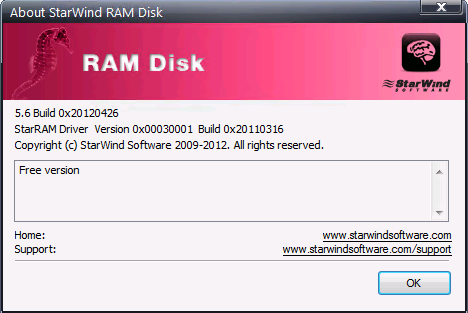
I’m using free RAMDisk software provided by StarWind. I chose this as they allow for large sized RAMDisks. I’m using the ones of 54GB right now to speed test copying fixed sized VHDX files. It install flawlessly on Windows Server 2012 and it hasn’t caused me any issues. Throw in some SSDs on the servers for where you need persistence and you’re in business for some very nice lab work.

clip_image001

You also need to be aware it doesn’t persist data when you reboot the system or lose power. This is not an issue if all we are doing is speed testing as we don’t care. Otherwise you’ll need to find a workaround and realize those ‘”flush the data to persistent storage” isn’t full proof or super fast, the SSDs do help here.

You have to register but the good news is that they don’t spam you to death at all, which I find cool. As said the tool is free, works with Windows Server 2012 and allows for larger RAMDisks where other free ones are often way to limited in size.

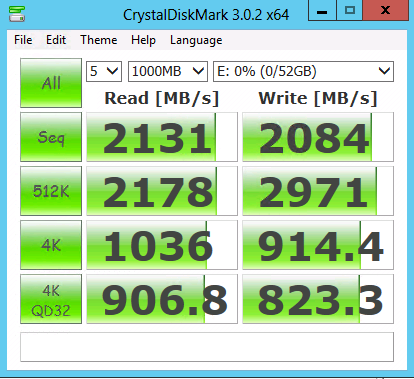
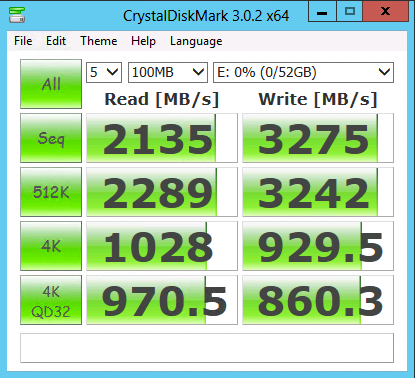
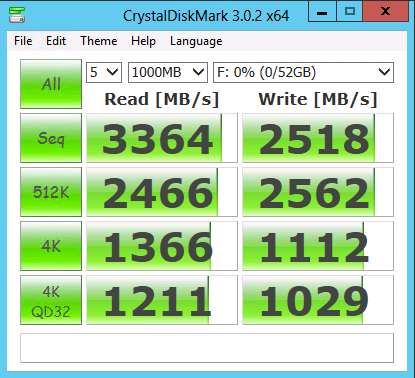
It has allowed me to do some really nice testing. Perhaps you want to check this out as well. WARNING: The below picture is a lab setup … I’m not a magician and it’s not the kind of IOPS I have all over the datacenters with 4 Cheapo SATA disks I touched my special magic pixie dust.

image

With #WinServ 2012 storage costs/performance/capacity are the only thing limiting you  http://twitter.yfrog.com/mnuo9fp #SMB3.0 #Multichannel

Some quick tests with a 52GB NTFS RAMDisk formatted with a 64K NTFS Allocation unit size.

image image

I also tested with another free tool from SoftPerfect ® RAM Disk FREE. It performs well but I don’t get to see the RAMDisk in the Windows Disk Management GUI, at least not on Windows Server 2012. I have not tested with W2K8R2.

NTFS Allocation unit size 4K NTFS Allocation unit size 64K
image image