Updating Hyper-V Integration Services: An error has occurred: One of the update processes returned error code 1603

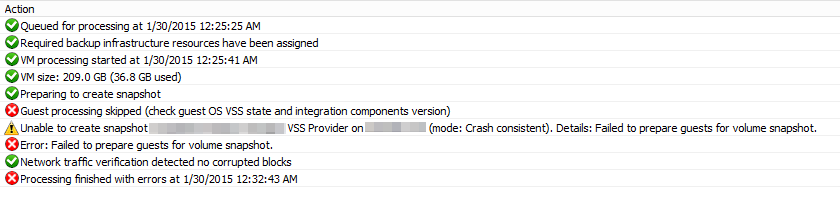
So you migrate over 200 VMs from a previous version of Hyper-V to Windows Server 2012 R2 fully patched and life looks great, full of possibilities etc. However one thing get’s back to your e-mail inbox consistently: a couple of Windows Server 2003 R2 SP2 (x64) and Windows XP SP3 (x86) virtual machines. The VEEAM backups consistently fail. Digging into that the cause is pretty obvious … it tells you where to problem lies.

image

Ah they forgot the upgrade the IS components you might conclude. Let’s see if we try an upgrade. Yes they are offered and you run them … looks to be going well too. But then you’re greeted by "An error has occurred: One of the update processes returned error code 1603”.

Darn! Now you can go and do all kinds of stuff to find out what part of the integrations services are messed up as most day to day operations work fine (registry, explore, versions, security settings …) or be smart a leverage the power of PowerShell. It’s easy to find out what is not right via a simple commandlet  Get-VMIntegrationService

image

We’ll that’s obvious. So how to fix this. I uninstalled the IS components, rebooted the VM, reinstalled the IS components  … which requires another reboot. While the VM is rebooting you can take a peak at the integration services status with Get-VMIntegrationService

image

That’s it, all is well again and backups run just fine. Lessons learned here are that SCOM was completely happy with the bad situation … that isn’t good Smile.

So there’s the solution for you but it’s kind of “omen” like that it happened to three Windows 2003 virtual machines (both x64 and x86). You really need to get off these obsolete operating systems. Staying will never improve things but I guarantee you they will get worse.

See you at a next blog Winking smile

Hyper-V Amigos Showcast Episode 9 – RDMA, RoCE, PFC and ETS

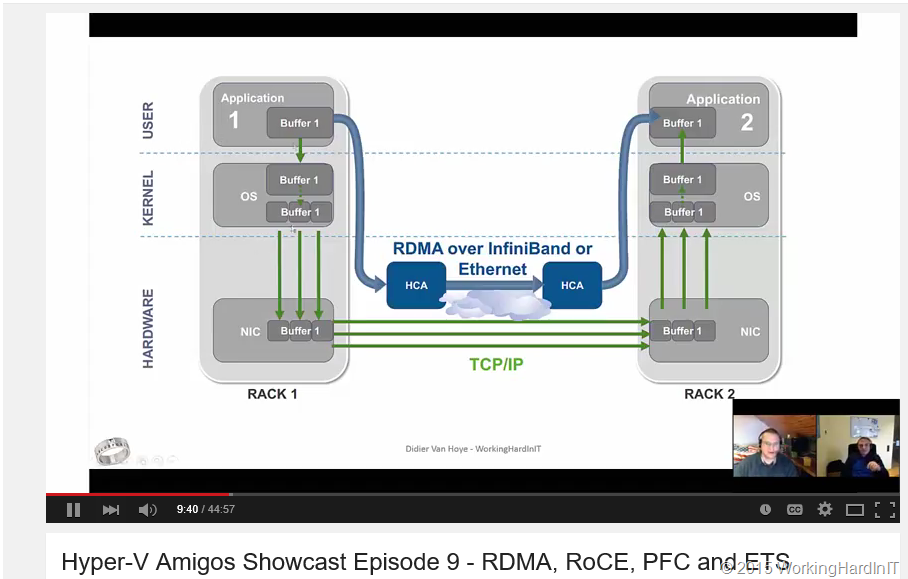
Just before Carsten Rachfahl and I left for Microsoft Ignite we recorded episode 9 of the Hyper-V Amigo Showcast. In this episode we’ll discuss SMB Direct over RoCE (RDMA over Converged Ethernet) which requires lossless Ethernet.

image

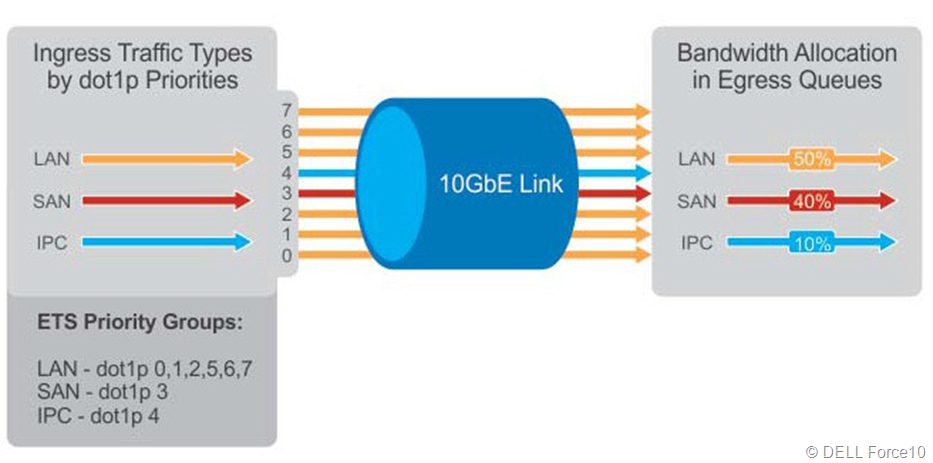
Data Center Bridging is the way to achieve this. It has four standards, PFC (802.1Qbb), ETS (802.1Qaz), CN (802.1Qau) and DCBx, but only two are important to us now.Priority Flow Control (PFC) is mandatory

image

and Enhanced Transmission Selection is optional (but very handy depending on your environment).

image

If you need more information on this start with these blogs on the subject. But without further delay here’s Hyper-V Amigos Showcast Episode 9 – RDMA, RoCE, PFC and ETS

For Whom The Bell Tolls At Microsoft Ignite 2015

Microsoft sure knows how to keep the pressure on the storage industry. Both the traditional and the hyper converged crowd now have heard the gloomy tolling of that big doomsday bell once again. The offerings for 3rd party storage in the Wintel ecosystem will have to become better value for money once again in order to keep up or stay ahead.

clip_image001

I already wrote that here in TechEd 2013 Revelations for Storage Vendors as the Future of Storage lies With Windows 2012 R2 and poked some fun that the days of the easy big money in storage were over. Today storage vendors that do not adapt are going to feel that more than ever. One thing is for sure, there is no one size fits all and one trick ponies are not going to thrive.  Microsoft now covers hyper converged, converged and centralized storage solutions. SMB Direct is the backbone for high throughput, low latency transport. If you haven’t done so you might just take a peek at SMB Direct now and study up on DCB (PFC/ETS). No worries … I have done a lot of “pioneer” work in the field on this. But unfortunately I could not present an end-to-end configuration of SMB Direct over RoCE session here at Ignite. But there are other opportunities.Storage replication completes the story while Storage QoS is giving is long needed control. So let the FUD fly, sit back and enjoy the show. Remember, when you’re catching lots of FLAK, you’re over your target Winking smile

REFS Is Going Places At Microsoft Ignite 2015

I just loved the strengths of ReFS when I started looking into them when it was first announced. However it has been a bit quiet around ReFS due to some limitations or support issues.

But we’re seeing progress again and it seems that ReFS will be taken on a bigger role, even as the preferred file system for certain use cases. This is awesome. We’ll get the benefits REFS brings for less expensive types of disks in combination with storage spaces which are quite good already:

  • Integrity: ReFS stores data so that it is protected from many of the common errors that can cause data loss. File system metadata is always protected. Optionally, user data can be protected on a per-volume, per-directory, or per-file basis. If corruption occurs, ReFS can detect and, when configured with Storage Spaces, automatically correct the corruption. In the event of a system error, ReFS is designed to recover from that error rapidly, with no loss of user data.
  • Availability: ReFS is designed to prioritize the availability of data. With ReFS, if corruption occurs, and it cannot be repaired automatically, the online salvage process is localized to the area of corruption, requiring no volume down-time. In short, if corruption occurs, ReFS will stay online.
  • Scalability: ReFS is designed for the data set sizes of today and the data set sizes of tomorrow; it’s optimized for high scalability.
  • App Compatibility: To maximize AppCompat, ReFS supports a subset of NTFS features plus Win32 APIs that are widely adopted.
  • Proactive Error Identification: The integrity capabilities of ReFS are leveraged by a data integrity scanner (a “scrubber”) that periodically scans the volume, attempts to identify latent corruption, and then proactively triggers a repair of that corrupt data.

But, there’s more as ReFS has been improved and those improvements qualify it as the best default choice for a file system on Storage Spaces Direct (SSDi or D2S). What they have done to make it fast for certain data operations (VM creation, resizing, merges, snapshots) can only be described as “ODX” like. We’re getting speed, scalability, auto repair, high availability and data protection in a budget friendly storage. What’s not to like. There are many uses cases now where the need and benefits are clear but the economics worked against us. Well that’s about to be solved with the new and improved storage offerings in Windows Server 2016. I’m looking forward to more information on the evolution of ReFS as it matures as a file systems and take its place in on the front stage over the years. If you haven’t yet, I suggest you start looking at ReFS (again). I’ll be watching to see how far they take this.