I’m Attending The MVP Summit 2012

I’ll be attending the MVP Summit 2012 in Redmond from the 27th of February to the 2nd of March. I consider myself very lucky to be able to do so and I’m grateful that my employer is helping me make use of this opportunity. I appreciate that enormously.

So my hotel is booked, my flights are scheduled. It’s a long flight with a lengthy stopover in Heathrow. I actually spend a day travelling to and from the event. But I’m told it’s very much worth the effort Smile and I got some great tips from some veteran MVPs in the community. For newbies who can use some information on the MVP summit take a look at What to expect at your first MVP Summit by Pat Richard.

image

I also look forward to meeting so many peers in person and attending all the briefings where we’ll learn a lot of valuable new things about Hyper-V. I cannot talk about them as they are under NDA but there will be many opportunities to provide feedback to the product teams in my expertise “Virtual Machine’” (i.e. Hyper-V). I have a bunch of questions & feedback for the product teams.

From my colleagues I have learned it’s also a good way to help pass feedback from others on to Microsoft. So this is your chance. Take it! What do you like or need in the virtualization products. What should be enhanced and what is hurting you? What works and what doesn’t?  What is missing?

With Windows 8 going into beta by next month don’t expect immediate actions and changes based on your feedback. But if you want to have your opinions taken into consideration you have to let them be heard. So don’t be shy now! Let me know. Sincere & real concerns, along with problems, challenges and feedback on your experiences with the product are very much appreciated.

So, if you have any remarks, feedback, feature requests you’d like to share with the virtualization product teams let me know. Just post them in the comments, send me a e-mail via the contact form or message me via @workinghardinit on twitter. My colleagues tell me the program managers in the virtualization area are a very communicative and responsive bunch. I think that’s true from my experiences with them in the past.

Thinking About Windows 8 Server & Hyper-V 3.0 Network Performance

Introduction

The main purpose of this post is, as mentioned in the title, to think. This is not a design or a technical reference. When it comes to designing a virtualization solution for your private cloud their are a lot of components to consider. Storage, networking, CPU, memory all come in to play and there is no one size fits all. It all depends on your needs, budget in combination with how good your  insight into your future plans & requirements are. This is not and easy task. Virtualizing 40 webservers is very different from virtualizing SQL Server, Exchange or SharePoint.  Server virtualization is different from VDI and VDI itself comes in many different flavors.

  • So what workloads are you hosting? Is it a homogeneous or a heterogeneous environment?
  • What kind of applications are you supporting? Client-Server, SOA/Web Services, Cloud apps?
  • What storage performance & features do you need to support all that?
  • What kind of network traffic does this require?
  • What does your business demand? Do you know, do they even know? Can you even know in a private cloud environment?
  • Do you have one customers or many (multi tenancy) and how are they alike or different in both IT needs and business requirements.

The needs of true public cloud builders are different from those running their own private clouds in their own data centers or in a mix of those with infrastructure at a hosting provider. On top of that an SMB environment is different from large enterprises and companies of the same size will differ in their requirements enormously due to the nature of their business.

I’ve written about virtualization and CPU considerations before (NUMA, Power Save settings for both OS & 10Gbps network performance) before. I’ve also discussed a number of posts about 10Gbps networking and different approaches on how to introduce it with out breaking the bank. In 2012 I intend to blog some more on networking and storage options with Windows 8 and Hyper-V 3.0. But I still need to get my hands on the betas and release candidates of Windows 8 to do so. You’ll notice I don’t talk about Infiniband. Well I just don’t circulate in the ecosystems where absolute top notch performance is so important that they can justify and get that kind of budget to throw at those needs.

To set the scene for these blog posts I’ll introduce some considerations around networking options with Hyper-V. There are many features and options both in hardware, technologies, protocols, file systems. Even when everything is intended to make live simpler people might get lost in all the options and choices available.

Windows Server 8 NIC features – The Alphabet Soup

  • Data Center Bridging (DCB)
  • Receive Segment Coalescing (RSC)
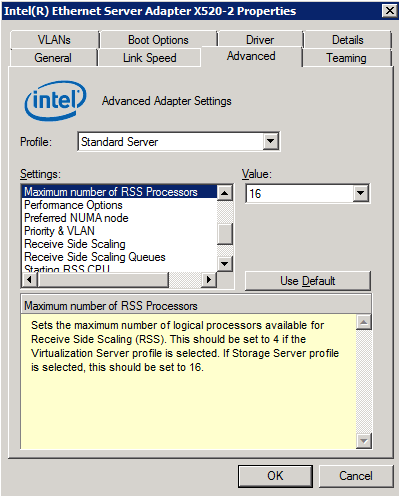
  • Receive Side Scaling (RSS)
  • Remote Direct Memory Access (RDMA)
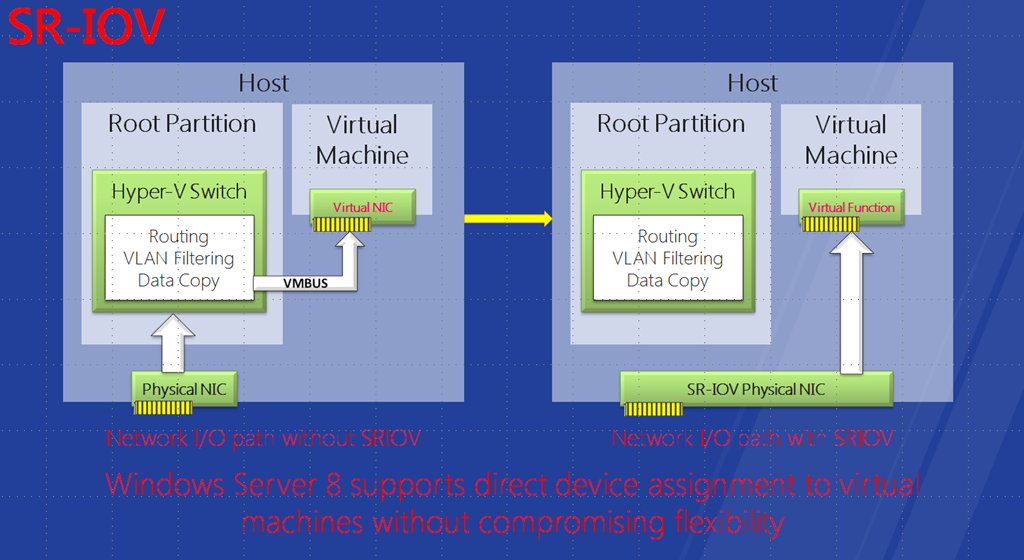
  • Single Root I/O Virtualization (SR-IOV)
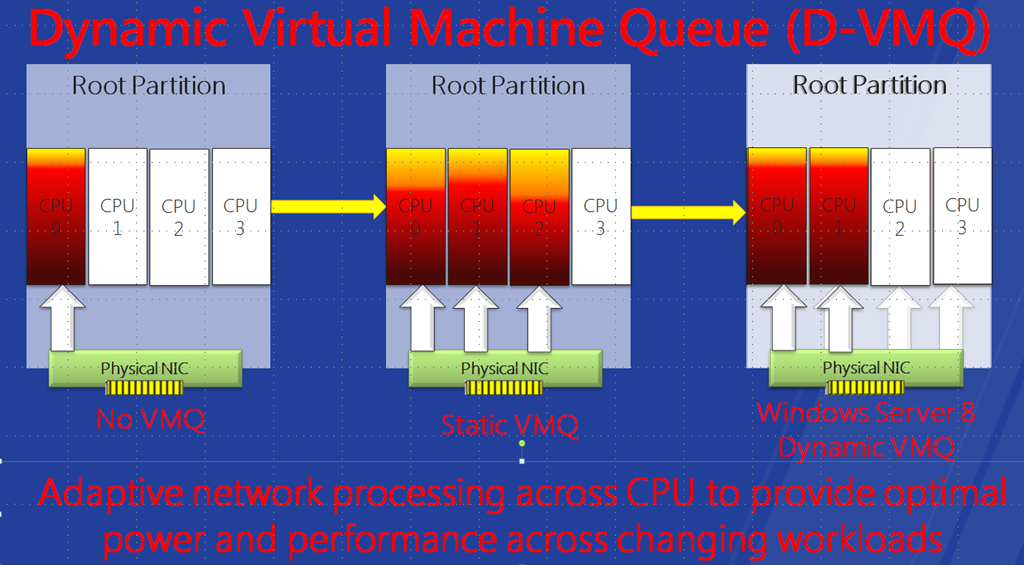
  • Virtual Machine Queue (VMQ)
  • IPsec offload (IPsecTO)

A lot of this stuff has to do with converged networks. These offer a lot of flexibility and the potential for cost savings along the way. But convergence & cost savings are not a goal. They are means to an end. Perhaps you can have better, cheaper and more effective solutions leveraging you existing network infrastructure by adding some 10Gbps switches & NICs where they provide the best bang for the buck. Chances are you don’t need to throw it all out and do a fork lift replacement. Use what you need from the options and features. Be smart about it. Remember my post on A Fool With A Tool Is Still A Fool, don’t be that guy!

Now let’s focus on couple of the features here that have to do with network I/O performance and not as much convergence or QOS. As an example of this I like to use Live migration of virtual machines with 10Gbps. Right now with one 10Gbps NIC I can use 75% of the bandwidth of a dedicated NIC for live migration. When running 20 or more virtual machines per host with 4Gbps to 8Gbps of memory and with Windows 8 giving me multiple concurrent Live Migrations I can really use that bandwidth. Why would I want to cut it up to 2 or 3Gbps in that case. Remember the goal. All the features and concepts are just tools, means to and end. Think about what you need.

But wait, in Windows 8 we have some new tricks up our sleeve. Let’s team two 10Gbps NICs put all traffic over that team and than divide the bandwidth up and use QOS to assure Live Migration gets 10Gbps when needed but without taking it away from others network I/O when it’s not needed. That’s nice! Sounds rather cool doesn’t it and I certainly see a use for it. It might not be right if you can’t afford to loose that bandwidth when Live Migration kicks in but if you can … more power & cost savings to you. But there are other reasons not to put everything on one NIC or team.

RSS, VMQ, SR-IOV

One thing all these have in common is that they are used to reduce the CPU load / bottleneck on the host and allow to optimize the network I/O and bandwidth usage of your expensive 10Gbps NICs. Both avoiding having a CPU bottleneck and optimizing the use of the available bandwidth mean you get more out of your servers. That translates in avoiding buying more of them to get the same workload done.

RSS is targeted at the host network traffic. VMQ and SR-IOV are targeted at the virtual machine network traffic but in the end the both result in the same benefits as stated above. RSS & VMQ integrate well with other advanced windows features. VMQ for examples can be used with the extensible Hyper-V switch while RSS can be combined with QOS & DCB in storage & cluster host networking scenarios. So these give you a lot of options and flexibility. SR-IOV or RDMA is more focused on raw performance and doesn’t integrate so well with the more advanced features for flexibility & scalability. I’ll talk some more on this in future blog posts.

Now with all these features that have there own requirements and compatibilities you might want to reconsider putting all traffic over one pair of teamed NICs. You can’t optimize them all in such a scenario and that might hurt you. Perhaps you’ll be fine, perhaps you won’t.

image

So what to use where and when depends on how many NICs you’ll use in your servers and for what purpose. For example even in a private cloud for lightweight virtual machines running web services you might want to separate the host management & cluster traffic from the virtual machine network traffic. You see RSS & VMQ are mutually exclusive. That way you can use RSS for the host/cluster traffic and DVMQ for the virtual machine network. Now if you need redundancy you might see that you’ll already use 2*2NIC with Windows 8 NLB in combination with two switches to avoid a single point of failure. Do your really need that bandwidth for the guest servers? Perhaps not but, you might find that it helps improve density because of better better host & NIC performance helping you avoiding the cost of buying extra servers. If you virtualize SQL servers you’d be even more interested in all this. The picture below is just an illustration, just to get you to think, it’s not a design.

image

I’m sure a lot of matrices will be produced showing what features are compatible under what conditions, perhaps even with some decision charts to help you decide what to use where and when.

DELL PowerConnect 8024F Is Now Stackable

A colleague pointed me the latest firmware update (4.2.0.4) for the DELL PowerConnect 8024F switches. As I was reading the release notes one item in particular caught my attention. The PowerConnect 8024/8024f/M8024-k switches are now stackable. You can put up to 6 switches in one stack using the regular front ports (SFP+). You might remember form a previous blog post on 10Gbps, Introducing 10Gbps With A Dedicated CSV & Live Migration Network (Part 2/4), where I mentioned that we got a great deal on those switches. I also mentioned that the only thing lacking in these switches and what would make this the best 10Gbps switch when comparing value for money is the ability to stack them. I quote myself:

“They could make that 8024F an unbeatable price/quality deal if they would make them stackable.”

I’ve been called visionary before but I won’t go into that that insider joke right now Winking smile. Now it’s for sure that not just my little blog post that made this update happen but it is a nice New Year’s gift. More features & options with hardware you already own is always nice. So I guess a lot of people have made the same observation, both customers & DELL themselves. You could just “smell” by the available command & configuration that this switch could be made stackable and they did.

Is Ethernet based stacking perfect? No (there is very little perfection in this world). The biggest drawback, if you need that feature,  is the fact that you can hot plug the stacking links. But for all other practical purposes it’s a nice deal. Why? Well, now that these switches supports Ethernet based stacking you will be able to choose more types of NIC Teaming to use for your servers. That means those teaming configurations that are dependent on stacking, such as for active-active NIC Teaming across two switches to be more precise. I find this pretty good news.

You all know I’m very enthusiastic to use the NIC Teaming build into Windows 8 and I will use it where and when I can. But there will be for many years to come a lot of Windows 2008 R2 systems to support and install. So it’s always good to see your hardware vendors improving their gear to give you more options. For the pricing I got on the 8024F in the last project and the needs of the solution we could deal with not being able to stack. Stacking via Ethernet using other switches was way more expensive, not even to mention the ones using stacking module ones (real premium pricing). So we got the best deal for our needs.

For 10Gbps switches stacking over Ethernet give you up to 80Gbps with a maximum of 8 uplinks so bandwidth is not as much a concern. With 1Gbps switches it is, which makes stacking modules the only way to go there I think. If you need massive bandwidth and you probably do. The drawback, as with all forms of inter switch links (a LAG for example) is that this method means you’re losing ports for other purposes. But you need to look at your needs and do the math. I think buying with investment protection is good but don’t always buy in preparation for the time you’ll become a fortune 500 company. That takes a while and in the mean while you’ll be very well served anyway.

Another related feature that’s new is Nonstop Forwarding (NSF). NSF allows the forwarding plane of stack units to continue forwarding packets even while the control and management planes restart. This could be a power failure, some hardware of software error or even an upgrade. This feature is common to all stackable switches as far as I know and is needed. Not that ‘m saying the redundant loop in stack is bad or overkill, far from it, but that takes care of other scenarios that NSF is designed to handle.

My Recommendations For Our IT Pro at TechDays 2012 Belgium

I’m very busy with storage at the moment and as I’m already doing some other conferences this year we’re giving some other members of our IT the opportunity to attend TechDays 2012. That doesn’t stop me from giving some hints to the junior but very smart & fast learning IT Pro that’s in our delegation (4 developers & 1 IT Pro) and I might as well share those hints with you. The idea of sending him to TechDays is to expose him to a variety of subjects that are related to current and future needs/trends in the industry and in our line of business. It’s not just focused on training. I want him to look at the bigger picture of all parts in the puzzle. It’s about getting some context and tasting the possibilities. It’s also good to see some of our local IT talent (like Mike Resseler and Kurt Roggen) in action. Naturally I leave it up to him to make his own choices, and I hope he does. So here are, in chronological order, my recommendations:

February 14th

10:45-12:00
Monitoring and Operating a Private Cloud with System Center 2012

12:00-13:00 (If you want to lunch & learn)
Manage VM’s and Services across Private Clouds and Windows Azure with System …

13:00-14:15
Take the Spaghetti out of Windows Azure – an insight for IT Pro Techies Part 1 (John Craddock)

14:30-15:45
Take the Spaghetti out of Windows Azure – an insight for IT Pro Techies Part 2 (John Craddock)

16:15-17:30
System Center Virtual Machine Manager 2012, Fabric Management, creation and consumption of the cloud (Vijay Tewari)

17:45-19:00
Windows 8 Dynamic Access Control (John Craddock)

February 15th

09:00-10:15
Windows 8 Hyper: Availability (Bryon Surace)

10:45-12:00
Discover what’s new in Windows 8 Active Directory (Paul Loonen)

13:00-14:15
The Private Cloud, Principles, Patterns and Concepts (Tom Shinder)

14:30-15:45
Toolmaking for Administrators using Windows PowerShell (Jason Helmick)

16:15-17:30
Windows 8 Disk Dedupe (Speaker: Mike Resseler)

17:45-18:45
What’s new in PowerShell V3! (Jason Helmick)

February 16th

09:00-10:15
Private Cloud Day Session 1- Building your Private Cloud Infrastructure (Kurt Roggen)

10:45-12:00
Private Cloud Day Session 2- Creating & Configure your Private Cloud (Kurt Roggen)

13:00-14:15
Private Cloud Day Session 3- Monitor & Operate your Private Cloud (Mike Resseler)

14:30-15:45
Private Cloud Day Session 4- Automating & Delivering Services in your Private Cloud (Mike Resseler & Kurt Roggen)

16:15-17:30
Private Cloud Day Session 5- A Solution for Private Cloud Security (Tom Shinder)