NTFS Permissions On A File Server From Hell Saved By SetACL.exe & SetACL Studio

Most IT people don’t have a warm and fuzzy feeling when NTFS permissions & “ACLing” are being discussed. While you can do great & very functional things with it, in reality when dealing with file servers over time “stuff” happens. Some of it technical, most of it is what I’ll call “real life”. When it comes to file servers, real life, especially in a business environment, has very little respect, let alone consideration for NFTS/ACL best practices. So we all end up dealing with the fall out of this phenomena. If you haven’t I could state you’re not a real sys admin but in reality I’m just envious of your avoidance skills Smile.

You don’t want to fight NTFS/ACLs, but if it can’t be avoided you need the best possible knowledge about how it works and the best possible tools to get the job done (in that order).

If you have not heard of SetACL or DelProf2, you might also not have heard of uberAgent for Splunk, let alone of their creator, community rock star Helge Klein. If you new to the business I’ll forgive you but if you been around for a while you have to get to know these tools. His admin tools, both the free or the paying ones, are rock solid and come in extremely handy in day to day work. When the shit hits the fans they are priceless.

Helge is an extremely knowledgeable, experienced, talented and creative IT Professional and developer. I’ve met him a couple of times (E2EVC, where he’s an appreciated speaker) and all I can say is that on top of all that, he’s a great guy, with heart for the community.

Having the free SetACL.exe available for scripting of NTFS permissions is a luxury I cannot do without anymore. On top of that for a very low price you can buy SetACL Studio. This must be the most efficient GUI tool for managing NFTS permissions / ACLs I have ever come across.

Not long ago I was faced with a MBR to GPT LUN migration on a very large file server. It’s the proverbial file server from hell. We’ve all been there too many times and even after 15 years plus we still cannot get people to listen and follow some best practices and above all the KISS principle. So you end up having to deal with the fall out of every political, organizational, process and technical mistake you can imagine when it comes to ACLs & NTFS permissions. So what did I reach for? SetACL.exe and SetACL Studio, these are my go to tools for this.

image

Check out the web page to read up on what this tool can do for you. It very easy to use, intuitive and fast. It can do ACL on file systems, registry, services, printers and even WMI. It helps you deal with granting ownership and rights without messing up the existing NTFS permissions in an easy way. It works on both local and remote systems. Last but not least it has an undo function, how cool is that?!  Yup and admin tool that let you change your mind. Quite unique.

As an MVP I can get a license for free form Helge Klein but I recommend any IT Pro or consultant to buy this tool as it makes a wonderful addition to anyone’s toolkit, saving countless of hours, perhaps even days. It pays itself back within the 15 minutes you use it.

Other useful tools in your toolkit are http://www.editpadlite.com/ as it can handle the large (550-800 MB) log files RoboCopy can produce and some PowerShell scripting skills to parse these files.
Windows 2012 R2 Data Deduplication Leverages Shadow Copies: “LastOptimizationResultMessage : A volume shadow copy could not be created or was unexpectedly deleted”.

When you’re investigation and planning large repositories for data (backups, archive, file servers, ISO/VHD stores, …) and you’d like to leverage Windows Data Deduplication you have too keep in mind that the maximum supported size for an NTFS volume is 64TB. They can be a lot bigger but that’s the maximum supported. Why, well they guarantee everything will perform & scale up to that size and all NTFS functionality will be available. Functionality on like volume shadow copies or snapshots. NFTS volumes can not be lager than 64TB or you cannot create a snapshot. And guess what data deduplication seems to depend on?

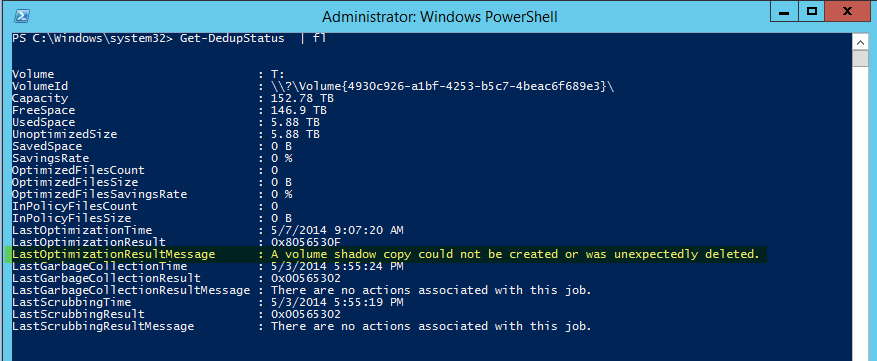
Here’s the output of Get-DedupeStatus for a > 150TB volume:

image

Note “LastOptimizationResultMessage      : A volume shadow copy could not be created or was unexpectedly deleted”.

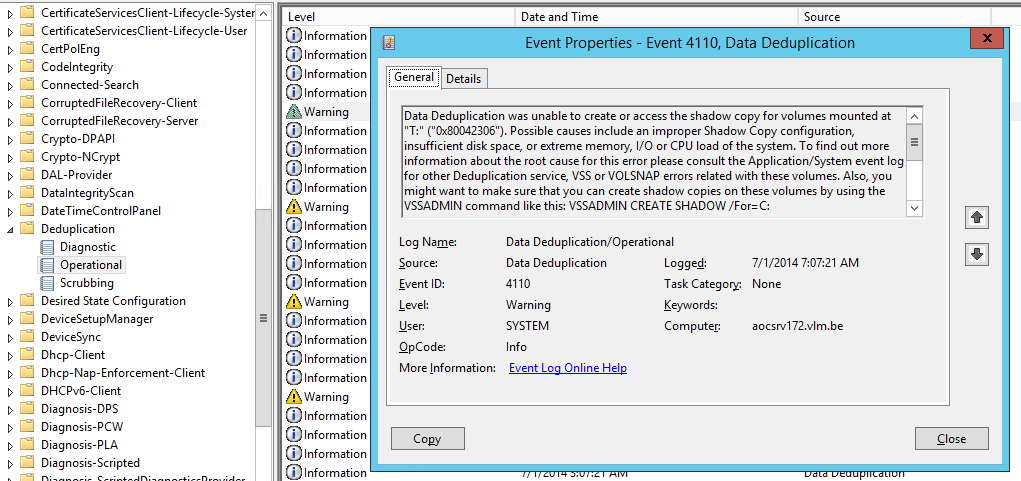
Looking in the Deduplication even log we find more evidence of this.

image

Data Deduplication was unable to create or access the shadow copy for volumes mounted at "T:" ("0x80042306"). Possible causes include an improper Shadow Copy configuration, insufficient disk space, or extreme memory, I/O or CPU load of the system. To find out more information about the root cause for this error please consult the Application/System event log for other Deduplication service, VSS or VOLSNAP errors related with these volumes. Also, you might want to make sure that you can create shadow copies on these volumes by using the VSSADMIN command like this: VSSADMIN CREATE SHADOW /For=C:

Operation:

   Creating shadow copy set.

   Running the deduplication job.

Context:

   Volume name: T: (\?Volume{4930c926-a1bf-4253-b5c7-4beac6f689e3})

Now there are multiple possible issues that might cause this but if you’ve got a serious amount of data to backup, please check the size of your LUN, especially if it’s larger then 64TB or flirting with that size. It’s temping I know, especially when you only focus on dedup efficiencies. But, you’ll never get any dedupe results on a > 64TB volume. Now you don’t get any warning for this when you configure deduplication. So if you don’t know this you can easily run into this issue. So next to making sure you have enough free space, CPU cycles and memory, keep the partitions you want to dedupe a reasonable size. I’m sticking to +/- 50TB max.

I have blogged before on the maximum supported LUN size and the fact that VSS can’t handle anything bigger that 64TB here Windows Server 2012 64TB Volumes And The New Check Disk Approach. So while you can create volumes of many hundreds of TB you’ll need a hardware provider that supports bigger LUNs if you need snapshots and the software needing these snapshots must be able to leverage that hardware VSS provider. For backups and data protection this is a common scenario. In case you ask, I’ve done a quick crazy test where I tried to leverage a hardware VSS provider in combination with Windows Server data deduplication. A LUN of 50TB worked just fine but I saw no usage of any hardware VSS provider here. Even if you have a hardware VSS provider, it’s not being used for data deduplication (not that I could establish with a quick test anyway) and to the best of my knowledge I don’t think it’s possible, as these have not exactly been written with this use case in mind. Comments on this are welcome, as I had no more time do dig in deeper.

Virtualizing Intensive Workloads on Hyper-V, Can It Be Done?

Can it be done?

All I can say is that, yes, absolutely, you can virtualize resource intensive workloads. Done right you’ll gain all benefits associated with virtualization and you won’t lose your performance & scalability.

Now I have to stress done right. There are a couple of major causes of problems with virtualization. So let’s look at those and see how a few well placed torpedoes can sink your project fast & effective.

Common Sense

One of them is the lack of common sense. If you currently have 10 SQL Servers with 12 15K RPM SAS Disks in RAID 1 and RAID 10 for the OS, TempDB, Logs & Data files, 64 GB of Memory, dual Quad Core sockets and teamed 1Gbps for resilience and throughput and you want to virtualize them you should expect to deliver the same resources to the virtualized servers. It’s technology people. Hoping that a hypervisor will magically create resources out of thin air is setting yourself up for failure. You cannot imagine how often people use cheap controllers, less disk or slower disks, less bandwidth or CPU cycles and then dump their workload on it. Dynamic memory, NUMA awareness, Storage QoS, etc. cannot rescue a undersized, ill conceived solution. I realize you have read that most physical servers are sitting there idle and let their resources go to waste. If you don’t measure this you can get bitten. You can get ripped to pieces when you’re dealing with virtualizing intensive workloads on Hyper-V based on assumptions.

image

Consider the entire stack

The second torpedo is not understanding the technology stack. The integration part of things or the holistic approach in management consulting speak. The times one could think as a storage admin, network admin, server admin, virtualization admin, SQL DBA, Exchange Engineer is long gone. Really, long gone. You need to think about the entire stack. Know your bottle necks, SPOF, weaknesses, capabilities and how these interact. If you’re still on premise for 100% that means you have to be a datacenter admin, not forgetting you might have multiple of those. And you’d better communicate a bit through DevOps to make sure the developers know that all those resources are not magically super redundant, are not continuously available without any limitation and that these do not have infinite scalability.

image


Drivers, firmware & bugs can sink your project

Hardware, VAR & ISV support is also a frequent cause of problems. They’ll al tell you that everything is supported. You can learn very fast and very painfully that this is too often not the case or serious bugs are wreaking havoc on your beautiful design. So I live by one of my mantras: “Trust but verify”. However sad it may be, you cannot in good faith trust OEM, VAR and ISVs. I’m not saying they are willfully doing this, but their experience, knowledge isn’t perfect & complete either. You have to do your due diligence. There are too many large scale examples of this right now with Emulex NIC issues around DVMQ. This is a prime example of how you slow acknowledgement of a real issue can ruin your virtualization project for intensive workloads and has been doing so for 9 months and might very well take a year to resolve. Due diligence could have saved you here. A VAR should protect its customers from that, but in reality they often find out when it’s too late. Another example is bugs in storage vendors implementation of ODX causing corruption or extremely slow support for a new version of Windows effectively blocking the use of it in production when you need it for the performance & scalability. I have long learned that losing customers and as such revenue is the only real language vendors understand. So do not be afraid to make hard decisions when you need to.

image

Knowledge & Due Diligence

Know your hypervisor and core technologies well. Don’t think it’s the same a hardware based deployments, don’t think all options and features work everywhere for everything, don’t think all hypervisor work the same. They do not. Know about Exchange and the rules/limits around virtualization. The same goes for SQL Server and any resource intensive workload you virtualize. Don’t think that the same rules apply to all workloads. There is no substitute for knowledge, experience and hands on testing, the verification part of trust but verify, remember? It goes for you as well!

image

It can be done

Yes, we can Winking smile! If you want to see some high level examples to simulate your appetite just browse my blog. Here are some pointers to get you started.

Unmap


Live migration at the speed of light

Remember , don’t just say “Damn those torpedoes, full speed ahead” but figure out why, where, when and how you’ll get the job done.

I’m Not Your (FREE) Personal Assistant

Volunteering in the community

As active community member and MVP I spend a lot of time and effort sharing information and experiences with the community. I also assist colleagues & peers across the globe when they have questions or issues I might be able to help them with. It’s part of sharing and caring. Just like my fellow community members & MVPs I blog, record video’s, web & screen casts, present at conferences & user groups. I hang out for the Ask The Experts moments of opportunity at both local and international. When possible I also attend the ChalkTalks nights like the one that local user group WinTalks organizes where people can bring their questions or problems to discuss.

The impossibility of answering the questions

I share a lot of information, ideas, opinions and experiences. Asking me directly, repeatedly, to give you quick & fast solutions for your current issues, problems and consulting challenges is not the way to go however. For one the complexity of the issues and the situation as exists is often ignored in these question. So it’s impossible to answer them in that fashion.

Also, as is the case with most of us, I’m a very, very busy man. A tremendous amount of knowledge many of my peers and I share is freely available to the community and we absolutely love doing that. If you ask a question on a blog post or contact me I will try and answer if it’s not too much work & is relevant to the blog post. It benefits everyone to see the question and the answer. But for real support you have forums and vendors service desks that are a lot better suited and have dedicated staff or thousands of volunteer eyes. For consulting engagements to solve the complex issues you’re running into you’ll just have to hire the expertise or make me an offer way too good to decline. When hiring expertise, you do get what you pay for if you do it smart. I’m not to blame and will not pay the bill for your previous bad hires, pseudo experts, marketing based decisions that got people into a pickle.

Keeping it real

We all have jobs with lots of work that we need to do to pay the bills. So we cannot be a free support desk, ad interim engineer, consultant or strategic advisor. This means e-mails and DMs with consulting questions or easily searchable questions are ignored unless the problem is personally interesting to me as a learning experience or it’s indeed “the opportunity of a life time”. The latter is highly unlikely.

You need to realize that you need to design your solutions to whatever level of complexity you can handle or afford. Many make this mistake. I understand all the issues around acquiring, building, maintaining, retaining & hiring expertise. Really I do, I do not live under a rock in the wilderness. It’s hard to find expertise and it’s hard to market expertise. So basically we end up with “best practices” & partially mediocrity. For good reason, that’s where you have to be and stay if you’re not willing/capable to pay for expertise. For a lot of commodity solutions that’s how it should be.

If you need better support & consultants than you currently have you should really consider hiring some of my fellow MVPs via their companies but don’t be surprised to be paying anything from € 200/hour and up for proven highly skilled experts for short very specialized assignments. Don’t balk at this, Ever hired MCS? Or a plumber? Right, these people are true consultants, not what passes for them nowadays but what is actually contracting or body shopping. Nothing wrong with temporary augmentation of your labor force, but is not high expertise consulting. Microsoft PFE/MCS aren’t expensive for the value they provide and the time and effort they put in. Next time you need to pay a plumber after a DIY project has gone wrong you’ll realize this.

You don’t have to engage experts. But if you do, you’ll need to bring a big wallet. You need to understand that your unwillingness to pay does not dictated rates, let alone value. Banks, doctors, shops, government … they only accept money and they laugh at me when I tell them I’d like to pay with some ones else’s gratitude.

Some of the people in my network know I have helped many in the past and know that I do this as a service to the community and learning experience. That benefits everyone out there, just like I benefit from them. That’s my choice, in my personal free time. I can assure you that neither those people or I  take this sort of help for granted, let alone demand it.

I can’t fix you being stupid, lazy, cheap or any combination of the above.

  • You’ll have to do your own searching of the internet via Bing or Google for you.
  • You’ll have to read the articles, blog & documentation.
  • You’ll have to analyze your own issues and come up with an plan of action.
  • You need to realize that developing yourself and skillsets is a time consuming, sustained effort. I understand you have other priorities, but that doesn’t mean I have to pick up the slack and put my own aside.
  • You’ll need to face reality. If your business needs something, they’ll need to make sure they are profitable enough to afford it.