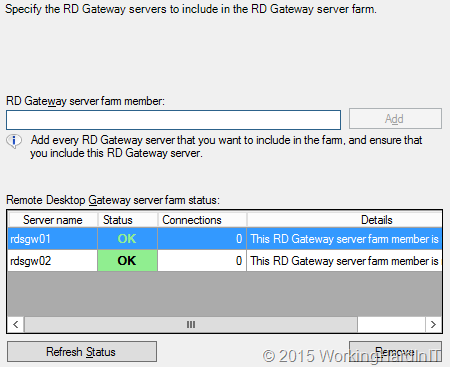
When you need to make the RD Gateway service highly available you have some options. On the RD Gateway side you have capability of configuring a farm with multiple RD Gateway servers.
When in comes to the actual load balancing of the connections there are some changes in respect load balancing from Windows Server 2008 R2 that you need to de aware of! With Windows 2008 R2 you could do:
- Load balancing appliances (KEMP Loadmaster for example, F5, A10, …) or Application Delivery Controllers, which can be hardware, OEM servers, virtual and even cloud based (see Load Balancing In An Ever More Demanding Virtualized & Cloudy World). KEMP has Hyper-V appliances, many others don’t. These support layer 4, layer 7, geo load balancing etc. Each has it’s use cases with benefits and drawback but you have many options for the many situations you might encounter.
- Software load balancing. With this they mean Windows NLB. It works but it’s rather limited in regards to intelligence for failure detection & failover. It’s in no way an “Application Delivery Controller” as load balancer are positioned nowadays.
- DNS Round Robin load balancing. That sort of works but has the usual drawbacks for problem detection and failover. Don’t get me wrong for some use cases it’s fine, but for many it isn’t.
I prefer the first but all 3 will do the basic job of load balancing the end-user connections based on the traffic. I have done 2 when it was good enough or the only option but I have never liked 3, bar where it’s all what’s needed, because it just doesn’t fit many of the uses cases I dealt with. It’s just too limited for many apps.
In regards to RD Gateway in Windows Server 2012 (R2), you can no longer use DNS Round Robin for load balancing with the new HTTP transport. The reason is that it uses two HTTP channels (one for input and one for output) and DNS round robin cannot guarantee that both these connections will be routed trough the same RD Gateways server which is a requirement for it to work. Basically RRDNS will only work for legacy RPC-HTTP. RPC could reroute a channel to make sure all flows over the same node at the cost of performance & scalability. But that won’t work with HTTP which provides scalability & performance. Another thing to note is that while you can work without UDP you don’t want to. The UDP protocol is used to deliver graphics with a better user experience over even low quality networks for graphics or high and experiences with RemoteFX. TCP (HTTP) is can be used without it (at the cost of a lesser experience) and is also used to maintain the sessions and actions. Do note that you CANNOT use UDP alone as these connections are established only after the main HTTP connection exists between the remote desktop client and the remote desktop server. See Don’t Forget To Leverage The Benefits of RD Gateway On Hyper-V & RDP 8/8.1 for more information
So you will need a least Windows Network Load Balancing (WNLB) because that supports IP affinity to make sure all channels stick to the same node. UDP & HTTP can be on different nodes by the way. Also please not that when using network virtualization WNLB isn’t a good choice. It’s time to move on.
So the (or at least my) preferred method is via a real “hardware” load balancer. These support a bunch of persistence options like IP affinity, cookie-based affinity, … just look at the screenshot below (KEMP Loadmaster)
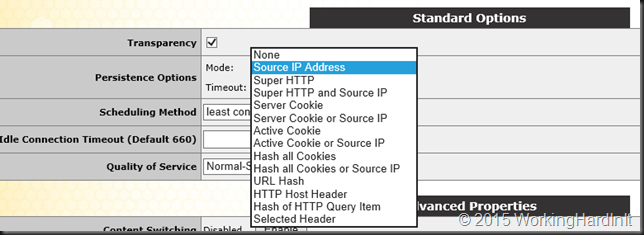
But they also support layer 7 functionality for better health checking and failover. So what’s not to like?
So we need to:
- Build a RD Gateway Farm with at least two servers
- Load balance HTTP/HTTPS for the RD Gateway farm
- Load balance UDP for the RD Gateway farm.
We’ll do this 100% virtualized on Hyper-V and we’ll also make make the load balancer it self highly available. Remember, removing single points of failure are like bottle necks. The moment you take one away you just hit the next one  .
.
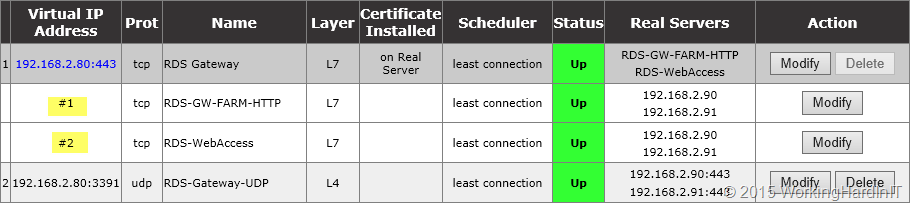
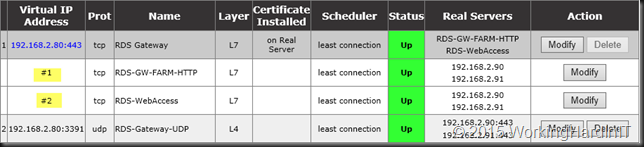
Kemp has a great deployment guide for RDS on how to do this but I should ass that you could leverage SUB Virtual Services (SUBVS) to deal with the other workloads such as RD Web Access if they’re on the same server. They don’t mention this in the white paper but it’s an option when using HTTP/HTTPS as service type for both configurations. #1 & #2 are the SUB Virtual Services where I used this in a lab.
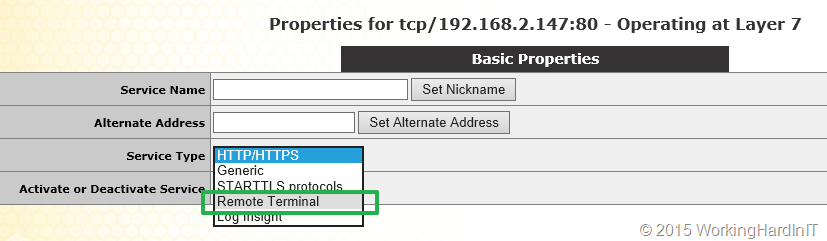
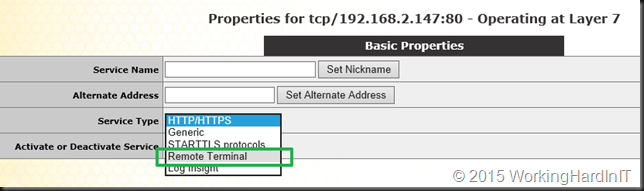
But for RD Gateway you can also leverage the Remote Terminal Service type and in this case you won’t leverage SUBVS as the service type is different between RD Gateway (Remote Terminal) and RD Web Access (HTTP/HTTPS). This is actually used by their RDS template you can download form their support site.
Hope this helps some of you out there!

 for all your IT needs. Much has been written by many community buddies and myself on this subject. Here’s a short reading list for you (and there a dozens more) on how to do it well.