Disclaimer: The Dilbert® Life series is a string of post on corporate culture from hell and dysfunctional organizations running wild. This can be quite shocking and sobering. A sense of humor will help when reading this. If you need to live in a sugar coated world were all is well and bliss and think all you do is close to godliness, stop reading right now and forget about the blog entries. It’s going to be dark. Pitch black at times actually, with a twist of humor, if you can laugh at yourself.
“Some men are born mediocre, some men achieve mediocrity, and some men have mediocrity trust upon them.”
― Joseph Heller, Catch-22
I don’t do mediocre. There, I said it. I only do good to great. Well sort of  . The point is that no matter how good you are, you still mess up. While perfection is not of this world it doesn’t look too great on my résumé when I have to write “As a real team player I collaborated enthusiastically to achieve mediocrity”. Sure I might cover it up with fluff like “I integrated the lateral dynamics of horizontally deployed technologies across a vertically integrated stack to realize an optimal use of resources exposing their inherent value to the business while leveraging the synergies of the cloud”, but I won’t.
As no one likes to be mediocre we sometimes see creative attempts to make sure we all pass the bar but we won’t discuss that here. Whilst every organization will have its share of mediocre processes, way too many are mediocre as an entire organization.
Indicators of mediocrity
Claiming to be innovative
Avoiding mediocrity is not about being original or “innovative” all of the time. Quite the opposite! Sometimes not being mediocre means using plain good commodity solutions that are great for the issue at hand. The good old 80/20 rule, “good enough is good enough” & commoditization delivers the best value for money here. Don’t spend vast amounts of money and time on custom or “boutique” solutions when a commodity will do. This has secondary benefits as well. That time and money can be used for some custom or creative design & work on the things that do matter a lot and make a big difference.
Groups providing false security
For some reasons mediocrity tends to flourish more often in groups and committees. I see this way too much. This danger of sliding into mediocrity exists as an individual but it seems to become more prevalent in a group or organization. Some of my peers call the “this the race to the bottom”:
”Mediocre people working for mediocre organizations delivering mediocre results”
Nobody wants to be that way, it just turns out like that. It has many reasons. The Peter Principle, The Dilbert Principle, B People hiring B people, human behavior in an environment where it’s wiser to conform & play politics than to get results etc. Don’t underestimate the group pressure to conform, avoid mistakes, be a team player or a “can do” person. And then there is the desire to avoid responsibility. Which also happens to be easier in group. The bigger the group in a meeting the bigger the risk of this, a group enforces indecisiveness & caters to fears.
Some organizations tolerate and even reward mediocrity. Management lead by example, whether they like it or not. The effects of this can be partially hidden and mitigated by real leadership in the group (competent employees, highly skilled external help), but it cannot be stopped. If management doesn’t care, they can’t expect others to care. If managers talks about team work & going the extra miles but don’t do so themselves, things break. If the need for safety, fear for failure or not looking good is what drives them you won’t progress & see success. Success cannot be bought and you can’t lead from behind.
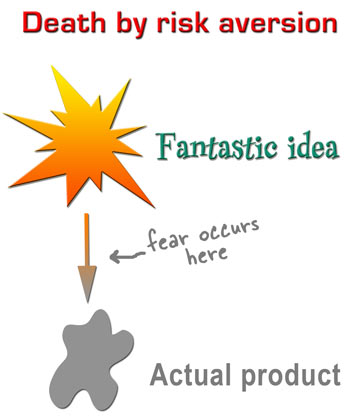
Mediocre groups can be manipulated quite easily. “Politicians” like this. It’s like water following the path of least resistance. By leveraging the group you make them accomplices and they can’t complain about decisions made over their heads. Some (most) probably know all to well that they are being manipulated, but why struggle if there is no benefit in it? It safer to conform a when risk aversion sets in, great ideas die. Here’s a beautiful summary (thanks to Kathy Sierra):
Avoiding reality is game we all play to some extent. The abuse of best practices, methodologies and such by clinging to time like a life craft or actually thinking that following the bullet points will magically result in stellar results. This leads to needing ever more resources for ever diminishing returns on investment. The organization becomes an overly complex entity where avoiding responsibility is a top priority and perception is everything. ITIL done wrong will achieve exactly that. It drains the all the fun out of work, and grinds progress to a halt. But no one is to blame as all rules where adhered to. Risk Avoidance As a Service (RAAS™).
Personal note: The power of a group lies in the excellence of the individuals and their ideas. Harvesting those to create the best possible solution is far from conformity to different points of view. It’s about leveraging the discussions, the different or opposite points of view to come to better solutions. In this respect I find the view that “people should learn to do what they’re told” misguided, dangerous & counter productive.
Who’s managing and who’s leading, if anyone?
It doesn’t take very long to walk into a group and observe who the real leaders are. Often these are not the people with the rank, title, mandate. In a lot of cases they are very different persons. This might sound great as a fail safe, but there’s only so many wrongs bottom up approaches can prevent or mitigate, let alone solve. “Bottom up” can only do so much.
This isn’t surprising as middle management is used a dumping ground for people they can do without in critical functions and are willing to sell their souls for the illusion of advancement. They often become a burden to employees & progress.
Now employees do notice this and it ruins trust. Sure you can blame the culture and bad attitude but hey when the team or the organization fails it is their fault and their responsibility. No this is not to harsh. They are all to eager to claim higher wages & ownership of success. Well that knife has two edges and you can’t blame it on the culture. You get the culture you cultivate . Those that can’t handle that responsibility are the ones to fail as managers & most certainly as leaders. You cannot complain to your subordinates as a managers. Shit flows down, gripes flow up. Go it?
Read The Dilbert Life Series – A Bad Manager’s Priorities. Your personnel already has enough crap to deal with, just like you. Don’t add to it. Not that employees can’t be total fools and pains in the proverbial behind but hey, I have posts on that to.
Strategies, Tactics & Execution
Mediocrity is seen where real strategies, tactics & execution are missing. They just do or buy stuff, often without any understanding of the ecosystems they operate in and the relations between them. Their situational awareness is zero and that’s deadly. So we have “managers”, “architects”, “analysts”, both in house and consultants, that cannot even explain what a strategy is. They might claim or believe to have one, but they don’t. It’s opportunistic actions towards the flavor of the day. Such an organization is doomed for mediocrity and survival is by chance, not skill.
Who’s to blame?
Most people just try to survive or perhaps get ahead to a nicer job and/or a better paid one. But no one will admit to it on a performance review, so we have institutionalized lying. At best you’ll get justifications when you ask, but no real explanations. It’s not just as simple as managers being stupid or lazy. When it comes to strategy many are playing a game they don’t understand, let alone master. They are out of their depth and as such they are bound to lose. They’re being used.
However it’s very in vogue to blame the lack of Business – IT alignment for the woes in these volatile IT times. The problem is not IT or the business. It is the entire organization that allows for mediocrity. Sure you read that “IT is an old school ivory tower” all over the internet and it has to prove it’s value. It’s pure management failure who don’t seem to know who does what and why in their organization. The division is purely artificial. It’s man made and kept alive as it serves political, personal & careerist agenda’s. Book authors, coaches & business consultant smile as they collect their fees discussing this at length. Welcome to mediocrity and failure. You have exactly what you have built.
![consultingdemotivator[1]](https://blog.workinghardinit.work/wp-content/uploads/2014/02/consultingdemotivator1_thumb1.jpg "consultingdemotivator[1]")
Nobody has any incentive to fix it either. There is good money to be made and job security to be had by prolonging the problem on both sides. Are these people to blame if some one keeps paying them for that? These woes are true both in the private and in the public sector. Bar some minor detail differences in buzz words they all get handled by the same players. These are the ones that deliver the lobbyists and advisers that turn out ever less services for ever higher costs. They sell “solutions”. One size fits all if possible. Gartner makes a killing from this situation and they do have a clear strategy for that.
No IT strategy? No map? You’re doomed, indecisiveness will kill you.
![FSCN0508_thumb[1]](https://blog.workinghardinit.work/wp-content/uploads/2014/05/fscn0508_thumb1_thumb.jpg "FSCN0508_thumb[1]")
If you don’t map out your game on the field you play on you can have no strategy. Without that you just do stuff. At best it’s functional (which is an achievement by the way) but often not. Planning, methods, tools … al of these fall victim to indecisiveness. So execution becomes impossible.
Here the result of decisiveness & purpose of action. You create green waves. When all the lights are green, you can ride the green wave. No starting, stopping, but a fluid highly effective way of moving ahead towards your target.

You’re not always in that situation and the light will turn orange & red along the way. That’s live and it’s not too bad unless you get caught in deadlock traffic jams during rush hour.
That situation requires a solution as it’s stressing, frustrating and detrimental to achieving your goals. In extreme case the time between the colors becomes shorter and shorter and eventually drops to zero …
There is another form of deadlock. Doing everything for everyone at the same time to avoid making choices. All the lights are on, on all sides, at all times. You do not get a clear signal or guidance.

Indecisive action kills or grinds you to a halt. Whatever the case you’re losing time and fail to reach your goals. Either by doing everything for everyone at the same time or by being stuck being in a mess. Game over.


 . So will it all fall apart and will we need to standardize on iWarp in the future? Maybe, but isn’t DCB the technology used for lossless, high performance environments (FCoE but also iSCSI) so why would not iWarp not need it. Sure it works without it quite well. So does iSCSI right, up to a point? I see these comments a lot more form virtualization admins that have a hard time doing DCB (I’m one so I do sympathize) than I see it from hard core network engineers. As I have RoCE cards and they have become routable now with the latest firmware and drivers I’d love to try and see if I can make RoCE v2 or Routable RoCE work over different types of switches but unless some one is going to sponsor the hardware I can’t even start doing that. Anyway, lossless is the name of the game whether it’s iWarp or RoCE. Who know what we’ll be doing in 5 years? 100Gbps iWarp & iSCSI both covered by DCB vNext while FC, FCoE, Infiniband & RoCE have fallen into oblivion? We’ll see.
![consultingdemotivator[1]](https://blog.workinghardinit.work/wp-content/uploads/2014/02/consultingdemotivator11.jpg "consultingdemotivator[1]")
![FSCN0508_thumb[1]](https://blog.workinghardinit.work/wp-content/uploads/2014/05/fscn0508_thumb1.jpg "FSCN0508_thumb[1]")


 I would really love to see