Defragmenting your CSV Windows 2012 R2 Style with Raxco Perfect Disk 13 SP2

When it comes to defragmenting CSV it seemed we took a step back when it comes to support from 3rd party vendors. While Windows provides for a great toolset to defragment a CSV it seemed to have disappeared form 3r party vendor software. Even from the really good Raxco Perfect disk. They did have support for this with Windows 2008 R2 and I even mentioned that in a blog.

If you need information on how to defragment a CSV in Windows 2012 R2, look no further.There is an absolutely fantastic blog post on the subject How to Run ChkDsk and Defrag on Cluster Shared Volumes in Windows Server 2012 R2, by Subhasish Bhattacharya one of the program managers in the Clustering and High Availability product group. He’s a great guy to talk shop to by the way if you ever get the opportunity to do so. One bizarre thing is that this must be the only place where PowerShell (Repair-ClusterSharedVolume cmdlet) is depreciated in lieu of chkdsk.

3rd party wise the release of Raxco Perfect Disk 13 SP2 brought back support for defragmenting CSV.

image

I don’t know why it took them so long but the support is here now. It looks like they struggled to get the CSVFS (the way CSV are now done since Windows Server 2012) supported. Whilst add it, they threw in support for ReFS by the way. This is the first time I’ve ever seen this. Any way it’s here and that’s good because I have a hard time accepting that any product (whatever it does) supports Hyper-V if it can’t handle CSV, not if you want to be taken seriously anyway. No CSV support equals = do not buy list in my book.

Here’s a screenshot of Perfect disk defragmenting away. One of the CSV LUNs in my lab is a SSD and the other a HDD.

image

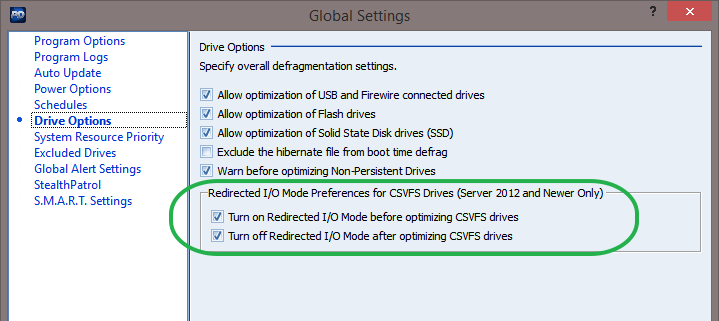
Notice that in Global Settings you can tweak the behavior when defragmenting optimization of various drive types, including CSVFS but you just have to leave the default on unless you like manual labor or love PowerShell that much you can’t forgo any opportunity to use it Winking smile

image

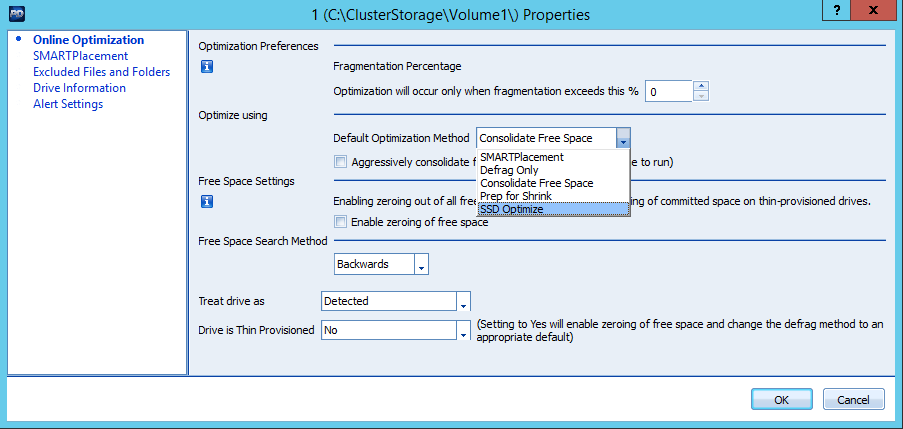
Perfect disk cannot detect what kind of disks you have behind the CSV LUN so you might want to change the optimization method if you’re running SSD instead of HHD.

image

I’d love for Raxco to comment on this or point to some guidance.

What would also be beneficial to a lot of customers is guidance on defragmentation on the different auto-tiering storage arrays. That would make for a fine discussion I think.

Migrate an old file server to a transparent failover file server with continuous availability

This is not a step by step “How to” but we’ll address some thing you need to do and the tips and tricks that might make things a bit smoother for you.

1) Disable Short file names & Strip existing old file names

Never mind that this is needed to be able to do continuous availability on a file share cluster. You should have done this a long time ago. For one is enhances performance significantly. It also make sure that no crappy apps that require short file names to function can be introduced into the environment. While I’m an advocate for mutual agreements there are many cases where you need to protect users, the business against itself. Being to much of a politician as a technologist can be very bad for the company due to allowing bad workarounds and technology debt to be introduced. Stand tall!

Read up on this here Windows Server 2012 File Server Tip: Disable 8.3 Naming (and strip those short names too. Next to Jose’s great blog read Fsutil 8dot3name on how to do this.

If you still have applications that depend on short file names you need to isolate and virtualize them immediately. I feel sorry for you that this situation exists in your environment and I hope you get the necessary means to deal with swiftly and decisively by getting rid of these applications. Please see The Zombie ISV® to be reminded why.

Some tips:

  • Only use the /F switch if it’s a non system disk and you can afford to do so as you’re moving the data LUN to a new server anyone. Otherwise you might run into issues. See the below example.


  • If you stumble on path that are too long, intervene. Talk to the owners. We got people to reduce “Human Resources Planning And Evaluations” sub folder & file names reduced to HRMPlanEval. You get the gist, trim them down.
  • You’ll have great success on most files & folders but if they are open. Schedule a maintenance window to make sure you can run without anyone connected to the shares (Stop LanManServer during that maintenance window).


  • Also verify no other processes are locking any files or folders (anti virus, backups, sync tools etc.)

Continue reading

SMB 3, ODX, Windows Server 2012 R2 & Windows 8.1 perform magic in file sharing for both corporate & branch offices

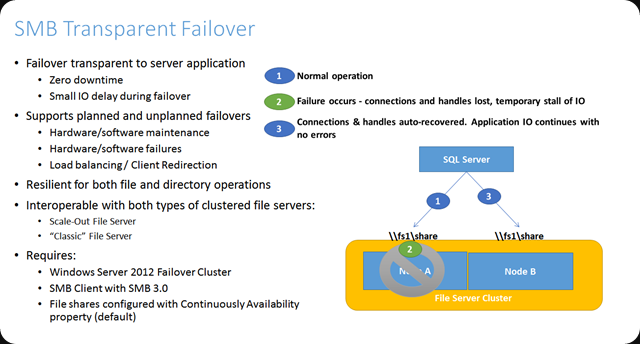
SMB 3 for Transparent Failover File Shares

SMB 3 gives us lots of goodies and one of them is Transparent Failover which allows us to make file shares continuously available on a cluster. I have talked about this before in Transparent Failover & Node Fault Tolerance With SMB 2.2 Tested (yes, that was with the developer preview bits after BUILD 2011, I was hooked fast and early) and here Continuously Available File Shares Don’t Support Short File Names – "The request is not supported" & “CA failure – Failed to set continuously available property on a new or existing file share as Resume Key filter is not started.”
image

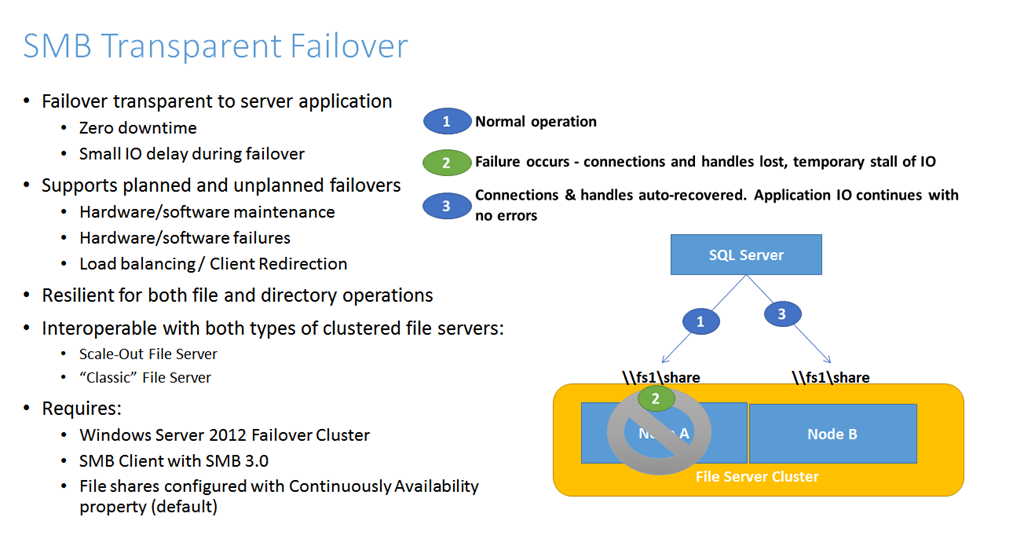
This is an awesome capability to have. This also made me decide to deploy Windows 8 and now 8.1 as the default client OS. The fact that maintenance (it the Resume Key filter that makes this possible) can now happen during day time and patches can be done via Cluster Aware Updating is such a win-win for everyone it’s a no brainer. Just do it. Even better, it’s continuous availability thanks to the Witness service!

When the node running the file share crashes, the clients will experience a somewhat long delay in responsiveness but after 10 seconds the continue where they left off when the role has resumed on the other node. Awesome! Learn more bout this here Continuously Available File Server: Under the Hood and SMB Transparent Failover – making file shares continuously available.

Windows Clients also benefits from ODX

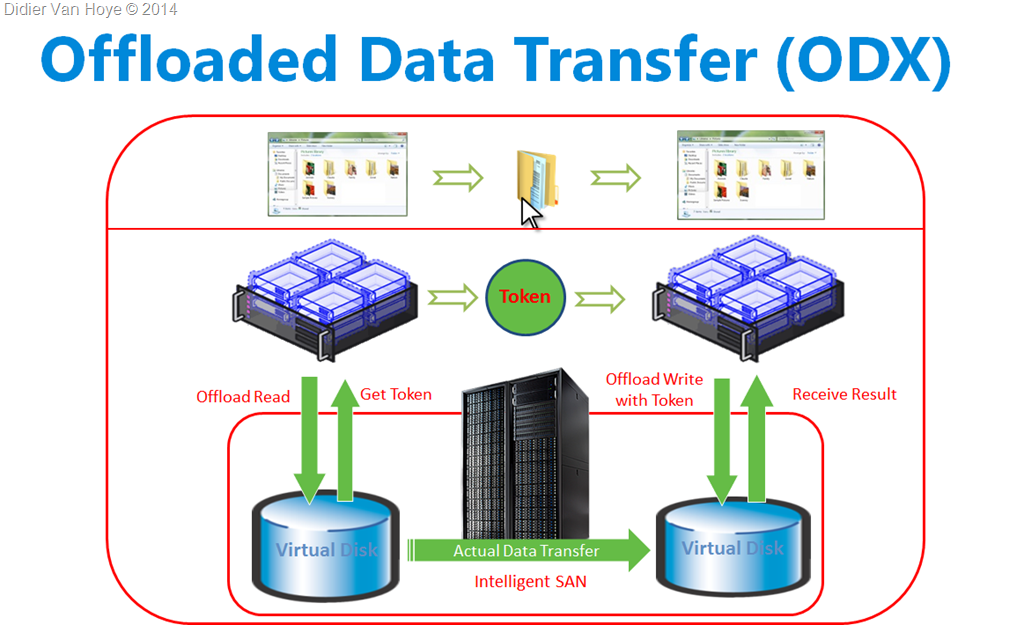
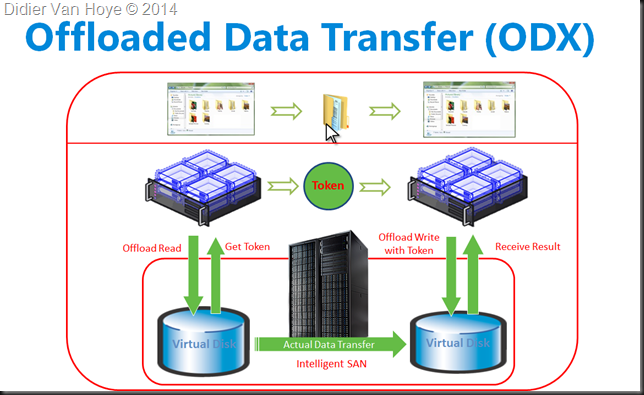
But there is more it’s SMB 3 & ODX that brings us even more goodness. The offloading of read & write to the SAN saving CPU cycles and bandwidth. Especially in the case of branch offices this rocks. SMB 3 clients who copy data between files shares on Windows Server 2012 (R2) that has storage an a ODX capable SAN get the benefit that the transfer request is translated to ODX by the server who gets a token that represents the data. This token is used by Windows to do the copying and is delivered to the storage array who internally does all the heavy lifting and tell the client the job is done. No more reading data form disk, translating it into TCP/IP, moving it across the wire to reassemble them on the other side and write them to disk.
image

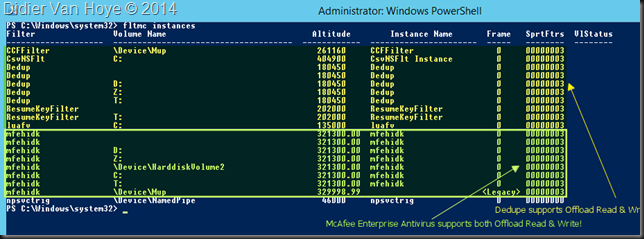
To make ODX happen we need a decent SAN that supports this well. A DELL Compellent shines here. Next to that you can’t have any filter drives on the volumes that don’t support offloaded read and write. This means that we need to make sure that features like data deduplication support this but also that 3rd party vendors for anti-virus and backup don’t ruin the party.
image

In the screenshot above you can see that Windows data deduplication supports ODX. And if you run antivirus on the host you have to make sure that the filter driver supports ODX. In our case McAfee Enterprise does. So we’re good. Do make sure to exclude the cluster related folders & subfolders from on access scans and schedules scans.

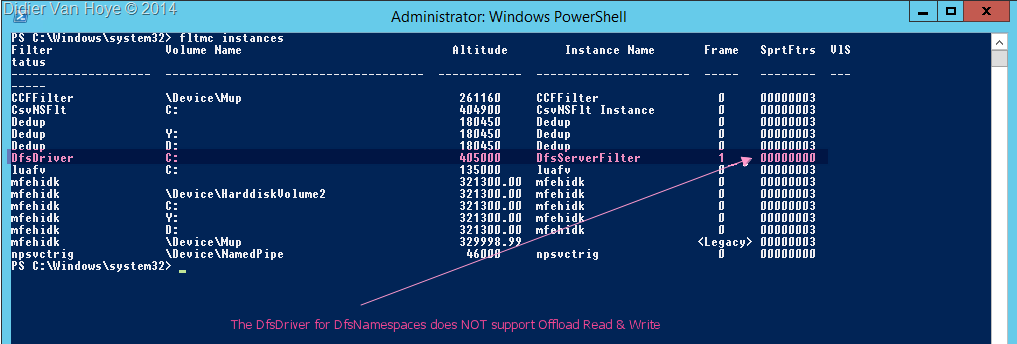
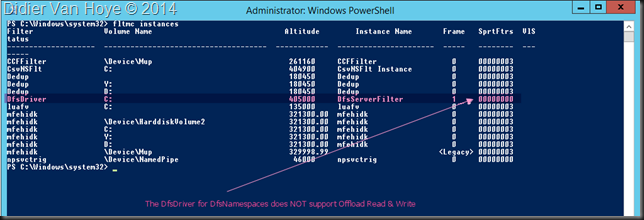
Do not run DFS Namespace servers on the cluster nodes. The DfsDriver does not support ODX!
image

The solution is easy, run your DFS Namespaces servers separate from your cluster hosts, somewhere else. That’s not a show stopper.

The user experience

What it looks like to a user? Totally normal except for the speed at which the file copies happen.

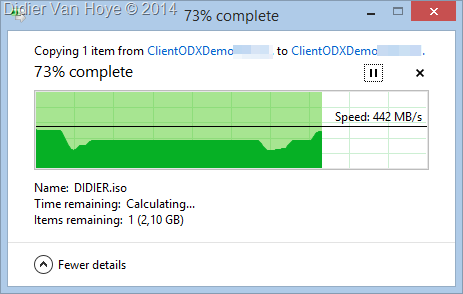
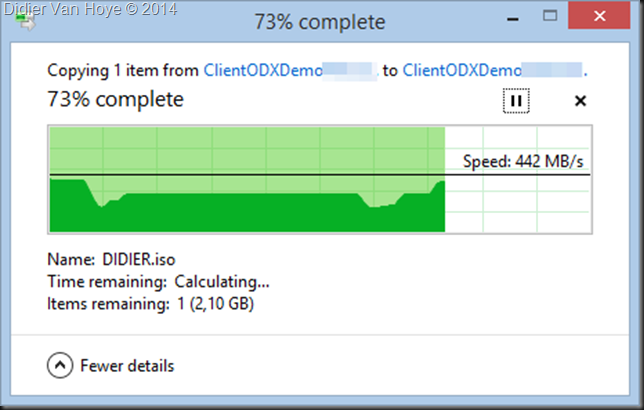
Here’s me copying an ISO file from a file share on server A to a file share on server B from my Windows 8.1 workstation at the branch office in another city, 65 KM away from our data center and connected via a 200Mbps pipe (MPLS).
image

On average we get about 300 MB/s or 2.4 Gbps, which “over” a 200Mbps WAN is a kind of magic. I assure you that they’re not complaining and get used to this quite (too) fast Winking smile.

The IT Pro experience

Leveraging SMB 3 and ODX means we avoid that people consume tons of bandwidth over the WAN and make copying large data sets a lot faster. On top of that the CPU cycles and bandwidth on the server are conserved for other needs as well. All this while we can failover the cluster nodes without our business users being impacted. Continuous to high availability, speed, less bandwidth & CPU cycles needed. What’s not to like?

Pretty cool huh! These improvements help out a lot and we’ve paid for them via software assurance so why not leverage them? Light up your IT infrastructure and make it shine.

What’s stopping you?

So what are your plans to leverage your software assurance benefits? What’s stopping you? When I asked that I got a couple of answers:

  • I don’t have money for new hardware. Well my SAN is also pré Windows 2012 (DELL Compellent SC40 controllers. I just chose based on my own research not on what VARs like to sell to get maximal kickbacks Winking smile. The servers I used are almost 4 years old but fully up to date DELL PowerEdge R710’s, recuperated from their duty as Hyper-V hosts. These server easily last us 6 years and over time we collected some spare servers for parts or replacement after the support expires. DELL doesn’t take away your access to firmware &drivers like some do and their servers aren’t artificially crippled in feature set.
  • Skills? Study, learn, test! I mean it, no excuse!
  • Bad support from ISV an OEMs for recent Windows versions are holding you back? Buy other brands, vote with your money and do not accept their excuses. You pay them to deliver.

As IT professionals we must and we can deliver. This is only possible as the result of sustained effort & planning. All the labs, testing, studying helps out when I’m designing and deploying solutions. As I take the entire stack into account in designs and we do our due diligence, I know it will work. The fact that being active in the community also helps me know early on what vendors & products have issues and makes that we can avoid the “marchitecture” solutions that don’t deliver when deployed. You can achieve this as well, you just have to make it happen. That’s not too expensive or time consuming, at least a lot less than being stuck after you spent your money.

Windows 2012 R2 Data Deduplication Leverages Shadow Copies: “LastOptimizationResultMessage : A volume shadow copy could not be created or was unexpectedly deleted”.

When you’re investigation and planning large repositories for data (backups, archive, file servers, ISO/VHD stores, …) and you’d like to leverage Windows Data Deduplication you have too keep in mind that the maximum supported size for an NTFS volume is 64TB. They can be a lot bigger but that’s the maximum supported. Why, well they guarantee everything will perform & scale up to that size and all NTFS functionality will be available. Functionality on like volume shadow copies or snapshots. NFTS volumes can not be lager than 64TB or you cannot create a snapshot. And guess what data deduplication seems to depend on?

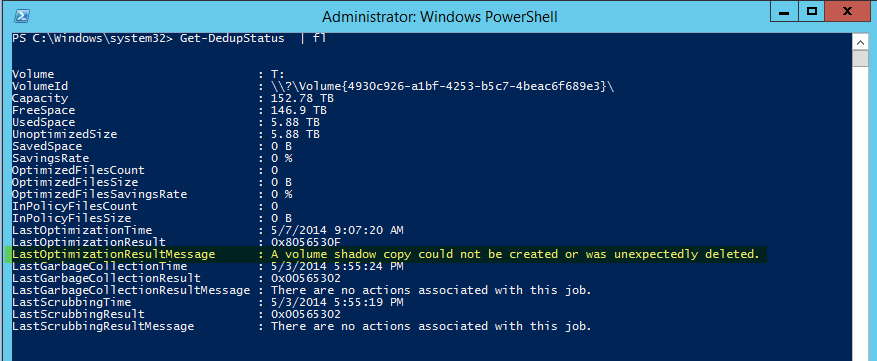
Here’s the output of Get-DedupeStatus for a > 150TB volume:

image

Note “LastOptimizationResultMessage      : A volume shadow copy could not be created or was unexpectedly deleted”.

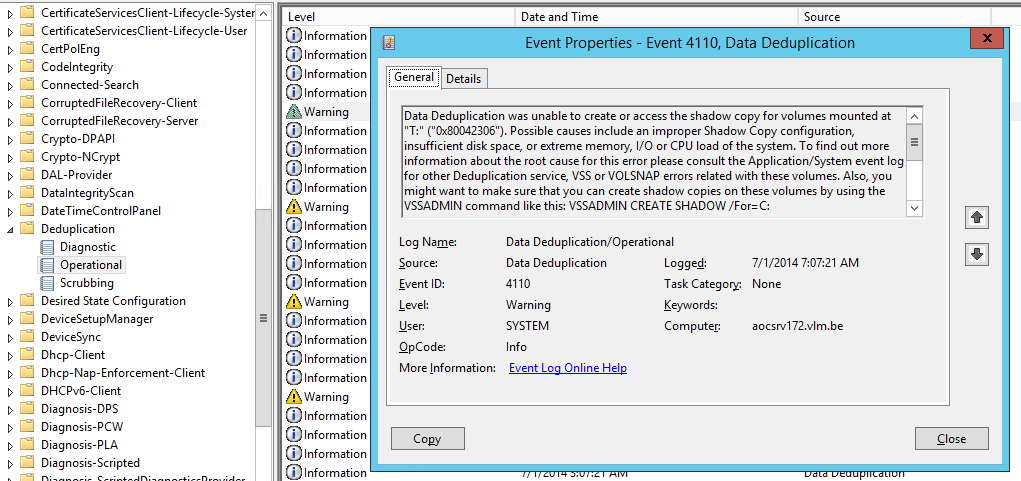
Looking in the Deduplication even log we find more evidence of this.

image

Data Deduplication was unable to create or access the shadow copy for volumes mounted at "T:" ("0x80042306"). Possible causes include an improper Shadow Copy configuration, insufficient disk space, or extreme memory, I/O or CPU load of the system. To find out more information about the root cause for this error please consult the Application/System event log for other Deduplication service, VSS or VOLSNAP errors related with these volumes. Also, you might want to make sure that you can create shadow copies on these volumes by using the VSSADMIN command like this: VSSADMIN CREATE SHADOW /For=C:

Operation:

   Creating shadow copy set.

   Running the deduplication job.

Context:

   Volume name: T: (\?Volume{4930c926-a1bf-4253-b5c7-4beac6f689e3})

Now there are multiple possible issues that might cause this but if you’ve got a serious amount of data to backup, please check the size of your LUN, especially if it’s larger then 64TB or flirting with that size. It’s temping I know, especially when you only focus on dedup efficiencies. But, you’ll never get any dedupe results on a > 64TB volume. Now you don’t get any warning for this when you configure deduplication. So if you don’t know this you can easily run into this issue. So next to making sure you have enough free space, CPU cycles and memory, keep the partitions you want to dedupe a reasonable size. I’m sticking to +/- 50TB max.

I have blogged before on the maximum supported LUN size and the fact that VSS can’t handle anything bigger that 64TB here Windows Server 2012 64TB Volumes And The New Check Disk Approach. So while you can create volumes of many hundreds of TB you’ll need a hardware provider that supports bigger LUNs if you need snapshots and the software needing these snapshots must be able to leverage that hardware VSS provider. For backups and data protection this is a common scenario. In case you ask, I’ve done a quick crazy test where I tried to leverage a hardware VSS provider in combination with Windows Server data deduplication. A LUN of 50TB worked just fine but I saw no usage of any hardware VSS provider here. Even if you have a hardware VSS provider, it’s not being used for data deduplication (not that I could establish with a quick test anyway) and to the best of my knowledge I don’t think it’s possible, as these have not exactly been written with this use case in mind. Comments on this are welcome, as I had no more time do dig in deeper.