
DELL released Replay Manager 8.0

DELL Released Replay Manager 8.0

On September the 4th 2019 DELL released Replay Manager 8.0 for Microsoft Servers. This brings us official Windows Server 2019 support. You can download it here: https://www.dell.com/support/home/us/en/04/product-support/product/storage-sc7020/drivers The Dell Replay Manager Version 8.0 Administrator’s Guide and release notes are here: https://www.dell.com/support/home/us/en/04/product-support/product/storage-sc7020/docs
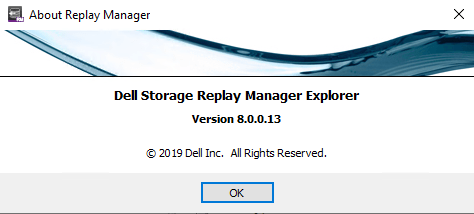
Replay Manager 8.0.0.13 was released early September 2019

I have Replay Manager 8.0 up and running in the lab and in production. The upgrade went fast and easy. And everything kept working as expected. The good news is that Replay Manager 8 service is compatible with the Replay Manager 7.8 Manager and vice versa. This means there was no rush to upgrade everything asap. We could do smoke testing at a releaxed pace before we upgraded all hosts.

Replay Manager 8.0 adds official support for Windows Server 2019 and Exchange Server 2019. I have tested Windows Server 2019 with Replay Manager 7.8 as well for many months. I was taking snapshots every 30 minutes for months with very few issues actually. But no we had oficial support. Replay Manager 8.0 also introduces support for SCOS 7.4.

No improvements with Hyper-V backups

Now, we don’t have SCOS 7.4 running yet. This will take another few weeks to go into general available status. But for now, with both Windows Server 2016 and 2019 host we noticed the following dissapointing behaviour with Hyper-V workloads. Replay Manager 8 still acts as a Windows Server 2012 R2 requestor (backup software) and hence isn’t as fast and effectice as it could be. I actually do not expect SCOS version 7.4 to make a difference in this. If you leverage the hardware VSS provider with backup software that does support Windows Server 2016/2019 backup mechanisms for Hyper-V this is not an issue. For that I mostly leverage Veeam Backup & Replication.

It is a missed opportunity unless I am missing something here that after so many years Replay Manager requestor still does not support Windows Server 2016/2019 native Hyper-V backups capabilities. And once again, I didn’t even mention the fact that the indivual Hyper-V VMs backups need modernization in Replay Manager to deal with VM mobility. See https://blog.workinghardinit.work/2017/06/02/testing-compellent-replay-manager-7-8/. I also won’t mention Live Volumes as I did then. Now as I leverage Replay Manager as a secondary backup method, not a primary I can live with this. But it could be so much better. I really need a chat with the PM for Replay Manager. Maybe at Dell Technologies World 2020 if I can find a sponsor for the long haul flight.
Fixing slow RoCE RDMA performance with WinOF-2 to WinOF

Fixing slow RoCE RDMA performance with WinOF-2 to WinOF

In this post, you join me on my quest of fixing slow RoCE RDMA performance with traffic initiated on WinOF-2 system to or from a WinOF system. I was working on the migration to new hardware for Hyper-V clusters. This is in one of the locations where I transition from 10/40Gbps to 25/50/100Gbps. The older nodes had ConnectX-3 Pro cards for SMB 3 traffic. The new ones had ConnectX-4 Lx cards. The existing network fabric has been configured with DCB for RoCE and has been working well for quite a while. Everything was being tested before the actual migrations. That’s when we came across an issue.

All the RDMA traffic workes very well except when initiated from the new servers. So ConnectX-3 Pro to ConnectX-3 Pro works fine. So does ConnectX-4 to ConnectX-4. When initiating traffic (send/retrieve) from a ConnectX-3 Pro server to a ConnectX-4 host it is also working fine.

However, when I initiated traffic (send/retrieve) from a ConnectX-4 server to a ConnectX-3 host the performance was abysmally slow. 2.5-3.5 MB/s is really bad. This need investigation. It smelled a bit like an MTU size issue. As if one side was configured wrong.

The suspects

As things are bad only when traffic was initiated from a ConnectX-4 host I suspected a misconfiguration. But that all checked out. We could reproduce it on every ConnectX-4 to any ConnectX-3.

The network fabric is configured to allow jumbo frames end to end. All the Mellanox NICs have an MTU size of 9014 and the RoCE frame size is set to Automatic. This has worked fine for many years and is a validated setup.

If you read up on how MTU sizes are handled by Mellanox you would expect this to work out well.

InfiniBand protocol Maximum Transmission Unit (MTU) defines several fix size MTU: 256, 512, 1024, 2048 or 4096 bytes.

The driver selects “active” MTU that is the largest value from the list above that is smaller than Eth MTU in the system (and takes in the account RoCE transport headers and CRC fields). So for example with default Ethernet MTU (1500 bytes) RoCE will use 1024 and with 4200 it will use 4096 as an “active MTU”. The “active_mtu” values can be checked with “ibv_devinfo”.

RoCE protocol exchanges “active_mtu” values and negotiates it between both ends. The minimum MTU will be used.

So what is going on here? I started researching a bit more and I found this in the release notes of the WinOF-2 2.20 driver.

Description: In RoCE, the maximum MTU of WinOF-2 (4k) is greater than the maximum MTU of WinOF (2k). As a result, when working with MTU greater than 2k, WinOF and WinOF-2 cannot operate together.

Well the ConnectX-3 Pro uses WinOF and the ConnectX-4 uses WinOF-2 so this is what they call a hint. But still, if you look at the mechanism for negotiating the RoCE frame size this should negotiate fine in our setup, right?

The Fix

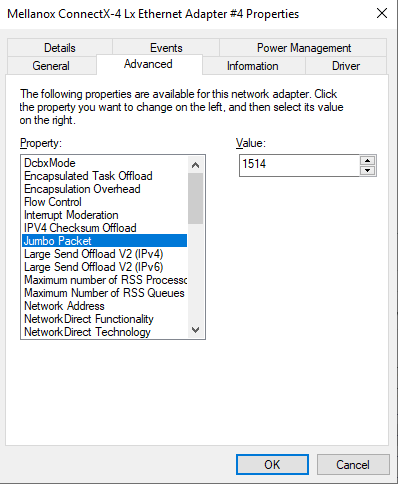
Well, we tried fixing the RoCE frame size to 2048 on both ConnectX-3 Pro and ConnectX-4 NICs. We left the NIC MTU at 9014. That did not help at all. What did help in the end wat set the NIC MTU sizes to 1514 (default) and set the Max RoCE frame size to automatic again? With this setting, all scenarios in all direction do work as expected.

MTU size of 1514 to the rescue

Personally, I think the negotiation of the RoCE frame size, when set to automatic should figure this out correctly with the NIC MTU size set to 9014 as well. But I am happy I found a workaround where we can leverage RDMA during the migration, After that is done we can set the NIC MTU sizes back to 9014 when there is no more need for ConnectX-4 / ConnectX3 RDMA traffic.

Conclusion

The above behavior was unexpected based on the documentation. I argue the RoCE frame size negotiation should work thing out correctly in each direction. Maybe a fix will appear in a new WinOF-2 driver. The good news is that after checking many permutations I found came up with a fix. Luckily, we can leave jumbo frames configured across the network fabric. Reverting the NIC interfaces MTU size to 1514 on both side and leaving the RoCE frame size on auto on both sides works fine. So that is all that’s needed for fixing slow RoCE RDMA performance with WinOF-2 to WinOF. This will do just fine during the co-existence period and we keep it in mind whenever we encounter this behavior again.