Windows Server 2019 went RTM on October 3rd 2018. Ever since we have been waiting for the Hyper-V Server 2019 edition. It has been sadly missing in action until now. Hyper-V Server 2019 is available since June 14th 2019. We’ll kindly distract the time for which Windows Server 2019 went AWOL for a month after RTM due to certain issues and bugs. It became available again on November 13th 2018. That means we had to wait 214 days ( 7 months, 2 days) to get it Hyper-V Server 2019. This makes the time it took to get the evaluation ISO of Windows Server 2019 look short (January 2019).
You can download Hyper-V Server 2019 here on the Windows Server Evaluations page.
Grab the Hyper-V Server 2019 bits!
What is Hyper-V Server?
Microsoft Hyper-V Server is a free product that delivers the same enterprise-class virtualization you get with Windows Server 2019. Hosters of Linux servers and VDI deployments are prime customers. Any one looking for the best performing hypervisor for free is interested in this version. It comes a “core only”and does not support any any other roles and features bar what is necessary to make Hyper-V work. Basically it is the hypervisor and not the rest of Windows. Which is fine!
Why does this matter?
The fact that it is here now is a big deal. The fact that it was missing so long sent many on speculations about the reasons for this. It fed the rumors that Hyper-V is dead to Microsoft and the Windows Server doesn’t matter anymore. Taking away the free version had people guessing that Microsoft was not even interested anymore in competing with VMware on this front.
Now, the IT landscape is changing and we’ll see the next generation hyper-visors appear that are tailored for and specialized in modern workloads. But sending of Hyper-V to the pastures already would be a huge mistake. Just like missing or incomplete features are hurting the product. Servers are going to be around for may years still and we need a modern, capable and reliable product to serve those needs for a long time.
Not having that is sending the wrong message and is a breach of trust. Trust is important. With trust you feel confident to rely on a technology and build on it. knowing. Only focusing on the new, which evolves ever faster and lasts ever less, is not how one builds long term customer loyalty. In this regards the fact that Hyper-V Server 2019 is here is hopefully enough to put the minds of people that rely on it at easy.
I had been running a SonicWall NSA 220 “for ages” in my home lab but after 5 years of non-stop service, it died on me. This was not good. The appliance provided both my home office and my lab environment with routing and firewall capabilities. Part of that setup is static and part of it is dynamic as for testing purposes lab environments are built and destroyed. So I needed to fix this asap.TL-DR: a WatchGuard Firebox M200 joins the home lab.
Workaround
I was looking at buying a pfSense dedicated appliance or a MikroTik router. It wanted to avoid my temporary workaround which was pfSense running in a virtual machine. That is great for temporary testing especially when you need to test various distros depending on the project. Integrating a dedicated appliance in the home lab does have some advantages. The drawback is that it does cost extra money to go get an appliance.
Dedicated appliance
With a dedicated appliance, I can isolate and protect my guest network, my home network as well as maintain a secured IoT segment. If the appliance is a VM I need to make sure it is always running. The appliance is also always ready to whenever I start up my home lab and work environment. Likewise, when I shut that all down the physical appliance still provides services for other needs.
A physical appliance also has the benefit of a small form
factor, a 1U size which provides the ability to rack mount it. We need to keep
the lab clean and well ventilated to prevent a fire hazard. A desk full of
powered on devices is not the way to go.
Last but not least I find that getting some hands-on with
the more popular brands these is always a good thing. While they all provide
similar functionality and some are more capable than others, they all do have
their own particular ways of doing things. This means that working with different
appliances helps solve issues in real life as we encounter a variety of
appliances out there.
A WatchGuard Firebox M200 joins the home lab
I was in luck, however. After talking shop on our way to some community events, a buddy who runs his own company provided me with some decommissioned WatchGuard hardware to use in the home office lab. I have tried to help him out with various small things over the years and what goes around came around. Thanks, buddy! You see, you don’t have to take dumpster diving to literally.
The M200 and AP 300 during initial configuration
I got a WatchGuard Firebox M200 and a WatchGuard AP300 to go with it. This meant I could rebuild the main firewall/router functionality in the home lab. These products have been replaced by newer editions (M270). They are still excellent products however and provide great functionality to test. In a lab environment, these are great to have around. As I work in environments that require enterprise-level functionality within SME budget this kit hits the mark.
Even with the licenses for the advanced features expired it
packs a punch. I also found a way to upgrade the OS to the latest version (v12.4.1). The standard ways require an
active license but there is an option that does not. It took me a while to find
it but it works and it is legit.
The WAP, which I also upgraded to the latest firmware (2.0.0.11) provides Wi-Fi for a guest network and a corporate authenticated network in my default permanent lab setup. More SSIDs and networks can be configured when the need arises for testing various scenarios. Wi-Fi in all its forms plays an essential part in any environment with more mobile and flexible roles than ever before. More recently I was testing 802.1x port authentication for deployments in DevOps environments that leverage Hyper-V quite a lot. You might recall the fact that the Hyper-V switch supports 802.1x since Windows Server 2019 (LTSC 1809) and Windows 10 (1809 and above) which was very timely for the solution I needed to provide.
The fist and most essential configurations
I registered with another free dynamic DNS provider (http://freedns.afraid.org/about-us/) which the M200 on firmware 12.4.1 supports. The previous one I used to was not supported. That was easily done quickly. I don’t need this because “host” stuff at the home lab but mainly because that how I keep my dynamic IP updated in a place where I can grab it with some code to update VPN local gateway settings in Azure and other stuff like that.
The WatchGuard Firebox M200 is now the new core of the home network. I recreated all my VLANs and routes. While I am not yet done with everything, I do have BGP routing running between my lab Azure deployments and my on-premises home lab now. This testing out hybrid connectivity as well as high availability, failover, and transitive scenarios.
Checking my routed VPN to Azure BGP advertised routes
After making sure RDS Gateway was working I created a custom
rule to have SMTP work with STARTTLS over 587 next to TLS over 465. But that
was about it. Except for one special jump host in a DMZ. For this host, I added
rules to enable TeamViewer to work. Which was kind of easy to do as we can
specify FQDN names so no matter how many and changing IP addresses are used
this helps deal with this. TeamViewer, for better or for worse, is used a lot,
and once in a while, I need to test with it.
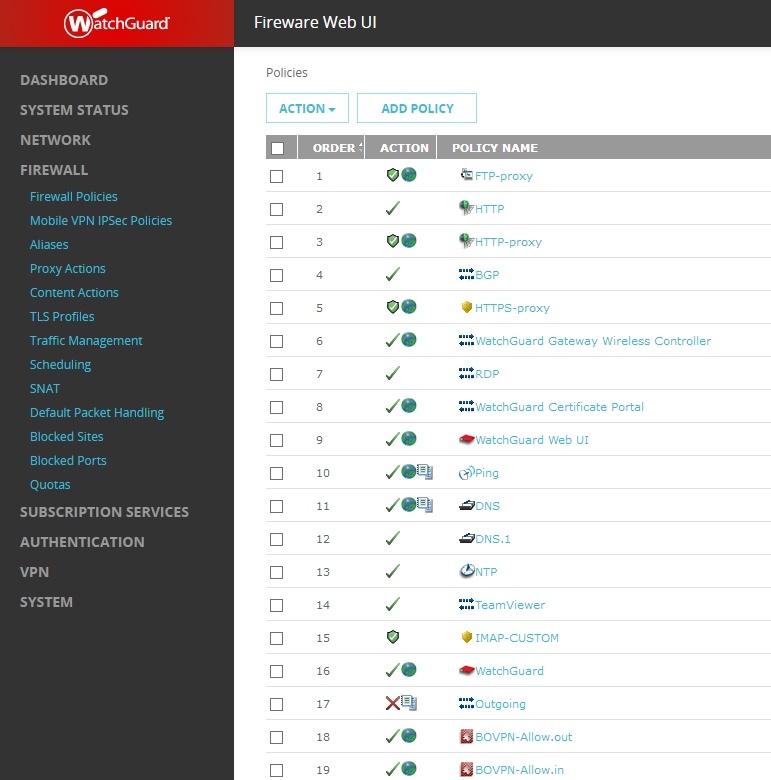
Configuring the WatchGuard Firebox M200 firewall ploicies
Conclusion
Now that I have the M200 & AP300 up and running the lab and home office are now again capable of simulating and testing business environment scenarios. This matters a lot while testing and learning because it helps me get a better grasp of all the pieces and parts that make up a design or solution. In my humble opinion, this has always been more helpful than pure paper-driven designs. My experimenting in the lab benefits myself, my employers and the community at large. Self-improvement and community contributions are by nature a win-win situation. So I am happy a WatchGuard Firebox M200 joins the home lab.
While I am at it I will upgrade my Azure VPN script from AzureRM to AZ. The reason is that I need to delete the Gateway when not testing as the minimal BGP capable VPN gateway SKU ( VpnGw1) is eating away at my limited Azure at home budget. This is still my main beef with cloud computing. Dumpster diving is a cost-effective CAPEX budget model. OPEX is not a personal budget-friendly model. It is game over when that runs out.