Reverting the Forest & Domain Functional Levels in Window Server 2008 R2, 2012, 2012 R2

Since Windows Server 2008 R2 and now with Windows Server 2012(R2)you can roll back the domain and forest functional level under certain conditions. This was not possible before with previous versions of Windows. In these cases you would have to revert to a restore from backup. Yup pretty hefty so raising functional levels has to be done with care.

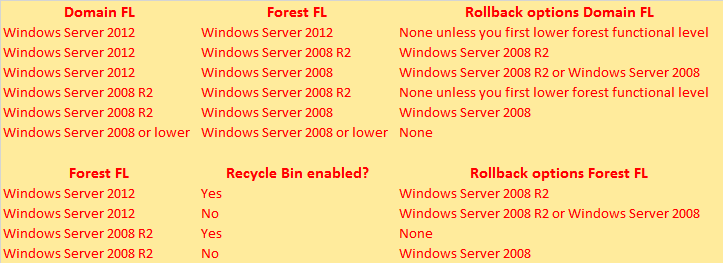
Now this isn’t a free fire zone there are some conditions as listed in the table below.

image

So you cannot have advanced features like the AD recycle bin enabled in some conditions. Enabling this is irreversible, so you cannot revert the Forest Functional Level of your environment to a level that supports the AD recycle bin when it has been enabled. Today that means from Windows Server 2012(R2) to Windows Server 2008 R2.

You also need Enterprise Administrator rights to do so, which I hope you’ll understand. It’s also a Windows PowerShell only feature (Set-ADDomainMode).

I used this information recently during an upgrade of an Windows Server 2008 R2 domain to Windows Server 2012 where they wanted to raise the domain and forest functional level. As they had a Forest Trust between the (now) Windows Server 2012 forest/domain and another Windows Server 2008 R2 forest/domain. They had enabled the Recycle Bin when still at Windows 2008 R2. They wanted to know if they would have issues with the trust and if so whether they could revert the levels in that case.

Well I could put their mind at ease. Look at the table. Yes you can go back to Windows 2008 R2 Forest Functional level as that’s a version that also supports AD Recycle bin so it doesn’t matter that is enabled.  And no, the forest trust capability is not affected by the forest functional level in this case as all you need there is to be at a minimum level of Windows 2003 to be able to do a forest trust. Forest Trust is enabled from and above Windows Server 2003 Forest functional Level. In a Windows Server 2000 Forest functional Level, Forest Trust is disabled. That means you can do them between forests at different functional levels a long as non of them is lower than Windows 2003. In this case it’s Windows 2008 R2 that’s the lowest, so again, not an issue.

How? Very simple:

Set-ADDomain Mode mydomain.com -DomainMode Windows2008R2Domain

Set-ADForestMode mydomain.com -ForestMode Windows2008R2Forest

Take a look at these TechNet Resources Understanding Active Directory Domain Services (AD DS) Functional Levels  and Set-ADDomainMode for more information.

Where Does Storage QoS Live In Windows Server 2012 R2 Hyper-V

Back to basics to explain where storage QoS lives and how it works

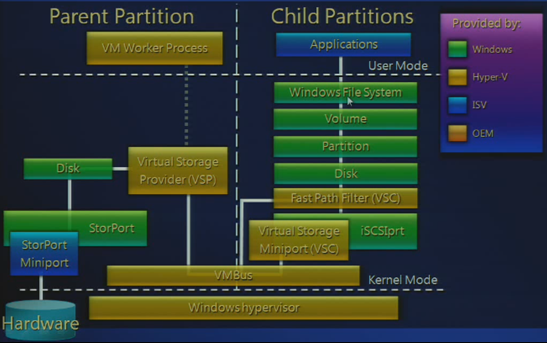
In Windows Server 2012 R2 Hyper-V (and earlier) we have Hyper-V components called Virtualization Service Provider (VSP) and Virtualization Service Clients (VSC). In combination with the VMBUS the VSP and VSC components are what make virtualization perform well on Hyper-V.The Stor VSP/VSC are were the maximum IOPS functionality lives, aka as QoS Limit.

In a hosted hypervisor like Virtual PC or in a bare metal hypervisor without any “enlightment” the operating system inside a virtual machine is blissfully unaware of the fact it virtualized. Basically it sends hardware access requests using native drivers, but the requests are received by the virtual layer that intercepts them on behalf of the host OS by emulating hardware devices. This comes at a cost, namely performance, latency and losing device specific functionality.

In Hyper-V Microsoft provides the Integration Services (IS) for virtual machines running on Hyper-V which, in combination with the VMBus, avoids this overhead. So you should ways use them where and when possible. Two of the components in the IS are VSP and VSC. They are responsible for the communication between the Host OS or Parent Partition (where the VSP lives) and the Guest OS or Child Partition (where the VSC lives).

image

There are 4 VSP & VSC components: Network, Video, HID and Storage. As you probably guessed we’re interested in the storage VSP & VSC (storVSP.sys & storvsc.sys) for the discussion at hand. While the Stor VSP lives in the host OS and the Stor VSC in the guest OS of every VM running on the host they communicate over the VMBus we mentioned and is designed to make communications as fast as possible (it’s a communication protocol that runs in memory, i.e. it’s very fast).

image

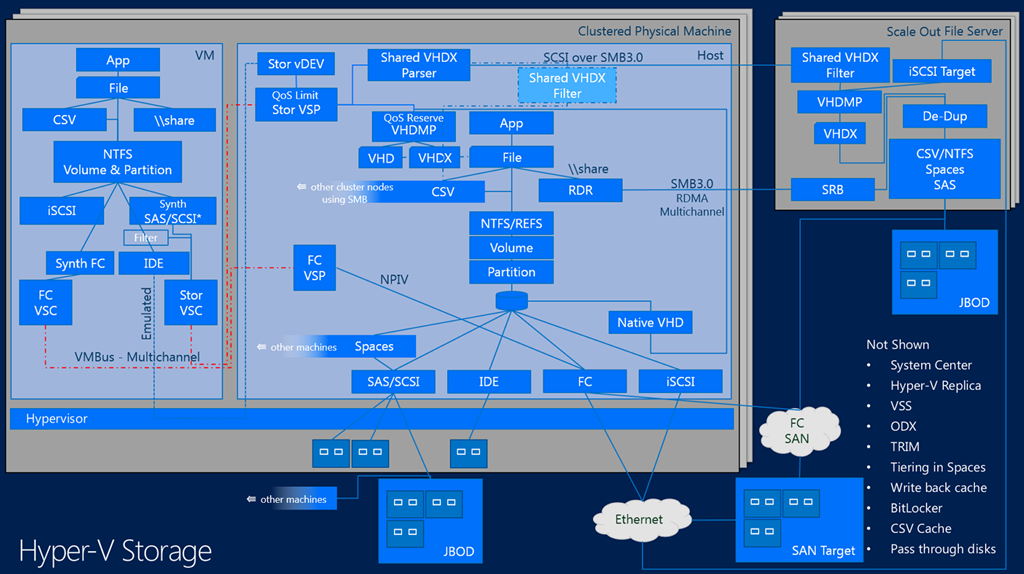
The Minimum IOPS, also known as the Reserve is set per virtual disk but the threshold alerts for it are generated by the VHDMP. This is the VHD/VHDX parser and dependency property provider and this know all about the VHD/VHDX format with in itself is again a file on storage (DAS, CSV, SMB 3.0 File Share). This also happens to be where the Storage IO Balancer lives with which it collaborates, more on that below. You now see why QoS is not available for pass-through disk or iSCSI/FC storage in a VM, it requires a VHDX and is implemented at the virtual disk layer.

The QoS Limit (Maximum IOPS) is set at the virtual disk level via the Stor VSC and the Qos Limiter lives in the Stor VSP.

image

So what do we know:

QoS Limit (Maximum IOPS) and QoS reserve (Minimum IOPS) are implemented at the virtual disk layer. So per VHDX in a particular VM.  It’s not available yet for shared VHDX, whether on the same host or not.

Unlike QoS Limit (Maximum IOPS), which is a hard cap, QoS reserve (Minimum IOPS) is a best effort not a hard minimum. It’s used to warn us, not as an enforcement. This works at the host level, where it will detect whether the VHDX can get get the minimum IOPS configured or not and can generate alerts if this happens. This tied to the QoS IO Balancer which is improved in R2 but it will still only spreads IOPS across multiple VMs on the same host, making sure they all get a fair share.

The key point here is that this process doesn’t work across multiple hosts in a cluster, over multiple clusters and stand alone member servers that might all be attached to the same storage system. Meaning that on shared, multi purpose storage we might have an issue. What if some VMs in a dedicated 4 node Hyper-V cluster dedicated to SQL Server virtualization is eating away all the IOPS. QoS IO Balancer will give each SQL Server VM a fair share of the IOPS but only within its host in that cluster. But if a VM on another host is consuming all IOPS, that’s out of it’s scope  That’s where the max cap comes to the rescue (at the virtual disk level) if you need it. Nice but not perfect. You can see now why the storage QoS minimum is implemented at the VHDMP layer, as this which is where the IO Balancer also lives. The fairness that the IO Balancer gives you a better change that the minimal reserve might be met and if it doesn’t you’ll get notified (you need to listen an react, I hope that’s obvious).

Also don’t forget that if you still have other physical servers that run file services, SQL Server or some data crunching apps you will find that those are blissfully ignorant of your QoS IO Balancer at the Hyper-V host level and of your QoS at the Hyper-V virtual disk level.

There is no multiple host QoS, there is no cluster wide QoS and there is no storage wide QoS in Windows. Perhaps you have some QoS your SAN but most of the time this has no knowledge of Hyper-V, the cluster and the virtual machines.

So the above this gives you an idea where does Microsoft might focus it’s attention in regards to storage IOPS  management (there are many more storage capabilities on my wish list) in vNext.

Any other options available today?

Other options are storage that is smart and has knowledge about the workload. This is nice but that means that it will come at a cost. For the moment GridStore with it’s virtual controller seems to be one of the better ones out there. Now I have heard people say Microsoft doesn’t get it and they’re doing do a bad job, but I do not agree. I have spoken to many people in the community and at MSFT and they have stated, even publicly, on stage, that they will keep investing in storage feature to enhance it in the versions to come. Take a look here at TechEd 2013 Session  MDC-B345: Windows Server 2012 Hyper-V Storage Performance.

Why would I like Microsoft to keep improving storage

When talking to storage vendors serving our needs, I always have some feedback. A lot of the advanced storage features don’t always work well in real life, especially if you combine a few. Don’t believe me? Talk to some experienced Windows engineers about the sorry state of many hardware VSS providers. Or how federation across storage systems falls apart the moment you combine it with application consistent snapshots or put a real heavy load on it. Not to cool when you paid for all those licenses which are tuned into “lab only” toys. Yes sometimes as a Windows user you feel like a second class citizen in storage land. A lot of storage systems are still very much a silo. Attempts to do storage federation without a hit on performance, making it load balance across SAN building blocks whilst making all the advanced features that have knowledge of the OS and hypervisor work reliably are not moving as fast as the race for ever more IOPS.

Sure I love the notion of 2 million IOPS, especially if you can get them with random write/read IO at super low latencies Smile. But there are other, sometimes more urgent needs and those seem to fall between the cracks as the storage vendors compete with each other and forget about the needs of their customers. If some storage vendors would shut up long enough to listen to customers they might be less surprised as to why those customers are interested in Storage Spaces.

So it would be kind of nice if Microsoft can work on this an include more evolved storage QoS capabilities in the box. I also like that approach for other reasons. Basically we will do everything we can with what Windows offers us inbox. It’s cost effective as long as you keep the KISS principle in mind and design it consciously. I assure you that often too much money is spent on 3rd party software because people don’t leverage what they have in box and drop the 20/80 rule. We do and you get the best TCO/ROI for our licenses possible. We don’t spend extra money on licenses, integration and support of third party products so we can spend it where it matters the most. It also makes upgrades easier as the complexity and the number of dependencies are lower on pure in box solution.On top of that we minimalize the distinct possibility that one or more 3rd party products will hold us hostage in an older infrastructure because they don’t support new versions of Windows fast, good and complete enough for us to upgrade.

Use Cases For Fluid Cache For SAN With DELL Compellent In High Performance Virtualization With Windows 2012 R2

Fluid Cache For SAN

At Dell World 2013 in Austin Texas I spent some time talking to engineers & managers about Fluid Cache For SAN. The demo in the keynote was enough to grab my distinct attention, especially as a Compellent customer.

What is it?

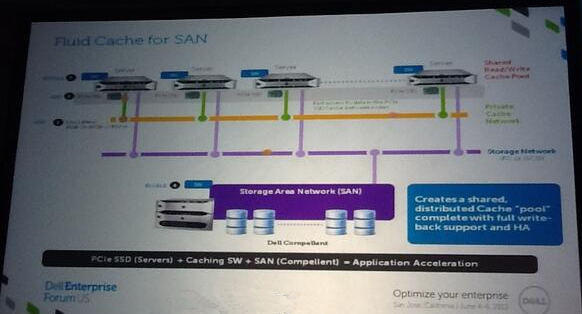
Dell already has Fluid Cache for DAS available in its PowerEdge servers. Now it’s time to bring this to their best SAN offering, the Compellent, and make Fluid Cache shared storage suitable for shared storage clustering. The way to do that cost effective and high performance is to build on the success of on board (local to the server) high performance storage and make that shared through software in a physical shared nothing replication/sync model. To make this happen they use a 10/40Gbps Ethernet solution leveraging RoCE (RDMA over Converged Ethernet). Yes that very technology I have been investing time & effort in for SMB Direct and which we leverage for CSV & Live Migration traffic and with SOFS in Windows 2012 R2.

Basically the super low latency an high throughput enable the memory to be synced across all nodes in a cluster and as such each node sees all the cluster memory. For redundancy you will need at least 3 nodes in a cluster. Dell will scale Fluid Cache For SAN to 128 nodes. Windows Server 2012 R2 can handle 64 nodes, which some think is ridiculously high, but then again, Dell aims even higher so it’s not as weird as you think. Some people have really huge computing needs. Just remember that 10 years ago you probably found that 16GB of RAM was extravagant.

Why this architecture?

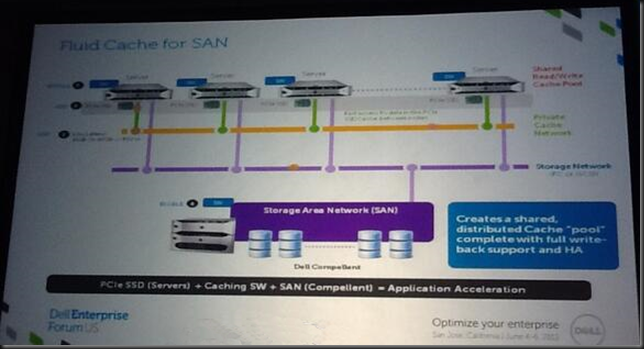
Dell uses server based “shared nothing flash storage” & high speed low, latency synchronization to create a logical cluster wide shared pool of flash memory. This means the achieve stellar low latency as the flash storage is inside of the servers, close to the processors and as such delivers excellent performance for the workloads. Way better that “just” flash only SAN can. For data integrity they commit the data only when it written to the Express Flash drive(s) of one server and then also to another and verified. This needs to happen very fast and that where the RoCE network come sin to play. Later, at less speed critical times the data is pushed out to the Compellent SAN for storage. If that SAN is a flash based setup think about the capabilities this gives you in performance. Likewise data reads of the SAN that are highly active are pushed from the Compellent SAN and cached (also in multiple copies) on the Express Flash modules. While two servers with each a copy of the data on Express Flash modules would suffice DELL requires at least three. This is just a plain common sense N+1 redundancy design to have high availability even when a node fails. A cool think to note is that you can build larger clusters with 3 nodes each having one or more Express Flash modules and additional nodes don’t need it as long as they can read the cache of those 3. So the cost of this can be managed. The drawback is that you don’t read & write to a local Express Flash module on those extra node. If you want that you’ll need to put more $ on the table.
clip_image001

The thing to note here is that the Servers/SAN are connected over RoCE/RDMA. Well this look familiar. What technology can also leverages RDMA? SMB Direct in Windows Server 2012 R2! And where do we use this amongst other things? Storage IO in Scale Out File Server, CSV traffic, Live Migration …

The big benefit of this design it just it takes your SAN to the next level but also, if DELL does this right, they won’t break any of the good stuff like VSS aware snapshot with Replay Manager, Automatic Data Tiering, Live Volumes, Live Migration etc. A lot of the high IOPS/low latency solutions out their based on fast local flash break a lot of the good stuff and reduces centralized storage management. What if you can have your cookie and eat it to?

Demo Time at Dell World

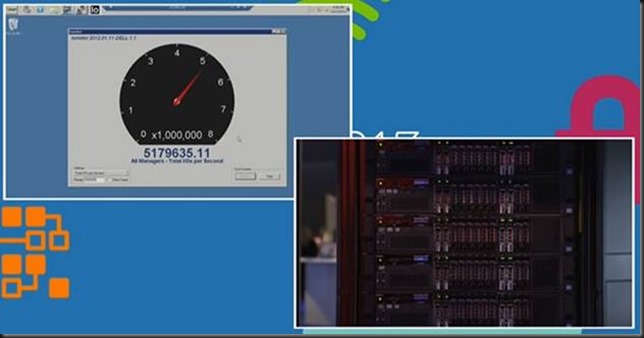
Dell demonstrated an Oracle database load on an eight node cluster of PowerEdge R720 servers with Intel Xeon E5 processors, with Linux (no Windows Server 2012 R2 support yet Sad smile) These servers each used 350GB PCI-Express flash cards (“only” PCI-Express 2.0 capable by the way). This cluster, using a Compellent SAN, managed to get a result of more than 5 million IOPS at 6 millisecond response times, delivering 12,000 tps for 14,000 client connections. This was read only. If they dropped the Fluid Cache for SAN they  could “only” achieve 2,000 clients (6 times less clients due to 4 time less transactions and 99% slower responses). See this movie for more info: http://www.youtube.com/watch?v=uw7UHWWAtig and watch the keynote from Dell World 2013 here
clip_image003

Where would I use this?

Cost will determine use cases and this is unknown for now. We can only look at what Fluid Cache for DAS cost right now and speculate. I for one hope/bet on the fact that DELL won’t price itself out of the marked (they have a lot of competition from big & smalls players in a “good enough is good enough” world with a cloud mindset all around). So make it too expensive and we might be happy with “just” 500.000 IOPS at much less cost. It’s a fine line. Price it right, support it well and you might win the bulk of sales in the storage wars. Based on the DAS solution we’re looking at least 8000 $ per server (license is 3500 for DAS => see http://www.theregister.co.uk/2013/03/05/dell_fluid_cache_server_acceleration/  + cost of PCI-Express flash module (> 5000$ => see http://en.community.dell.com/techcenter/extras/chats/w/wiki/4480.3-5-2013-techchat-fluid-cache-for-das.aspx) &  yearly maintenance fee. Then we need to factor in the cost of the RDMA/RoCE capable NICs & the (dedicated) Force10 switches – 2 for redundancy  that are at least 10Gbps (S4810?) or probably 40Gbps (S6000?) & cabling. So this is not a cheap solution and you won’t just “throw it in” on a quiet afternoon to see what it does for you. Not that there will be a DIY “throw it on kit” I think, it’s a step above plug and play. If they keep it affordable and do some other things for Windows Server 201 R2 / Hyper-V they can be the absolute number one SAN vendor for any Microsoft customer. But that’s another blog topic.

Cost is indeed something that might make it a show stopper for us. I just can’t tell yet. One of the key factors is that if affordable it could give the point solutions we now see pop up more and more in storage. a run for their money. While cheap and workable in good enough is good enough scenarios it takes some of the centrally shared storage advantages away. But if we ever do a state full VDI project in an environment with high end physical desktops (500GB or more local storage, SSD disks, 8 core CPU, 8-32GB DDR3, dual or more screens) that run ArcGis, AutoCad, Visual Studio, SQL Server, Outlook with 5GB mailboxes, large documents & huge files (images) this might be the enabler we need to make VDI happen & works as desired with current all-purpose Compellent SANs. IIf the price is right it could enable VDI in now “NO GO” scenarios.  And those are plentiful, … Another use case I see is a virtualized SQL Server environment on Hyper-V with general purpose shared storage. We’re doing very well but the day might arrive that we need those IOPS in order to take it even further. Don’t laugh but realize how much IOPS an SSD delivers to a workstation today and that’s what your users expect & demand. Want to fail at VDI? Have it outperformed by a 4 year old physical PC where you slapped an SSD into.

Could it help in keeping excessive IOPS away from the SAN, making that capable of doing more over a longer life time? In other words can it play a part in the Storage QoS issue across server/cluster/storage system issue for non workload aware storage solutions?

So I might have some homework to do. For our next SQL Server cluster we’ll look at the next generation of servers & start counting our PCI Express slots. We now already consume 4 PCI-Express slots for 2*FC & 2*Dual Port 10Gbps) in our Hyper-V design. That’s another discussion, but they are built purposely for performance under any condition & to be highly redundant. A health check / improvement track by Microsoft for our SQL Server environment has proven this to be an outstanding setup (nice e-mail to see your bosses get by the way). I digress, free PCI-Slots should not be an issue, as we also don’t need the FC cards in the Fluid Cache Nodes. The storage IO uses the RoCE network, to which the Compellent SAN attaches.

Cost is very important in determining if we’ll ever get to deploy it. The cloud is here, and while that is far from cheap either, it’s a lot easier to sell than internal IT for various reasons. That’s just how the powers that be roll right now & how things are.

What we’ll get in our hands

There was a lot of love between Dell & Samsung at Dell World. Talking to Dell at the server/storage/networking boots I understood that Samsung is going to produce flash modules for this that support PCI-Express 3.0 and the industry backed NVM Express host interface for solid state drives which will reduce latency with 1/3 compared to now. As it seems they will produce higher capacity cards than what was used in the demos (800 GB and 1.6 TB). So capacity will increase & latency will drop even more. They leverage the Force10 10Gpbs or 40Gbps switches for the RoCE network. As Dell & Mellanox are cooperating heavily (Mellanox Collaborates with Dell to Deliver 10/40GbE Solution for Mainstream Servers and Networking Solutions) my bet is on Mellanox for the cards. Broadcom is not there yet for it to happen in time and Intel has no RoCE cards afaik. They seem to be playing the waiting game before they jump in.

Magic Ball Time, Speculation & Questions.

I’m not a DELL Server / Storage designer or architect, and those that are don’t tell me to plaster it all over the internet, so this really is magic ball time …

image

I’ll show my ignorance on what Samsung does under the hood when I hear that the next generation of DELL servers can have 6TB of RAM I can only speculate that with the advent of DDR4 in servers & ever dropping cost the path is open to leverage NV-RAM disk for the read/write cache in Fluid Cache for SAN as well a bit like what IDT did http://us.generation-nt.com/idt-announces-world-first-pci-express-gen-3-nvme-nv-dram-press-3732872.html. The persistence comes from writing the DRAM content to NAND at shutdown, can we do that fast enough at 1.6 TB sized caches? Can we fit enough of  those modules on a card? What would that do for IOPS & latency? Does that even make sense at this moment in time?

What if we could leverage the DDR4 dims in the server itself? This would perhaps cut costs and also save us some valuable PCI-Express 3.0 slots for our 10Gbps or better addiction Smile. Sure there is no persistence than but the content is distributed redundantly over the cluster anyway? Is that safe enough to make it feasible? What if we need to shut down the cluster? I guess it’s not that easy and perhaps we just need to make sure future motherboards have 8 or more PC-Express 3.0 slots & not worry about that. Or move to 40/100Gbps & have less need for NICs. Yeah that’s what was said of 10Gbps in the early days …

Support for Windows?

While it’s not there yet I have absolutely no doubt that they will bring it to Windows Server 2012 R2 and higher. Well Windows is a huge on premise market for native workloads like SQL Server, VDI and Hyper-V. The number of sales opportunities in the Microsoft ecosystem is growing (despite cloud) while others are stagnant or dropping. On top of that the low cost of Hyper-V leaves money to be spent on Fluid Cache for SAN. As Dell is in business to make money, they will not leave that big chunk of cash on the table.

When can we get our hands on this technology?

Timing wise that will be early to late Q2 in 2014, which is my best guestimate. Interesting times people, interesting times

Storage Quality of Service (QoS) In Windows Server 2012 R2

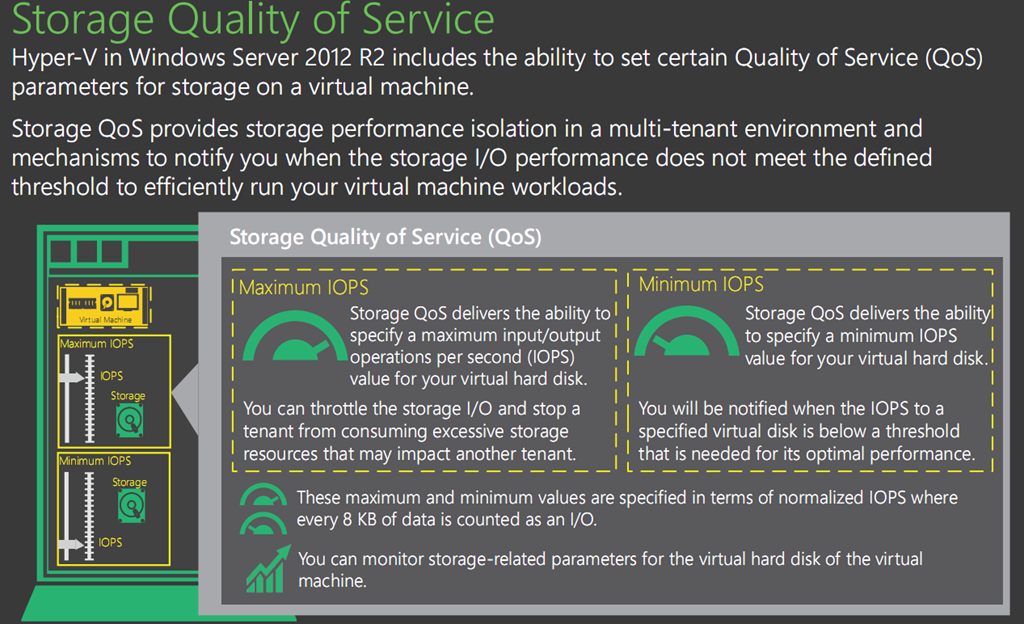
In Windows Server 2012 R2 Hyper-V we have the ability to set  quality-of-service (QoS) options for a virtual machine at the virtual disk level. There is no QoS (yet) for shared VHDX, so it’s a per individual VM, per virtual hard disk associated with that virtual machine setting for now.

What can we do?

  • Limit – Maximum IOPS
  • Reserve – Minimum IOPS threshold alerts
  • Measure – New Storage attributes in VM Metrics

image

Limit

Storage QoS allows you to specify maximum input/output operations per second (IOPS) value for a virtual hard disk associated with virtual machine. This puts a limit on what a virtual disk can use. This means that one or more VMs cannot steal away all IOPS from the others (perhaps even belonging to separate customers). So this is an automatic hard cap.

Reserve

We can also set a minimum IOPS value. This is often referred to as the reserve. This is not hard minimum. Here’s a worth of warning, unless you hopelessly overprovision your physical storage capabilities (ruling out disk, controller issues, HBA problems & other risks that impact deliverable IOPS) and dedicate it to a single Hyper-V host with a single VM (ruling out the unknown) you cannot ever guarantee IOPS. It’s best effort. It might fail but than events will alert you that things are going south. We will be notified when the IOPS to a specified virtual hard disk is below that reserve you specified?that is needed for its optimal performance.  We’ll talk more about this in another blog post.

Measure

The virtual machine metrics infrastructure have been extended with storage related attributes so we can monitor the performance (and so charge or show back).  To do this they use what they call “normalized IOPS” where every 8 K of data is counted as one I/O. This is how the values are measured and set. So it’s just for that purpose alone.

  • One 4K I/O = 1 Normalized I/O
  • One 8K I/O = 1 Normalized I/O
  • One 10K I/O = 2 Normalized I/Os
  • One 16K I/O = 2 Normalized I/Os
  • One 20K I/O = 3 Normalized I/Os

A Little Scenario

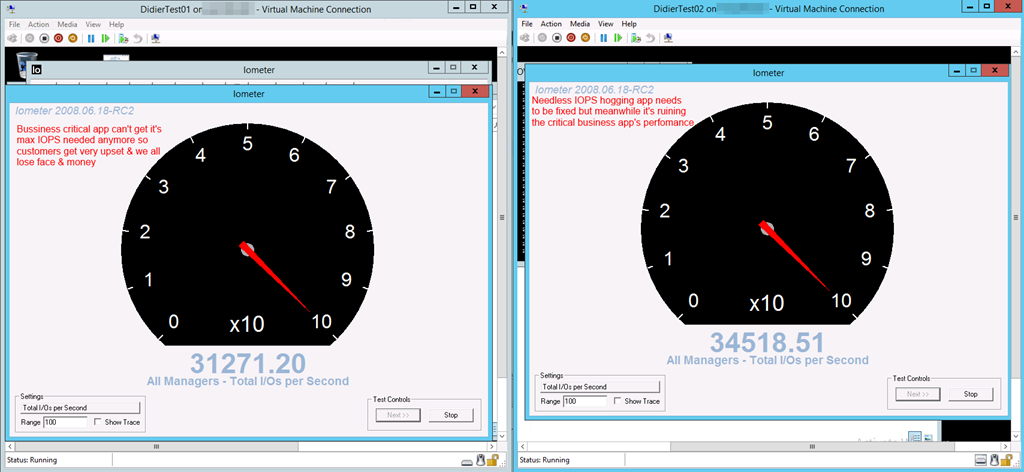
We take IO Meter and we put it inside 2 virtual machines. These virtual machine reside on a Hyper-V Cluster that is leveraging shared storage on a SAN. Let’s say you have a VM that requires 45000 IOPS at times and as long as it can get that when needed all is well.

All is well until one day a project that goes into production has not been designed/written with storage IOPS (real needs & effects) in mind. So while they have no issue the application behaves as a scrounging hog eating a humongous size of the IOPS the storage can deliver.

Now, you do some investigation (pays to be buddies with a good developer and own the entire infrastructure stack) and notice that they don’t need those IOPS as they:

  1. Can do more intelligent data retrieval slashing IOPS in half.
  2. They waste 75% of the time in several suboptimal algorithms for sorting & parsing data anyway.
  3. The number of users isn’t that high and the impact of reducing storage IOPS is non existent due to (2).

All valid excuses to take the IOPS away …You think let’s ask the PM to deal with this. They might, they might not, and if they do it might take time. But while that remains to be seen, you have a critical solution that serves many customers who’re losing real money because of that drop in IOPS has become an issue with the application. So what’s the easiest thing to do? Cap that IOPS hog! Here the video on how you deal with this on Vimeo: http://vimeo.com/82728497

image

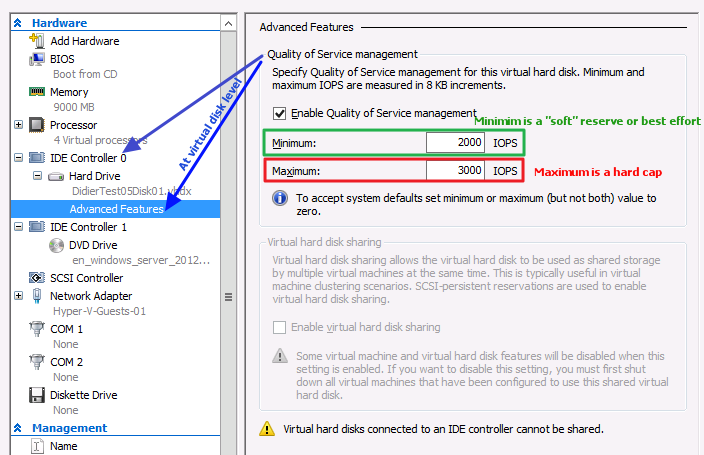
Now let’s enable QoS as in the screenshot below. We give it a best effort 2000 IOPS minimum and a hard maximum of 3000 IOPS.

image

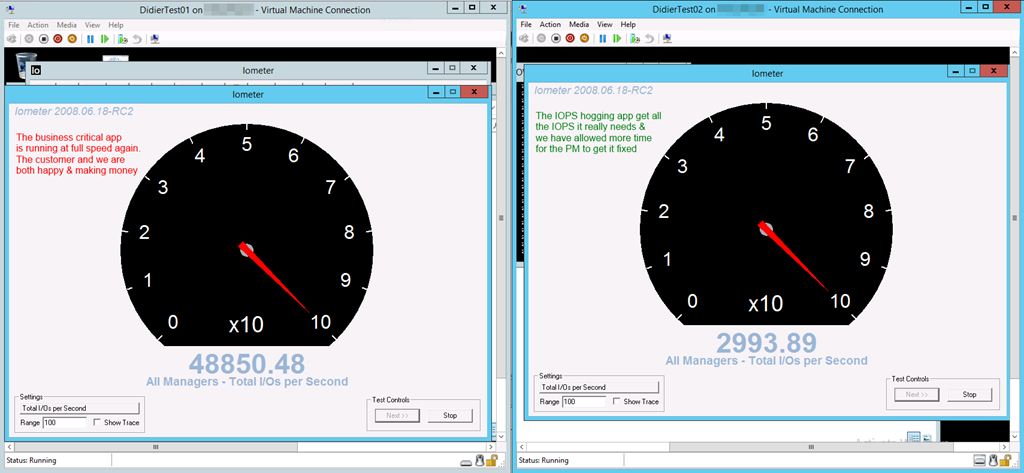
The moment you click “Apply” it kicks in! You can do this live, not service interruption/ system downtime is needed.

image

I actually have a hard cap of 50000 on the business critical app as well just to make sure the other VMs don’t get starved. Remember that minimum is a soft reserve. You get warned but it can’t give what potentially isn’t available. After all, as always, it’s technology, not magic.

In a next blog we’ll discuss QoS a bit more and what’s in play with storage IO management in Hyper-V, what the limitations are and as such we get an idea what Microsoft should pay attention to vNext.

Remarks

Well doing this for a 24 node Hyper-V cluster with 500 VMs could be a bit of challenge.