Are you are working with Veeam software solutions? Are you passionate about sharing your experiences, knowledge, and insights? If so, you might want to consider a nomination for the Veeam Vanguard program. If you are already a Veeam Vanguard I’m pretty sure you already know submissions for Veeam Vanguard Renewals and Nominations 2020 are open.
Veeam Vanguard Renewals and Nominations
As we are nearing the end of 2019 Veeeam has opened the Veeam Vanguard Renewals and Nominations for 2020.
Describing the Veeam Vanguard program is not easily done. But Nikola Pejková has done a great job to do exactly that in Join the Veeam Vanguard 2020 class! She also explains how to nominate someone or yourself. Read the blog post and find out if this is something for you. I enjoy being a part of it because I get to learn with and from some of the best minds in the industry. This allows me to help others better while also keeping up with the changing IT landscape whilst helping others.
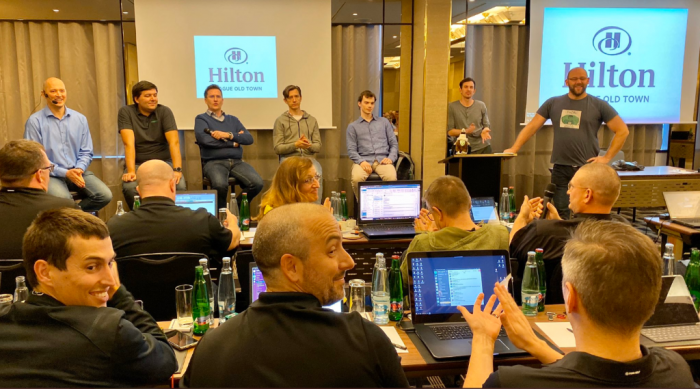
My fellow Veeam Vanguard and me in a Q&A session with the Veeam R&D and PM teams at the Veeam Vanguard Summit.
I would like to emphasize that the diversity of the Veeam Vanguard is paramount to me. It works because we have people in there form around the globe, from all kinds of backgrounds and job roles. This helps open up discussions with different points of view and experiences. Customers, consultants, and partners look at needs and solutions from their perspectives. Having us together in the Vanguard benefits us all and prevents tunnel vision.
Nominate someone, yourself or be nominated
Nikola explains how to do this in her blog so read Join the Veeam Vanguard 2020 class! and apply to become Vanguard! It is quite an experience. Quality people who are active in the commumnity and help by sharing their knowledge are welcomed and appreciated. Maybe you’ll find yourself to be a Veeam Vanguard in 2020!
When Veeam preferred networks cause slow backup initialization speeds
When using preferred networks in Veeam you choose to use another than the default host network for backups and restores. In this post, we’ll discuss how to optimize the Veeam preferred networks backup initialization speed because we aim for optimal performance. TL-DR: You need to provide connectivity to the preferred networks for the Veeam Backup & Replication server. It seems a common mistake I run into every now and then. Ultimately it makes people think Veeam is slow. No, it is just a configuration mistake.
Why use a preferred network?
Backups can fill up a 1Gbps pipe very fast. Many people still use 1Gbps networking as default connectivity to the hosts. Even when they leverage 10Gbps or better it is often in a converged network setup. This means that only part of the bandwidth goes to host connectivity. Few have 10Gbps for “just” host connectivity. This means it makes sense to select a different higher bandwidth network for backup and restore traffic.
Hence for high volume, high-performance backup and restores it is smart to look for a bigger pipe to leverage. Some environments have dedicated backup networks at 10Gbps or better. But we find way more high bandwidth networks for other purposes. In Hyper-V environments, you’ll have those for SMB networking like CSV, Live Migration variants and storage replication. Hyper-Converged Infrastructure deployments use these networks for storage as well. With S2D you’ll find more and more 25/50/100Gbps. All these can be leveraged as a preferred backup network in Veeam
Setting up a preferred network
Setting up a preferred network is easy. First of all, you figure out which network to use. You then add those to the preferred networks as follows:
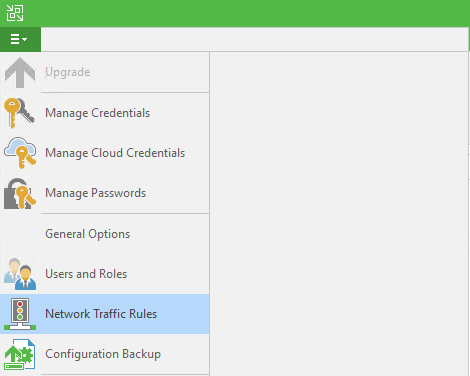
In file menu select “Network Traffic Rules”
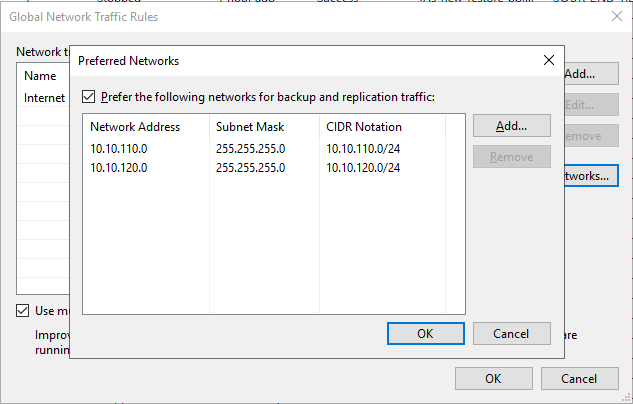
Click “Add” and specify the source IP as well as the target IP range. You can op to encrypt the traffic and /or set a bandwidth limit.
We have two SMB storage networks available, we enter both.
There is no need to have the preferred network registered in DNS. It will work fine without.
I hope it is clear that the source (Hyper-V Hosts), the target (backup repository or the extends in a Scale-Out Backup Repository) and any Off Host Proxies need connectivity to the preferred network(s). If you leverage WAN accelerators, Gateways Servers, log shipping servers than these also need access. Last but not least you should also make sure that the Veeam Backup Server (VBR) has access to the preferred networks. This is one that a lot of people seem to forget. May because it is most often a VM if it is not a shared role on the repository server or such and things do work without it.
When the VBR server has no access to the preferred networks things still work but initialization of the backup and restore jobs is a lot slower. Let’s test this.
Slow Initialization of backup and restore jobs
As a result of using preferred networks you might probably notice the following:
First of all, we notice a slow down in the overall initialization of the backup and restore job.
This manifests itself in a slow start of the actual VM backup/restore and reducing the number of simultaneous backups/restores of VMs within a job.
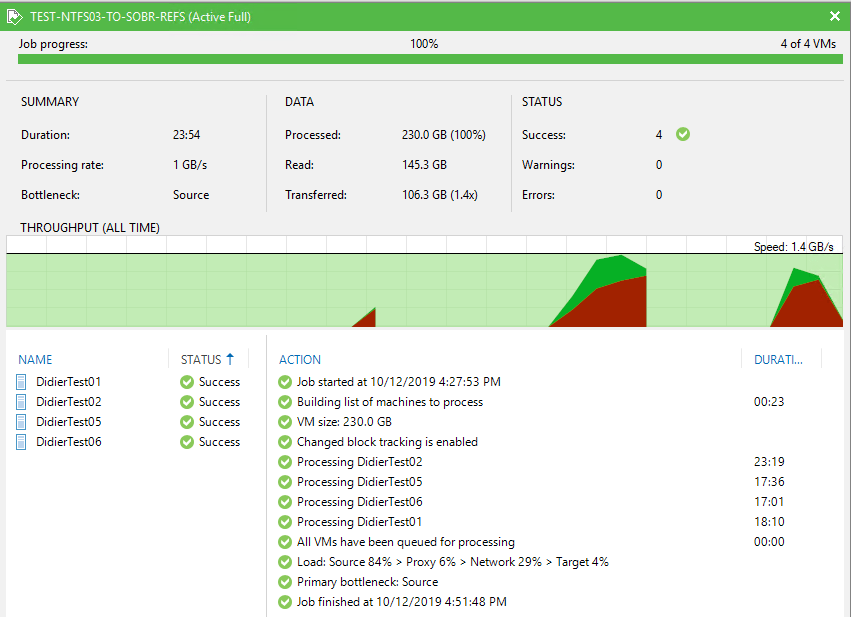
Without the VBR server having connectivity to the preferred networks
23:54 to complete the backup job (no connectivity to the preferred network)
Optimize the Veeam preferred networks backup initialization speed
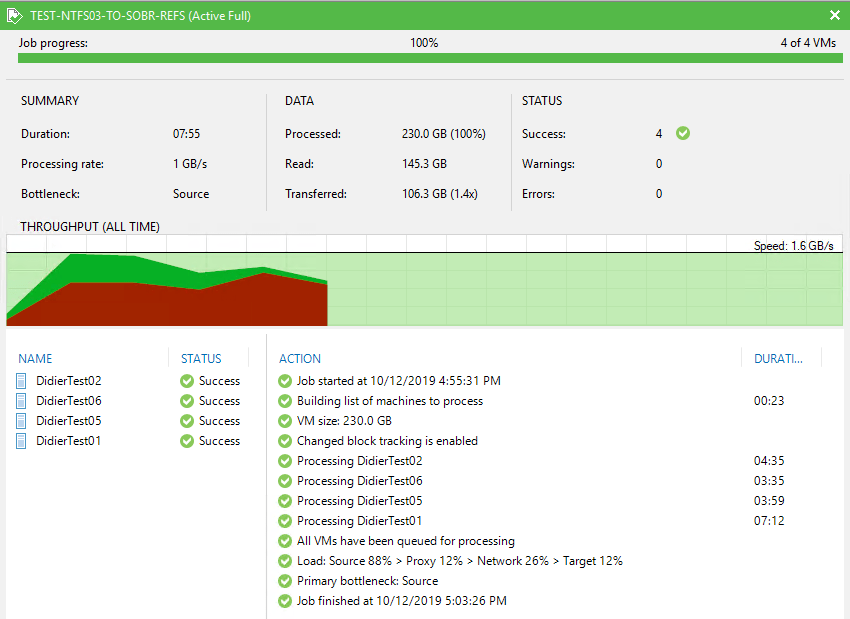
With the VBR server having connectivity to the preferred networks. Notice how smooth and continuous the throughput is.
07:55 to complete the backup job (with connectivity to the preferred network) => 3 times as fast.
When you look into the Veeam backup logs for this job you will find at various stages attempts by the VBR server to connect to the preferred networks. If it can’t it has to wait until it times out. You see entries like:
A connection attempt failed because the connected party did not properly respond after a period of time, or established connection failed because connected host has failed to respond 10.10.110.2:2509 (System.Net.Sockets.SocketException)
Just a small part of all the NetSocket time out you will find for every single VM in the job. Here VBR is trying to connect to one of the extends in the SOBR.
This happens for every file in the backups (config files and disks) for every extend in the Scale-Out Backup Repository (per VM backup chain). This slows down the entire backup job tremendously.
Conclusion
I always make sure that the VBR servers in my environments have preferred network connectivity. Consequently, initialization is faster for both backups and restores. Test it out for yourself! It is the first thing I check when people complain of really slow backup. Do they have preferred networks set up? Check if the VBR server has connectivity to them!
While attending the Microsoft MVP Global Summit 2018 I received notification that I was renewed as a Vanguard in 2018. This is my forth year, as I’m one of the inaugural members in 2015.
The Veeam Vanguard group is a collection of smart, hardworking IT experts that have a healthy interest in data protection and availability. No matter what you build in IT to support your business or customers it requires to be protected against down time. You also need the ability to perform disaster recovery and deliver business continuity for those days things are not going smoothly. Those requirements keeps these technologist busy and honest. They have to deliver on those requirements and they can’t talk their way out of not being able to do that when needed. The result is that this group of experts is very experienced and knowledgeable in both their specialties and in how to protect their workloads. Being part of the Veeam Vanguards means sharing that experience and knowledge and tapping in to their collective brain power. I’m happy and proud the be a Veeam Vanguard as it is a great learning experience and it helps me to deliver even more value to my employers and all Veeam customers. It’s win-win all over. Thank you Veeam for the opportunity and recognition.
Just a quick blog post on the Veeam Vanguard program. The nominations for 2018 are open! That means that if you know people who would make a Veeam Vanguard you can nominate them. You can even nominate yourself, that’s perfectly fine. It’s not frowned upon, but it also doesn’t change anything in terms of evaluation for the program.
Rick blogged on this yesterday on the Veeam blog in “Veeam Vanguard nominations are now open for 2018!” and gave some more insight of what the program is, tries to achieve and does. He also discusses the selection. The key take-away is that you cannot study for this and that it is not some kind of certification or such. Some of the current Vanguards were quoted on how they look at the program and one thing is constant in that. The fact that the people in these programs are contributors to the global tech community and it’s about sharing and helping others getting the best out of their environment and their investment in Veeam. It also helps Veeam as they get a very communicative group of people to give them feedback on their offerings, both products and services. It’s just one more tool that helps them get things right of fix thing when they got it wrong. Likewise understanding Veeam and their products better for us helps us make better decisions on design, implementation and operation of them.
You can have a look at the current lineup of Veeam Vanguards over here.
You’ll find a short video on the program on that page as well. So go meet the Vanguards and find their blog, their communities and follow @VeeamVanguard and the hash tag #VeeamVanguard to see what’s going on.
So, people, this is the moment if you want to nominate someone or yourself to join the Veeam Vanguards in 2018. You have time until December 29th 2017 to do so. I have always felt honored to be selected and have found memories of the events I was able to go to and I to this day I’m happy to be active in the Veeam Vanguard ecosystem. It’s a fine group of professionals in a program of a great company.