
MVP Carsten Rachfahl Visits & Interviews Me On Networking & Storage in Windows Server 2012

Last month Carsten (MVP – Virtual Machine) & Kerstin Rachfahl (MVP – Office 365) visited me in my home town. Apart from a short visit to the historic center & a sushi diner amongst friends we also did an interview where we discussed our ongoing Windows Server 2012 Hyper-V activities. We’re trying to leverage as much of the product we can to get the best TCO & ROI and as early adopters we’ve been reaping the benefits form the day the RTM bits were available to us. So far that has been delivering great results. Funny to hear me mention the Fast Track designs as a week later we saw version 3 of those at MMS2013. The most interesting to me about those was the fact that the small & medium sizes focus on Cluster in a Box and Storage Spaces!

While we were having fun talking about the above we also enjoyed some of the most beautiful landmarks of the City of Ghent as a back drop for the interview. It was filmed in a meeting room at AGIV, to whom I provide Infrastructure services with a great team of colleagues. Just click the picture to view the video.
Videointerview_with_Didier_Van_Hoye_Storage_Networking_and_other_Stuff-Thumb2

You can also enjoy the video on Carsten’s blog http://www.hyper-v-server.de/videos/interview-mit-didier-van-hoye-ber-seinen-storage-netwerk-und-mehr/ All I need to do now is to arrange for Carsten to physically touch the Compellent storage I think.
PowerShell: Monitoring DrainStatus of a Hyper-V Host & The Time Limited Value of Information In Beta & RC Era Blogs

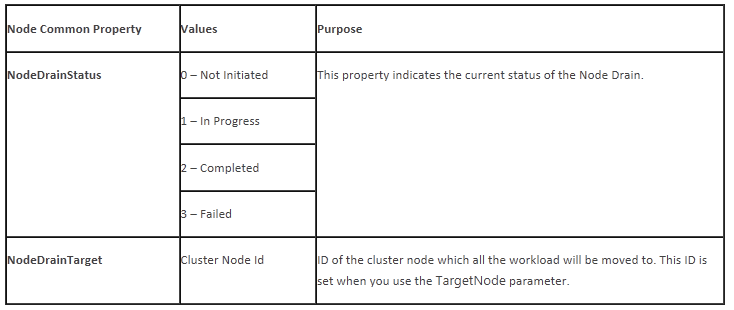
I was writing some small PowerShell scripts to kick pause and resume Hyper-V cluster hosts and I wanted to monitor the progress of draining the virtual machines of the node when pausing it. I found this nice blog about Draining Nodes for Planned Maintenance with Windows Server 2012 discussing this subject and providing us with the properties to do just that.

It seems we have two common properties at our disposal: NodeDrainStatus and NodeDrainTarget.

image

So I set to work but I just didn’t manage to get those properties to be read. It was like they didn’t exist. So I pinged Jeff Wouters who happens to use PowerShell for just about anything and asked him if it was me being stupid and missing the obvious. Well it turned out to be missing the obvious for sure as those properties do no exist. Jeff told me to double check using:

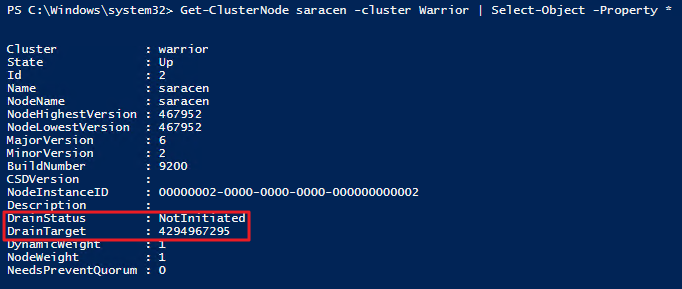
Get-ClusterNode MyNode -cluster MyCluster | Select-Object -Property *

Guess what, it’s not NodeDrainStatus and NodeDrainTarget but DrainStatus and DrainTarget.

image

What put me off here was the following example in the same blog post:

Get-ClusterResourceType "Virtual Machine" | Get-ClusterParameter NodeDrainMoveTypeThreshold

That should have been a dead give away. As we’ve been using MoveTypeTresHold a lot the recent months and there is no NodeDrain in that value either. But it just didn’t register. By the way you don’t need to create the property either is exists. I guess this code was valid with some version (Beta?) but not anymore. You can just get en set the property like this

Get-ClusterResourceType “Virtual Machine” -Cluster MyCluster | Get-ClusterParameter MoveTypeThreshold

Get-ClusterResourceType “Virtual Machine” -Cluster MyCluster | Set-ClusterParameter MoveTypeThreshold 2000

So lessons learned. Trust but verify Smile.  Don’t forget that a lot of things in IT have a time limited value. Make sure that to look at the date of what you’re reading and about what pre RTM version of the product the information is relevant to.
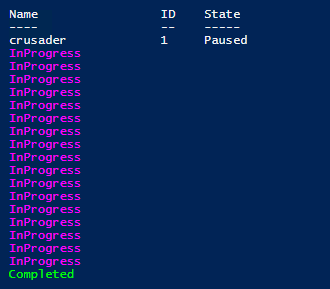
To conclude here’s the PowerShell snippet I used to monitor the draining process.


Suspend-clusternode –Name crusader -Cluster warrior -Drain

Do
{
    Write-Host (get-clusternode –Name “crusader” -Cluster warrior).DrainStatus -ForegroundColor Magenta    
    Sleep 1
}
until ((get-clusternode –Name “crusader” -Cluster warrior).DrainStatus -ne "InProgress")

If ((get-clusternode –Name “crusader” -Cluster warrior).DrainStatus -eq "Completed")
{
    Write-Host (get-clusternode –Name “crusader” -Cluster warrior).DrainStatus -ForegroundColor Green
}

Which outputs

image

Ben Armstrong Interviewed by Carsten Rachfahl on Windows Server 2012 Hyper-V

During the 2013 Global MVP Summit Carsten Rachfahl (@hypervserver) interviewed Ben Armstrong (@VirtualPCGuy.) who is the senior program manager for Hyper-V and as such the guy who has the honorable job of herding us cats Smile during the MVP Summit (he does an excellent job). Click the picture below to view the interview or visit Videointerview mit Ben Armstrong über Hyper-V

image

This interview took place at the CenturyLink Field stadium in Seattle (home of the Seahawks) where we had our little summit party and turned out to be a real gem and we have to thank Carsten for his efforts and Ben for giving the interview. Watch it all to the end to see that we’re all pretty convinced about the qualities of Windows Server 2012 Hyper-V!

My Impressions on Windows Server 2012 Hyper-V Cookbook

Having read Windows Server 2012 Hyper-V Cookbook I can safely say that if you need get up to speed with Hyper-V in Windows Server 2012 this is a great book for this purpose.

Having met Leandro Carvalho that’s not a surprise. What is pretty impressive is how he managed to get all you need to know to get going inside of one book that you can still lift with one hand. Now this is not going to make you a veteran Hyper-V enterprise architect over the weekend but it will help you get a well set up and functional Hyper-V environment running, monitored and protected. If you are already familiar with Hyper-V form previous Windows versions this book will also get you up to speed on a lot of the most important new features and improvements.

Windows Server 2012 Hyper-V Cookbook

Now a mere 305 pages are not enough to go into depth on every subject but this book will make a fine learning tool to set up a lab and take your first Windows Server 2012 Hyper-V servers / clusters into production. It also tackles some of the more intimidating stuff to some people like in place upgrades of Hyper-V clusters and disaster recovery. Details like CSV cache, Port ACL and their significance in the new Hyper-V version are not forgotten. I like that attention to detail. Knowing the vastness of what’s new in Windows Server 2012 Hyper-V I’m impressed at how well organized and effective the information is presented. So if you need to get started with Hyper-V, do it here with this book. It will make for a fine foundation to build on and move on to investigate the numerous network configurations, the VHDX format, SMB 3.0 goodness etc.