What does an MVP do after a day of traveling back home from the MVP Summit 2012 in Redmond? He goes to bed and gets up early next morning to upgrade his Windows 2008 R2 SP1 Hyper-V Cluster to Windows 8. That means when I boot the lab nodes these days I get greeted by the “beta fish” we knew from Windows 2008 R /Windows 7 but it’s “metro-ized”
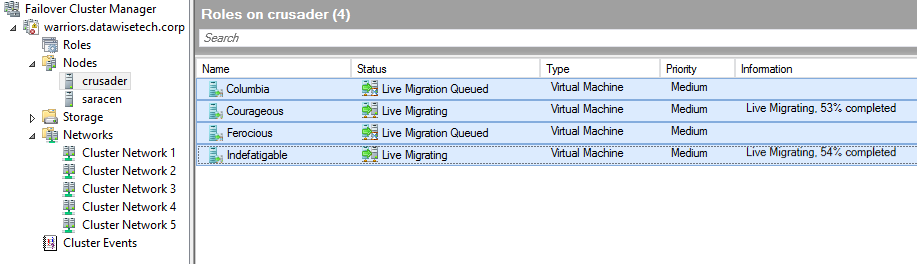
Here is a teaser screenshot from concurrent Live Migrations in action on a new Windows Server 8 Beta Hyper-V cluster in the lab. As you can see this 2 node cluster is handling 2 concurrent Live Migrations at the time. The other guests are queued. The number of Live Migrations you can do concurrently is dictated by how much bandwidth you want to pay for. In the lab that isn’t very much as you can see .
In Hyper-V 3.0 you can choose the networks to use for Live Migrations with a preference order. Just like it was in W2K8R2. So if you want more bandwidth you’ll have to team some NIC ports together or put more NICs in and you should be fine. It does not use multichannel. You have to keep in mind that each live migration only utilizes a single network connection, even if multiple interfaces are provided or network teaming is enabled. If there are multiple simultaneous live migrations, different migrations will be put on different network connections.
If the Live Migration network should become unavailable the CSV network in this example will take over. The CSV & the Live Migration network serve as each others redundant backup network.
There is more to come but I have only 24 hours in a day and they are packed. Catch you later!
I’ve written before (see "Key Value Pair Exchange WMI Component Property GuestIntrinsicExchangeItems & Assumptions") on the need to & ways with PowerShell to determine the version of the integration services or integration components running in your guests. These need to be in sync with the one running on the hosts. Meaning that all the hosts in a cluster should be running the same version as well as the guests.
During an upgrade with a service pack this get the necessary attention and scripts (PowerShell) are written to check versions and create reports and normally you end up with a pretty consistent cluster. Over time virtual machines are imported, inherited from another cluster of created on a test/developer host and shipped to production. I know, I know, this isn’t something that should happen, but I don’t always have the luxury of working in a perfect world.
Enough said. This means you might end up with guests that are not running the most recent version of the integration tools. Apart from checking manually in the guest (which is tedious, see my blog "Upgrading a Hyper-V R2 Cluster to Windows 2008 R2 SP1" on how to do this) or running previously mentioned script you can also check the Hyper-V event log.
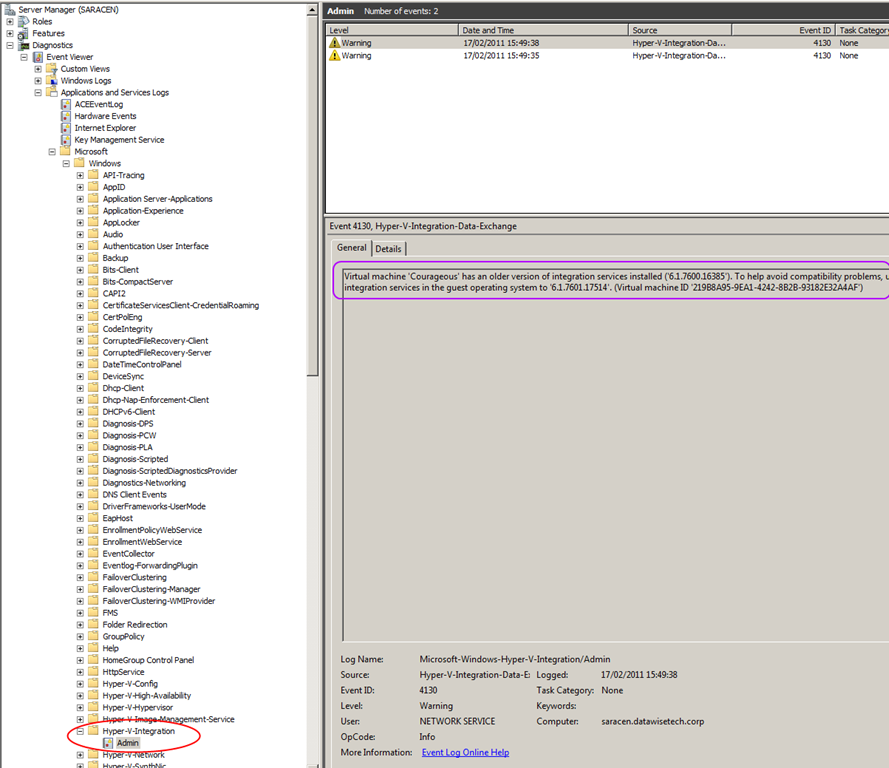
Another way to spot virtual machines that might not have the most recent version of the integration tools is via the Hyper-V logs. In Server Manager you drill down in the “Diagnostics” to, “Event Viewer” and than navigate your way through "Applications and Services Logs", "Microsoft", "Windows" until you hit “Hyper-V-Integration”
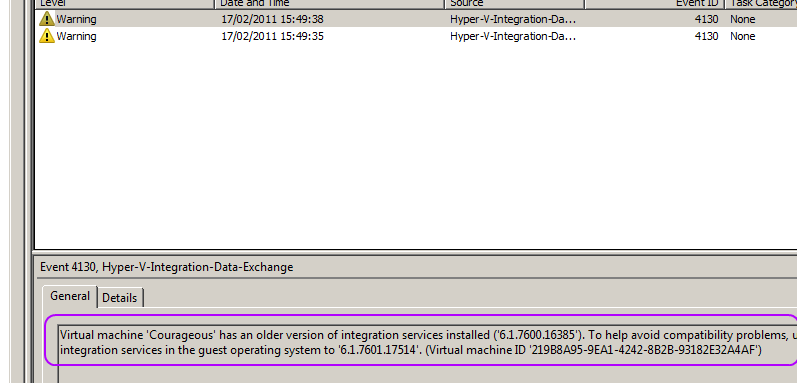
Take a closer look and you’ll see the warning about 2 guests having an older version of the integration tools installed.
As you can see it records a warning for every virtual machine whose integration services are older than the host running Hyper-V. This makes it easy to grab a list of guest needing some attention. The down side is that you need to check all hosts, not to bad for a small cluster but not very efficient on the larger ones.
So just remember this as another way to spot virtual machines that might not have the most recent version of the integration tools. It’s not a replacement for some cool PowerShell scripting or the BPA tools, but it is a handy quick way to check the version for all the guests on a host when you’re in a hurry.
It might be nice if integration services version management becomes easier in the future. Meaning a built-in way to report on the versions in the guests and an easier way to deploy these automatically if there not part of a service pack (this is the case when the guest OS and the host OS differ or when you can’t install the SP in the guest for some application compatibility reason). You can do this in bulk using SCVMM and of cause Scripting this with PowerShell comes to the rescue here again, especially when dealing with hundreds of virtual machines in multiple large clusters. Orchestration via System Center Orchestrator can also be used. Integration with WSUS would be another nice option, for those that don’t have Configuration Manager or Orchestrator but that’s not supported as far as I know for now.
So here I go. I’m off the United States of America, Washington State, Seattle, Bellevue/Redmond. I’m travelling there to attend the MVP Summit 2012. I mentioned this already in a previous post I’m Attending The MVP Summit 2012
That means I’ll be rather quiet the next week. For one I’ll be very busy, both during the day as well as at night with all the meet ups and networking opportunities that are planned. On top of that all of the content & such is subject to a Non Disclosure Agreement (NDA). So no blogs, no tweets, nothing. If I see the Space Needle or visit any other interesting venues I might let you know .
It’s great to see so many friends & colleagues converging to the Summit. I’ll be happy to meet up again and talk shop. A good number of them I have never met in person before and it will be fun to finally do so.
Right now I’ve parked myself in LHR waiting for my connecting flight to SEA. Sunny, day mild weather and I got a very friendly lift to the airport. Thanks! Time to grab a drink and spend some time looking at the airplanes landing & taking off. We’re an industrious little lot us humans, judged by the amount of travelling we do.
I hope I can grab some sleep on the flight over the big pond & I’m not to weary after that long haul. If not I have some books, music & movies to help pass the time. But it’s all good. I’m very fortunate to be able to attend the MVP Summit and I have every intention to make the most of this opportunity.
We dive a bit deeper into SR-IOV today. I’m not a hardware of software network engineer but this is my perspective on what it is and why it’s valuable addition to the toolbox of Hyper-V in Windows 8.
What is SR-IOV?
SR-IOV stands for Single Root I/O Virtualization. The “Single Root” part means that the PCIe device can only be shared with one system. The Multi Root I/O Virtualization (MR-IOV) is a specification where it can be shared by multiple systems. This is beyond the scope of this blog but you can imagine this being used in future high density blade server topologies and such to share connectivity among systems.
What does SR-IOV do?
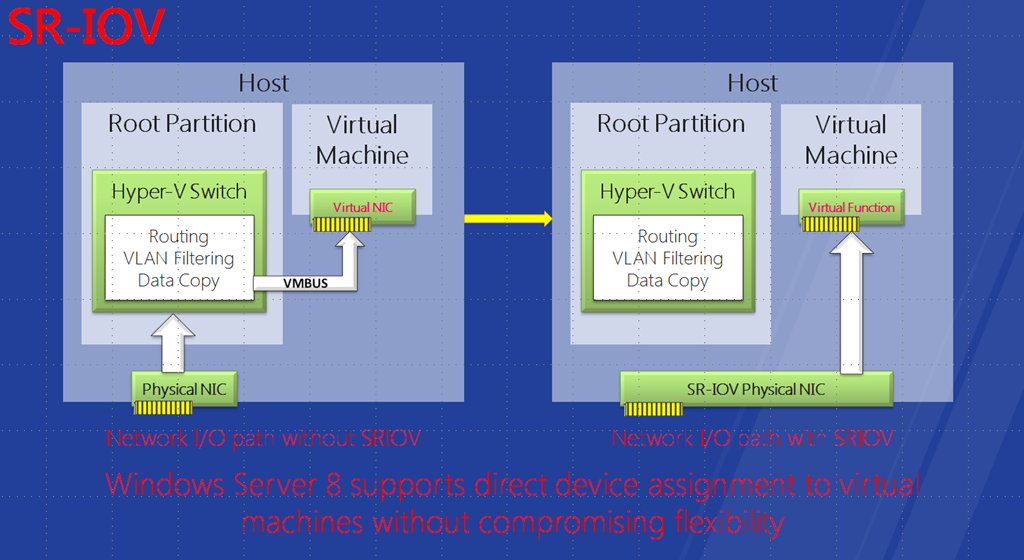
Basically SR-IOV allows a single PCIe device to emulate multiple instances of that physical PCIe device on the PCI bus. So it’s a sort of PCIe virtualization. SR-IOV achieves this by using NICs that support this (hardware dependent) by use physical functions (PFs) and virtual functions (VFs). The physical device (think of this a port on a NIC) is known as a Physical Function (PF) . The virtualized instances of that physical device (that port on our NIC that gets emulated x times) are the Virtual Functions (VF). A PF acts like a full blown PCIe device and is configurable, it acts and functions like a physical device. There is only one PF per port on a physical NIC. VF are only capable of data transfers in and out of devices and can’t be configured or act like real PCIe devices. However you can have many of them tied to one PF but they share the configuration of the PF.
It’s up to the hypervisor (software dependency) to assign one or more of these VFs to a virtual Machine (VM) directly. The guest can then use the VF NIC ports via VF driver (so there need to be VF drivers in the integration components) and traffic is send directly (via DMA) in and out of the guest to the physical NIC bypassing the virtual switch of the hyper visor completely. This reduces overhead on CPU load and increases performance of the host and as such also helps with network I/O to and from the guests, it’s as if the virtual machine uses the physical NIC in the host directly. The hyper visor needs to support SR-IOV because it needs to know what PFs and VFs are en how they work.
So SR-IOV depends on both hardware (NIC) and software (hypervisor) that supports it. It’s not just the NIC by the way, SR-IOV also needs a modern BIOS with virtualization support. Now most decent to high end server CPUs today support it, so that’s not an issue. Likewise for the NIC. A modern quality NIC targeted at the virtualization market supports this. And of cause SR-IOV also needs to be supported by the hypervisor. Until Windows 8, Hyper-V did not support SR-IOV but now it does.
I’ve read in an HP document that you can have 1 to 6 PFs per device (NIC port) and up to 256 “virtual devices” or VF per NIC today. But in reality that might not viable due to the overhead in hardware resources associated with this. So 64 or 32 VFs might be about the maximum but still, 64*2=128 virtual devices from a dual port 10Gbps NIC is already pretty impressive to me. I don’t know what they are for Hyper-V 3.0 but there will be limits to the number of SR-IOV NIC is a server and the number of VFs per core and host but I think they won’t matter to much for most of us in reality. And as technology advances we’ll only see these limits go up as the SR-IOV standard itself allows for more VFs.
So where does SR-IOV fit in when compared to VMQ?
Well it does away with some overhead that still remains with VMQ. VMQ took away the overload of a single core in the host have to be involved in handle all the incoming traffic. But still the hypervisor still has to touch every packet coming in and out. With SR-IOV that issue is addressed as it allows moving data in and out of a virtual machine to the physical NIC via Direct memory Access (DMA). So with this the CPU bottle neck is removed entirely from the process of moving data in and out of virtual machines. The virtual switch never touches it. To see a nice explanation of SR-IOV take a look at the Intel SR-IOV Explanation video on YouTube.
Intel SR-IOV Explanation
VMQ Coalescing tried to address some of the pain of the next bottle neck of using VMQ, which is the large number of interrupts needed to handle traffic if you have a lot of queues. But as we discussed already this functionality is highly under documented and it’s a bit of black art. Especially when NIC teaming and some NIC advanced software issues come in to play. Dynamic VMQ is supposed to take care of that black art and make it more reliable and easier.
Now in contrast to VMQ & RSS that don’t mix together in a Hyper-V environment you can combine SR-IOV with RSS, they work together.
Benefits Versus The Competition
One of the benefits That Hyper-V 3.0 in Windows 8 has over the competition is that you can live migrate to an node that’s not using SR-IOV. That’s quite impressive.
Potential Drawback Of Using SR-IOV
A draw back is that by bypassing the Extensible Virtual Switch you might lose some features and extensions. Whether this is very important to you depends on your environment and needs. It would take me to far for this blog post but CISCO seems to have enough aces up it’s sleeve to have an integrated management & configuration interface to manage both the networking done in the extensible virtual switch as the SR-IOV NICs. You can read more on this over here Cisco Virtual Networking: Extend Advanced Networking for Microsoft Hyper-V Environments. Basically they:
Extend enterprise-class networking functions to the hypervisor layer with Cisco Nexus 1000V Series Switches.
Extend physical network to the virtual machine with Cisco UCS VM-FEX.
Interesting times are indeed ahead. Only time will tell what many vendors have to offer in those areas & for what type customer profiles (needs/budgets).
A Possible Usage Scenario
You can send data traffic over SR-IOV if that suits your needs. But perhaps you’ll want to keep that data traffic flowing over the extensible Hyper-V virtual switch. But if you’re using iSCSI to the guest why not send that over the SR-IOV virtual function to reduce the load to the host? There is still a lot to learn and investigate on this subject As a little side note. How are the HBAs in Hyper-V 3.0 made available to the virtual machines? SR-IOV, but the PCIe device here is a Fibre HBA not a NIC. I don’t know any details but I think it’s similar.


 .
.

 .
.