SFP+ and SFP28 compatibility

Introduction

As 25Gbps (SFP28) is on route to displace 10Gbps (SFP+) from its leading role as the work horse in the datacenter. That means that 10Gbps is slowly but surely becoming “the LOM option”. So it will be passing on to the role and place 1Gbps has held for many years. What extension slots are concerned we see 25Gbps cards rise tremendously in popularity. The same is happening on the switches where 25-100Gbps ports are readily available. As this transition takes place and we start working on acquiring 25Gbps or faster gear the question about SFP+ and SFP28 compatibility arises for anyone who’s involved in planning this.

SPF+ and SFP28 compatibility

Who needs 25Gbps?

When I got really deep into 10Gbps about 7 years ago I was considered a bit crazy and accused of over delivering. That was until they saw the speed of a live migration. From Windows Server 2012 and later versions that was driven home even more with shared nothing and storage live migration and SMB 3 Multichannel SMB Direct.

On top of that storage spaces and SOFS came onto the storage scene in the Microsoft Windows server ecosystem. This lead us to S2D and storage replica in Windows Server 2016 and later. This meant that the need for more bandwidth, higher throughput and low latency was ever more obvious and clear. Microsoft has a rather extensive collection of features & capabilities that leverage SMB 3 and as such can leverage RDMA.

In this time frame we also saw the strong rise of All Flash Array solutions with SSD and NVMe. Today we even see storage class memory come into the picture. All this means even bigger needs for high throughput at low latency, so the trend for ever faster Ethernet is not over yet.

What does this mean?

That means that 10Gbps is slowly but surely becoming the LOM option and is passing on to the role 1Gbps has held for many years. In our extension slots we see 25-100Gbps cards rise in popularity. The same is happening on the switches where we see 25, 50, 100Gbps or even higher. I’m not sure if 50Gbps is ever going to be as popular but 25Gbps is for sure. In any case I am not crazy but I do know how to avoid tech debt and get as much long term use out of hardware as possible.

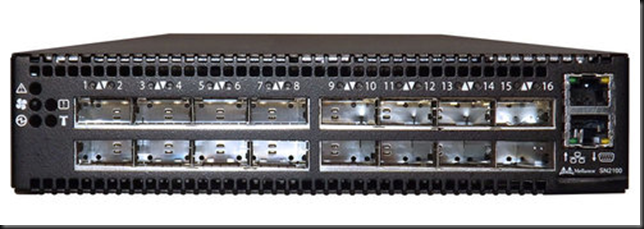
When it comes to the optic components SFP+ is commonly used for 10Gbps. This provides a path to 40Gbps and 100Gbps via QSFP. For 25Gbps we have SFP28 (1 channel or lane for 25Gbps). This give us a path to 50Gbps (2225Gbps – two lanes) and to 100Gbps (4*25Gbps – 4 lanes) via QSFP28. In the end this a lot more economical. But let’s look at SFP+ and SFP28 compatibility now.

SFP+ and SFP28 compatibility

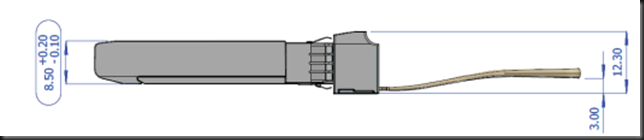
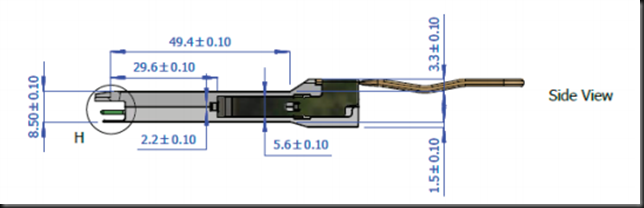
When it comes to SFP+ and SFP28 compatibility we’re golden. SFP+ and SFP28 share the same form factor & are “compatible”. The moment I learned that SFP28 share the same form factor with SFP+ I was hopeful that they would only differ in speed. And indeed, that hope became a sigh of relief when I read and experimentally demonstrated to myself the following things I had read:

  1. I can plug in a SFP28 module into an SFP+ port
  2. I can plug in a SFP+ module into an SFP28 port
  3. Connectivity is established at the lowest common denominator, which is 10Gbps
  4. The connectivity is functional but you don’t gain the benefits SFP28 bring to the table.

Compatibility for migrations & future proofing

For a migration path that is phased over time this is great news as you don’t need to have everything in place right away from day one. I can order 25Gbps NIC in my servers now, knowing that they will work with my existing 10Gbps network. They’ll be ready to roll when I get my switches replaced 6 months or a year later. Older servers with 10Gbps SFP+ that are still in production when the new network gear arrives can keep working on new SFP28 network gear.

  • SFP+: 10Gbps
  • SFP28: 25Gbps but it can go up to 28 so the name is SFP28, not 25. Note that SFP28 can handle 25Gbps, 10Gbps and even 1Gbps.
  • QSFP28: 100Gbps to 4*25Gbps or 2*50Gbps gives you flexibility and port density.
  • 25Gbps / SFP28 is the new workhorse to deliver more bandwidth, better error control, less cross talk and an economical sound upgrade path.

Do note that SFP+ modules will work in SFP28 ports and vice versa but you have to be a bit careful:

  • Fix the ports speed when you’re not running at the default speed
  • On SFP28 modules you might need to disable options such as forward error correction.
  • Make sure a 10Gbps switch is OK with a 25Gbps cables, it might not.

If you have all your gear from a vendor specializing in RDMA technology like Mellanox this detects this all this and takes care of everything for you. Between vendors and 3rd party cables pay extra attention to verifying all will be well.

SFP+ and SFP28 compatibility is also important for future proofing upgrade paths. When you buy and introduce new network gear it is nice to know what will work with what you already have and what will work with what you might or will have in the future. Some people will get all new network switches in at once while others might have to wait for a while before new servers with SFP28 arrive. Older servers might be around and will not force you to keep older switches around just for them.

SFP28 / QSFP28 provides flexibility

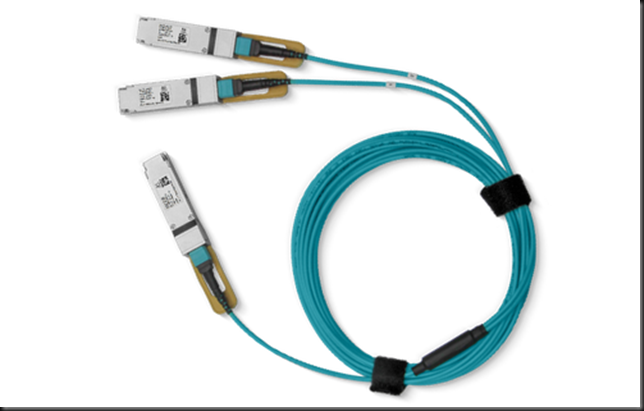
Compatibility is also important for purchase decision as you don’t need to match 25Gbps NIC ports to 25Gbps switch ports. You can use the QSFP28 cables and split them to 4 * 25Gbps SFP28.

SPF+ and SFP28 compatibility

QSFP28

The same goes for 50Gbps, which is 100Gbps QSFP to 2 * 50Gbps QSFP.

SPF+ and SFP28 compatibility

SPF+ and SFP28 compatibility

This means you can have switch port density and future proofing if you so desire. Some vendors offer modular switches where you can mix port types (Dell EMC Networking S6100-ON)

Conclusion

More bandwidth at less cost is a no brainer. It also makes your bean counters happy as this is achieved with less switches and cables. That also translates to less space in a datacenter, less consumption of power and less cooling. And the less material you have the less it cost in operational expenses (management and maintenance). This is only offset partially by our ever-growing need for more bandwidth. As converged networking matures and becomes better that also helps with the cost. Even where economies of scale don’t matter that much. The transition to 25Gbps and higher is facilitated by SFP+ and SFP28 compatibility and that is good news for all involved.

Talking to business & technical audiences

Introduction

In my professional IT life is have been a developer and an IT Pro. I have worked on specific parts of solutions or owned the entire stack, top to bottom. No matter what the environment is like, the one “truth” is that both the business management and technologist need to trust and respect each other. The solution is always a compromise between the needs, budgets, politics within an environment. This is the context I often talk about. Without context you’re blindly doing “stuff” on a playing field you do not see, let alone understand. No matter how much money, resource, cool tech and superb PM’s you have the result will be suboptimal, often mediocre and always to expensive, taking to long to deliver and even longer to fix. Now, talking to business & technical audiences about IT, requires the right content for the public you talk to.

Talking to business & technical audiences about IT

I have nothing but the greatest respect for good managers and good sales people even as a techie. My problem with them is just due to the fact there’s way too few of them around! That’s a pity as we need them to deliver great results and address needs. It also makes things easier. As a technologist I have talked to C level executives and board of directors to get funding for key projects. Even up to that special occasion where I had to go and defend a major project to get the funding after the IT manager had been thrown out by the board during the previous meeting. That was fun! 1 hour long for the board, convincing them of the value. Normally you don’t spend that long in a board to finally succeed and needing to get on a later flight to a conference due to that. They paid for my flight change actually. When I was having a beer with my fellow MVPs in Vienna late that spring evening when I received a couple of messages from some of our C level execs congratulating me. Times when CxO’s and IT are collaborating and on the same page are the best. You can even overcome the odds at that moment.

Talking to business & technical audiencesImage courtesy of @rawpixel at https://unsplash.com/photos/phDXV_uhx_g

Know your audience

But such heroic moments are seldom. It’s all about preparation, a bit of evangelizing and continuing communications about value. The general consensus is that when communicating with diverse audiences on the subject of IT you must recognize the differences and adapt to them. Good sales people know this. Most other struggle with it. But to get things going we need everyone on board. Technical people care about the why, what and how. Managerial types are more focused on the what, the why and the budget. When both have some context and understanding about each other’s needs that helps tremendously in terms of effectiveness. This is because you can the focus on telling each what they need and nothing more.

There are prerequisites

This comes with a warning however. Communication between C levels, middle management, technical architects, analysts and implementing technologist must be functional. They should understand the context and the dependencies and you have to make sure those are dealt with and are OK. If not, giving them only the information they need isn’t going to work. For that to happens the right people at the right place must have the capabilities, budget and mandate to achieve this. Trust is a factor in all this. When that is the case, the real challenge, which is making sure the communication lines are open and are effective and efficient, is normally taken care of. That makes it possible to talk constructively with all parties.

In many cases where organizations struggle with IT this is often a huge challenge. If the quality of the roles isn’t up to the level required talking to business & technical audiences is actually more a key problem.

Microsoft MVP Award 2018-2019

I received the Microsoft MVP Award 2018-2019

While on vacation I received some excellent news. I received the Microsoft MVP Award 2018-2019. I’m an Microsoft Most Valuable Professional in the Cloud & Datacenter expertise for another year!

Dear Didier Van Hoye,
We’re once again pleased to present you with the 2018-2019 Microsoft Most Valuable Professional (MVP) award in recognition of your exceptional technical community leadership. We appreciate your outstanding contributions in the following technical communities during the past year:

  • Cloud and Datacenter Management

Image result for microsoft mvp award

It’s a moment of appreciation of our work in the global community. I feel both proud an humble to be part of this select group of experts chosen to be recognized by Microsoft and be awarded the Microsoft MVP Award 2018-2019. Basically it puts a smile on my face.

What does this mean?

I have another year to look forward to as a Microsoft MVP. I’ll be sharing, teaching, discussing, designing and implementing the best possible solutions. I blog, write articles, engage in webinars and speak at conferences. I also help out fellow IT professionals and MVPs when and where possible. The community exist because we contribute, not just take. But I do know I can ask for help when I need it. A big thank you to all Microsoft employees I engage with. Your patience and willingness to listen to us, even when it might be “constructive feedback” and not always praise, helps us all. I appreciate the opportunity. One very nice success this year of such collaboration was to get ReFS support extended to many more use cases.

Every year I try to make it too some of the best and most interesting conferences to learn, exchange experiences, discuss and share knowledge as both a presenter and attendee. That take a bite out of my personal time budget and sometimes even my financial budget. Both of those have limits. But that is the investment I make in myself and the community. You cannot solely depend on your employer or job for your professional advancement. They have different agendas that don’t always align.  To broaden you horizon, prevent tunnel vision and (deadly) echo chambers you need to step out of your workplace cocoon. Luckily I’m blessed with the opportunity to attend & speak at conferences where travel and expenses get paid by the organizers.  That helps a lot.

Thank you for reading, for attending my sessions, for listening to the webinars I join as a subject matter expert. You help me be a better me. Being an MVP allows me to interact with very smart people around the globe. It lets me contribute to and learn from very interesting challenges and  projects. That exposure helps me grow as I help others. It allows me to provide even more well founded feedback to Microsoft. This mutual beneficial relationship is the core of community and what being a MVP is all about.


Upgrading MySQL 5.7.21 to 8.0.11

Upgrading MySQL 5.7.21 to 8.0.11 for WordPress 4.9.6

The process of Upgrading MySQL 5.7.21 to 8.0.11 for WordPress 4.9.6 is actually quite easy (official MySQL documentation). And as I maintain my WordPress version, plugins regularly that’s not big of a deal for me.

Prepare the upgrade

  1. Backup your VM
  2. Backup your MySQL database
  3. Verify the restores work
  4. I also copy the data folder (in my case C:\MySQLDataFolder\Data) which I keep separate from the MySQL installation files as it helps me with upgrades. The only things that are in the C:\Program Files\MySQL\MySQL Server X.Y folder (I use the x64 bits) are the MySQL application files and the my.ini file.
  5. Create the C:\Program Files\MySQL\MySQL Server 8.0 (x64 bit version of MySQL, otherwise use the C:\Program Files (x86) folder). Copy the content of the  zip file with MySQL files and folders in there.

Upgrading MySQL 5.7.21 to 8.0.11 for WordPress 4.9.5

I then copy the my.ini file form the current installation (C:\Program Files\MySQL\MySQL Server 5.7. into the C:\Program Files\MySQL\MySQL Server 8.0 as well. It might be necessary to edit this file a bit more later but I start out with and exact copy and one change to point to the new basedir:  5.7 becomes 8.0 in this case.

As you notice, I don’t keep the MySQL Data and the ini file in the ProgramData folder on windows. It’s fine to leave it all there, if you prefer that.

# Path to installation directory. All paths are usually resolved relative to this.
basedir=”C:/Program Files/MySQL/MySQL Server 8.0/”

Perform the upgrade

  • Stop the MySQL Service:NET STOP MYSQL
  • I the remove the service form the OS:
    mysqld –remove
  • Install the MySQL service again, now with the new version path. As you see I explicity specify the default name of the service as MySQL and point it to where my ini file lives so I know which ini files this service uses.
    “C:\Program Files\MySQL\MySQL Server 8.0\bin\mysqld.exe” –install MySQL –defaults-file=”C:\Program Files\MySQL\MySQL Server 8.0\my.ini”
  • Start the MySQL Service
    NET START MYSQL

If all goes well that’s it, your new MySQL version is running. If so we, can jump to the part where you run the upgrade command to upgrade the system and user databases.  You can verify all went well in the error log. The name (mine is called WORKINGHARDINIT.err) as defined in the my.ini and is to be found under the data folder. Any problems will be logged there as well. This approach makes it easy to go back if the service won’t start as all files of the previous MySQL install are still there and you just have to install it as a service again.

Most common issues I have seen

My.ini file mistakes

The things that go wrong the most often and cause the MySQL service not to start -based on some of the support I have given to some people (including myself) are the following: certain options in your ini file are not compatible with the MySQL version you just installed.

Specifically for MySQL 8.0 make sure you comment out query_cache_size=0 (put a # in front of it) or remove the entry from the my.ini file.
#query_cache_size=0

If not the MySQL service won’t start. The error logged is:
[ERROR] [MY-011071] [Server] unknown variable ‘query_cache_size=0’

Next to that if you have the sql-mode entry in there this some times causes issues, so comment out that line as well. at least remove the offending entry, which might take some trial and error.
# sql-mode=”STRICT_TRANS_TABLES,NO_AUTO_CREATE_USER,NO_ENGINE_SUBSTITUTION”

As you can see the error log is the pointer to many issues with the MySQL service failing to start so do look there, that’s how you find what to do.

Data file ibdata1 is not writable

Sometimes you can see an error like this:
ERROR] [MY-012271] [InnoDB, InnoDB: The innodb_system data file ‘ibdata1’ must be writable

The 2 most common reasons are that the file is locked because you started mysqld.exe manually as you didn’t close a process you don’t know about/ cannot find that accesses it will also cause this error. A restart is then normally the easiest solution.

Sometimes people run into this due to permission problems (but with an upgrade this should not really happen). The MySQL service account (the default or the one you created and assigned) the need full control over the data folder. Check that.

Thinking you lost your blog

Another issue might be that MySQL is running but WordPress can’t find your blog. This might be 1 or more missing files such as ibdata1in the data folder root (hence I always make a copy of the entire data folder before I start an upgrade for safe keeping). The service might start but WordPress might not find your blog. In that case you’ll see a lot o warning similar to this in the error log:

Warning] InnoDB: Cannot open table wordpress592/wp_options from the internal data dictionary of InnoDB though the .frm file for the table exists.

So if these files are gone or corrupted, place them back from your spare copy or grab them from a backup. Most often these files are gone because some bad advise to delete these to fix a permission issue or a mistake. If they are not there they are recreated with the correct permissions but that causes the above issue.

Once you know the basics and you are careful, an upgrade process is mostly straightforward for most IT enthusiasts. Once MySQL is up and running and you can access your wordpress database again it’s time for the last step. Upgrade the databases.

Perform the MySQL upgrade run

Finally whenever you have done an upgrade don’t forget to run the mysql_upgrade.exe. This will take care of any upgrades needed to you system and user databases. Until you do you’ll see in the error log. If you don’t look there you might not even notice much but it pays to complete the complete upgrade process.

To do so, from an elevated command prompt navigate to C:\Program Files\MySQL\MySQL Server 8.0\Bin and run mysql_upgrade.exe-u root –p
Then enter the password and the upgrade process will kick off. This takes a while and it also depends on the amount of work the script has to do.

It 1st deals with the system database, when it finds out of date issues it will take care of those like in this case the sys schema.

Upgrading MySQL 5.7.21 to 8.0.11 for WordPress 4.9.5

Next it checks the user databases (in my case the word press database),

Upgrading MySQL 5.7.21 to 8.0.11 for WordPress 4.9.5

…  not much work to do here clearly.

Upgrading MySQL 5.7.21 to 8.0.11 for WordPress 4.9.5

That’s it. You’re all up to date. I normally do this about once or twice per year to make sure the blog server is up to date (performance, security, capabilities) & I don’t introduce tech debt and potentially more involved and risky upgrade scenarios. With a free community edition, that’s a zero cost game,bar a little effort on your part.

As a final note, when everything has proven to be up and running as it should do some housekeeping and clean up the old files / folders you no longer need of previous MySQL version installs.