Presenting at Experts Live 2015 On SMB Direct

I’m happy and proud to present that I’m presenting at Experts Live 2015 On SMB Direct on November 19th. I enjoyed this community driven very much last year. The speaker line up is awesome, the organization flawless and the attendees numerous and motivated. This make for a great one day conference where people come to learn, share experiences and network.

cinemec-voorkant

I’ll be doing a session called “SMB Direct, The Secret Decoder Ring” that has been updated with some tips and experiences learned for recent engagements. You can not afford to ignore SMB Direct, RDMA, Data Center Bridging as it is being leveraged for ever more workloads in ever more scenarios. The need for high performance combined with the steady progress of converged architectures makes it an essential part of your solutions.

There are many well respect speakers also presenting, people I learn a lot from and enjoy talking shop with. You can take a look at the line up of speakers here. It reads as a “who’s who” in modern Microsoft technologies. These are all people working in the field, who are active in the community and love to share. This means a wealth of knowledge is available to any one who attends to leverage it their own day jobs and companies.

You can follow a preferred track all day long or mix and match sessions between tracks. It’s your day, so you decide how to make the most out of it. Don’t forget to talk and network with your peers as this is an essential part of any conference.

I hope to see you there!
The Mysterious Case of Infrequent Network Connectivity Issues on 2 Hyper-V VMs Out of 40 Guests

In The Mysterious Case of Infrequent Network Connectivity Issues on 2 Hyper-V VMs Out of 40 Guests I share a trouble shooting experience with you. I was asked if I could possibly take a look at a weird, but very infrequent network issue with 2 VMs (W2K12R2) on a cluster (W2K12R2) running over 40 guests? Sure! These 2 virtual machines worked well 98% of the time. About 2% of the time they just fell of the network, sometimes both vNICs, sometimes both VMs. Asking what they meant, they said unreachable. But we can’t find anything wrong as all other VMs run fine with the same configuration on the same hosts. They told me there was nothing in the event logs of either the host or the guests to explain any of this. A reboot or 2 or even a live migration sometimes fix the issue. Normally the monthly patch cycle prevent to many problems with connectivity. Pretty weird! Usually bad firmware, drivers or bad offload feature support can cause issues, but that would not target just 2 out of 40 VMs that have the same settings.

It was only these 2 VMs, not matter what host the were running on in the cluster. As the the vNICs shared the same 2 vSwitches (teamed) with all other VMS that never had issues I was pretty sure the configuration of the switches, NIC, teams and vSwitch were OK. This was verified for due diligence and it  checked out on all hosts as expected. All firmware, drivers and offloads were done correctly.

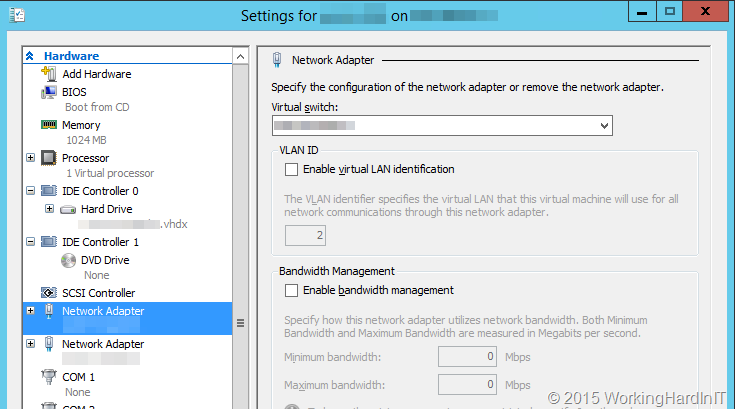
I also checking the VLANs settings of the vNIC themselves for those two VMs and compared them a couple of VMs that had no issues what so ever and found them to be identical.

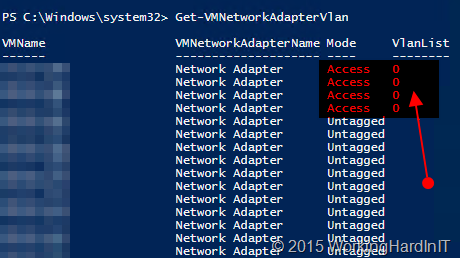
At first everything seemed fine and I was stumped. The event logs both in the VMs as on the hosts were squeaky clean. After that exercise I started running some PowerShell command lets to take a look at the configuration of the VMs on the hosts. You see the GUI does not expose all possible configurations and I wanted to look every configuration option. That’s when I found the following

image

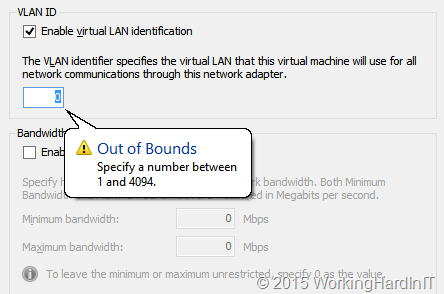
The vNIC for the 2 offending VMs were in Access mode while the VlanList had a single value 0 (basically meaning untagged, it’s a reserved VLAN for priority tagging and the use is not 100% standard across switch vendors). This just didn’t compute. In the GUI we did not see this, there things looked normal.

image

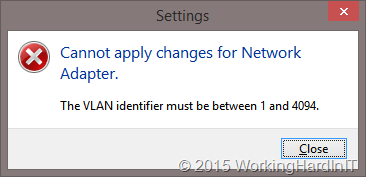
You cannot even set this in the GUI, it won’t allow you.

image

image

But when run in a PowerShell command it allows you to make this configuration. So maybe that’s what’s happened.

Set-VMNetworkAdaptervlan -VMName DNS01 -Access -VlanId 0

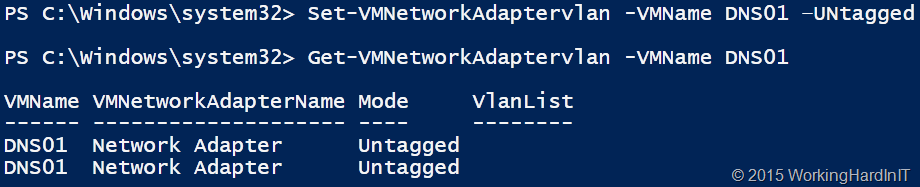
No one knew, nor can I tell you. But I tested to verify this does run and makes that configuration without any issue, weird. Anyway, I resolved the issue by running the following command.

Set-VMNetworkAdaptervlan -VMName DNS01 –Untagged

image

The rare connectivity issue disappeared and all was well in 100% of the cases. That how The Mysterious Case of Infrequent Network Connectivity Issues on 2 Hyper-V VMs Out of 40 Guests came to a happy end.

Update that enables Windows 7 and Windows Server 2008 R2 KMS hosts to activate Windows 10

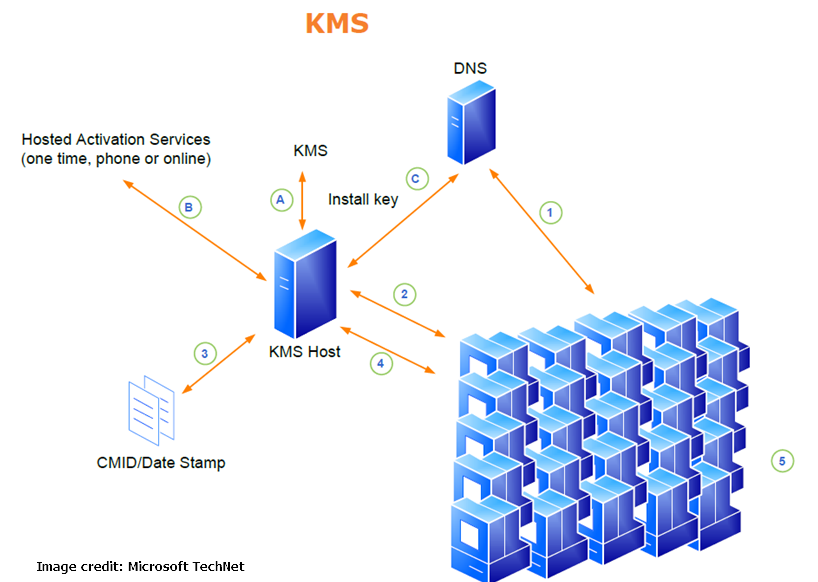
Today, a blog reader notified me that Microsoft released an update that extends KMS for Windows 7 Service Pack 1 (SP1) and Windows Server 2008 R2 SP1 to enable the activation of Windows 10-based clients. Find it here.

image

I blogged about the update for Windows Server 2012 (R2) and Windows 8/8.1 before but now these older operating systems can also serve as KMS servers for Windows 10. All you need is the update that enables Windows 7 and Windows Server 2008 R2 KMS hosts to activate Windows 10 as discussed in KB3079821

Until now the workaround was to leverage Active Directory based activation for Windows 10 whilst you left your KMS server in place for the older clients. That works well and I have used it before. But with this update you can use your older KMS servers for all activations of windows clients.

Windows Server 2016 Data Deduplication Scales and Performs Better

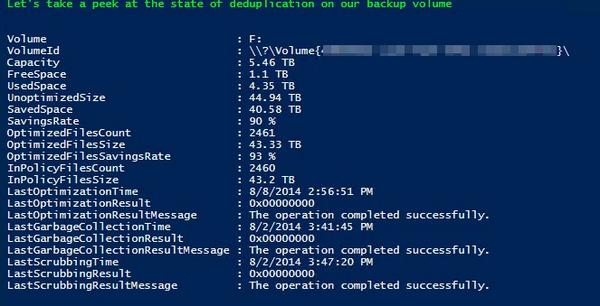
I’ve been leveraging Windows Server Data Deduplication since it became available with great results.

Embedded image permalink

One of the enhanced features in Windows Server 2016 is Data Deduplication and it’s one I welcome very much. The improvements we’re getting mostly have to do with scale and performance. I’m quite pleased that Microsoft listened to our previous feedback on this.

image

You cannot imagine how much money on backup target storage we have saved by using this. So we’re very happy that Windows Server 2016 Data Deduplication scales and performs better. The fact that we can no get even better scale and performance is music to our ears. The Backup target servers are the first in line for an upgrade, that’s for sure! That’s the reason I mentioned it as a subject to look into in the Hyper-V amigos interview at Ignite!

Scale Improvement of the supported LUN sizes, up to 64TB

Actually I was already pushing this to 50TB Embarrassed smile in some cases for testing but over all I used 6 to 10 TB volumes. But the support for bigger volumes is very welcome. Now, please not that you should NOT go any higher than 64TB (I actually stay below that) otherwise deduplication doesn’t work due to it’s dependency on VSS. Please read my blog
Windows 2012 R2 Data Deduplication Leverages Shadow Copies: “LastOptimizationResultMessage : A volume shadow copy could not be created or was unexpectedly deleted” on this subject.

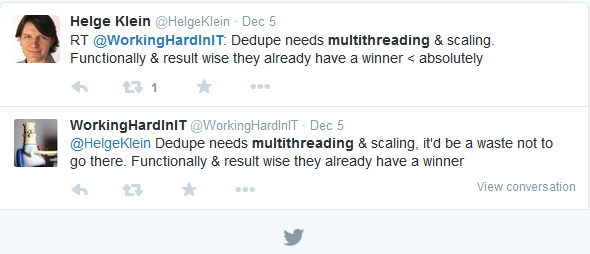
In Windows 2012 R2 we were limited because data deduplication used a single-threaded job and I/O queue for each volume. That makes it wiser to have 10 target LUNS of 6TB than one huge 60TB LUN. The big issue otherwise is that large volumes could lead to the dedup processing keeping up with the rate of data changes (“churn”).  Now your milage would very depending on the type of data and the delta. More info on this in the blog post:Sizing Volumes for Data Deduplication in Windows Server. It will help you size the volumes but note that in Windows Server 2016 the rules have changed Smile

The dedup optimization processing now runs multiple threads in parallel using multiple I/O queues on a single volume which gives you better performance and doesn’t incur the overhead of having to use more smaller LUNs.

File sizes up to 1TB are good for dedup

Windows Server 2012 R2 Data Deduplication supports the use of file sizes up to 1TB, but they are considered as “not good candidates” for dedup.  So that DPM workaround of backing up to a truckload of virtual machines with 1TB virtual disks that are deduplicated is borderline. You can see one improvement in CPS v2 coming already (also see the next header). 1TB is now fully supported and a good candidate. I’ll be pushing it higher … in my opinion this is were the most work will need to be done for future improvements. It would allow for more scenarios (I have VMs that hold VHDX virtual disks of  2TB or more). Scale it something that helps keep things simple. Simple avoid costs & issue with complexity. That’s always a good thing if possible.

In Windows Server 2012 the algorithms can’t scale as well and performance suffers due to things like scanning for and inserting changes can slow down as the total data set increases. These processes have been redesigned in Windows Server 2016. It now uses new stream map structures and improved partial file optimization. As a result 1TB file sizes have become good candidates.

Virtualized backup is a new usage type

DPM is already leveraging deduplication of virtual machines (CPS drove that I think, see Deduplicating DPM Storage).

image

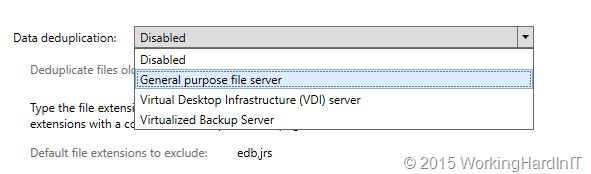
In Windows Server 2016 all the dedup configuration settings needed for the DPM backup scenario have been combined into a new usage type called “Backup”. This simplifies the deployment and helps “future proof” your setup as future changes can automatically be applied true this usage type.

Nano Server support

Data deduplication is (or will be) fully supported in Nano Server (new in TPv3). It’s not completely done yet so deduplication support in Nano Server still has a few restrictions:

  • Support has only been validated in non-clustered configurations
  • Deduplication job cancellation must be done manually (using the Stop-DedupJob PowerShell command)

Microsoft welcomes any feedback on the deduplication feature via an email sent to [email protected]. For me the standing order is to break through that 1TB barrier!

My take & Magic Ball

In combination with the right backup product it saves a ton of money. I have leveraged VEEAM and in the past Windows Backup (inbox) with great results. The benefit of these two is that you can backup to physical storage and leverage deduplication. Virtualized backup as a new usage type and makes live easier for the supported “workaround” around the limitations of DPM where normally they only support VDI for  with deduplication.  What I’m really curious about is another possible future usage type: “Virtual Servers” … I guess for that one deduplication support for the OS disk would be very beneficial for “cloud” providers. We’ll see