Storage-level corruption guard

One of the many gems in Veeam Backup & Replication v9 is the introduction of storage-level corruption guard for primary backup jobs. This was already a feature for backup copy jobs. But now we have the option of periodically scanning or backup files for storage issues.It works like this: if any corrupt data blocks are found the correct ones are retrieved from the primary storage and auto healed. Ever bigger disks, vast amounts of storage and huge amounts of data mean more chances of bit rot. It’s an industry wide issue. Microsoft tries to address this with ReFS and storage space for example where you also see an auto healing mechanism based on retrieving the needed data from the redundant copies.

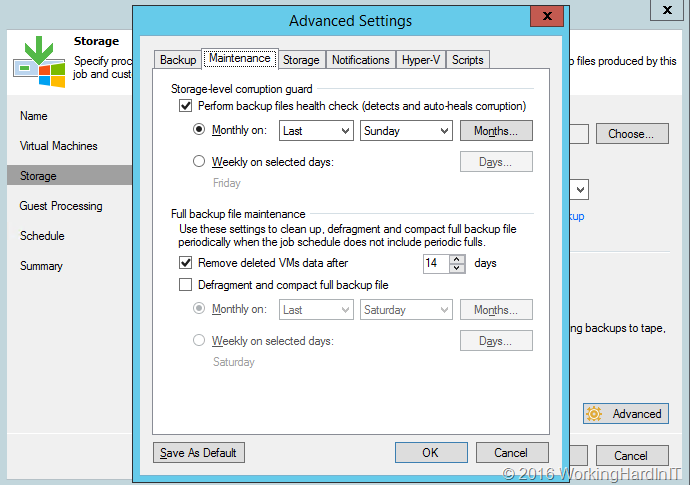
We find this option on the maintenance tab of the advanced setting for the storage settings of a backup job, where you can enable it and set a schedule.
image

The idea behind this is that this is more efficient than doing periodical active full backups to protect against data corruption. You can reduce them in frequency or, perhaps better, get rid of those altogether.

Veeam describes Storage-level corruption guard as follows:

image

Can it replace any form of full backup completely? I don’t think so. The optimal use case seems to lie in the combination of storage-level corruption guard with periodic synthetic backups. Here’s why. When the bit rot is in older data that can no longer be found in the production storage, it could fail at doing something about it, as the correct data is no longer to be found there. So we’ll have to weigh the frequency of these corruption guard scans to determine what reduction if making full backups is wise for our environment and needs. The most interesting scenario to deal with this seems to be the one where we indeed can eliminate periodic full backups all together. To mitigate the potential issue of not being able to recover, which we described above, we’d still create synthetic full backups periodically in combination with the Storage-level corruption guard option enabled. Doing this gives us the following benefits:

  • We protect our backup against corruption, bit rot etc.
  • We avoid making periodic full backups which are the most expensive in storage space, I/O and time.
  • We avoid having no useful backup let in the scenario where Storage-level corruption guard needs to retrieve data from the primary storage that is no longer there.

To me this seems to be a very interesting scenario. To optimize backup times and economies. In the end it’s all about weighing risks versus cost and effort. Storage-level corruption guard gives us yet another tool to strike a better balance between those two. I have enabled it on a number of the jobs to see how it does in real life. So far things have been working out well.
Cloud & Datacenter Conference Germany

It’s with great joy that I can share that the Cloud & Datacenter Conference Germany website is live and you can now register to attend. My fellow MVP and friend Carsten Rachfahl has realized one of his ambitions to organize a large community driven conference by and for the IT community in the DACH region. But please free to attend if you’re from outside that region, it is open to all and welcomes anyone who wishes to attend. Just note not all sessions will be in English, but in German.

Organizing such an event is not an easy undertaking and I want to applaud Carsten for making this happen. He’s one of Germany’s for most experts and via his company, Rachfahl IT-Solutions, he’s always contributed heavily into the community. Thank you Carsten, you contribute a lot and we appreciate those efforts.

image

I invite you all to attend and join us on May 12 for the first edition of the Cloud & Datacenter Conference Germany in Dusseldorf. It offers more than 25 presentations by top community speakers in five parallel tracks. These tracks cover the entire spectrum of Microsoft technologies available to help you design, build and maintain a state of the art modern IT infrastructure. The conference covers Windows Server 2016, Hyper-V, Microsoft software defined storage, networking, azure stack, System Center, OMS, failover cluster, IaaS, azure, Nano server, PowerShell, containers, and much more.

I’m happy and honored to speak at this conference with so many true real life experts that are part the global community around Microsoft technologies. My presentation will aim to get you briefed on the new and improved functionality in Windows Server 2016 Failover Clustering. In that respect it’s a nice addition to my session What’s new in Failover Clustering in Windows Server 2012 R2. I can only suggest to get up to speed on those as these are still very much valid and I’’ be focusing on the delta between Windows Server 212 R2 and 2016.

The breadth and depth of the technologies available to us cannot be overstated and is still growing. It takes a team effort with both complementary and overlapping expertise to stay on top of things. Education is a huge and important part of daily life for anyone working in IT.

Nowadays when any meeting can be held on-line an in person a conference is still very valuable. It enables you to focus on absorbing the content without being distracted by the realities and interrupts of daily work life. That’s why I still invest in attending conference and I hope you do so as well. When you attend one, be there! That might sound silly but it’s painful to see attendees working remotely and being on the phone all the time. Bart true emergencies that’s a waste of money and effort. Allow yourself or your employees to optimize the ROI of that conference by having them do why they came. Learn, get inspired and network with peers.

Register soon to secure your spot. The price is set a level to make sure it will not be an issue. Sponsoring by companies who have real investment in cloud and datacenter management and benefit from a flourishing well informed ecosystem make this possible.

Azure AD Connect 1.1.105.0 is GA

On February 18th  2016 Microsoft released a significant update to Azure AD Connect, version 1.1.105.0. It adds some capabilities and improves on others. For me this is a core piece of the puzzle today and in the future for many of my plans to optimize the future IT Infrastructure & DevOps. Even when politics seem hell bound on slowing you down and cause a serious delay and missed opportunities this piece of technology is key in breaking through those barriers and keep moving ahead.

So what’s in the box with version  1.1.105.0

  • Automatic upgrade feature for Express settings customers.
    Support for the global admin using MFA and PIM in the installation wizard.
  • We can change the user’s sign-in method after initial install.
  • We can now set Domain and OU filtering in the installation wizard. As a secondary benefit this means we can now connect to forests where not all domains are available.
  • We get a Scheduler is built-in to the sync engine.

Some preview features are now GA:

We get one new preview features which is going to be a hit in world where patience disappeared from the equation:

  • The default sync interval is now 30 minutes instead of 3 hours before. this is configurable now in the scheduler.

It also fixes the following issues:

  • The verify DNS domains page didn’t always recognize the domains.
  • Prompts for domain admin credentials when configuring ADFS.
  • On-premises AD accounts are not recognized by the installation wizard when they are in a domain with a different DNS tree than the root domain.

Grab the latest version of Azure AD Connect here.