
Today we’ll have some fun with an Azure storage account and file services. We’ll show that you can actually get on premises access to Azure files services. You might not have tried this yet but you can expose this file share to your on premises physical or virtual machine as long as it’s an operating system supporting SMB 3.X. That means, Windows 8/8.1/10 and Windows 2012/2012R2 and 2016.
Realize that this is just a demo. Exposing an Azure File Services share to “and users” is not the primary use case for an Azure file service. It meant for applications in both public and hybrid cloud scenarios.
You set up an Azure file service (a file share) in a storage account. just like you do blobs, tables or queues.
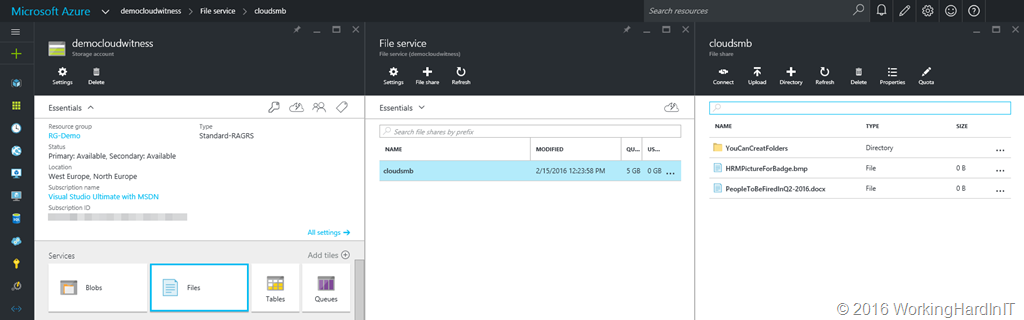
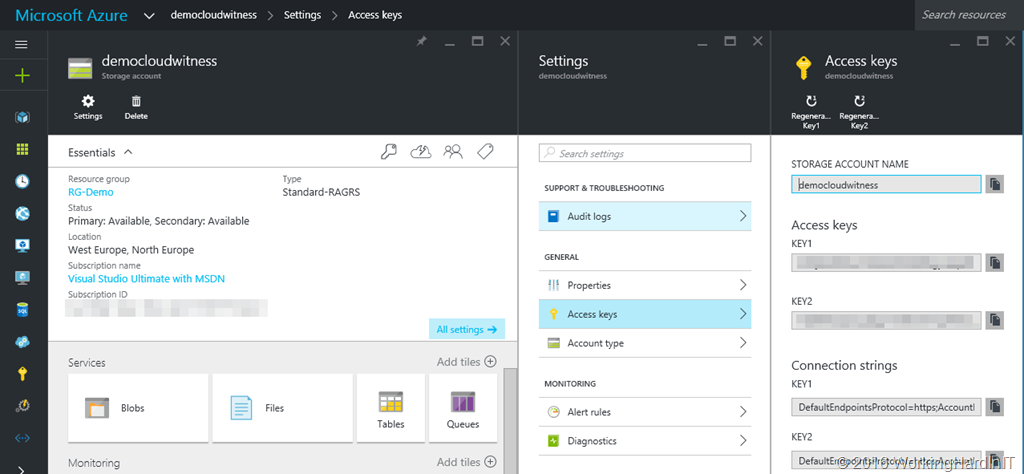
What you need to access such a file share is the path to the share on your storage account on Azure and an access key
All you need to do is open up a command prompt and type
net use T: \\democloudwitness.file.core.windows.net\cloudsmb /u:democloudwitness Qzd4/fhHrt!45f*5652ddehse4qfjfqsfpKDMP45Hdg8etDlg2fyr8dtR^_pmL9QzedtrMhLcxo7Rsdew4U4E7A==
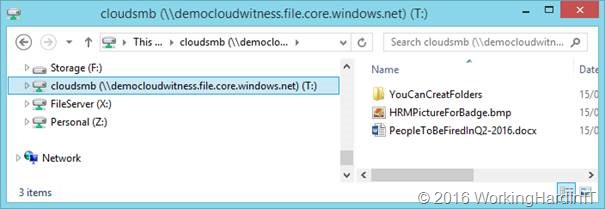
It’s a FAKE access key people, don’t bother. If you did not make a mistake it will report success and you have access to the Azure file share via letter T: from any interface that supports them.
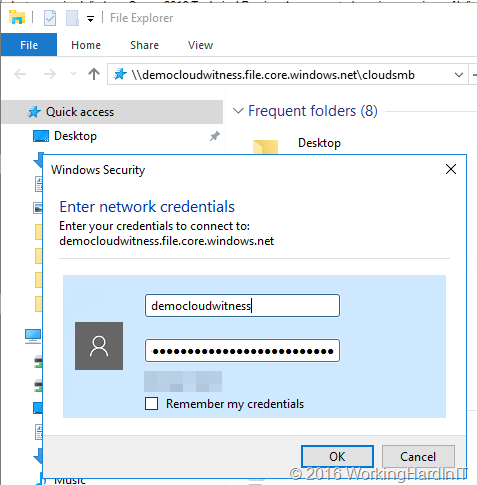
But even if you did not, you can just enter the storage account and the access key to get access just like any other file share.
Voila, you have mapped that cloud share to your on premises machine. There’s no local users or AD based security settings so you can do whatever you want in regards to adding or deleting data. The storage account access key are literally the keys to the kingdom.
That’s right. It’s not limited to virtual machines or services in Azure nowadays. No need for a VPN or Express Route to Azure any more. Just an internet connection that allows you to connect remotely to port 445.

Pretty cool. Sure, end users are not the primary use case for this feature but it’s certainly nice to see what the capabilities are.
Security wise you might have some objections. In reality it’s just another way people don’t realize yet that data might be leaving the organization. No need to panic or to create a fuzz. Chances are most people have a dozen more popular and better known ways of getting data in and out in many environments. But if you have a dreamy eyed security officer whose mainly in place because they’re convenient, you can scare him/her a little with this. Let’s imagine you’re working at one of those <sarcasm> rare </sarcasm> companies where the firewall only seems to works in one way, for the ingress traffic. Egress is free fire zone as it avoids many support tickets and issues. That it opens the gates to others is another issue, but hey, the firewall is dead in the brave new world of BYOD and IoT anyway. What if you need some extra storage, temporarily, but you can’t get it on the file servers? Nor do they want to give you an external disk, a large thumb drive, or let you bring one in yourself. Maybe they’ve even spent money on disabling some of the USB ports or glued them up. Well get a trial account for Azure, set up the above. You’ll have a temp data dump that you can access from another location just as easily. I actually had more issues at home with my UTM firewall than in the few business settings where I tested this. Some ISPs do block this port outbound. So be ware when testing at home
Now forget about the security officer bashing and FUD. The real take away here is that you can expose a file share for an application easily both inside of Azure and on premises. That’s a powerful thing to do and it’s actually documented. It helps in new cloud service development, hybrid scenarios, migration or transition scenarios etc. All this highly available with the benefits SMB 3.x offers or over REST API. Now, imagine the possibilities! As said, for now there is no Active Directory authentication support, but who knows what the future brings? You can read more about getting started with Azure file services here.