
Introduction
Whether you realize this or not but our trusted old VHD format is getting a bit old in the tooth. As a matter of fact it has been around since the last century. It has served us well but now it needs a major overhaul to better serve us at present and to prepare us for the decades to come. We (at least in the environments I support) see a continuing demand for bigger virtual disks & ever better performance. This should be no surprise. Not only does the amount of data produced keep going up year after year but we’re virtualizing more very resource intensive workloads than ever. Think image intensive data that has to be processed by number crunching virtual machines or large databases like SQL Servers. Sure 64 vCPUs and 1TB of memory are great and impressive but we also need loads of fast and ever more reliable storage. Trying to serve and support these needs with combined 2TB disks is very cumbersome (to be polite) and pass trough disks take a way a lot of the flexibility & options the VHD format gives us. So here comes the new VHDX format. There is no back porting here, the only OS at the moment that supports VHDX is Windows Server 2012. The good news here is that we have in box tools to convert between VHD & VHDX.
Bigger, Better & Faster
Size
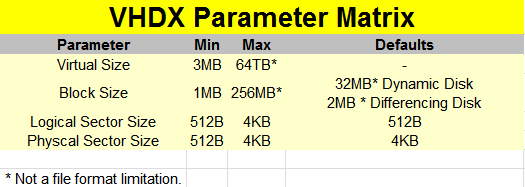
The VHDX format supports up to 64TB now. Yes that is 32 times more than the current VHD. As a matter of fact al lot of SANs still in use today won’t give you that size of LUN. Is there a need for this? Well, I circle in some places with huge files in massive amounts so I can use big LUNs and large data VHDX files. Concatenating disks is something I do no like to do. Come upgrade/maintenance/renewal time that one bites too much for comfort.
There are also some other virtual disk formats that need to wake up and break that 2TB size boundary . Especially when Microsoft states that this is not a File format hard limitation. By that they mean they have room to increase it. Wow!
Protection Against Disk Corruption
The VHDX format also provides corruption protection during power failures for the VHDX files. This is done by a logging mechanism for the updates of the VHDX metadata structures. The logging mechanism is contained within the VHDX file so no worries, you won’t have to worry about managing log files. The overhead is minimal, as they only log metadata such as block allocations, block state updates and NOT the actual data stored. So no, it has not become a database  you need to manage, don’t worry. The protection works only for the VHDX file and not the data that is written to it. That job falls to NTFS or ReFS. What we discussed here was protection against VHDX file corruption.
The Need For Speed
With VHDX we also get larger block sizes up to 256MB for dynamic & differencing disks, meaning they perform better with workloads that allocate in larger chunks.
Modern Large Sector Disks
We get support to run VHDX on large sector disks without loosing performance.
I refer you to KB articles Using Hyper-V with large sector drives on Windows Server 2008 and Windows Server 2008 R2 and Information about Microsoft support policy for large-sector drives in Windows.
As you can read there the performance hit for both non fixed VHDs and applications is pretty bad. The 512e (4K physical and 512-byte logical sector size) approach is bad due to the Read-Modify-Write (RMW) process overhead in dynamic & differencing disks. 4K native (4K logical sector size) just isn’t supported by Hyper-V before Windows Server 2012. The maximum logical & physical sector size is now 4KB and that means that we get a lot better performance when running applications that are designed to use 4KB workloads in Hyper-V 3.0. VHDX structures are aligned on MB boundaries, so the need for the RMW from the disk is eliminated if the physical sector size of the virtual disk is set to 4K.
Storing Custom Metadata
We also get the ability to store custom metadata in the VHDX file for information we find relevant. This could be about what’s on there, OS version or patches applied.
ODX Support. This custom data is stored using key/value pairs that support up to 1024 entries of 1MB. That should be adequate for a while  .
.
VHDX Leverages Offline Data Transfer (ODX)
The virtual stack allows ODX requests from the guest to flow down all the way to the hardware and as such VHDX operations benefit from this as well. Examples of this are:
- Creating VHDX files, even such large ones has gotten an whole lot faster. Especially if you can offload this to the SAN. If your storage vendor supports ODX then you’re in VHDX creation speed heaven! As a bonus even VHD files created in Windows Server 2012 benefit from this technology.
- On top of that Merge & Mirror operation are also offloaded to the hardware which is great for merging snapshots or live storage migration.
- In the future the virtual machines themselves might/will be able to pass through offload operations. This is hard core stuff and due to the file layout far from trivial.
Please note that this only works with SCSI attached VHDX files. IDE devices have no ODX support capabilities.
TRIM/UNMAP Support
With Windows Server 2012 / VHDX we get what is described in the documentation “’Efficiency in representing data (also known as “trim”), which results in smaller file size and allows the underlying physical storage device to reclaim unused space. (Trim requires physical disks directly attached to a virtual machine or SCSI disks in the VM, and trim-compatible hardware.) It also requires Windows Server 2012 on hosts & guests.
It’s a major benefit in the “Stay Thin” philosophy associated with thin provisioning. No more running “sdelete” in your windows VMs (tedious, slow, resource intensive) or installing an agent (less tedious) to support reclaiming space. This is important to many of us and this level of support and integration makes our lives a lot easier & speeds things up. So choose you storage wisely.
TRIM is the specification for this functionality by Technical Committee T13, that handles all standards for ATA interfaces. UNMAP is the Technical Committee T10 specification for this and is the full equivalent of TRIM but for SCSI disks. UNMAP is used to remove physical blocks from the storage allocation in thinly provisioned Storage Area Networks. My understanding is that is what is used on the physical storage depends on what storage it is (SSD/SAS/SATA/NL-SAS or SAN with one or all or the above).
Basically VHDX disks report themselves as thin provision capable. That means that any deletes as well as defrag operation in the guests will send down “unmaps” to the VHDX file, which will be used to ensure that block allocations within the VHDX file is freed up for subsequent allocations as well as the same requests are forwarded to the physical hardware which can reuse it for it’s thin provisioning purpose. This means that an VHDX will only consume storage for really stored data & not for the entire size of the VHDX, even when it is a fixed one. You can see that not t just the operating system but also the application/hypervisor that owns the file systems on which the VHDX lives needs to be TRIM/UNMAP aware to pull this off. It is worth nothing this mean that it only works on the SCSI attached storage in the virtual machine, not on IDE connected VHDX disks.
Closing Thoughts On The Future Proof VHDX Format
For anyone interested in developing against the VHDX formats the specifications will be published. So that’s good news for ISVs, big and small. For all the reasons mentioned above I’m a fan of the VHDX format  and it’s yet one more reason to go full speed ahead with testing Windows 2012 so we can move forward fast and reap the benefits of reliability & scalability without sacrificing performance.
 . It’s also very useful beyond that because a lot of you might agree with me that silos and fork lift, down time inducing upgrades, migrations, transitions or replacements are expensive and bad. This is where Share Nothing Live Migrations comes into play. You gain mobility over silos. That silo might be a server, a cluster, storage or mixtures of them all.


 . But this is pushing the ball forward, this is ambitious in the best sense of that word. There will be bugs, there will be challenges and hiccups. That’s part of the business and the realities of life. But look at all what’s available in there. Don’t just read some industry press articles. Did you test it your self already? Did you do any clustering? Tested all the new functionality in Hyper-V? The innovations in Live Migration options and networking? Looked at the amount of PowerShell support in there? Notice the improvements in Active Directory, DHCP and other core infrastructure services? Have you used Windows Server 2012 at all yet? You didn’t look at SMB 3.0 and all the storage improvements in there did you? Go talk to Jeff Woolsey, he’s passionate about it and for good reasons. Put in some effort, live a little, get out of your comfort zone and you’ll be going places. Don’t be a pessimist. Think positive or you’ll end up like Tad who was the joke of the party at
 Just getting a feel for what happens and how Windows 2012 & Hyper-V responds.

