
We have been running CommVault Simpana 9.0 R2 SP7 in combination with the DELL Compellent Hardware VSS provider to do host based backups of the virtual machines on our Windows Server 2012 Hyper-V clusters host with great success and speed.
We’ve run into two issues so far. One, I blogged about in DELL Compellent Hardware VSS Provider & Commvault on Windows Server 2012 Hyper-V nodes – Volume Shadow Copy Service error: Unexpected error querying for the IVssWriterCallback interface. hr = 0×80070005, Access is denied was an due to some missing permissions for the domain account we configured the Compellent Replay manager Service to run with. The solution for that issue can be found in that same blog post.
The other one was that sometimes during the backup of a Hyper-V host we got an error from CommVault that put the job in a “pending” status, kept trying and failing. The error is:
Error Code: [91:9], Description: Volume Shadow Copy Service (VSS) error. VSS service or writers may be in a bad state. Please check vsbkp.log and Windows Event Viewer for VSS related messages. Or run vssadmin list writers from command prompt to check state of the VSS writers.

When we look at the Compellent controller we see the following things happen:
- The snapshots get made
- They are mounted briefly and then dismounted.
- They are deleted
The result at the CommVault end is that the job goes into a pending state with the above error. When we look at the state of the Microsoft Hyper-V VSS Writer by running “vssadmin list writer” …

… from an elevated command prompt we see:
Writer name: ‘Microsoft Hyper-V VSS Writer’
…Writer Id: {66841cd4-6ded-4f4b-8f17-fd23f8ddc3de}
…Writer Instance Id: {2fa6f9ba-b613-4740-9bf3-e01eb4320a01}
…State: [5] Waiting for completion
…Last error: Retryable error
Note at this stage:
- Resuming the job doesn’t help (it actually keep trying by itself but no joy).
- Killing the job and restarting brings no joy. On top of that our friendly error “Volume Shadow Copy Service error: Unexpected error querying for the IVssWriterCallback interface. hr = 0×80070005, Access is denied.“ is back, but this time related to the error state of the ‘Microsoft Hyper-V VSS Writer’. The error now has changed a little and has become:

Writer name: ‘Microsoft Hyper-V VSS Writer’
…Writer Id: {66841cd4-6ded-4f4b-8f17-fd23f8ddc3de}
…Writer Instance Id: {2fa6f9ba-b613-4740-9bf3-e01eb4320a01}
…State: [5] Waiting for completion
…Last error: Unexpected error
To get rid of this one we can restart the host or, less drastic, restart the Hyper-V Virtual Machine management Service (VMMS.exe) which will do the trick as well. Before you do this , drain the node when you pause it, then resume it with the option failing back the roles. Windows 2012 makes it a breeze to do this without service interruption 


The Cause: Almost or completely full partitions inside the virtual machines
Looking for solutions when CommVault is involved can be tedious as their consultancy driven sales model isn’t focused on making information widely available. Trouble shooting VSS issues can also be considered a form of black art at times. Since this is Windows 2012 RTM an the date is September 20th 2012 as the moment of writing, there are not yet any hotfixes related to host level backups of Virtual machines and such. CommVault Simpana 9.0 R2 SP7 is also fully patched.
This,combined with the fact that we did not see anything like this during testing (and we did a fair amount) makes us look at the guests. That’s the big difference on a large production cluster. All those unique guests with their own history. We also know from the past years with VSS snapshots in Windows 2008(R2) that these tend to fail due to issues in the guests. Take a peak at Troubleshoot VSS issues that occur with Windows Server Backup (WBADMIN) in Windows Server 2008 and Windows Server 2008 R2 just for starters As an example we already had seen one guest (dev/test server) that had 5 user logged in doing all kinds of reconfigurations and installs go into save mode during a backup, so it could be due to something rotten in certain guests. There is very much to consider when doing these kinds of backups.
By doing some comparing of successful & failed backups it really looks as if it was related to certain virtual machines. A lot of issues are caused by the VSS service, not running or not being able to do snapshots because of lack of space so perhaps this was the case here as well?
We poked around a bit. First let’s see what we can find in the Hyper-V specific logs like the Microsoft-Windows-Hyper-V-VMMS-Admin event log. Ah lot’s of errors relating to a number of guests!
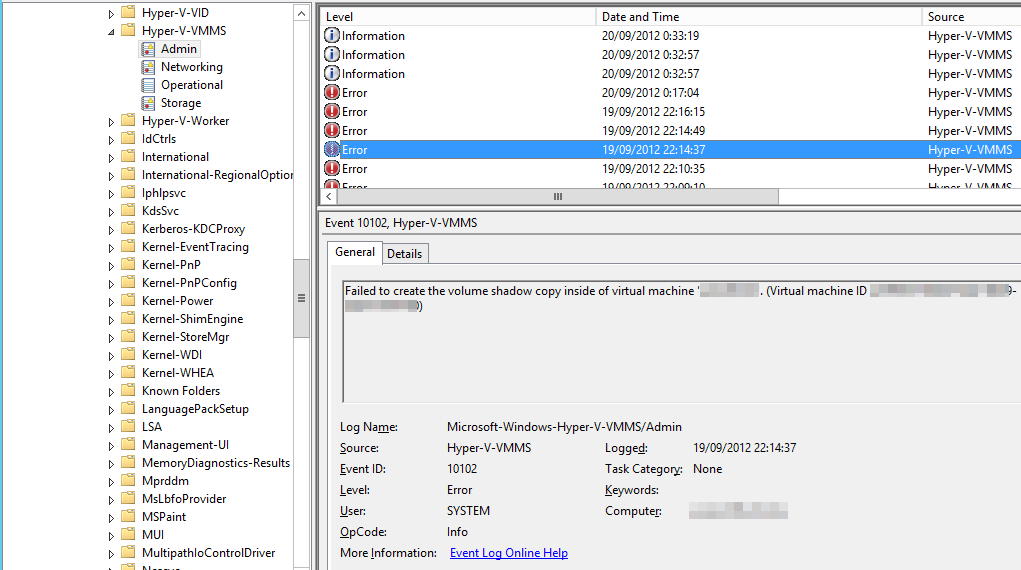
Log Name: Microsoft-Windows-Hyper-V-VMMS-Admin
Source: Microsoft-Windows-Hyper-V-VMMS
Date: 19/09/2012 22:14:37
Event ID: 10102
Task Category: None
Level: Error
Keywords:
User: SYSTEM
Computer: undisclosed server
Description:
Failed to create the volume shadow copy inside of virtual machine ‘undisclosedserver’. (Virtual machine ID 84521EG0G-8B7A-54ED-2F24-392A1761ED11)
Well people, that is called a clue  . So we did some Live Migration to isolate suspect VMs to a single node, run backups, see them fail, do the the same with a new and clean VM an it all works. and indeed … looking at the guest involved when the CommVault backup fails we that the VSS service is running and healthy but we do see all kind of badness related to disk space:
- Large SQL Server backup files put aside on the system partition or or other disks
- Application & service pack installers left behind,
- Log and tempdb volumes running out of space.
- Application Logs running out of control
That later one left 0MB of disk space on the system (Test Controller TFS shitting itself), but we managed to clear just enough to get to just over 1GB of free space which was enough to make the backup succeed.
![clip_image001[8]](https://blog.workinghardinit.work/wp-content/uploads/2012/09/clip_image0018.png "clip_image001[8]")

Servers, virtual or physical ones, should to be locked down to prevent such abuse. I know, I know. Did I already tell you I do not reside in a perfect world? We cannot protect against dev and test server admins who act without much care on their servers. We’ll just keep hammering at it to raise their awareness I guess. For end users and production servers we monitor those well enough to proactively avoid issues. With dev & test servers we don’t do so, or the response team would have a day’s work reacting to all alerts that daily dev & test usage on those servers generate.
The fix
- Clear at least 1GB or a bit more inside each partition in the guest running on the host that has a failing backup. I prefer to have at least a couple of GB free (10% to 15% => give yourself some head room people).
- Then you can resume the backup job manually or let CommVault do that for you if it’s still in a pending state.
- If you’ve killed the job make sure you restore the
Microsoft Hyper-V VSS Writer to a healthy state as described above. Thanks to Live Migration this can be achieved without any down time.
Conclusion
There is experimenting, testing, production testing, production and finally real life environments where not all is done as it should be. Yes, really the world isn’t perfect. Managers sometimes think it’s click, click, Next, click and voila we’ve got a complex multisite system running. Well it isn’t like that and you need some time and skills to make it all work. Yes even in todays “cheap, fast, easy to run your business form your smartphone” ecosystem of the private, hybrid and public cloud, where all is bliss and world peace reigns.
The DELL Compellent Hardware VSS provider & replay manager service handle all this without missing a beat, which is very comforting. As previous experiences with hardware VSS provides of other vendors make us think that these would probably have blown up by now.


 ).
). ) .
) .


 But it can be fixed. The root cause for this I do not know but it is driver related. The same thing happened in the release candidate. But now things are easier to fix. Navigate to the Intel Site to