Presentation & Demos E2EVC Rome 2013

Well my E2EVC presentation has been given and it went well. Sweet experience for the 20th edition of this excellent community conference.

image

Thank you to all those attendees that attended my session. I hope you enjoyed it, learned something and got a taste of experimenting with some of the perhaps lesser know features at your disposal in Windows Server 2012 R2.

A big thanks to Alex and Clare for the splendid organization of E2EVC for the twentieth time!

For more information on VMQ & vRSS go here: https://blog.workinghardinit.work/2013/10/23/windows-server-2012-r2-virtual-rss-vrss-in-action/
http://blogs.technet.com/b/networking/archive/2013/09/10/vmq-deep-dive-1-of-3.aspx
http://blogs.technet.com/b/networking/archive/2013/09/24/vmq-deep-dive-2-of-3.aspx
http://blogs.technet.com/b/networking/archive/2013/10/22/vmq-deep-dive-3-of-3.aspx

For a good start on SMB Direct with iWarp or RoCE go here: https://blog.workinghardinit.work/2013/08/28/adventures-in-rdma-the-roce-path-to-windows-server-2012-r2-smb-3-0-glory/

You can download the presentation here. The video of the session will be made available later by E2EVC so you can see the demo.

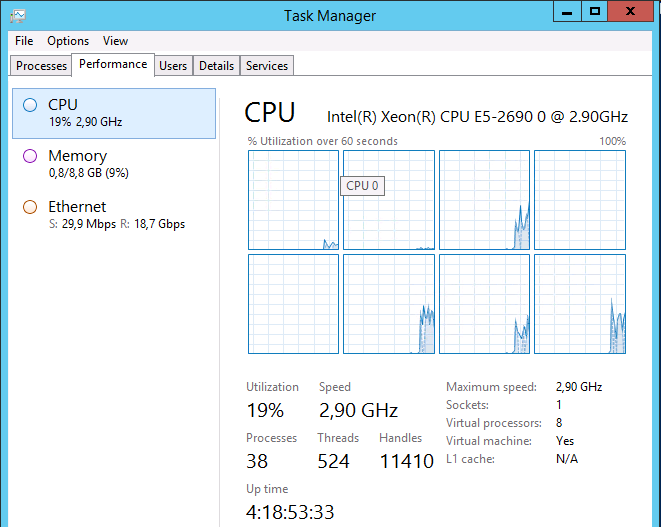
Just to make you all drool for the video to become live here’s a screenshot of what DVMQ/vRSS can achieve. Just pushing it to the limit. No, this is not “Photoshopped” I have witnesses Winking smile. That’s a W2K12R2 VM receiving 37.4Gbps of traffic. That will do or most of you I guess until 100Gbps NICs are the standard LOM on your future computing device.

image

By the way some people really loved some of the drawn art I used in the presentation. For these I owe thanks to Kathy Sierra and her great blog art. It’s a shame she felt the need to go dark.

More stuff is in the work as working hard in IT never fails to deliver more good subjects, findings and results to blog about.

If you’re a managerial type and feel offended, you probably should, as you’re doing it all wrong Smile. Otherwise you would have smiled because you have a sense of humor and nodded at the mistakes of your colleagues.

Great Hardware Support Equals Fast Windows 2012 R2 Implementation

I love it when a plan comes together

We adopted Windows 2012 when right after it went RTM in august 2012. Today we’re are already running Windows 2012 R2 and ready to step up the pace. If you are a VAR/ISV that does not have fast & good support for Windows Server 2012 R2 consider this your notice. You can’t lead from behind. Get your act together and take an example from Altaro. Small, sure, but good & fast. How do we get our act together so fast? Fast? Yes, but it does take time and effort.

As it turns out, we’re pretty well of with the DELL hardware stack. The generation 11 and 12 servers are supported by DELL and on the Windows Server Catalog for Windows Server 2012 R2.

image

For more information on Dell Server inbox driver support see: Windows Server 2012 R2 RTM Inbox Driver Support on Dell PowerEdge Servers. By the way I can testify that we’ve run Windows Sever 2012 R2 successfully on 9th Generation hardware (PowerEdge 1950/2950).

We’ve been running tests since Windows 2012 R2 Preview on R710/R720 and it has been a blast. We’ve kept them up to date with the latest firmware & drives via SUU. And for our Intel X520 and Mellanox ConnectX-3 we’ve had rapid support as well.

So what more could you want? Well support from your storage array vendor I would think. I’m happy to report that Storage Center 6.4 has been out since October 8th and it supports Windows Server 2012 R2. Dell Compellent Adds MLC SSD Tier – Bests 15K HDDs on Price and Performance. Mind you on a lazy Sunday afternoon 2 quick e-mails to CoPilot got me the answer that Storage Center 6.3.10 also supports Windows Server 2012 R2.  Sweet!

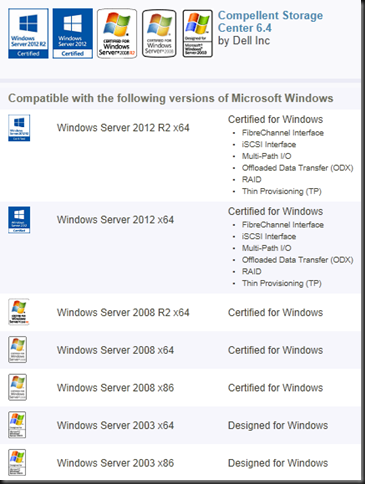
And that’s not just DELL, the Dell Compellent Storage Center 6.4 is fully Windows Server 2012 R2 logo certified! That’s what you want to see from you vendor. Fast & excellent support.

image

Here’s the entire DELL hardware line up with Windows Server 2012 R2 support. Happy upgrading & implementation! If you have Software Assurance you’re set to reap the benefits of that investment today!

To my all employers / clients, you see now, told you so. Now, I have a thing in common with Col. Hannibal Smith, I love it when a plan comes together Open-mouthed smile.

image

I know some of you think that all the testing, breaking, wrecking of Preview bits, RTM & GA versions we do looks like chaos. Especially when you visually add the test server & switch configurations. But that’s what it looks like to YOU. To the initiated this is well executed plan, dropping all assumptions, to establish what works & will hold up. The result is that we’re ready today and by extension, so are you.

E2EVC Rome 2013–Attending & Speaking

I’m attending and speaking at the E2EVC (Experts2Experts Virtualization Conference) in Rome, November 1-3.

I’ll be doing a talk on networking features in Windows Server 2012 R2 & Hyper-V. The good, the bad & the ugly. And no, no SDN talk. It’s about the other stuff.

“Session Topic: Networking Options For Virtualization in Windows Server 2012 R2
Short description: In Windows 2012 R2 there are many networking options available to optimize for both speed & redundancy. Let’s talk about some of them and see where and when they can help. The biggest problem is thinking you need  all of them or wanting all of them. Others are knowledge& complexity. Join us for a chalk & talk discussing all this. Some fellow MVPs will be there and we all have different experiences in different environments.
Presenter: Didier Van Hoye, Microsoft MVP”

It will be an interactive chalk & talk based on testing & experiences with these features & demos if the internet holds up.

image

It’s a suburb non-commercial, virtualization community Event. It brings the best real life  virtualization experts together to exchange knowledge and to establish new connections. Lots of presentations, Master Classes and discussions going on both the attendees, vendors product teams & independent experts.

Now this is a conference where marketing & marchitecture is shot down fast & hard. But always in a friendly way. These people are all working in the sector and they have to keep it real. They have a business & a livelihood that depends on them delivering results, not fairy tales & management pleasing BS. These people tell you what you need to know, not what you want to hear.

Look at the turnout for this event, this twitter list reads as the “Who’s Who In Virtualization”: @pcrampton, @joe_elway, @shawnbass, @ThomasMaurer, @Andrea_Mauro, @hansdeleenheer, @drtritsch, @WorkingHardInIT, @HelgeKlein, @JimMoyle, @neilspellings, @andyjmorgan, @KBaggerman, @CarlWebster, @bsonposh, @gilwood_cs, @E2EVC, @KristianNese, @_POPPELGAARD, @barryschiffer, @RemkoWeijnen, @IngmarVerheij, @WilcovanBragt, @david_obrien, @Microspecialist, @virtualfat, @LFoverskov, @virtuEs_IT, @stibakke, @granttiller, @Easi123, @ChrisJMarks, @arbeijer, @znackattack, @ShaunRitchie_UK, @Rob_Aarts, @StefanKoell, @EHouben, @crachfahl, @JeroenTielen, @plompr, @Gkunst, @drmiru, @espenbe, @marcdrinkwater, @DocsMortar, @AlBayliss, @wedelit, @pzykomAtle, @LoDani, @fborozan, @JeffWouters, @mrpickford, @smspasscode, @schose, @rvanderkruk, @TimmBrochhaus, @HansMinnee, @JZanten, @Sargola, @JaspervanWesten, @airdeca_nl, @danielBuonocore, @PeppelT, @TondeVreede, @pcortis, @ConorScolard, @CarstenDreyer, @arnaud_pain, @RoyTextor, @saschazimmer, @abstrask, @loopern, @PulseITch, @joarleithe, clarecoops9, @rfolmer, @wimoortgiesen  …

Here’s the conference agenda: http://www.e2evc.com/home/Agenda.aspx

See you there Smile and I’m looking forward to seeing my community buddies!

Windows Server 2012 R2 Virtual RSS (vRSS) In Action

The Need For Speed

My clients or employers are normally into lots of data, large files &  number crunching. That means they like CPU power, memory, bandwidth & IOPS. That doesn’t mean they want to spend fortunes but it does mean I got a standing order to get every last ounce of optimization and efficiency out of commodity hardware.

Today that means we prefer to work with DELL generation 12 servers like the R620 & R720 which are the best possible value for money you can get. They deliver all features in box at no extra cost / licensing crap and they can be fine tuned and optimized for top performance. Windows Server 2012 R2 can handle loads higher than the hardware today can throw at it so you want all you can get without breaking the bank. Add Intel X520/540, Mellanox (RoCE) or Cheslio (iWarp) 10Gbps cards and you’re ready to rumble with some nice PowerConnect 81XX Series or even the Force10 S4810 10Gbps switches.

CPU Power is not an issue, just bring money. You have 8-12 core CPUs. You can scale up to 4 socket systems & scale out as well. Licensing is probably your biggest concern here due to cost.

Memory?  DDR3 is readily available and compared to other costs cheap. DDR4 is on the way. For max performance you possibly won’t do Dynamic Memory to avoid a NUMA hit but otherwise it helps with efficiencies.

Network. We’ll you’ve seen/heard/read me on topics like 10Gbps, RDMA/SMB Direct, (Dynamic VMQ) but today we’ll look at virtual RSS. In Windows Server 2008 R2 VMQ helped us beyond the scalability issues of a single core on the host having to handle all interrupts for the traffic going the virtual machines. In Windows 2012 that got optimized with Dynamic VMQ. For workloads that need the absolute best performance & lowest latency we got SR-IOV support. That works fine but it has some potentially important draw backs on bot the manageability (NIC teaming needs to be done inside the guest) & security front (it bypasses the virtual switch, so no ACLs or NVGRE).

Today with Windows 2012 R2 we have a new optimization for network traffic in a virtual environment. It’s “Virtual RSS” or vRSS. I tell you it’s sweet and you’d do well to investigate this and enable it in your environment especially if, like we, you move lots of data around & virtualization is default. We don’t do physical unless for very strict reasons, i.e. it cannot be virtualized. Otherwise … no excuses, the economics and benefits are just to good not to do so. It’s not as supper low latency as SR-IOV but depending on your needs you might never notice and … it plays nicely with all other network features in Hyper-V.

Show me vRSS already!

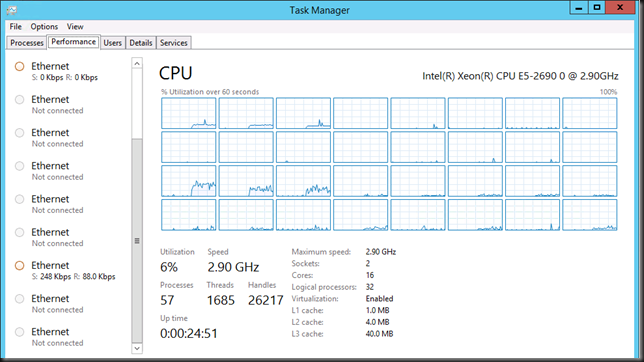
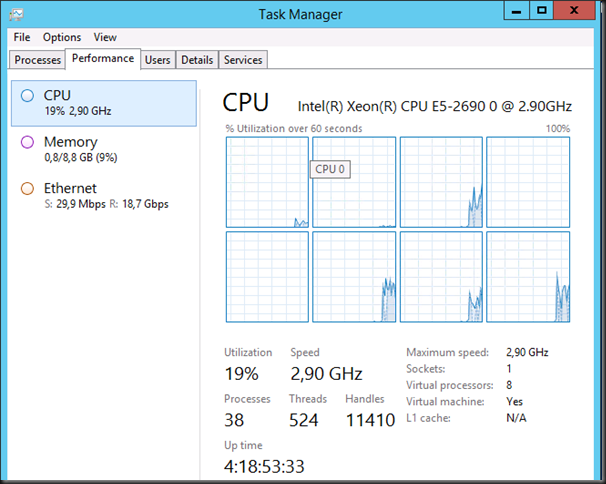
Inside the guest we see vRSS in action as multiple cores are put in to action to handle the interrupts of incoming traffic. This takes away the single vCPU bottle neck.
image

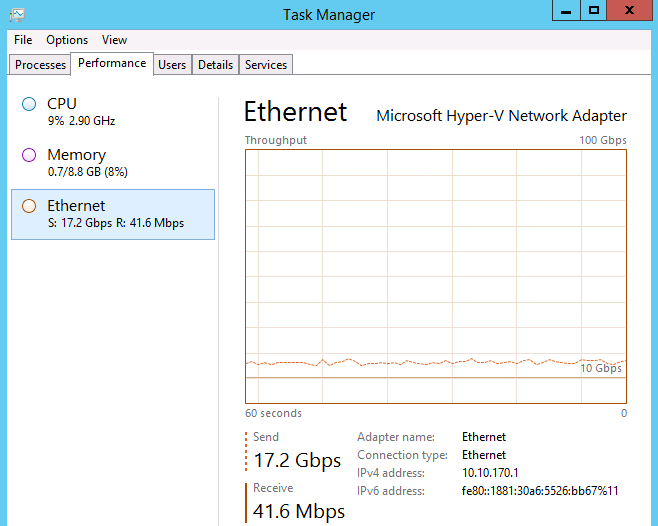
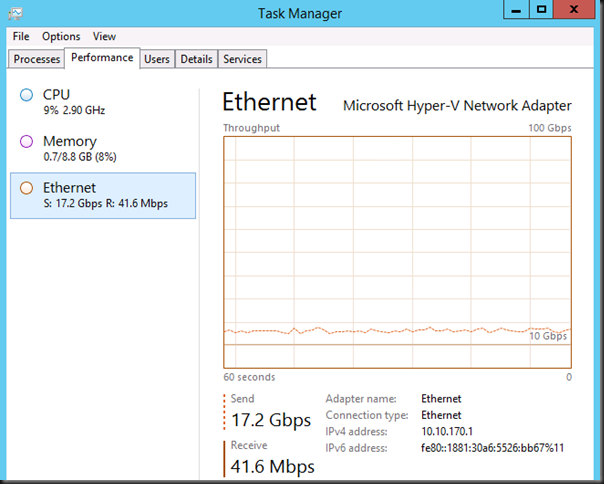
And the result is a sweet 17.2Gbps from VM1 to VM2. For the sharp eyed ones amongst you, they are on the same host so yes in this case we get top bandwidth as the traffic doesn’t have to go across the wire over the 2*10Gbps NIC team but stays within the same host or better, vSwitch.
image

The GUI is very friendly and suggest I can go to 100Gbps networking hardware Smile Well, not yet I’m afraid, but I’ve taken note Winking smile.

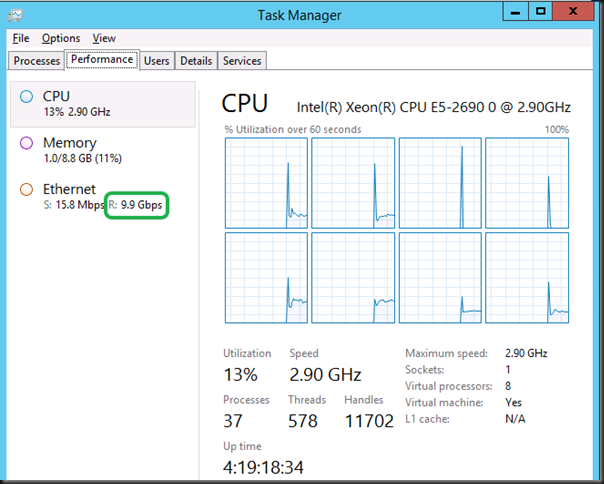
Here’s what it looks like when the sending and receiving VM are on different hosts and the vSwitch is connected to a 2*10Gbps team, switch independent, dynamic mode. You “only” get 10Gbps as the team can send on all members but receive on only one. But that’s still fine.
image

So how this look like on the host?

image

Here you see Dynamic VMQ in action. To prevent one core of becoming overloaded the host puts more of them into service. This depends on the load and it’s dynamic. Hence Dynamic VMQ. Where VMQ was great it still a limiting factor as you used to be tied to one core / VM.

This means that our network traffic processing is no longer limited by the OS or better the use of a single core, both inside the VM and on the host. Our bottleneck now is the maximum throughput the NICs can deliver. In our 2 member NIC team that’s 20Gbps max under the right circumstances. Yup. Line speed. Need more? Throw 40Gbps NICs at the problem or even 100Gbps pretty soon. Windows Server 2012 R2 is ready for this.

Sharing the wealth

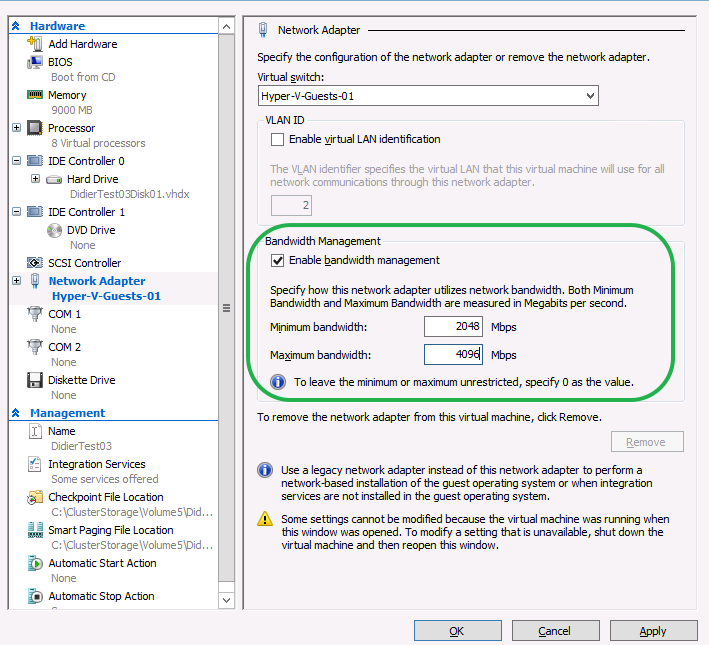
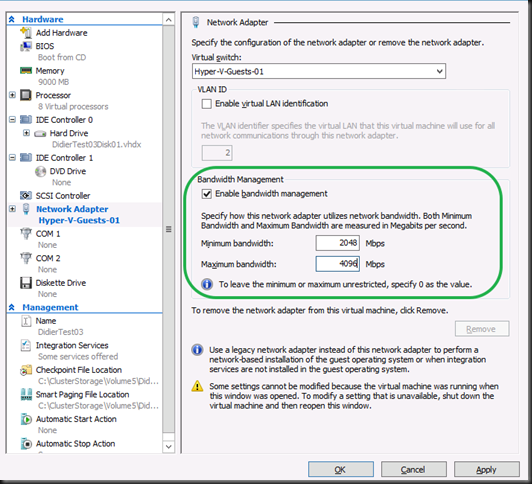
Now to make sure a bunch of these VMs on your cluster don’t starve the rest of the VM population with their greed for and lust after bandwidth you have the option of using Bandwidth management on the VM NIC.
image

This is one of the cases where this option can be very useful.

VM mobility without boundaries

Also consider this capability and this type of high workloads combined while leveraging SMB Direct. This offloads the processing of CSV traffic,  Live Migration, Shared Nothing Live Migration and under certain conditions Storage Live Migration to the NIC by leveraging RDMA.  In other words it doesn’t tax your host CPUs. This means you can have these kinds of network traffic loads going on and still live migrate at will. Scalable VM mobility anyone? You’ll understand what tremendous network loads the combination Windows Server 2012 R2 Hyper-V host & guests can handle.

It’s virtualization, not magic

OK, time for a little reality check, just in case it’s needed. Virtualization is technology, not magic. For all of you “thinking” they can push 20GBps into 20 VMs simultaneously on single host over just a single Team of 2 *10Gbps … ah well, get real Smile OK?

Teaser

I can talk about the benefits of vRSS all day and show you some more screenshots but I’m working on “vRSS, The Movie’”.  Perhaps even a sequel already.