Windows 2008 R2 SP1 – RemoteFX Hardware To Get The Needed GPU Performance

When the first information about RemoteFX in Windows 2008 R2 SP1 Beta became available a lot of people busy with VDI solutions found this pretty cool and good news. It’s is a very much needed addition in this arena. Now after that first happy reaction the question soon arises about how the host will provide all that GPU power to serve a rich GUI experience to those virtual machines. In VDI solutions you’re dealing with at least dozens and often hundreds of VM’s. It’s clear, when you think about it, that just the onboard GPU won’t hack it. And how many high performance GPU can you put into a server? Not many or not even none depending on the model. So where does the VDI hosts in a cluster get the GPU resources? Well there are some servers that can contain a lot of GPUs. But in most cases you just add GPU units to the rack which you attach to the supported server models. Such units exist for both rack servers and for blade servers. Dell has some info up on this over here here. The specs on the  the PowerEdge C410x, a 3U, external PCIe expansion chassis by DELL can be found following this link C410x. It’s just like with external DAS Disk bays. You can attach one or more 1U / 2U servers to a chassis with up to 16 GPUs. They also have solutions for blade servers. So that’s what building a RemoteFX enabled VDI farm will look like. Unlike some of the early pictures showing a huge server chassis in order to make room to stuff all those GPU’s cards the reality will be the use of one or more external GPU chassis, depending on the requirements.

Exchange 2010 SP1 Public Folder High Availability Returns with Roll Up 2

Al lot of people were cheering in the inter active session on Exchange 2010 SP1 High Availability with Scott Schnoll and Ross Smith of the Exchange Team. They announced (between goofing around) that the alternate server that provides failover to the clients (so they can select another public folder database to connect to) for public folders and that is sadly missing from Exchange 2010 would return with Exchange 2010 SP 1 Roll Up 2. This feature is needed by Outlook to automatically connect to an alternate public folder and it’s return means that high availability will finally be achievable for public folders in Exchange 2010 SP1. That’s great news and frankly an “oversight” that shouldn’t have happened even in Exchange 2010 RTM. The issue is described in knowledge base article “You cannot open a public folder item when the default public folder database for the mailbox database is unavailable in an Exchange Server 2010 environment” which you can find here  http://support.microsoft.com/kb/2409597.

In previous versions of exchange you made public folders highly available to Outlook clients by having replica’s. The Outlook clients could access an replica on another server if the default public folders as defined in the client settings of the database was not available. Clustering in Exchange 2010 does nothing for public folders. In Exchange 2010 the Outlook clients connect directly to the mailbox server in order to get to a public folder so they do not leverage the CAS or CAS array. Also the DAG does not support public folders and as clustering happens at the database level on DAG members and no longer at the server level we no longer get any high availability for the clients with clustering in Exchange 2010. Sure, if you have multiple replica’s the data is highly available but the access to another replica/database/server for public folder doesn’t happen automatically in Outlook when you’re running Exchange 2010. To make that happen you need an alternate server to be offered to the client for selection But as this feature is missing in Exchange 2010 up until SP1 Roll Up 1 in reality until now you need to keep using Exchange 2003/2007 to have public folder high availability.  Exchange 2010 SP1 Roll Up 2 will change that. I call that good news.

New Spatial & High Availability Features in SQL Server Code-Named “Denali”

The SQL Server team is hard at work on SQL Server vNext, code name “Denali”. They have a whitepaper out on their web site, “New Features in SQL Server Code-Named “Denali” Community Technology Preview 1” which you can download here.

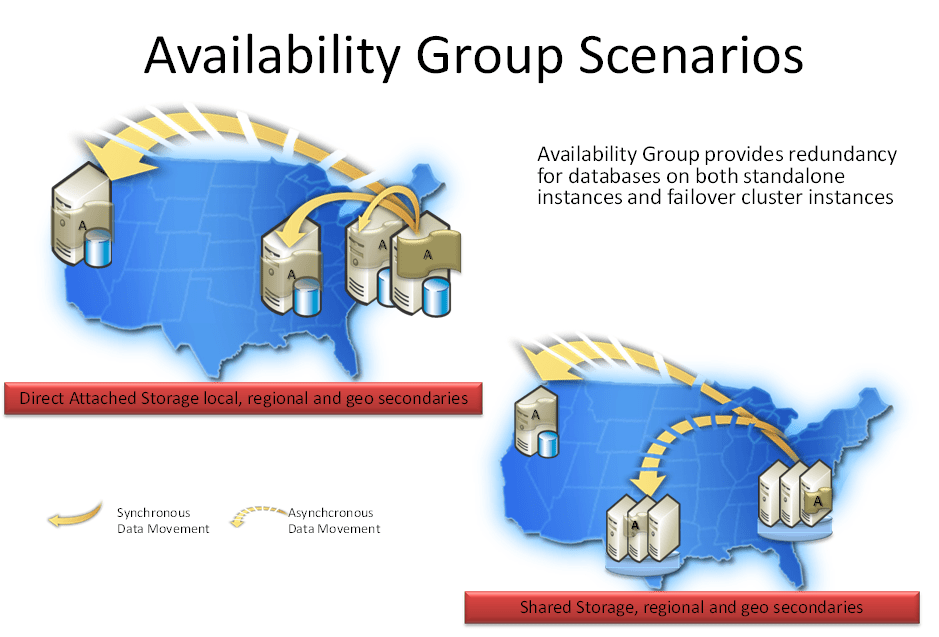
As I do a lot of infrastructure work for people who really dig al this spatial and GIS related “stuff” I always keep an eye out for related information that can make their lives easier an enhance the use of the technology stack they own.  Another part of the new features coming in “Denali” is Availability Groups. More information will be available later this year but for now I’ll leave you with the knowledge that it will provide for Multi-Database Failover, Multiple Secondaries, Active Secondaries, Fast Client Connection Redirection, can run on Windows Server Core & supports Multisite (Geo) Clustering as shown in the Microsoft (Tech Ed Europe, Justin Erickson) illustration below.

Availability Group can provide redundancy for databases on both standalone instances and failover cluster instances using Direct Attached storage (DAS), Network Attached Storage (NAS) and Storage Area Networks (SAN) which is useful for physical servers in a high availability cluster and virtualization. The latter is significant as they will support it with Hyper-V Live Migration where as Exchange 2010 Database Availability Groups do not. I confirmed this with a Microsoft PM at Tech Ed Europe 2010.  Download the CTP here and play all you want. Please pay attention to the fact that in CTP 1 a lot of stuff  isn’t quite ready for show time. Take a look at the Tech Europe 2010 Session on the high availability features here. You can also download the video and the PowerPoint presentation via that link. At first I thought MS might be going the same way with SQL as they did with Exchange, less choice in high availability but easier and covering all needs but than I don’t think they can. SQL Server Applications are beyond the realm of control of Redmond. They do control Outlook & OWA. So I think the SQL Server Team needs to provide backward compatibility and functionality way more than the Exchange team has. Brent Ozar (Twitter: @BrentO)  did a Blog on “Denali”/Hadron which you can read here http://www.brentozar.com/archive/2010/11/sql-server-denali-database-mirroring-rocks/. What he says about clustering is true. I’ use to cluster Windows 2000/2003 and suffered some kind of mental trauma. That was completely cured with Windows 2008 (R2) and I’m now clustering with Hyper-V, Exchange 2010, File Servers, etc. with a big smile on my face. I just love it!

Exchange 2010 Public Folder Worries At Customer: No existing ‘PublicFolderProxyInformation’ matches the following Identity

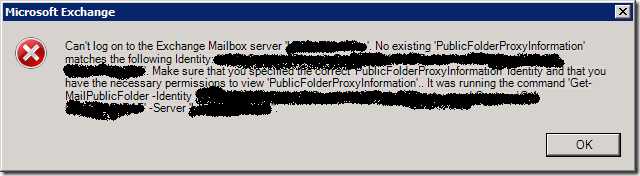
A customers was recently using the EMC GUI in their Exchange 2010 environment, having a look a the public folder properties when they got this error:

—————————
Microsoft Exchange
—————————
Can’t log on to the Exchange Mailbox server ‘DAGMBX.demolab.com’. No existing ‘PublicFolderProxyInformation’ matches the following Identity: ‘demolabHeadQuartersFincanceDepartmentFiscalUnit’. Make sure that you specified the correct ‘PublicFolderProxyInformation’ Identity and that you have the necessary permissions to view ‘PublicFolderProxyInformation’.. It was running the command ‘Get-MailPublicFolder -Identity ”demolabHeadQuartersFincanceDepartmentFiscalUnit” -Server ‘DAGMBX.demolab.com”.
—————————
OK  
—————————
image

Hey … when did this start?  They never complained about this before, but did they ever use it.This probably was actually the first time they tried to look/edit the public folder permissions after doing the following over the past month and in this particular order:

  1. Moving to Exchange 2010 SP1
  2. Removing the last Exchange 2007 servers from the organization.

Now I know about a bug that exist and that was recently blogged about by Dan Rowley in Exchange 2010 get-mailpublicfolder name returns No existing ‘PublicFolderProxyInformation’. The point is that there should be a mailbox database mounted on the server that has the System Attendant mailbox associated with it.  However, this is not the case here.  The mailbox servers are member of a DAG and all of them host a copy of the PF. The replication runs fine, users can work with them, the remaining Outlook 2003 users report no issues. But there is more in that blog: “Basically the work around is to mount a mailbox store on the server that is generating the error, or if there is a database already mounted – verify the system attendant is properly configured to point to a valid homemdb.” Now that last point is interesting and indeed that was the issue here. On two members of the DAG the homeMDB attribute was not set. Now what could be the root cause of this? I don’t know, certainly not in this case. All things have been done by the book … Ah well, luckily the fix is not very difficult. We need to put a valid entry in the homemdb. In this case we’ll take the value of the DAG member that had it filled in. This seems to be the most recently created database in the DAG. In Exchange 2010 this is done as described below. Note we have a DAG here, so we can work with any database that has a valid copy on the server(s) in question.

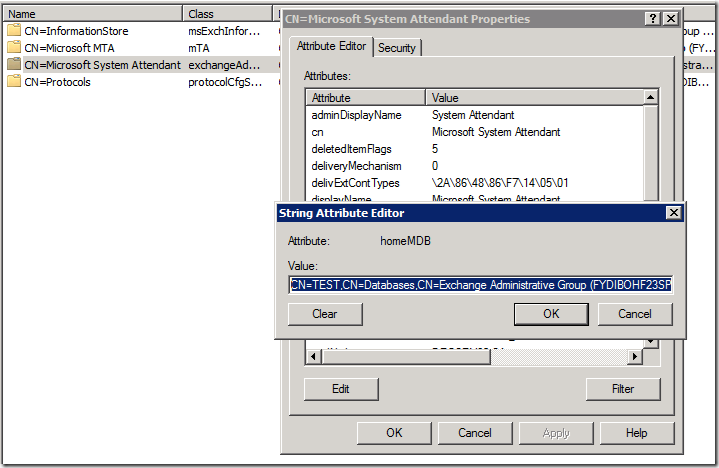
How to check the homeMDB attribute value:

  • Start ADSI Edit and navigate to CN=Configuration,DC=,DC=,DC=/Services/Microsoft Exchange//Administrative Groups/Exchange Administrative Group (FYDIBOHF23SPDLT)//Servers/MBXServerWithIssue
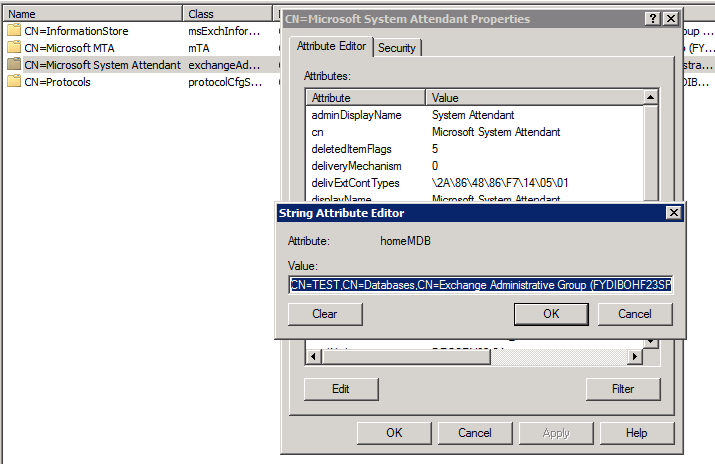
  • Right-click Microsoft System Attendant, and then click Properties to display the  Attributes list and find the homeMDB attribute.
  • If the homeMDB attribute has a value make sure  it points to a valid mailbox database. If the value of the homeMDB attribute is empty (not set) or incorrect you need to fix this.
image

How Fix the homeMDB attribute value:

  • In ADSI Edit navigate to Start ADSI Edit and navigate to CN=Configuration,DC=,DC=,DC=/Services/Microsoft Exchange//Administrative Groups/Exchange Administrative Group (FYDIBOHF23SPDLT)/Databases."
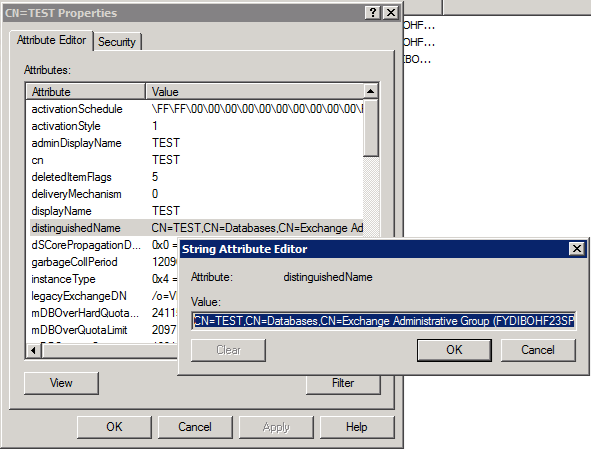
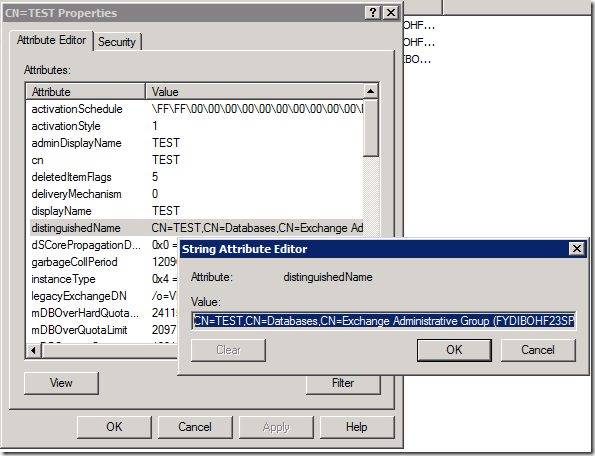
  • Right-click a mailbox database that is local (NON DAG) or has a valid copy on the server (DAG) , select Properties and in  the Attributes list, select the distinguishedName, and then click View.
  • Copy the value of the distinguishedName attribute and close the dialogs
image

NOTE in this particular case we can copy the value that was filled in the homeMDB attribute on one of the DAG members. You might not have one set in any.

  • Right-click Microsoft System Attendant, and then click Properties to get to the Attributes list, click homeMDB, and then choose Edit
  • In the Value box, paste the value that you copied form the distinguishedName attribute
  • Close the dialog boxes and exit ADSI Edit

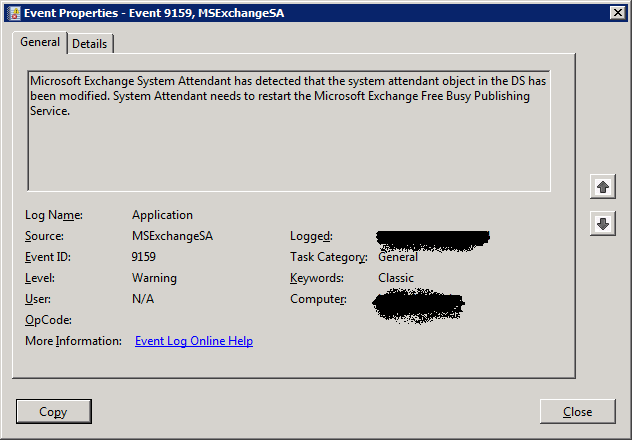
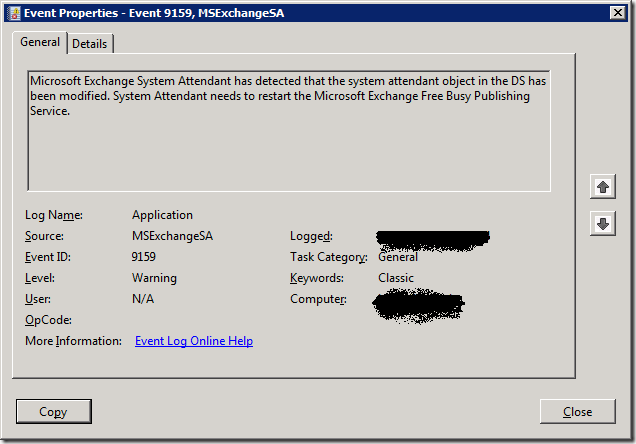
When you’ve don this you’ll find following entry in the application event viewer:

Log Name:      Application

Source:        MSExchangeSA

Date:          11/2/2010 3:25:59 PM

Event ID:      9159

Task Category: General

Level:         Warning

Keywords:      Classic

User:          N/A

Computer:      DAGMBX.demolab.com

Description:

Microsoft Exchange System Attendant has detected that the system attendant object in the DS has been modified. System Attendant needs to restart the Microsoft Exchange Free Busy Publishing Service.
image

After that, I wait 10 minutes to get AD replicated and make sure to close the EMC and start it again and voila, it’s fixed.