
Anti Virus & Hyper-V Reloaded

The anti virus industry is both a blessing and a curse.  They protect us from a whole lot of security threats and at the same time they make us pay dearly for their mistakes or failures. Apart from those issues themselves this is aggravated that management does not see the protection it provides on a daily basis. Management only notices anti virus when things go wrong, when they lose productivity and money. And frankly when you consider scenarios like this one …

Hi boss, yes, I know we spent a 1.5 million Euros on our virtualization projects and it’s fully redundant to protect our livelihood. Unfortunately the anti virus product crashed the clusters so we’re out of business for the next 24 hours, at least.

… I can’t blame them for being a bit grumpy about it.

Recently some colleagues & partners in IT got bitten once again by McAfee with one of there patches (8.8 Patch 1 and 8.7 Patch 5). These have caused a lot of BSOD reports and they put the CSVs on Hyper-V clusters into redirected mode (https://kc.mcafee.com/corporate/index?page=content&id=KB73596). Sigh. As you can read here for the redirected mode issue they are telling us Microsoft will have to provide a hotfix. Now all anti virus vendors have their issue but McAfee has had too many issues for to long now.  I had hoped that Intel buying them would have helped with quality assurance but it clearly did not. This only makes me hope that whatever protection against malware is going to built into the hardware will be of a lot better quality as we don’t need our hardware destroying our servers and client devices. We’re also no very happy with the prospect or rolling out firmware & BIOS updates at the rate and with the risk of current anti virus products.

Aidan Finn has written before about the balance between risk & high availability when it comes to putting anti virus on Hyper-V cluster hosts and I concur with his approach:

  • When you do it pay attention to the exclusion & configuration requirements
  • Manage those host very carefully, don’t slap on just any update/patches and this includes anti virus products of cause

I’m have a Masters in biology from they days before I went head over heals into the IT business. From that background I’ve taken my approach to defending against malware. You have to make a judgment call, weighing all the options with their pros and cons. Compare this to vaccines/inoculations to protect the majority of your population. You don’t have to get a 100% complete coverage to be successful in containing an outbreak. Just a sufficiently large enough part including your most vulnerable and most at risk population. Excluding the Hyper-V hosts from mandatory anti virus fits this bill. Will you have 100% success, always? Forget it. There is no such thing.

Benign GUI Cosmetic Bug in Failover Cluster Manager (UseMnemonic Property)

Here’s a little issue I‘ve run into with using an ampersand (&) in the naming of the networks in the Failover Cluster Manager.

As you can see the name “Heart Beat & CSV” shows up correctly in the left side navigation pane. In the management pane is show up as “Heart Beat _CSV”.

image

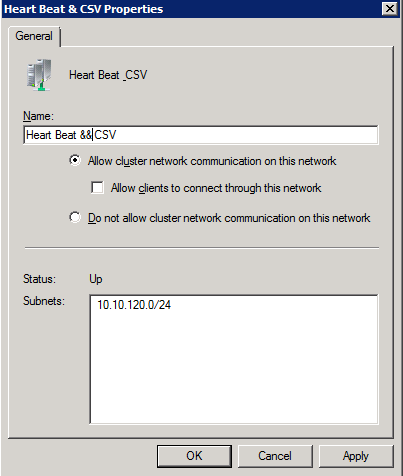
So me being a bit an old scripter / VBA / VB developer I have seen this before and I try what I know to do from that far away, long ago and dusky part of my IT history: type in double ampersands (&&). The good old UseMnemonic Property for you in the know Winking smile VB & VBA devies wanting to display an & on a button, label etc. will know this trick of using && to really display a & as a single & indicates an action. But I digress.
image

So as you can see it’s fixed in the management pane but now you end up with double ampersands in the left navigation pane.

image

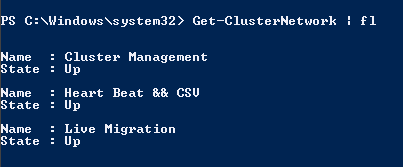
And then it also shows up with double ampersands in PowerShell

image

This is one for the GUI team to fix I guess. Perhaps the UseMnemonic Property is set to false in the navigation pane label and to true in the management pane label. So far my frivolous reporting on benign GUI cosmetics bugs in Windows 2008 R2 SP1 Open-mouthed smile We’ll be resuming our more serious blog posts in the very near future.
Video Interview on CSV & Storage Design by Carsten Rachfahl

I already mentioned that during the Experts2Experts Virtualization Conference I met a lot of great people and I presented on High Performance & High Availability networking for Hyper-V clusters (10Gbps goodness). Some of the people I met I already knew from the on line community and others were unknown to me until that event. Among the attendees we found some of the usual virtualization suspects in our community like Aidan Finn, Jeff Wouters, Carsten Rachfahl, Ronnie Isherwood.

Now Carsten Rachfahl is a MVP in Virtual Machine expertise but he’s also a dynamic entrepreneur who shows a lot of initiative. Using social media he is really making in effort to get people & customers to notice important snippets of information by providing easy and fast access to them. He’s very active as a speaker, on Twitter and on his blogs. On top of that he does podcasts and video interviews. For Hyper-V information go to http://www.hyper-v-server.de/  which you can also use  as an entry point for his other sites focusing on several aspects of IT in the Microsoft sphere in Germany. Like cloud computing & Licensing. There you’ll also find the videos of interviews on these subjects. It’s quite an impressive endeavor.

Carsten took the opportunity to make some videos with all the above suspects on various subject and he recently released our interview. 2011-12-01-didier-interview

In this video we continued the discussion that Aidan started on CSV and we briefly touched on a subject you could make hour long documentaries about: storage options in Windows Hyper-V now and in the years to come. Enjoy!

Experts2Experts Conference London (UK) 2011

I’m at the Experts2Experts Conference in London and I’m having a great time talking shop, tech & business with my fellow IT Pro colleagues from around Europe. Aidan Finn, Jeff Wouters, Carsten Rachfahl, Ronnie Isherwood.

It might be fun for Microsoft to join us for some of these lunch & dinner time dicussions. It would provide them with great feedback, ideas, concerns. Very educational. While we’re discussing Citrix, VMware, Microsoft & ISV solutions (RES, Appsense) this is not a vendor centric conference. Sure we all work with these products but we’re discussing it from our point of view. The challenges, the issues, the successes & failures are discussed and mentioned.

There’s a high density of virtualization, private cloud, desktop virtualization (VDI, Terminal Servers, Application Virtualization, Client hosted virtual desktops etc.) expertise at the conference to make it interesting.

Tomorrow I’ll be sharing some musings on “High Performance & High availability Networks for Hyper-V Clusters” during my session.