Shared Virtual Disks in Windows Server 2012 R2 Hyper-V Maximizes TCO/ROI

One of the great additions to Hyper-V in Windows Server 20012 R2 are shared virtual disks. TechEd 2013 is disclosing a lot of new and improved features and this is one of them!

image

This single feature brings benefits to me I can use to solve business issues today:

Ease of guest clustering

How easy is it? Look at this:

New-VHD -Path C:ClusterStorageVolume1Shared.VHDX -Fixed -SizeBytes 30GB

Add-VMHardDiskDrive -VMName Node1 -Path C:ClusterStorageVolume1Shared.VHDX -ShareVirtualDisk

Add-VMHardDiskDrive -VMName Node2 -Path C:ClusterStorageVolume1Shared.VHDX –ShareVirtualDisk

That’s it, basically. No fabrics to extend to the guest, no vFC  needed. In simplicity it looks a lot like SMB 3.0. A major improvement.

To the guest the shared storage has become abstracted

With a shared VHDX I get mobility and flexibility I’m used to with VHDX files & virtualization. FC, iSCSI, SMB3.0, Storage Spaces, PCI Raid, Share SAS, it all doesn’t matter what happens to the underlying storage infrastructure when doing guest clustering in this way.That’s sweet!

Fast Backups

We have a lot of large size LUNs. 2-16TB. We want to virtualize all of these as the speed of backing up these large VHDX file  a LOT better than backing up a LUN with millions of smaller files. But when we need high availability we have to go for vFC, iSCSI and don’t get that benefit.  Yes we can also use SMB3.0 already gave us a helping hand (SQL Server guest clustering if you don’t or can’t do “Always On”) in some scenarios but it’s not the major storage deployment out there (not yet) AND we’re talking about file server workloads. Now with shared VHDX we can have our cookies and eat it to. Or better 2 cookies!

Conclusion

This just rocks. My live just got better and easier. So can yours. Moving to Windows Server 2012 (R2) is all that’s needed. For more information look here at Application Availability Strategies for the Private Cloud (Speakers: Jose Barreto, Steven Ekren)

Complete VM Mobility Across The Data Center with SMB 3.0, RDMA, Multichannel & Windows Server 2012 (R2)

Introduction

The moment I figured out that Storage Live Migration (in certain scenarios) and Shared Nothing Live Migration leverage SMB 3.0 and as such Multichannel and RDMA in Windows Server 2012 I was hooked. I just couldn’t let go of the concept of leveraging RDMA for those scenarios.  Let me show you the value of my current favorite network design for some demanding Hyper-V environments. I was challenged a couple of time on the cost/port of this design which is, when you really think of it, a very myopic way of calculating TCO/ROI. Really it is. And this week at TechEd North America 2013 Microsoft announced that all types of Live Migrations support Multichannel & RDMA (next to compression) in Windows Server 2012 R2.  Watch that in action at minute 39 over here at Understanding the Hyper-V over SMB Scenario, Configurations, and End-to-End Performance. You should have seen the smile on my face when I heard that one! Yes standard Live Migration now uses multiple NIC (no teaming) and RDMA for lightning fast  VM mobility & storage traffic. People you will hit the speed boundaries of DDR3 memory with this! The TCO/ROI of our plans just became even better, just watch the session.

So why might I use more than two 10Gbps NIC ports in a team with converged networking for Hyper-V in Windows 2012? It’s a great solution for sure and a combined bandwidth of 2*10Gbps is more than what a lot of people have right now and it can handle a serious workload. So don’t get me wrong, I like that solution. But sometimes more is asked and warranted depending on your environment.

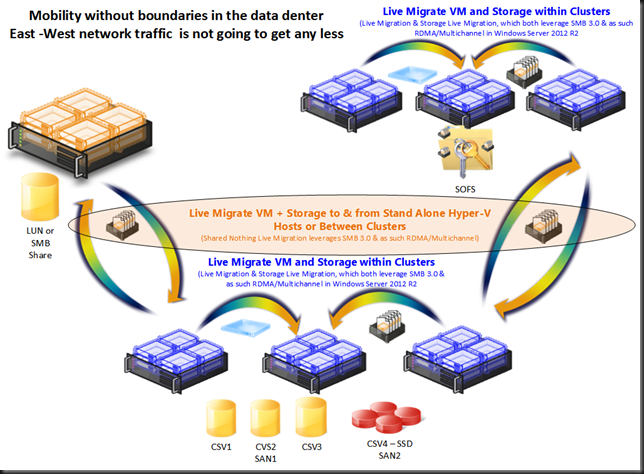
The reason for this is shown in the picture below. Today there is no more limit on the VM mobility within a data center. This will only become more common in the future.
image

This is not just a wet dream of virtualization engineers, it serves some very real needs. Of cause it does. Otherwise I would not spend the money. It consumes extra 10Gbps ports on the network switches that need to be redundant as well and you need to have 10Gbps RDMA capable cards and DCB capable switches.  So why this investment? Well I’m designing for very flexible and dynamic environments that have certain demands laid down by the business. Let’s have a look at those.

The Road to Continuous Availability

All maintenance operations, troubleshooting and even upgraded/migrations should be done with minimal impact to the business. This means that we need to build for high to continuous availability where practical and make sure performance doesn’t suffer too much, not noticeably anyway. That’s where the capability to live migrate virtual machines of a host, clustered or not, rapidly and efficiently with a minimal impact to the workload on the hosts involved comes into play.

Dynamics Environments won’t tolerate downtime

We also want to leverage our resources where and when they are needed the most. And the infrastructure for the above can also be leveraged for that. Storage live migration and even Shared Nothing Live Migration can be used to place virtual machine workloads where they are getting the resources they need. You could see this as (dynamically) optimizing the workload both within and across clusters or amongst standalone Hyper-V nodes. This could be to a SSD only storage array or a smaller but very powerful node or cluster in regards to CPU, memory and Disk IO. This can be useful in those scenarios where scientific applications, number crunching or IOPS intesive  software or the like needs them but only for certain times and not permanently.

Future proofing for future storage designs

Maybe you’re an old time fiber channel user or iSCSI rules your current data center and Windows Server 2012 has not changed that. But that doesn’t mean it will not come. The option of using a Scale Out File Server and leverage SMB 3.0 file shares to providing storage for Hyper-V deployments is a very attractive one in many aspects. And if you build the network as I’m doing you’re ready to switch to SMB 3.0 without missing a heart beat. If you were to deplete the bandwidth x number of 10Gbps can offer, no worries you’ll either use 40Gbps and up or Infiniband. If you don’t want to go there … well since you just dumped iSCSI or FC you have room for some more 10Gbps ports Smile

Future proofing performance demands

Solutions tend to stay in place longer than envisioned and if you need some long levity and a stable, standard way of doing networking, here it is. It’s not the most economical way of doing things but it’s not as cost prohibitive as you think. Recently I was confronted again with some of the insanities of enterprise IT. A couple of network architects costing a hefty daily rate stated that 1Gbps is only for the data center and not the desktop while even arguing about the cost of some fiber cable versus RJ45 (CAT5E). Well let’s look beyond the North – South traffic and the cost of aggregating band all the way up the stack with shall we? Let me tell you that the money spent on such advisers can buy you in 10Gbps capabilities in the server room or data center (and some 1Gbps for the desktops to go) if you shop around and negotiate well. This one size fits all and the ridiculous economies of scale “to make it affordable” argument in big central IT are not always the best fit in helping the customers. Think  a little bit outside of the box please and don’t say no out of habit or laziness!

Conclusion

In some future blog post(s) we’ll take a look at what such a network design might look like and why. There is no one size fits all but there are not to many permutations either. In our latest efforts we had been specifically looking into making sure that a single rack failure would not bring down a cluster. So when thinking of the rack as a failure domain we need to spread the cluster nodes across multiple racks in different rows. That means we need the network to provide the connectivity & capability to support this, but more on that later.

Windows Server 2012 Cluster Aware Updating In Action

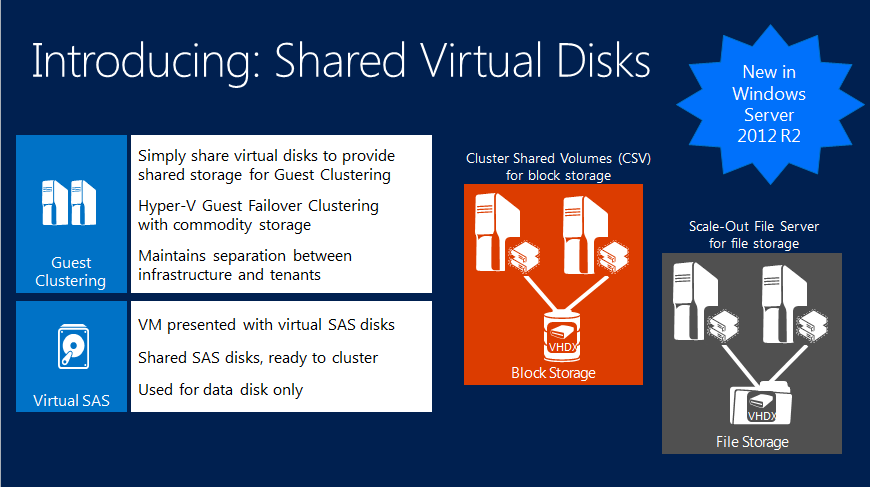
You might have noticed that Microsoft recently released some important hotfixes for Windows Server 2012 Hyper-V Clusters. These are You cannot add VHD files to Hyper-V virtual machines in Windows Server 2012 and Update that improves cluster resiliency in Windows Server 2012 is available

So how do you deploy these easily and automatically to your Windows Server 2012 Clusters? Cluster Aware Updating! Here’s a screenshot of cluster Aware Updating in action deploying these hotfixes without a single interruption to the business services.

image

So what are you waiting for?Start using it Smile It will make your live easier, save time, and help you with continuous available infrastructure.
Here’s a link to the slide deck of a presentation I did on Cluster Aware Updating in a TechNet webcast http://www.slideshare.net/technetbelux/hands-on-with-hyperv-clustering-maintenance-mode-cluster-aware-updating

We’ve been enjoying the benefits of Windows Server 2012 since we got the RTM bits in August 2012. I can highly recommend it to everyone.

Design Considerations For Converged Networking On A Budget With Switch Independent Teaming In Windows Server 2012 Hyper-V

Last Friday I was working on some Windows Server 2012 Hyper-V networking designs and investigating the benefits & drawbacks of each. Some other fellow MVPs were also working on designs in that area and some interesting questions & answers came up (thank you Hans Vredevoort for starting the discussion!)

You might have read that for low cost, high value 10Gbps networks solutions I find the switch independent scenarios very interesting as they keep complexity and costs low while optimizing value & flexibility in many scenarios. Talk about great ROI!

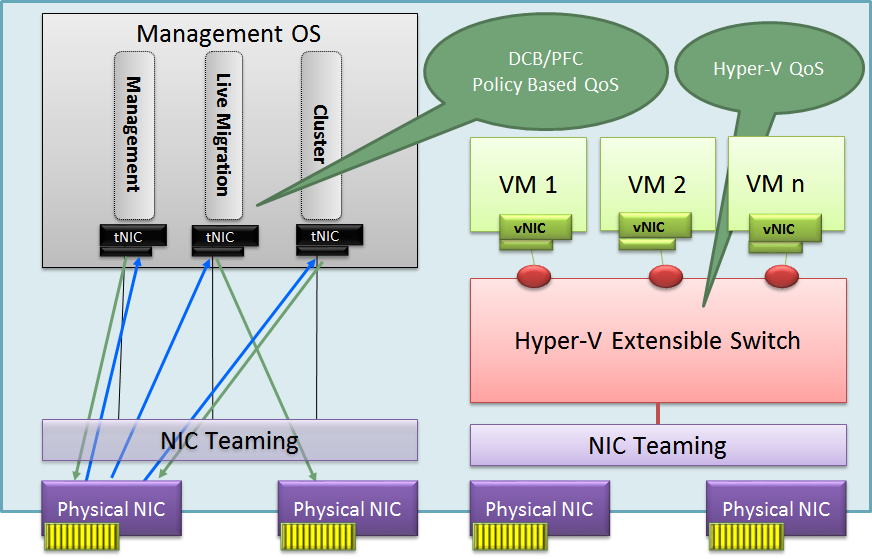
So now let’s apply this scenario to one of my (current) favorite converged networking designs for Windows Server 2012 Hyper-V. Two dual NIC LBFO teams. One to be used for virtual machine traffic and one for other network traffic such as Cluster/CSV/Management/Backup traffic, you could even add storage traffic to that. But for this particular argument that was provided by Fiber Channel HBAs. Also with teaming we forego RDMA/SR-IOV.

For the VM traffic the decision is rather easy. We go for Switch Independent with Hyper-V Port mode. Look at Windows Server 2012 NIC Teaming (LBFO) Deployment and Management to read why. The exceptions mentioned there do not come into play here and we are getting great virtual machine density this way. With lesser density 2-4 teamed 1Gbps ports will also do.

But what about the team we use for the other network traffic. Do we use Address hash or Hyper-V port mode. Or better put, do we use native teaming with tNICs as shown below where we can use DCB or Windows QoS?

image

Well one drawback here with Address Hash is that only one member will be used for incoming traffic with a switch independent setup. Qos with DCB and policies isn’t that easy for a system admin and the hardware is more expensive.

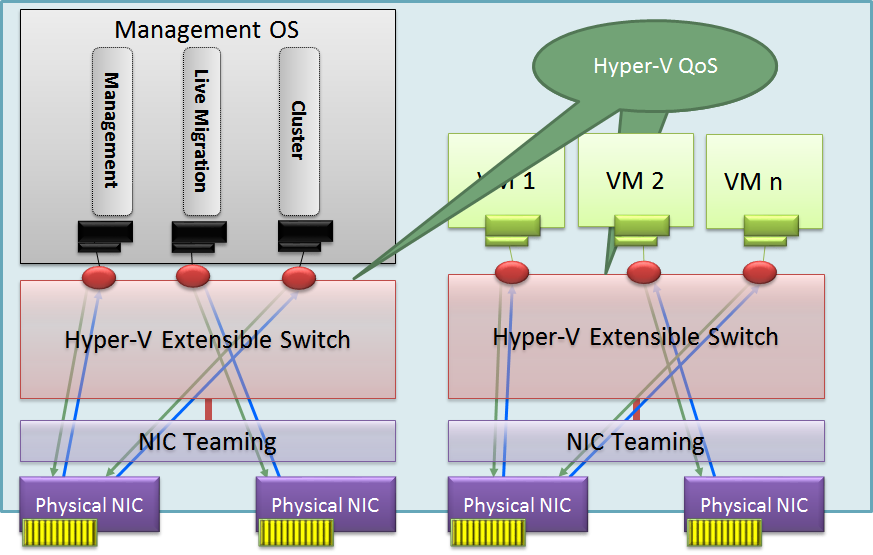
So could we use a virtual switch here as well with QoS defined on the Hyper-V switch?

image

Well as it turns out in this scenario we might be better off using a Hyper-V Switch with Hyper-V Port mode on this Switch independent team as well. This reaps some real nice benefits compared to using a native NIC team with address hash mode:

  • You have a nice load distribution of the different vNIC’s send/receive traffic over a single member of the NIC team per VM. This way we don’t get into a scenario where we only use one NIC of the team for incoming traffic. The result is a better balance between incoming and outgoing traffic as long an none of those exceeds the capability of one of the team members.
  • Easy to define QoS via the Hyper-V Switch even when you don’t have network gear that supports QoS via DCB etc.
  • Simplicity of switch configuration (complexity can be an enemy of high availability & your budget).
  • Compared to a single Team of dual 10Gbps ports you can get a lot higher number of VM density even they have rather intensive network traffic and the non VM traffic gets a lots of bandwidth as well.
  • Works with the cheaper line of 10Gbps switches
  • Great TCO & ROI

With a dual 10Gbps team you’re ready to roll. All software defined. Making the switches just easy to use providers of connectivity. For smaller environments this is all that’s needed. More complex configurations in the larger networks might be needed high up the stack but for the Hyper-V / cloud admin things can stay very easy and under their control. The network guys need only deal with their realm of responsibility and not deal with the demands for virtualization administration directly.

I’m not saying DCB, LACP, Switch Dependent is bad, far from. But the cost and complexity scares some people while they might not even need. With the concept above they could benefit tremendously from moving to 10Gbps in a really cheap and easy fashion. That’s hard (and silly) to ignore. Don’t over engineer it, don’t IBM it and don’t go for a server rack phD in complex configurations. Don’t think you need to use DCB, SR-IOV, etc. in every environment just because you can or because you want to look awesome. Unless you have a real need for the benefits those offer you can get simplicity, performance, redundancy and QoS in a very cost effective way. What’s not to like. If you worry about LACP etc. consider this, Switch independent mode allows for nearly no service down time firmware upgrades compared to stacking. It’s been working very well for us and avoids the expense & complexity of vPC, VLT and the likes of that. Life is good.