Back to basics to explain where storage QoS lives and how it works
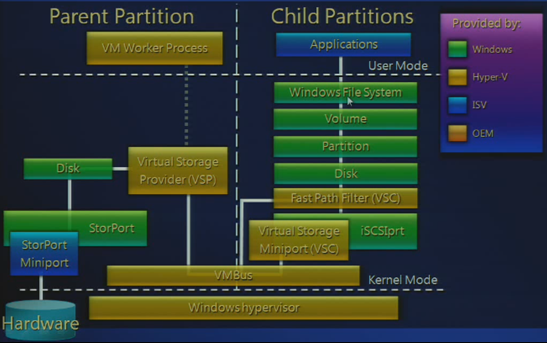
In Windows Server 2012 R2 Hyper-V (and earlier) we have Hyper-V components called Virtualization Service Provider (VSP) and Virtualization Service Clients (VSC). In combination with the VMBUS the VSP and VSC components are what make virtualization perform well on Hyper-V.The Stor VSP/VSC are were the maximum IOPS functionality lives, aka as QoS Limit.
In a hosted hypervisor like Virtual PC or in a bare metal hypervisor without any “enlightment” the operating system inside a virtual machine is blissfully unaware of the fact it virtualized. Basically it sends hardware access requests using native drivers, but the requests are received by the virtual layer that intercepts them on behalf of the host OS by emulating hardware devices. This comes at a cost, namely performance, latency and losing device specific functionality.
In Hyper-V Microsoft provides the Integration Services (IS) for virtual machines running on Hyper-V which, in combination with the VMBus, avoids this overhead. So you should ways use them where and when possible. Two of the components in the IS are VSP and VSC. They are responsible for the communication between the Host OS or Parent Partition (where the VSP lives) and the Guest OS or Child Partition (where the VSC lives).
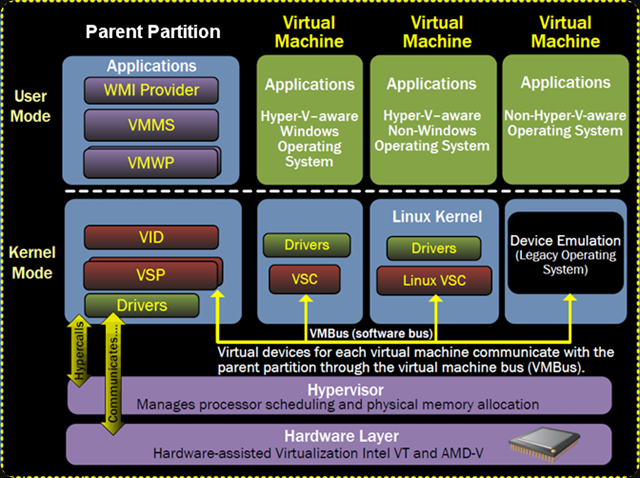
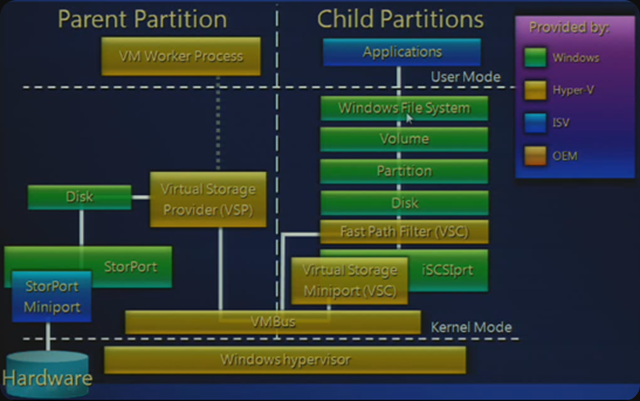
There are 4 VSP & VSC components: Network, Video, HID and Storage. As you probably guessed we’re interested in the storage VSP & VSC (storVSP.sys & storvsc.sys) for the discussion at hand. While the Stor VSP lives in the host OS and the Stor VSC in the guest OS of every VM running on the host they communicate over the VMBus we mentioned and is designed to make communications as fast as possible (it’s a communication protocol that runs in memory, i.e. it’s very fast).
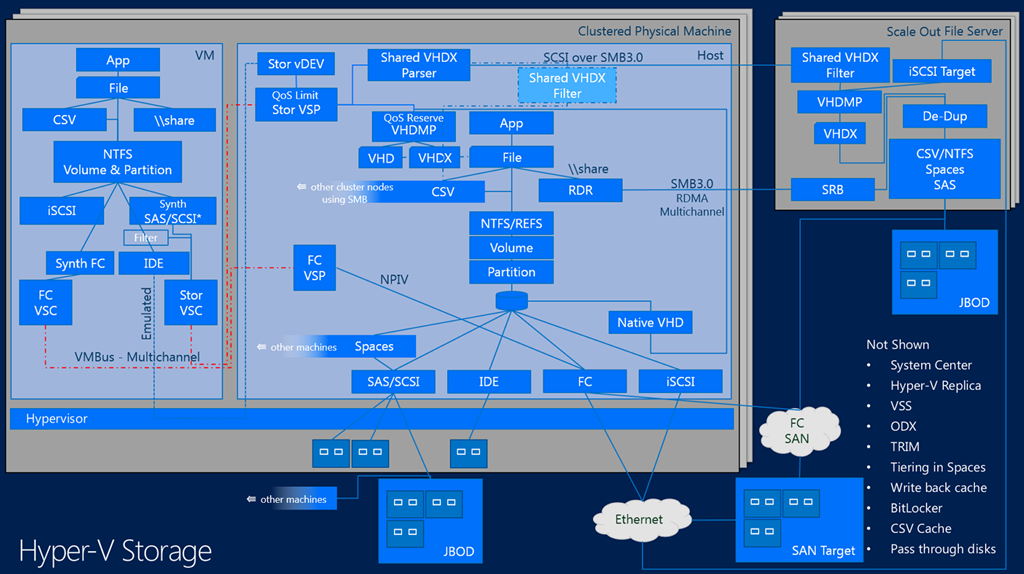
The Minimum IOPS, also known as the Reserve is set per virtual disk but the threshold alerts for it are generated by the VHDMP. This is the VHD/VHDX parser and dependency property provider and this know all about the VHD/VHDX format with in itself is again a file on storage (DAS, CSV, SMB 3.0 File Share). This also happens to be where the Storage IO Balancer lives with which it collaborates, more on that below. You now see why QoS is not available for pass-through disk or iSCSI/FC storage in a VM, it requires a VHDX and is implemented at the virtual disk layer.
The QoS Limit (Maximum IOPS) is set at the virtual disk level via the Stor VSC and the Qos Limiter lives in the Stor VSP.
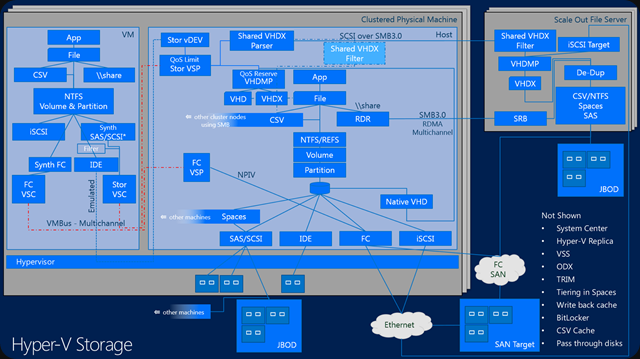
So what do we know:
QoS Limit (Maximum IOPS) and QoS reserve (Minimum IOPS) are implemented at the virtual disk layer. So per VHDX in a particular VM. It’s not available yet for shared VHDX, whether on the same host or not.
Unlike QoS Limit (Maximum IOPS), which is a hard cap, QoS reserve (Minimum IOPS) is a best effort not a hard minimum. It’s used to warn us, not as an enforcement. This works at the host level, where it will detect whether the VHDX can get get the minimum IOPS configured or not and can generate alerts if this happens. This tied to the QoS IO Balancer which is improved in R2 but it will still only spreads IOPS across multiple VMs on the same host, making sure they all get a fair share.
The key point here is that this process doesn’t work across multiple hosts in a cluster, over multiple clusters and stand alone member servers that might all be attached to the same storage system. Meaning that on shared, multi purpose storage we might have an issue. What if some VMs in a dedicated 4 node Hyper-V cluster dedicated to SQL Server virtualization is eating away all the IOPS. QoS IO Balancer will give each SQL Server VM a fair share of the IOPS but only within its host in that cluster. But if a VM on another host is consuming all IOPS, that’s out of it’s scope That’s where the max cap comes to the rescue (at the virtual disk level) if you need it. Nice but not perfect. You can see now why the storage QoS minimum is implemented at the VHDMP layer, as this which is where the IO Balancer also lives. The fairness that the IO Balancer gives you a better change that the minimal reserve might be met and if it doesn’t you’ll get notified (you need to listen an react, I hope that’s obvious).
Also don’t forget that if you still have other physical servers that run file services, SQL Server or some data crunching apps you will find that those are blissfully ignorant of your QoS IO Balancer at the Hyper-V host level and of your QoS at the Hyper-V virtual disk level.
There is no multiple host QoS, there is no cluster wide QoS and there is no storage wide QoS in Windows. Perhaps you have some QoS your SAN but most of the time this has no knowledge of Hyper-V, the cluster and the virtual machines.
So the above this gives you an idea where does Microsoft might focus it’s attention in regards to storage IOPS management (there are many more storage capabilities on my wish list) in vNext.
Any other options available today?
Other options are storage that is smart and has knowledge about the workload. This is nice but that means that it will come at a cost. For the moment GridStore with it’s virtual controller seems to be one of the better ones out there. Now I have heard people say Microsoft doesn’t get it and they’re doing do a bad job, but I do not agree. I have spoken to many people in the community and at MSFT and they have stated, even publicly, on stage, that they will keep investing in storage feature to enhance it in the versions to come. Take a look here at TechEd 2013 Session MDC-B345: Windows Server 2012 Hyper-V Storage Performance.
Why would I like Microsoft to keep improving storage
When talking to storage vendors serving our needs, I always have some feedback. A lot of the advanced storage features don’t always work well in real life, especially if you combine a few. Don’t believe me? Talk to some experienced Windows engineers about the sorry state of many hardware VSS providers. Or how federation across storage systems falls apart the moment you combine it with application consistent snapshots or put a real heavy load on it. Not to cool when you paid for all those licenses which are tuned into “lab only” toys. Yes sometimes as a Windows user you feel like a second class citizen in storage land. A lot of storage systems are still very much a silo. Attempts to do storage federation without a hit on performance, making it load balance across SAN building blocks whilst making all the advanced features that have knowledge of the OS and hypervisor work reliably are not moving as fast as the race for ever more IOPS.
Sure I love the notion of 2 million IOPS, especially if you can get them with random write/read IO at super low latencies  . But there are other, sometimes more urgent needs and those seem to fall between the cracks as the storage vendors compete with each other and forget about the needs of their customers. If some storage vendors would shut up long enough to listen to customers they might be less surprised as to why those customers are interested in Storage Spaces.
So it would be kind of nice if Microsoft can work on this an include more evolved storage QoS capabilities in the box. I also like that approach for other reasons. Basically we will do everything we can with what Windows offers us inbox. It’s cost effective as long as you keep the KISS principle in mind and design it consciously. I assure you that often too much money is spent on 3rd party software because people don’t leverage what they have in box and drop the 20/80 rule. We do and you get the best TCO/ROI for our licenses possible. We don’t spend extra money on licenses, integration and support of third party products so we can spend it where it matters the most. It also makes upgrades easier as the complexity and the number of dependencies are lower on pure in box solution.On top of that we minimalize the distinct possibility that one or more 3rd party products will hold us hostage in an older infrastructure because they don’t support new versions of Windows fast, good and complete enough for us to upgrade.