Full Steam Ahead With Windows 8 & Hyper-V in 2012

Some History

There have been a good number of people who’ve always used, some a lot more and some others a lot less, a bit of Microsoft bashing to gain some extra credibility or try to position other products as superior. Sometimes this addressed, at least, some real challenges and issues with Microsoft products. A lot of the time it doesn’t. I have always found this ridiculous. In the early years of this century I was told to get out of the Microsoft stack and into the LAMP stack to make sure I still had a job in a few years’ time. My reaction was to buy Inside SQL Server 2000 among other technology books Smile. The paradox is that in some cases, like some storage integrators, is that the ones doing the bashing are forgetting that their customers are often heavily invested in the Microsoft stack.

I Still Have A Job

As you might have realized already, I still have a job today. I’m very busy, building more and better environments based on Microsoft technologies. Microsoft does not get everything right. Who does? Sometimes it takes more than a few tries, sometimes they fail. But they also succeed in a lot of their endeavors.They are capable to learn, adapt and provide outstanding results with a very good support system to boot (I would dare say that you get out of that what you put into it). Given the size and nature of the company, combined with IT evolving at the speed of light, that’s not an easy task.

Today that ability translates into the upcoming release of Windows 8. Things like Hyper-V 3.0, the new storage and networking features, the improvements to clustering and the file system are the current state an evolution. A path along Windows 2000 over Windows 2003(R2), to  the milestone Windows 2008 which was improved with Windows 2008 R2. Now, Windows 8 being the next generation improves vastly on that very good and solid foundation. With Windows 8 we’ll take the next step forward in building highly scalable, highly available, feature rich a very functional solutions in a very cost effective manner. On top of that we can do more now than ever before, with less complexity and with affordable  standard hardware. If you have a bigger budget, great, Windows 8 will deliver even more and better bang for the buck if and when your hardware vendors get on the band wagon.

Windows 8 & Storage

One of the things the Windows BUILD Conference achieved is that it wanted me to buy hardware that I couldn’t get yet. Just try asking DELL or HP for RDMA support on 10Gbps and you get a bit of a vacant blank stare.

Another thing is that it made me look at our storage roadmap again. One of the few sectors in IT that are still very expensive is storage. Some of the storage vendors might start to feel a bit like a major network gear vendor. You know the one that has also seen the effects of serious competition by high quality but lower cost kit. Just think about what Storage Pools/Spaces will do for affordable, easy to use and rich storage solutions. Both with standard over the shelf available (read affordable) hardware and with modern SANs that leverage the Windows 8 features there is value. Heath my warning storage vendors. You’re struggling in the SMB market due to complexity, cost and way to much overhead and expensive services. Well it’s only going to get worse. You’ll have to come with better proposals or you’ll end up being high end / niche market players in the future. Let’s face it, if I can buy a super micro chassis with the disks of my choosing I can build my own storage solution for cheap and use Windows 8 to achieve my storage needs. Perhaps is 80/20 but hey, that’s great. It’s not that much better with more expensive solutions (vendor disks are ridiculously over priced) and the support process is sometimes a drain on your workforce’s time and motivation. And yes you paid for that. Compare this with being able to buy some spare parts on the cheap and having it all available of the shelf with the vendors. No more calls, no more bureaucratic mess for return parts, nor more IT illiterate operators to work through before you reach support that can be sub standard as well. Once you reach a certain level of hardware quality there is not that much difference any more except for price and service. Granted, some vendors are better at this then others. The really big ones often struggle getting this right.

I’ve been in this business long enough to know that all stuff breaks. SLAs are fine for lawyers and for management. CYA is part of doing business. But for the IT Pro in the field you need reliable people, gear and services.  On top of that you have to design for failure. You know things will break. So it should be a cheap, easy and fast as possible to fix while your design and architecture should cope with the effects of a failure. That’s what IT Pros need and that what’s keeps things running (not that SLA paper in the mailbox of your manager).

Show the Windows customers a bit more love than you have done in the past. Some in the storage industry tend to like to look down on the Windows OS. But guess what, it is your largest customer base. Unless you want to end up in the same niche as a very expensive personal trainer for Hollywood stars (tip: there’s not a huge job market there) you’d better adjust to new realities. A lot of them are doing that already , some of them aren’t. To those: get over it and leverage the features in Windows 8. You’ll be able to sell to a more varied public and at the high end you’ll have even better solutions to offer. Today I notice way to many storage integrators who haven’t even looked at Windows 8. It’s about time they started … really, like today. I mean how do you want to sell me storage today if you can’t answer my queries on Windows 8 & System Center 2012 support and integration? To me this is huge! I want to know about ODX, RDMA, SMI-S and yes I want you to be able to answer me how your storage deals with CSVs. You should know about the consumption of persistent ISCSI-3 reservations and a rock solid hardware VSS provider. If you can do that it creates the warm fuzzy feeling a customers need to make that leap of faith.

When I look at the network improvements in Windows 8. Things like RDMA, SMB 2.2; File Transfer Offload and what that means for file sharing and data intensive environments I’m pretty impressed. Then there is Hyper-V 3.0 and it many improvements. Only a fool would deny that it is a very good, affordable & rich hypervisor with a bright future as far as hypervisors go (they are not the goal, just a means to an end). Live Storage Migration, an extensible virtual switch, monitoring of the virtual switch, Network Virtualization, Hyper-V Replica, … it’s just too much to mention here. But hop on over to Windows 8 Hyper-V Feature Glossary by Aidan Finn. He’s got a nice list up of the new features relevant to the Hyper-V crowd. Again, we see improvements for all business sizes, from SMB to enterprise, including the ISPs and Cloud providers. Windows 8 is breaking down barriers that would interdict it’s use in various environments and scenarios. Objections based on missing features, scalability, performance or security in multi tenancy environments are being wiped of the map. If you want to see some musing on this subject just look at Group Video Interview: What is your favorite Hyper-V feature in Windows 8?.

2012 & Beyond

Hyper-V is growing. It’s already won a lot of hearts and minds of many smaller Microsoft shops but it’s also growing in the enterprise. The hybrid world is here when you look at the numbers, even if it’s not yet the case in your neck of the woods. Why? Cost versus features. Good enough is good enough. Especially when that good is rather great. On top of that the integration is top notch and it won’t cost you a fortune and save you a lot of plumbing hassle.

Basically everyone can benefit from all this. You’ll get more and better at a lesser or at least a more affordable cost. Even if you don’t use any Microsoft technologies you’ll benefit from the increased competition. So everyone can be happy.

Microsoft Management Summit 2012

From the 16th of April until the 20th of April 2012 Microsoft is running animportant conference for anyone who’s involved with systems management in the Microsoft sphere. It is, of cause, the Microsoft Management Summit 2012 (MMS 2012) in Las Vegas (Nevada, USA).

image

This is a conference that is held in very high regard and I’ve heard through the grape vines it’s one of the favorite conferences for Microsoft Employees to attend themselves due to its high quality and focus on the System Center suite. I’ve never had the opportunity to attend before and I would like to go.

It’s very likely that the System Center 2012 Suite of products will be officially launched at MMS 2012 and there will be an abundance of learning opportunities in regards to these. As said above, I’d really love to go and I encourage anyone who can make it to attend. Yes, I know it’s in the United States, so for us non US residents that can mean long and expensive travel and we’ll need a budget to stay in Las Vegas for a week. But it’s the only conference of its kind. There is no MMS Europe and such. Although I have to say that with initiatives like “Best of MMS” TechNet events Microsoft & the community make an effort to deliver content and information to a much larger audience, which is great.

If you’re in the target group for this conference and you’re interested take a look here. They even have cost/benefit sheet to help convince your management Winking smile

Now a lot of you are already be playing with the System Center 2012 Betas and Release Candidates but if you’re not  you might want to get a head start by downloading the System Center 2012 Evaluation Products and perhaps even by joining the Community Evaluation Program for System Center 2012 (Private Cloud) and Configuration Manager 2012.

I’m an MVP–What a Great Start Of 2012

Microsoft presented me with the 2012 Microsoft® MVP Award under the Virtual Machine expertise. If you’d like to know a bit more about the MVP Program and the Award you can take a look here http://mvp.support.microsoft.com/gp/aboutmvp

This is special to me, and I’m honored by it. It’s very nice to get such recognition both from your peers in the community and from Microsoft for sharing your experiences and knowledge for the better good. This doesn’t mean I’m an "know all, end all" guru, far from it. No one knows everything or never makes mistakes. To me it does mean my peers think highly enough of me so that they are willing to nominate me and serve as a reference for my skill set and contributions. That by itself is a huge compliment but I’m grateful to have the opportunities to learn a lot and for that I owe some thanks. I learn a lot from participating in a world wide community that shares experiences & knowledge. The amount of skills that these people bring to the table and the wealth of information that is shared by all is enormous. ”The community” is a varied group of experts in their own areas of excellence.

  • Some are (sometimes long time) MVPs like Aidan Finn, Hans Vredevoort, Jaap Wesselius, Jetze Mellema, Kurt Roggen, Mike Resseler, Kristian Nese, Carsten Rachfahl.
  • Naturally there are the Microsoft employees, both locally and abroad, with whom I’ve had the pleasure of working on support & business cases and who’ve probably vouched for me when asked to do so.
  • Then there is the interaction with community members like Ronnie Isherwood, Jeff Wouters, Dave Stork, Peter Noorderijk, Maarten Wijsman, Rick Slager and my blog readers , and a lot of the  people who follow me on twitter (Ronny Pot, J. Wolfgang Goerlich, Kevin Ball, Kenneth, …) and so many other I’m probably forgetting to mention Embarrassed smile. Some of these I’ve had the privilege of meeting in real life and those occasions have always been both educational & fun. Sometimes these meetings turned into an international distributed testing/troubleshooting effort where we all learn something like at TEC 2011.
  • On top of that I have the luck to work with some really nice people both colleagues (Tom, Peter, Karel, Ivan, Sabrina, Jeff – you rock – and thanks for sticking with us through all the sometimes challenging projects). Some are consultants and people I know at other companies that work for or with us.

Together we learn a lot through the need to answer sometimes complex questions and find solutions for the problems at hand. This makes for a great learning school and ongoing education until that day arrives you’re recognized as an expert while you realize more and more how much there is to learn.

Upgrading Exchange 2010 SP1 To SP2

Here is a step by step walk trough of an Exchange 2010 SP2 installation. I needed to document the process for a partner anyway so I might as well throw on here as well. Perhaps it will help out some people. The Exchange Team announced Exchange 2010 SP2 RTM on their blog recently. There you can find some more information and links to the downloads, release notes etc. You will also note that the Exchange 2012 TechNet documentation has SP2 relevant information added. if you just want to grab the bits get them here; Microsoft Exchange Server 2010 Service Pack 2 directly from Microsoft
 
Exchange 2010 SP1 and SP2 can coexist for the time you need to upgrade the entire organizations. Once you started to upgrade it’s best to upgrade all nodes in the Exchange Organization as fast as you can to SP2. That way you’ll have all of them on the same install base which is easier to support and trouble shoot. Before I did this upgrade in production environments I tested this two time in a lab/test environment. I also made sure  anti virus, backup and other agents dis not have any issues with Exchange 2010 SP2. Nothing is more annoying then telling a customer his Exchange Organization has been upgraded to the lasted and greatest version only to follow up on that statement with the fact the backups don’t run anymore.

You can install Exchange SP2 easily via the setup wizard that will guide you through the entire process. There are some well documented “issues” you might see but these are just about the fact you need IIS 6 WMI compatibility for the CAS role now and the fact that you need to upgrade the Active Directory Schema. Please look at Jetze Mellema’s blog for some detailed info & at Dave Stork’s blog post for consolidated information on this service pack.

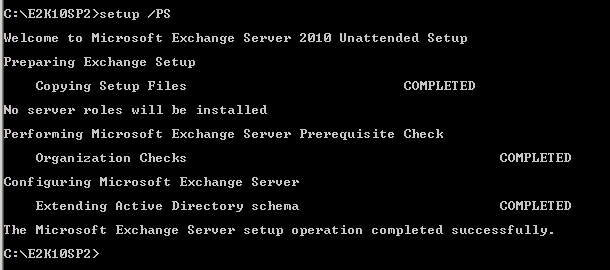
Changing the Active Directory schema is a big deal in some environments and you might not be able to do this just as part of the Exchange upgrade. Perhaps you need to hand this of to a different team and they’ll do that for you using the  command “setup /prepareschema” as shown below.

image

You’ll have to wait for them to give you the go ahead when everything is replicated and all is still working fine. Below we’ll show you how you can do it with the setup wizard.

Order of upgrade is a it has been for a while

  1. CAS servers
  2. HUB Transport servers
  3. If you run Unified Messaging servers upgrade these now, before doing the mailbox servers
  4. Mailbox servers
  5. If you’re using Edge Transport servers you can upgrade them whenever you want.

Let’s walk through the process with some additional information

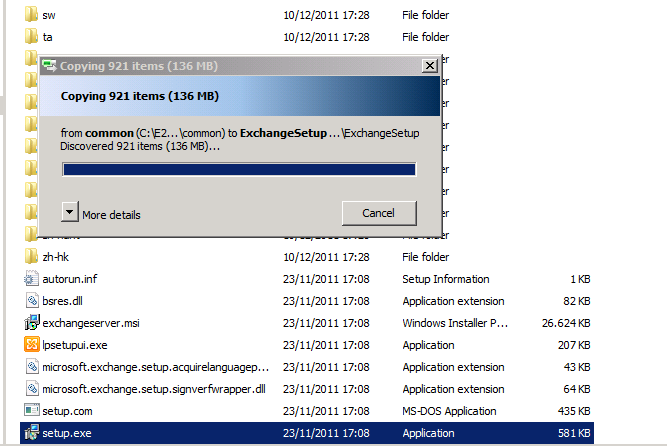
Once you’ve download the bits and have the Exchange2010-SP2-x64.exe file click it to extract the contents. Find the  setup.exe and it will copy the files it needs to start the installation.

image


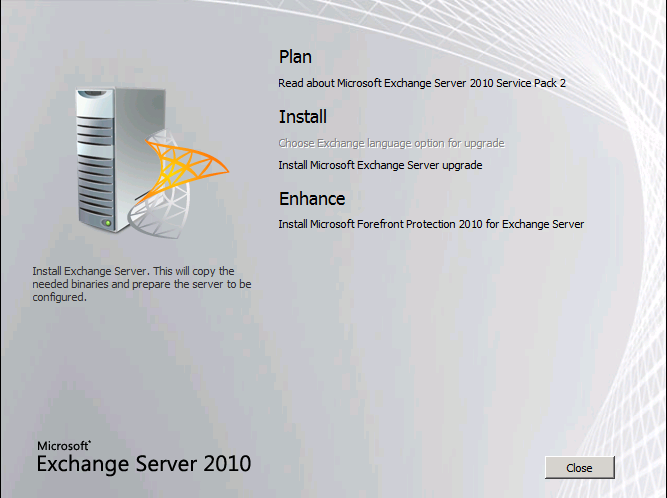
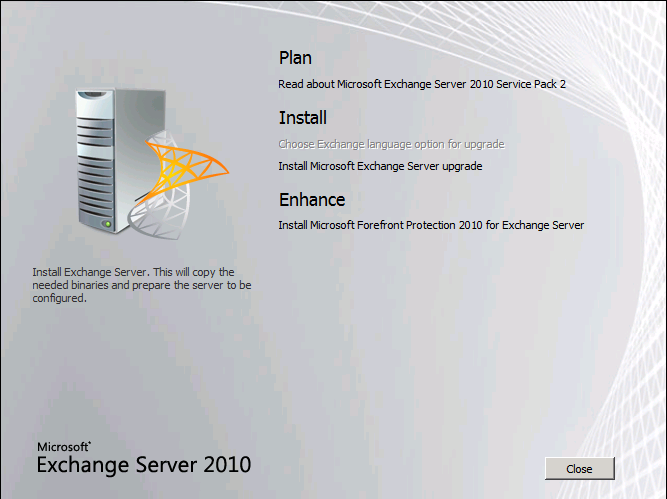
You then arrive at the welcome screen where you choose “Install Microsoft Exchange Server Upgrade”

image


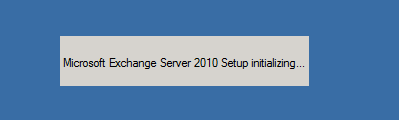
The setup then initializes

image


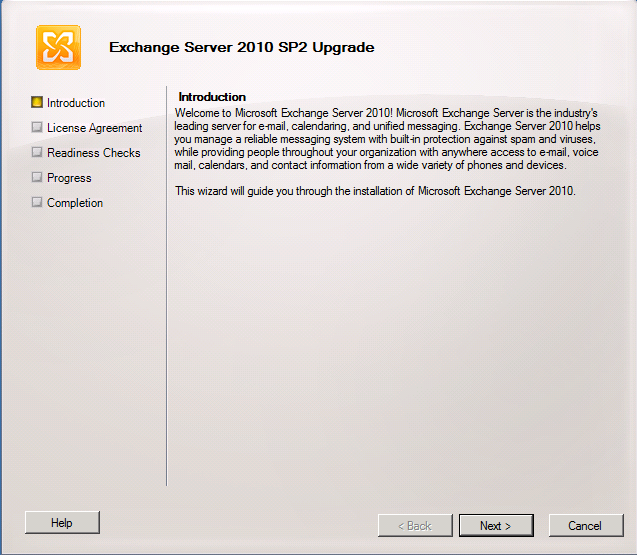
You get to the Upgrade Introduction screen where you can read what Exchange is and does Smile. I hope you already know this at this stage. Click Next.
image


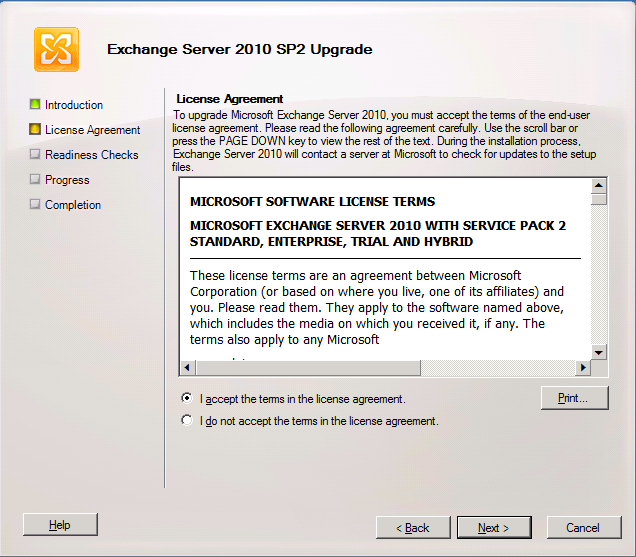
You accept the EULA

image


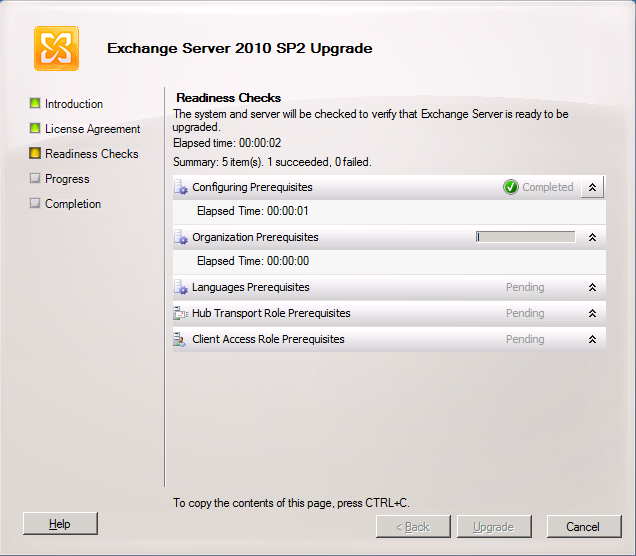
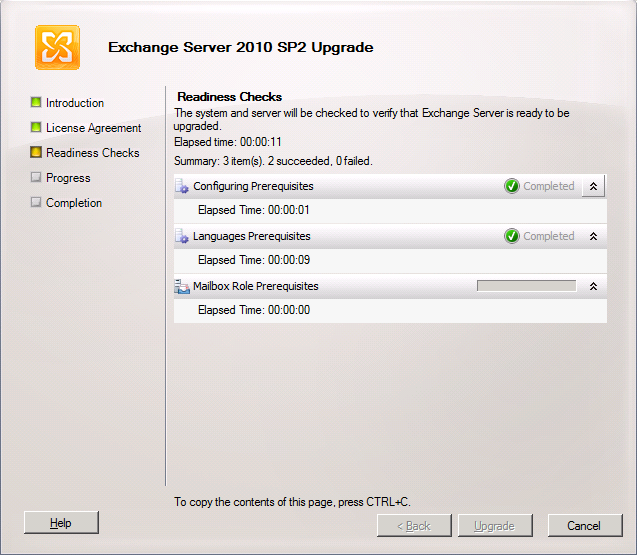
And watch the wizard run the readiness checks

image


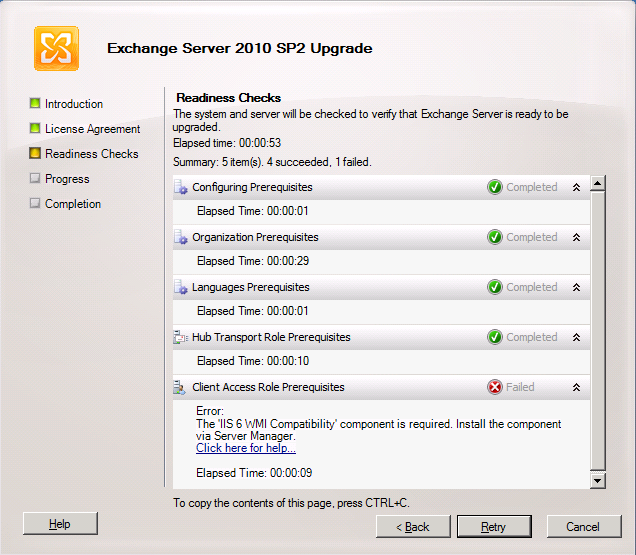
In the lab we have our CAS/HUB servers on the same nodes, so the prerequisites are checked for both. The CAS servers in Exchange 2010 SP2 need the IIS 6 WMI Compatibility Feature. If you had done the upgrade from the CLI you would have to run SETUP /m:upgrade /InstallWindowsComponents and you would not have seen this error as it would have been taken care of installing the missing components. When using the GUI you’ll see the error below.

image

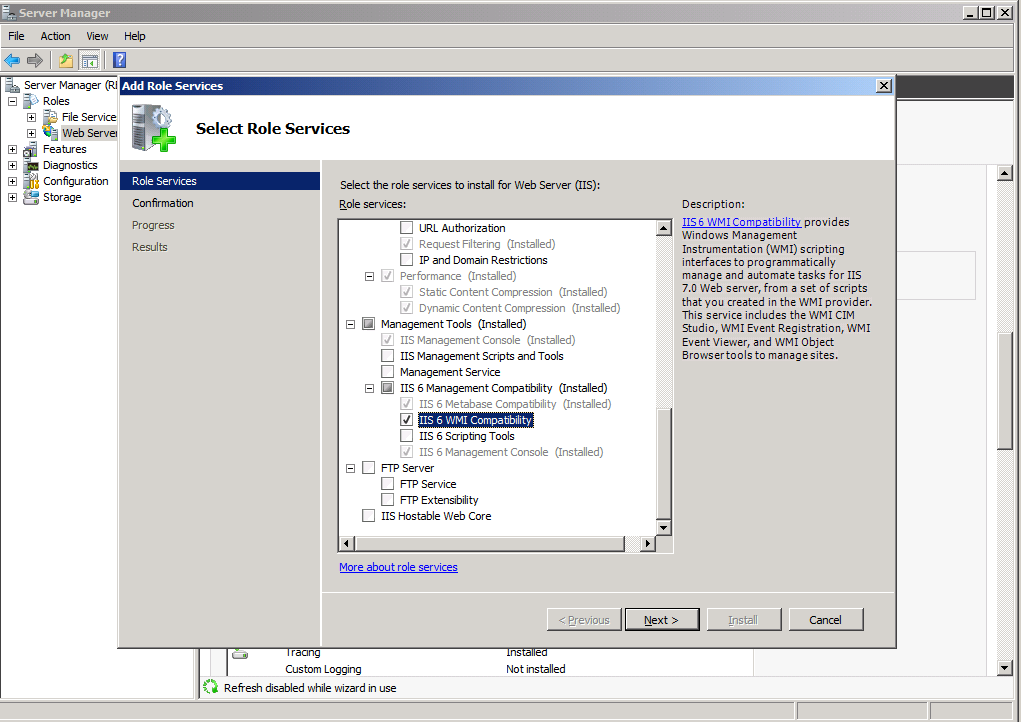
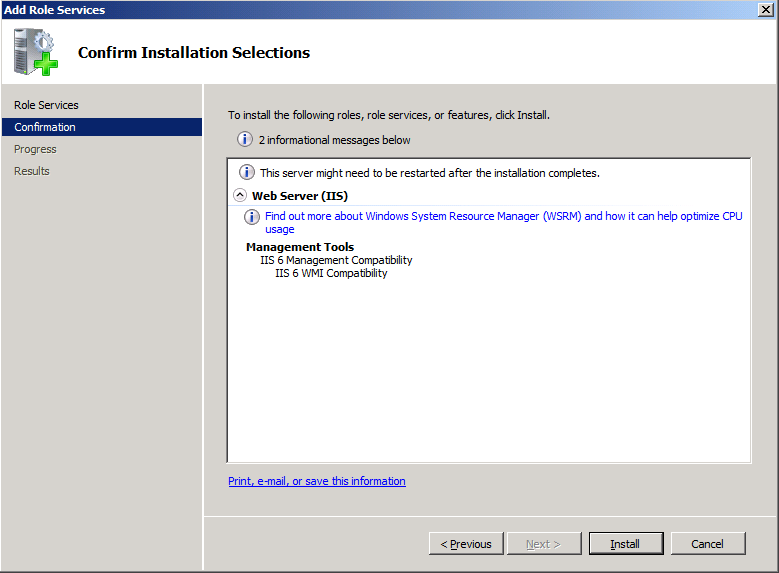
You can take care of that by installing this via “Add Role Services” in Server Manager for the Web Server (IIS) role.

image

image

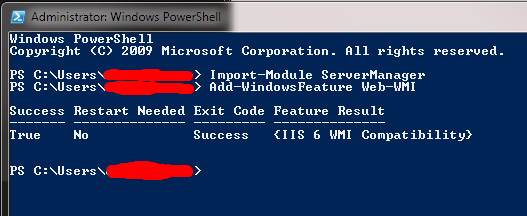
Or you can use our beloved PowerShell with the following commands:

  • Import-Module ServerManager
  • Add-WindowsFeature Web-WMI.

image

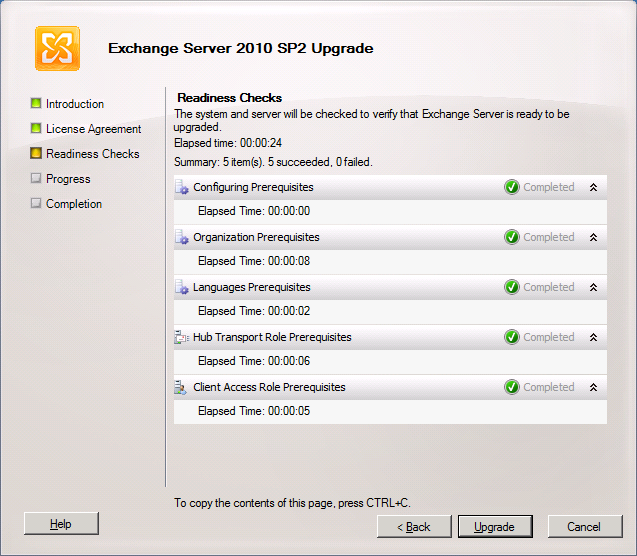
Now we have the IIS 6 WMI compatibility issue out of the way we can rerun the readiness checks and we’ll get all green check marks.

image

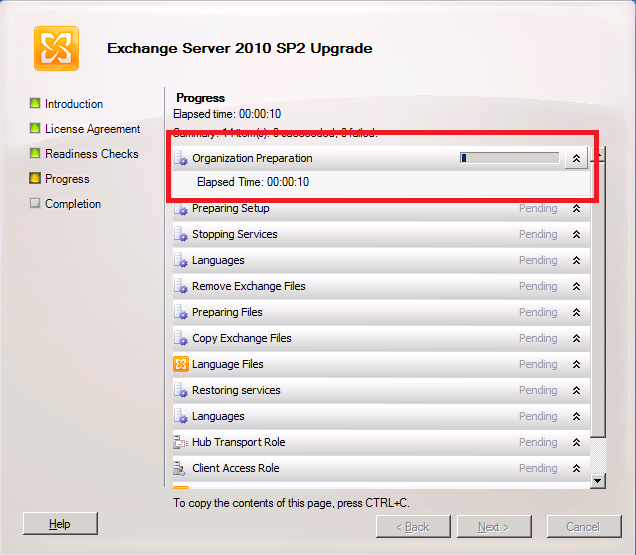
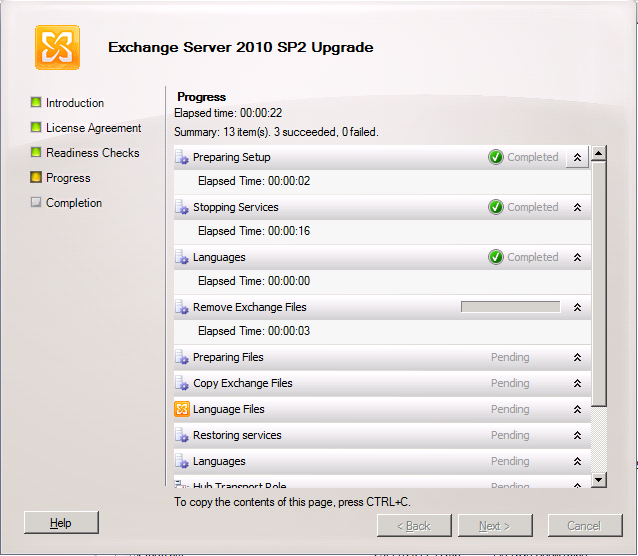
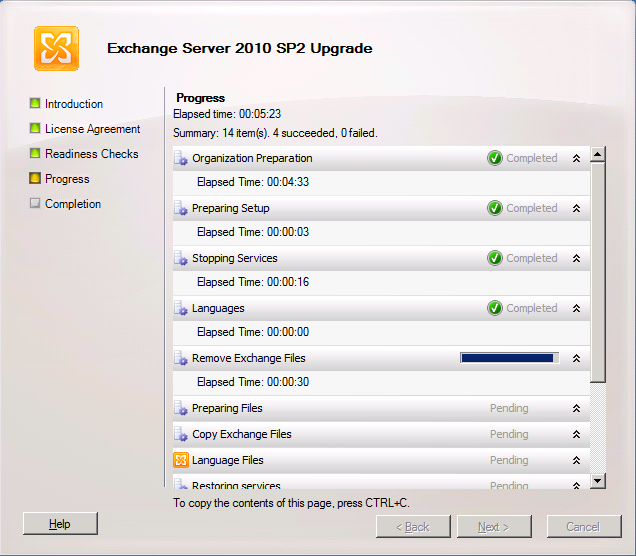
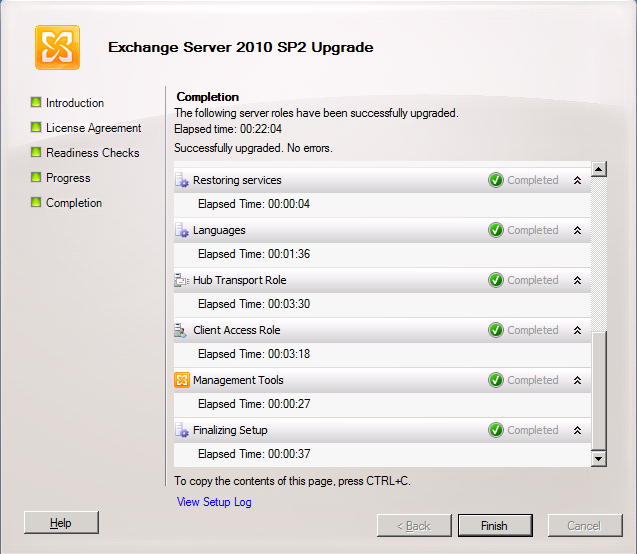
So we can click on “Upgrade” and get the show on the road. The first thing you’ll see this step do is “Organization Preparation”. This is the schema upgrade that is needed for Exchange 2010. If you had run this one manually it would not have to this step and you’ll see later it only does is for the first server you upgrade (note that it is missing form the second screen print, which was taken from the second CAS/HUB role server). I like to do them manually and make sure Active Directory replication has occurred to all domain controllers involved. If I use the GUI setup I give it some time to replicate.

Intermezzo: How to check the schema version

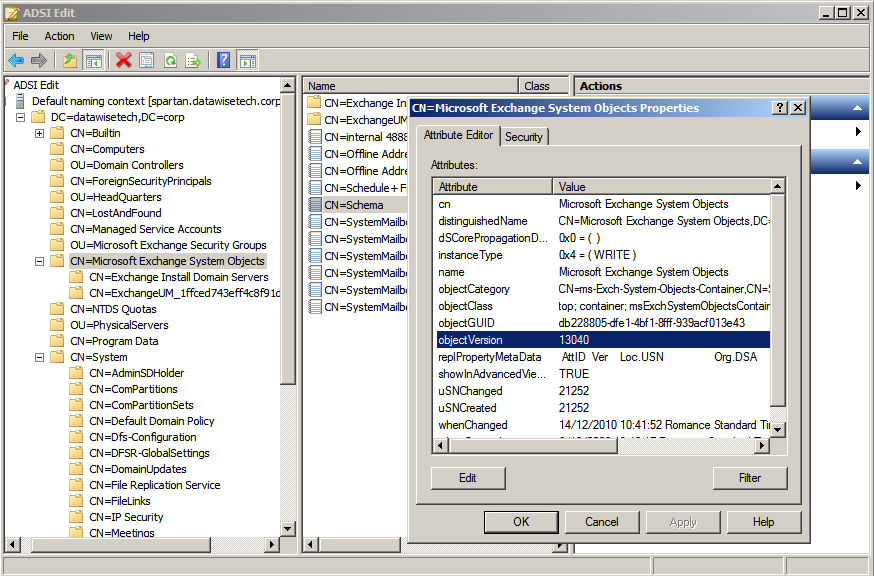
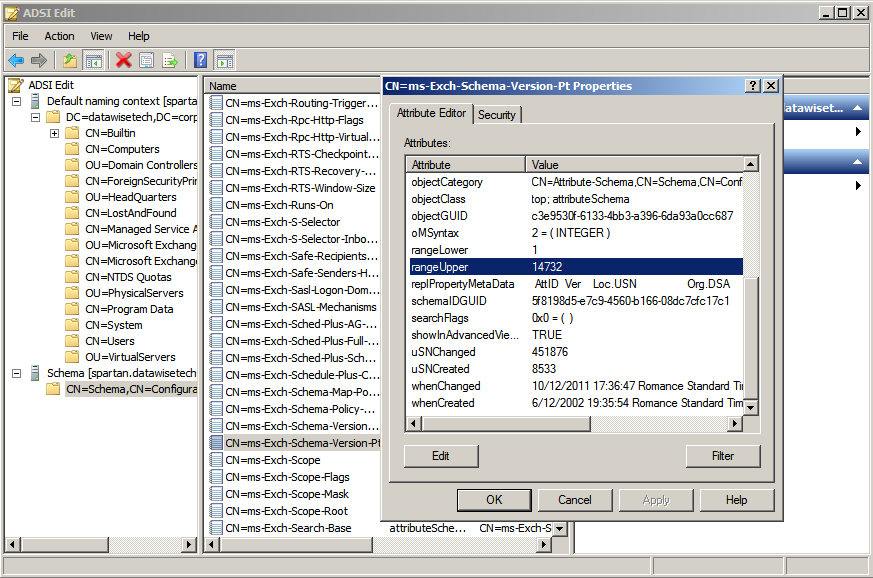
You can verify after having run SP2 on the first node or having updated the schema manually that this is indeed effective by looking at the properties of both the domain and the schema via ADSIEdit or dsquery.

The value for objectVersion in the properties of “CN=Microsoft Exchange System Objects” should be 13040. This is the domain schema version. Via dsquery this is done as follows: dsquery * “CN=Microsoft Exchange System Objects,DC=datawisetech,DC=corp” -scope
base -attr objectVersion

image

The rangeUpper property of “CN=ms-Exch-Schema-Version-Pt,cn=schema,cn=configuration,<Forest DN>” should be 14732. You can also check this using dsquery * CN=ms-Exch-Schema-Version-Pt,cn=schema,cn=configuration,<Forest DN> -scope base –attr rangeUpper tocheck this value

image

Note that you might need to wait for Active Directory replication if you’re not looking at the domain controller where the update was run. If you want to verify all your domain controllers immediately you can always force replication.

Step By Step Continued

First CAS/HUB roles server (If you didn’t upgrade the schema manually)

image

Additional CAS/HUB roles server

image

… it takes a while …

image

But then it completes and you can click “Finish”

image

We’re done here so we click “Close”

image

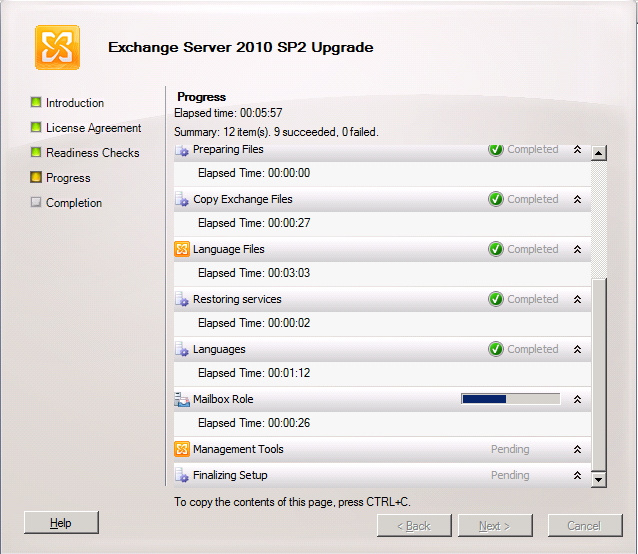
When you run the setup on the other server roles like Unified Messaging, Mailbox and Edge the process is very similar and is only different in the fact it checks the relevant prerequisites and upgrades the relevant roles. An example of this is below for a the mailbox role server.

image

image

In DAG please upgrade all nodes a.s.a.p. and do so by evacuating the databases to the other nodes as to avoid service interruption. The process to upgrade DAG member is described here: http://technet.microsoft.com/en-us/library/bb629560.aspx

  • Upgrade only passive servers Before applying the service pack to a DAG member, move all active mailbox database copies off the server to be upgraded and configure the server to be blocked from activation. If the server to be upgraded currently holds the primary Active Manager role, move the role to another DAG member prior to performing the upgrade. You can determine which DAG member holds the primary Active Manager role by running Get-DatabaseAvailabilityGroup <DAGName> -Status | Format-List PrimaryActiveManager.
  • Place server in maintenance mode Before applying the service pack to any DAG member, you may want to adjust monitoring applications that are in use so that the server doesn’t generate alerts or alarms during the upgrade. For example, if you’re using Microsoft System Center Operations Manager 2007 to monitor your DAG members, you should put the DAG member to be upgraded in maintenance mode prior to performing the upgrade. If you’re not using System Center Operations Manager 2007, you can use StartDagServerMaintenance.ps1 to put the DAG member in maintenance mode. After the upgrade is complete, you can use StopDagServerMaintenance.ps1 to take the server out of maintenance mode.
  • Stop any processes that might interfere with the upgrade Stop any scheduled tasks or other processes running on the DAG member or within that DAG that could adversely affect the DAG member being upgraded or the upgrade process.
  • Verify the DAG is healthy Before applying the service pack to any DAG member, we recommend that you verify the health of the DAG and its mailbox database copies. A healthy DAG will pass MAPI connectivity tests to all active databases in the DAG, will have mailbox database copies with a copy queue length and replay queue length that’s very low, if not 0, as well as a copy status and content index state of Healthy.
  • Be aware of other implications of the upgrade A DAG member running an older version of Exchange 2010 can move its active databases to a DAG member running a newer version of Exchange 2010, but not the reverse. After a DAG member has been upgraded to a newer Exchange 2010 service pack, its active database copies can’t be moved to another DAG member running the RTM version or an older service pack.

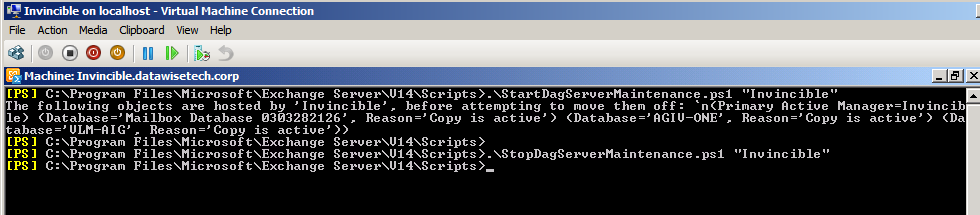
Microsoft provides two PowerShell scripts to automat this for you. These scripts are StartDagServerMaintenance.ps1 and StopDagServerMaintenance.ps1 to be found in the C:Program FilesMicrosoftExchange ServerV14Scripts folder. Usage is straight forware just open EMS, navigate to the scripts folder and run these scripts for each DAG member like below.

  1. .StartDagServerMaintenance –ServerName “Invincible”
  2. Close the EMS other wise PowerShell will hold a lock files that need to be upgraded (same reason the EMC should be closed) and than upgrade of the node in question
  3. .StopDagServerMaintenance –ServerName “invincible”

image

Voila, there you have it. Happy upgrading. Do you preparations well and all will go smooth.