After an initial false start (https://blog.workinghardinit.work/2011/01/14/windows-2008-r2-windows-7-sp1-rtm-today/) Window 2008 R2/Windows 7 Service Pack 1 has been officially RTMed today . SP1 brings Dynamic Memory& RemoteFX to hyper-V virtualization. I’m probably doing a SQL Server virtualization project and thus I’m very interested in the ability to disable NUMA spanning (watch Ben Armstrong’s Tech Ed 2010 presentation here) http://blogs.msdn.com/b/virtual_pc_guy/archive/2010/06/10/talking-about-dynamic-memory-the-movie.aspx) when beneficial to do so . Which is good news. Until now SQL Server Hyper-V host where better of using machine with lesser CPU sockets & and SSL server VM’s that don’t consume more RAM than that CPU socket can address directly to avoid this. Until now, for the environment at hand, I’m leaning to virtualizing SQL Server on it’s own Hyper-V cluster for that reason. It will have to be confirmed in a test environment to see how big the impact is. Systems do differ and get better every year. Perhaps I’ll get back to that subject later. Anyway The bits should be on TechNet/MSDN on February 16th 2001 and available to the general public on February 22 2011. Read the announcement by Microsoft here Windows Server 2008 R2 and Windows 7 SP1 Releases to Manufacturing Today
Category Archives: Hyper-V
Shameless Plug For Mastering Hyper-V Deployment By Aidan Finn
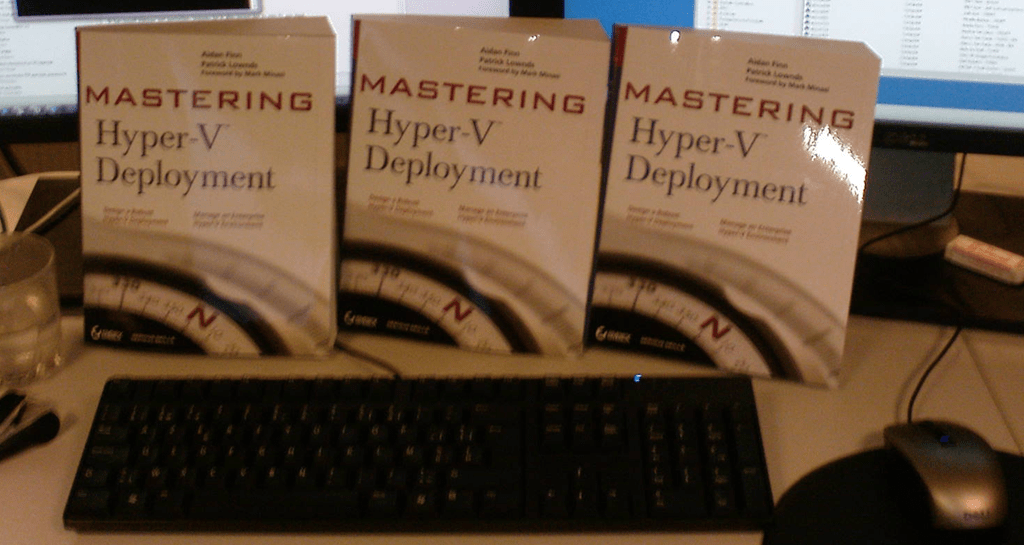
In October 2010 Aidan Finn (MVP) his book “Mastering Hyper-V Deployment” was released and in November three copies of this book landed on my desk. I bought them (pre order) via Amazon. Nope I did not get them as a gift or anything. Why Three? Well that’s the number of people I wanted to get up to speed about Hyper-V and virtualization management and operations in a Microsoft environment.
His book takes you along a journey through a Hyper-V project that will teach you about virtualization in all it’s aspects. It also touches on many supporting technologies and products such as System Center Virtual Machine Manager 2008 R2, System Center Essentials 2010, Data Protection manager 2010 and System Center Operations Manager 2007 R2. No one book can be the only source of knowledge and understanding, but using this book as a start for both new and experienced IT Pros to learn about virtualization with Hyper-V will give you the best possible start. Consider it going to an Ivy league college on a scholarship paid for by Aidan’s experience and hard work. The subsidized tuition fee is the price of the book.
We feel a bit sorry that Aidan only got one copy so we made a group picture of the gang of three on the desk of our newest team member. He got a copy of the book together with 4 recycled PC’s and a TechNet subscription to build a lab.

If you know people who want or need to learn about Hyper-V, you’d do well to make sure they get this book and have them set up a lab to play with the technologies. Those efforts will pay off big time when they implement their solutions in the wild. If Ireland is doomed it won’t be because of smart & hardworking Irish IT professionals like Aidan. You see when you design, build and support IT solutions that your customers depend on 24/7 you can not hide behind false promises, you can’t fake away from the fact when “stuff” doesn’t work or hide behind vast amounts of papers & documents void of any substance. Nope, you are responsible for everything and anything you build. Aidan backed and supported by some very knowledgeable colleagues has made that burden a bit lighter for you to bear with this book. Aidan’s blog lives here: http://www.aidanfinn.com/
Building A New Lab For 2011 And Beyond
Well with all this (Hyper-V) Clustering, Virtualization, System Center Suite, Exchange 2010 & Lync, SQL Servers, iSCSI demands on my lab network I really need to refresh my hard ware. It sounds a bit like a paradox but such is life for the people building all this stuff. Yes, they still need some hardware, pretty beefy machines actually, to set it all up, test it, break it, fix it and keep learning. I’ve depleted my 4 years old lab material which in which I can’t put more than 4 GB RAM. Now that I have finished all my infrastructure projects for 2010 I have time to focus on improving my old setup. Or at least I hope. Things are very busy. Thanks to W2K8R2 SP1 beta I could use Dynamic Memory which helped to keep churning away with these and various Exchange setups but now with Lync coming into the picture I want and need an upgrade. A couple of SQL Servers in various high availability setups help eat any remaining resources resources . Add to that the fact that I want to do some private cloud testing so there it is. I need hosts with at least an Intel Quad Core (i7) and at least 16 GB of DDR3 memory. They should have room for extra NIC cards. And I always try to get some speedy disks where it matters. Now since Windows Server 2008 R2 added support for Second Level Address Translation (SLAT), which Intel calls Extended Page Tables (EPT) and which AMD calls Nested Page Tables (NPT) or Rapid Virtualization Indexing (RVI), we can make use of better graphics cards. Until now none of my processors had SLAT support. With the Intel i7 (Nehalem) processor I’m good to go. As all machine in my lab are Intel so I’m sticking with them for Hyper-V migrations as that doesn’t work between brands.
So here’s an logical overview of my setup. This is what I already in place with my current hardware but have now drawn with my coveted hardware refreshment
Oh, yes the dual 1Gbps switches for iSCSI are new for this setup. I’m adding one so I can play with MPIO in the lab.
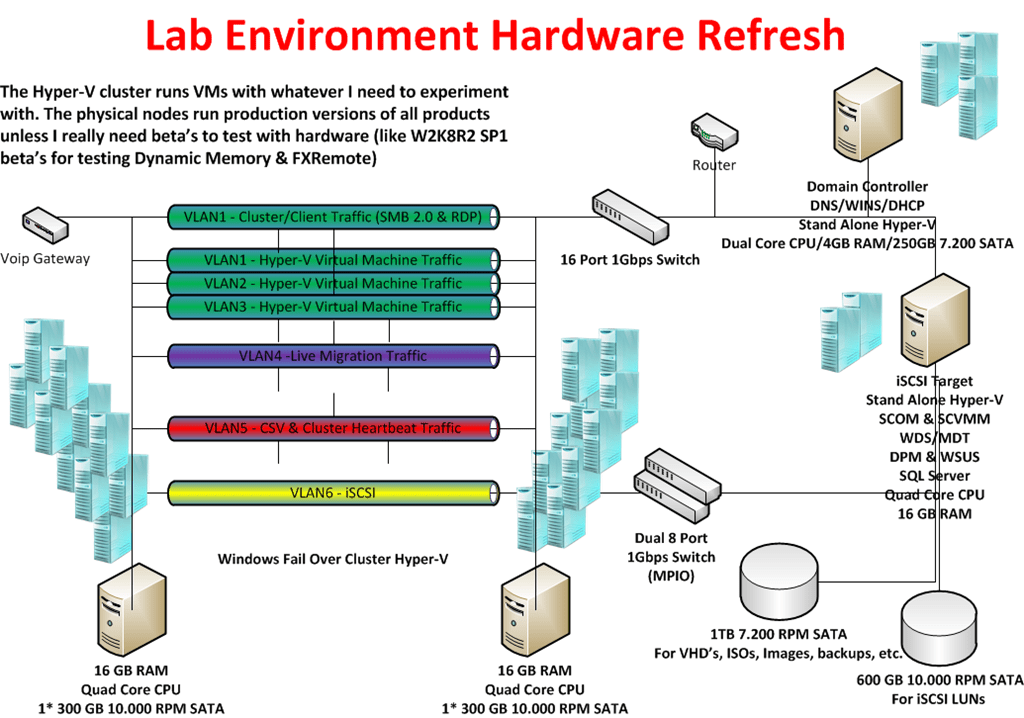
For disks I use 300GB – 16MB – 10.000 rpm and 600GB –32MB – 10.000rpm Raptors in combination with an external eSATA 1TB/2TB Western Digital Black Disk for storage of VHD’s, Images, backups etc. I have to buy some extra now. The faster disks are expensive but a lab environment needs some performance as waiting around for servers & virtual machines becomes a major of annoyance when you need to get work done. The 10.000 rpm disks are great for iSCSI storage for which I use the iSCSI Target from Windows 2008 R2 Storage server via my TechNet subscription.
All this kit should keep me up and running from 2011 until the end of 2014. Is this expensive? Yes and no. I can recuperate my 1 Gbps Intel NIC’s and most of my hard disks. I already have my network switches, monitors and KVM switches. So in all it’s the new motherboards, CPU’s and memory that will eat the most of the budget. It’s a sum to put out but here’s a note to all IT Pro’s out there. You need to invest in yourself every now and then.
I’ve blogged about this before in https://blog.workinghardinit.work/2010/02/04/having-a-lab-using-it/. Self improvement and learning is a continuous process that never ends. Sure it does have some peak moments in financial costs when you need equipment. Remember you don’t need to buy it all at once. Talk to you employer about this if you’re not self employed. Look at how much a 5 day advanced course or a conference costs. You can use a lab to learn and experiment for many years to come. So basically the potential ROI is very good. In the end, what my employers and customers get out of this is knowledge, insight, skills and results. Think about it, it helps to put the investment in perspective. Sure, I invest more than just the hardware, my time which is very valuable to me. You can’t maker more time, everyone has the same 24 hours in a day. Now it really helps if you like this stuff and have fun whilst learning new technologies or setting up a proof of concept. In a way what people put into their job and knowledge is an indicator of their professionalism. You do not become an expert by working 9 to 5 and only learning when a course is provided. It’s not going to happen. Even a genius who puts in the effort stands out amongst his or her peers. The same goes for you, but be smart about it. You can work yourself to death and not accomplish anything. So smart & hard is the way to go.

Windows 2008 R2 SP1 – RemoteFX Hardware To Get The Needed GPU Performance
When the first information about RemoteFX in Windows 2008 R2 SP1 Beta became available a lot of people busy with VDI solutions found this pretty cool and good news. It’s is a very much needed addition in this arena. Now after that first happy reaction the question soon arises about how the host will provide all that GPU power to serve a rich GUI experience to those virtual machines. In VDI solutions you’re dealing with at least dozens and often hundreds of VM’s. It’s clear, when you think about it, that just the onboard GPU won’t hack it. And how many high performance GPU can you put into a server? Not many or not even none depending on the model. So where does the VDI hosts in a cluster get the GPU resources? Well there are some servers that can contain a lot of GPUs. But in most cases you just add GPU units to the rack which you attach to the supported server models. Such units exist for both rack servers and for blade servers. Dell has some info up on this over here here. The specs on the the PowerEdge C410x, a 3U, external PCIe expansion chassis by DELL can be found following this link C410x. It’s just like with external DAS Disk bays. You can attach one or more 1U / 2U servers to a chassis with up to 16 GPUs. They also have solutions for blade servers. So that’s what building a RemoteFX enabled VDI farm will look like. Unlike some of the early pictures showing a huge server chassis in order to make room to stuff all those GPU’s cards the reality will be the use of one or more external GPU chassis, depending on the requirements.