vKernel Adds Tools to Free vOPS Server Explorer 6.3

When it comes to gaining insight and understanding of your virtual environment vKernel has some nifty products. They just added two new utilities, Storage Explorer and Change Explorer, to their free vOPS™ Server Explorer that give you more management capabilities with SCOM/SCVMM or vCenter. Sure it’s to get you looking into and considering buying the paid stuff with more functionality and remediation but it does provide you with tools to rapidly asses your virtualization environment for free as is. So what did they add?

Storage Explorer

  • Gain insight into storage performance and capacity via views across data stores and VMs
  • Identifies critical storage issues such as over commitment, low capacity, high latency, VMFS version mismatch
  • Alerts you to critical VM issues such as low disk space,  latency and throughput issues
  • There’s sorting and searching support

Change Explorer

  • You get a listing of the changes to resource pools, hosts, data stores and VMs within the past week. They also indicate a risk associated with hat change
  • You can search & filter to find specific changes
    • There is a graphical mapping of changes over a time line for rapid reporting/assessment.
    • So if you need some free tools to help you get a quick insight into your environment or the need to be informed about changes of performance issues you can try these out. The press release is here http://www.vkernel.com/press-kits/vops-server-explorer-6-3. We have smaller environment at work next to our main production infrastructure where we’d like to test this out. So they need to add support for SCVMM 2012 SP1 a.s.a.p. I think Smile

      In a world were complexity reduction is paramount and the TCO/ROI needs to be good from day one competition is heating up between 3rd party vendors active in this arena providing tools to make that happen. This is especially true when they are adding more and more Hyper-V support. It also doesn’t hurt to push Microsoft or VMware to make their solutions better.
    Remote File Browsing Issue In Windows Server 2012 Hyper-V Leaves Results Pane Empty Workaround

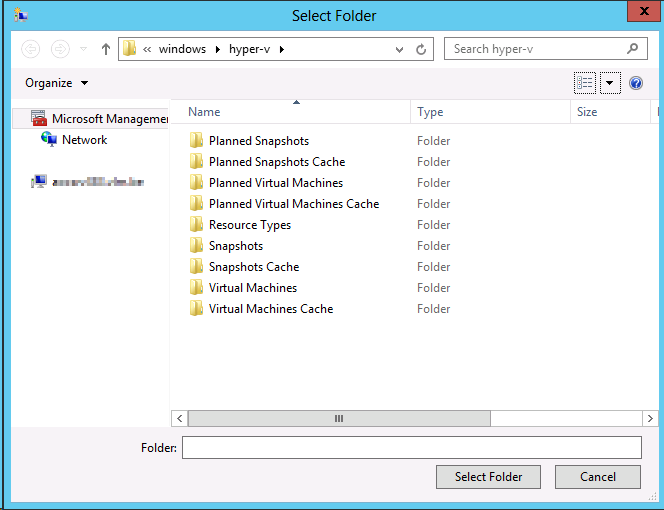
    In Windows Server 2012 the Remote File Browsing functionality for Hyper-V acts ups on some nodes indicating a problem.

    You can read what “Remote File Browsing” is on TechNet here. You use it to browse the file system on a remote Hyper-V server when creating a  new VM there for example.

    Remote File Browsing is a shell namespace extension implemented by Hyper-V, it provides a way to browse the folders/files on remove Hyper-V server without requiring server to open extra shell over the network.

    The path "::{0907616E-F5E6-48D8-9D61-A91C3D28106D}HYPER-V-TEST" is to tell shell (explorer or common file dialog) that it is hosting/pointing to the RemoteFileBrowsing shell namespace extension on the HYPER-V-TEST. The guid is Hyper-V remotefilebrowsing shell namespace extension GUID. However, due to the limitation on common file browser, it is not able to translated into "Hyper-V Remote File Browsing".

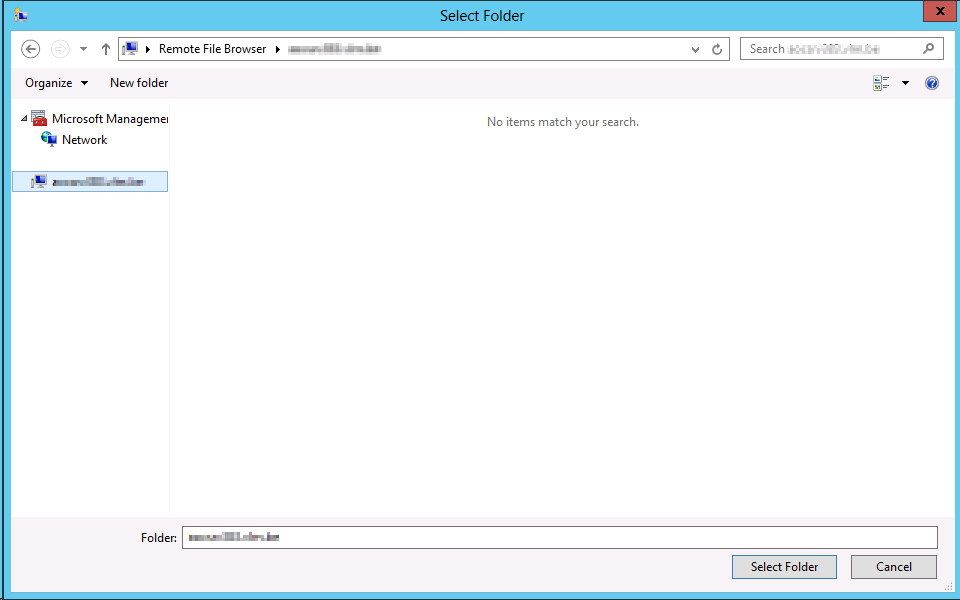
    Now in Windows Server 2012 we sometimes see the following when we use it:

    image

    It seems to work but the result pane remains empty. The cluster is healthy, the nodes are healthy, all nodes are identically configured. Some nodes have it, other don’t. We also can’t find any errors logged anywhere.

    If you try to work around it using the UNC path that will fail due to security issues later so don’t even go there Winking smile

    Basically we were a bit baffled (we could not reproduce it in the lab either) until we saw some posts on then forums, indicating we’re not the only one seeing this.

    http://social.technet.microsoft.com/Forums/en-US/winserverhyperv/thread/608d0c3b-0a7b-4ad9-9843-5e5051dcd526

    http://social.technet.microsoft.com/Forums/en-US/winserverhyperv/thread/7a34f5e1-76bc-493a-8a7a-e9f420bf6a79#d7dd4db7-d7bd-419d-aa72-b12e43cd7a5d

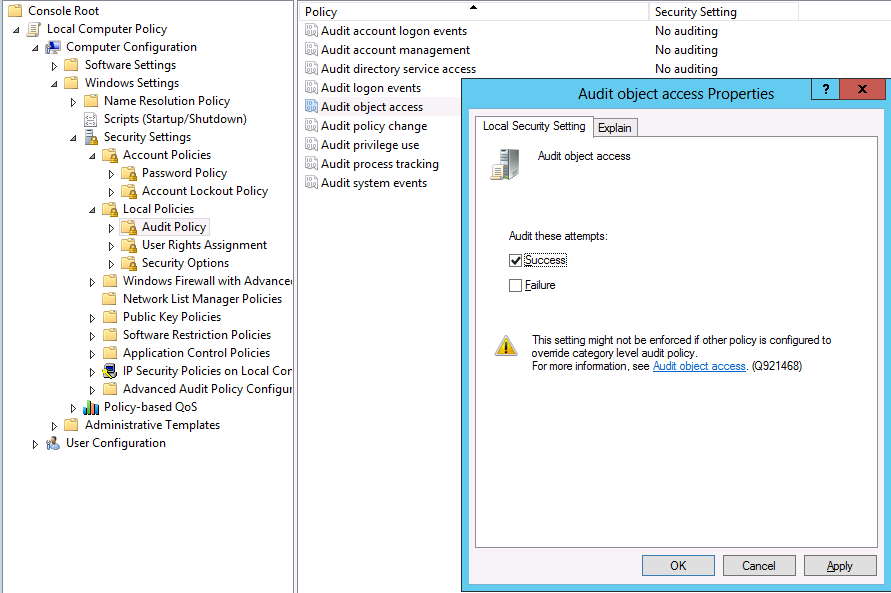
    If you know your cluster is perfectly healthy forget all the security settings stuff and go straight to testing this “fix” or rather workaround: Toggle Audit Object Access on and off.

    In our case I can confirm that these nodes had been under a group policy that audited registry entries during a period that we were trouble shooting network card settings change behavior. We had removed that policy by first reverting the settings to not configured and after some days by removing the GPO. But that didn’t work. Even with no audit policy configured we had to go to all nodes showing this behavior, opening the local Group Policy, toggling our Audit Object Access on for success,applying this and reverting this to No auditing again.

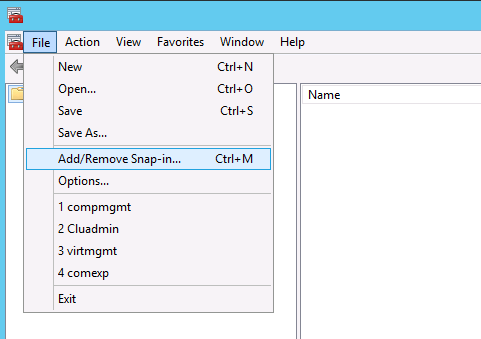
    So fire up an MMC, add a snap-in

    image

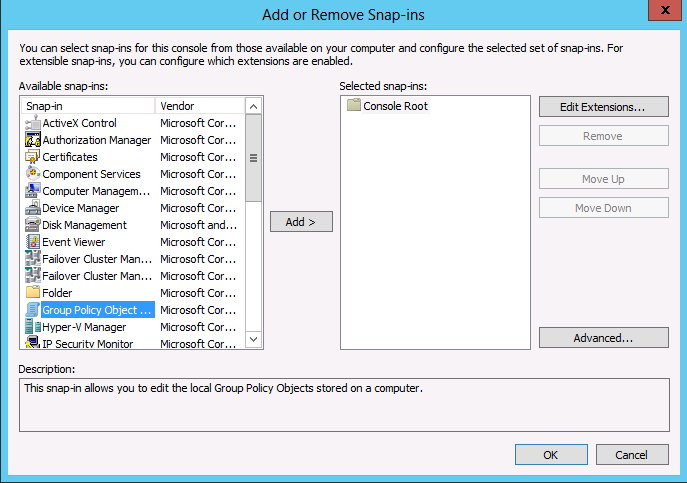
    Select Group Policy Object

    image

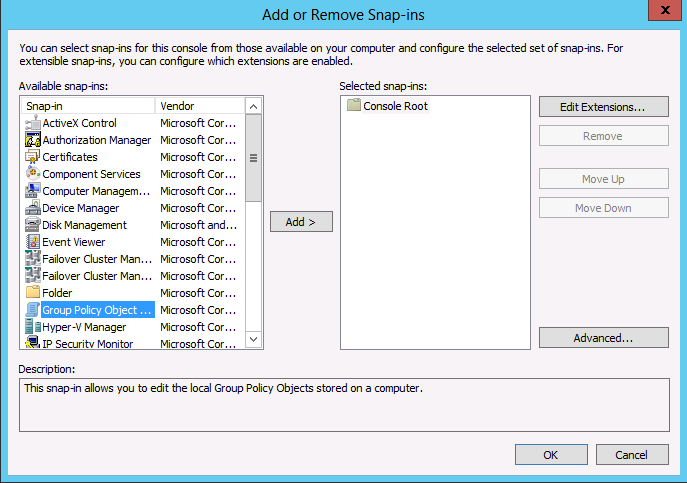
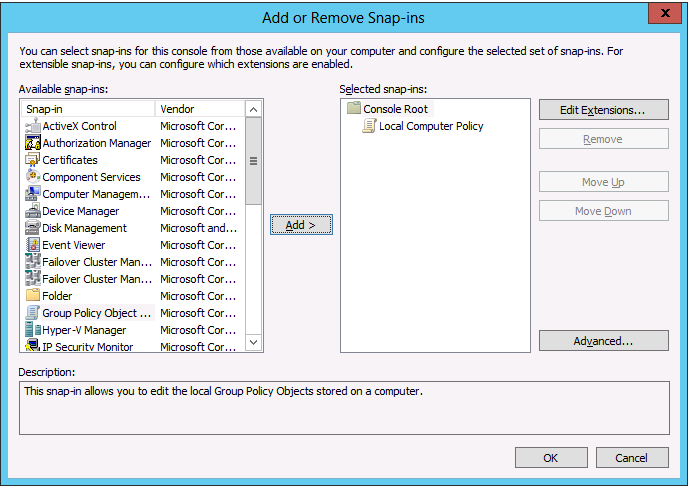
    Accept the defaults

    image

    image

    When don navigate to Computer Configuration -> Windows Settings -> Security Settings -> Local Policy -> Audit Policy -> Audit Object Access

    image

    Now try to use Remote Browser again (close & reopen all wizard windows and start over a new) to see the results:

    image

    Success! All is well again.

    Notes:

    • We only see this on systems remotely connecting to Windows Server 2012 Hyper-V nodes that are running Windows Server 2012 or Windows 8 themselves not on Windows 2008 R2 or Windows 7 with the RSAT for W2K12 installed.
    • This is not related to Windows core alone due to missing GUI components or something.

    E2EVC Hamburg 2012 Video Interview

    In November 2012 during Experts2Experts Virtualization Conference in Hamburg a couple of fellow MVPs (Aidan Finn  aka @joe_elway, Carsten Rachfahl aka @hypervserver, Thomas Maurer aka  @ThomasMaurer) I delivered a keynote and a master class on Windows Server 2012 Hyper-V. During some down time at the conference we took the time to do some podcast interviews with Florian Klaffenbach form Dell aka @FloKlaffenbach.  We also sat down for a video interview on our beloved subject. Carsten Rachfahl was the interviewer/director and did a great job, for which I’d like to thank him in this post as he’s been doing a bunch of them over the years and it’s nice to see the results of the time he puts into them.

    clip_image002

    Subjects include converged networking, migration paths, Cluster Aware Updating and the very capable Windows 8 hypervisor we can now enjoy for free.

    A New Year and it came with a Microsoft MVP Renewal for 2013

    I’m a January 1st MVP. That means that on the 1st January I get an e-mail that brings news of a renewal or not … so apart from celebrating the new year relaxing a bit we also keep an eye on our inbox. This is what arrived just now:

    Dear Didier van Hoye,
    Congratulations! We are pleased to present you with the 2013 Microsoft® MVP Award! This award is given to exceptional technical community leaders who actively share their high quality, real world expertise with others. We appreciate your outstanding contributions in Virtual Machine technical communities during the past year.
    The Microsoft MVP Award provides us the unique opportunity to celebrate and honor your significant contributions and say "Thank you for your technical leadership."

    Mike Hickman
    Director
    Community Engagement
    Microsoft

    Great news to start the new year with. While you get the MVP reward for contributions over the past year to the community I must say that being active in the community is a very rewarding endeavor in itself. For my job I need to figure out a lot of things and I like to share them, including my mistakes, for the benefit of all. Sharing means communication, which leads to questions and discussions that help all of us gain a better knowledge of how things work. It’s not one way traffic. They say there is no better way to learn a subject that to teach it or write a book on it. I think that holds true. Heck, “just” doing a presentation on one subject helps. There’s a constant stream of new capabilities and options that can be leveraged to achieve our goals and being able to discuss these with so many experts from different environments makes a lot of difference in wrapping our heads around it all.

    It also helps me be better at my job. So it also helps my employers. In that respect I have very good bosses. They invest in their people without hesitation. They don’t fear the possibility that we might leave for greener pastures. Instead they focus on getting the best out of us and support this actively. Pretty smart and we all gain something from this, as this makes for a very nice green pasture to stay on and they get knowledgeable, motivated employees.

    I’m very happy and I’m looking forward to seeing many of my fellow MVPs in Redmond in February for the 2013 MVP Global Summit. Last year’s summit was very educational. It was also a blast to meet so many people in real life for the very first time and talk shop. Thank you all for the opportunities, the challenges and the continuous learning journey.

    To conclude I wish all my community buddies and readers a wonderful and happy 2013!