Windows NLB Nodes Misconfigured after Simultaneous Live Migration on Windows Server 2012 (R2)

Here’s the deal. While Windows NLB on Hyper-V guests might seem to work OK you can run into issues. Our biggest challenge was to keep the WNLB cluster functional when all or multiple node of the cluster are live migrated simultaneously. The live migration goes blazingly fast via SMB over RDMA nut afterwards we have a node or nodes in an problematic state and clients being send to them are having connectivity issues.

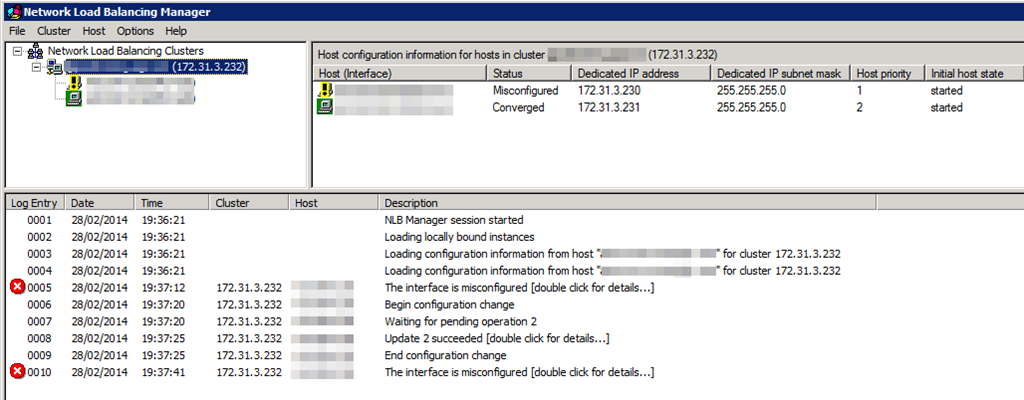
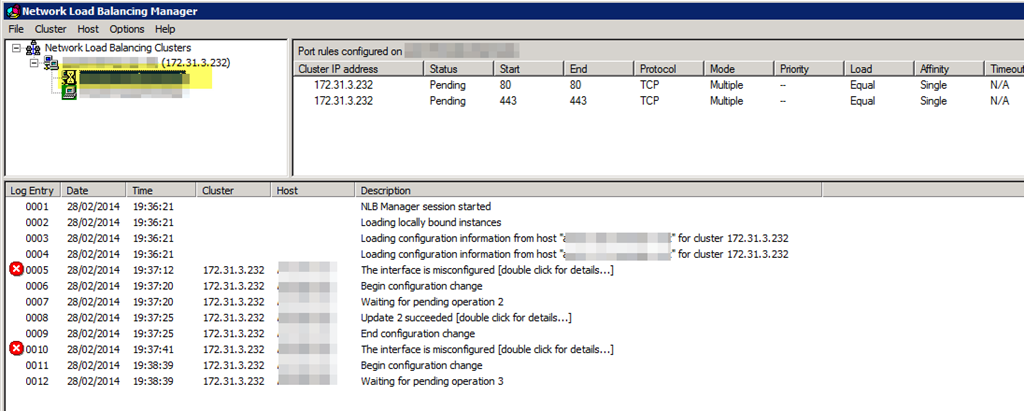
After live migrating multiple or all nodes of the Windows NLB cluster simultaneously the cluster ends up in this state:

image

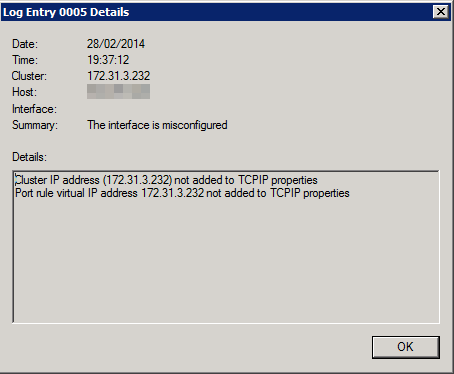
A misconfigured interface. If you click on the error for details you’ll see

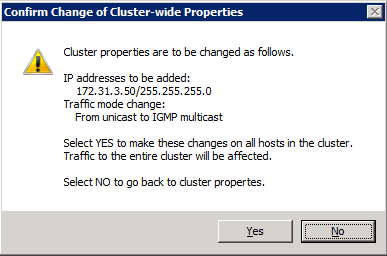
image

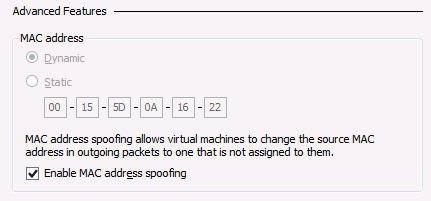
Not good, and no we did not add those IP addresses manually or so, we let the WNLB cluster handle that as it’s supposed to do. We saw this with both fixed MAC addresses (old school WNLB configuration of early Hyper-V deployments) and with dynamic MAC addresses. On all the nodes MAC spoofing is enabled on the appropriate vNICs.

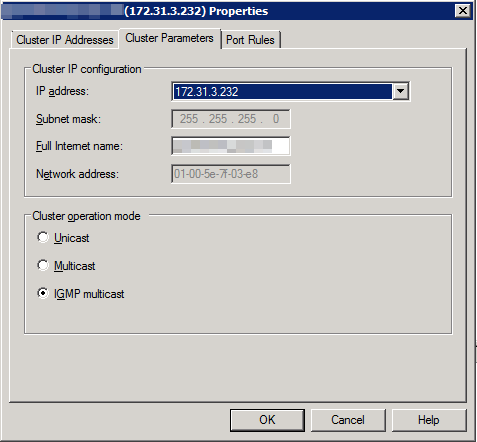
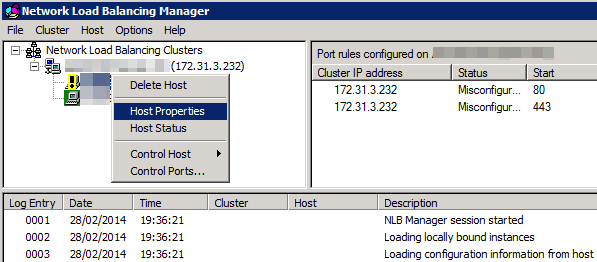
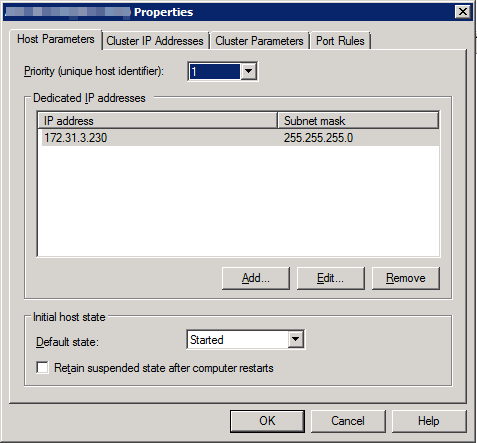
The temporary fix is rather easy. However it’s a manual intervention and as such not a good solution. Open up the properties of the offending node or nodes (for every NLB cluster that running on that node, you might have multiple).

image

Click “OK” to close it …

image

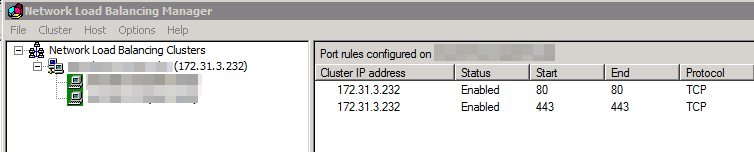
… and you’re back in business.

image

image

Scripting this out somehow with nlb.exe or PowerShell after a guest gets live migrated is not the way to go either.

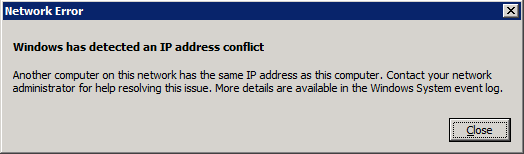
But that’s not all. In some case you’ll get an extra error you can ignore if it’s not due to a real duplicate IP address on your network:

image

We tried rebooting the guest, dumping and recreating the WNLB cluster configuration from scratch. Clearing the switches ARP tables. Nothing gave us a solid result.

No you might say, Who live migrates multiple WNLB nodes at the same time? Well any two node Hyper-V cluster that uses Cluster Aware Updating get’s into this situation and possibly bigger clusters as well when anti affinity is not configured or chose to keep guest on line over enforcing said anti affinity, during a drain for an intervention on a cluster perhaps etc. It happens. Now whether you’ll hit this issue depends on how you configure and use your switches and what configuration of LBFO you use for the vSwitches in Hyper-V.

How do we fix this?

First we need some back ground and there is way to much for one blog actually. So many permutations of vendors, switches, configurations, firmware & drivers …

Unicast

This is the default and Thomas Shinder has an aging but  great blog post on how it works and what the challenges are here. Read it. It you least good option and if you can you shouldn’t use it. With Hyper-V we and the inner workings and challenges of a vSwitch to the mix. Basically in virtualization Unicast is the least good option. Only use it if your network team won’t do it and you can’t get to the switch yourself. Or when the switch doesn’t support mapping a unicast IP to a multicast MAC address. Some tips if you want to use it:

  1. Don’t use NIC teaming for the virtual switch.
  2. If you do use NIC teaming for the virtual switch you should (must):
    • use switch independent teaming on two different switches.
    • If you have a stack or just one switch use multicast or even better IGMP with multicast to avoid issues.

I know, don’t shout at me, teaming on the same switch, but it does happen. At least it protects against NIC issues which are more common than switch or switch port failures.

Multicast

Again, read Thomas Shinder his great blog post on how it works and what the challenges are here.

It’s an OK option but I’ll only use it if I have a switch where I can’t do IGMP and even then I do hope I can do two things:

  1. Add a static entry for the cluster IP address  / MAC address on your switch if it doesn’t support IGMP multicast:
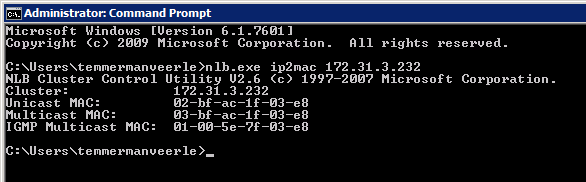
    • arp [ip] [cluster multicast mac*] ARPA  > arp 172.31.1.232  03bf.bc1f.0164 ARPA
  2. To prevent switch flooding occurs, as with the unicast configure your switch which ports to use for multicast traffic:
    • mac-address-table static [cluster multicast mac] [vlan id] [interface]  > mac-address-table static 03bf.bc1f.0164 vlan 10 interface Gi1/0/1

The big rotten thing here is that this is great when you’re dealing with physical servers. They don’t tend to jump form switch port to switch port and switch to switch on the fly like a virtual machine live migrating. You just can’t hardcode all the vSwitch ports into the physical switches, one they move and depending on the teaming choice there are multiple ports, switches etc …it’s not allowed and not possible. So when using multicast in a Hyper-V environment stick to 1). But here’s an interesting fact. Many switches that don’t support 1) do support 2). Fun fact is that most commodity switches do seems to support IGMP … and that’s your best choice anyway! Some high end switches don’t support WNLB well but in that category a hardware load balancer shouldn’t be an issue. But let’s move on to my preferred option.

  • IGMP With Multicast (see IGMP Support for Network Load Balancing)

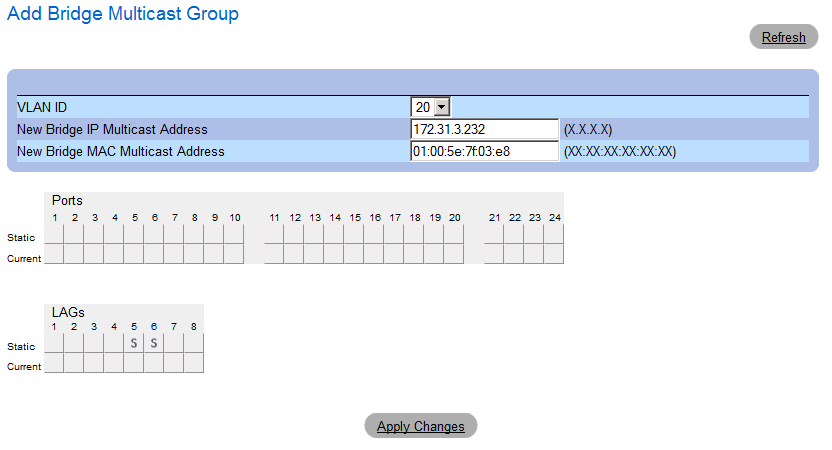
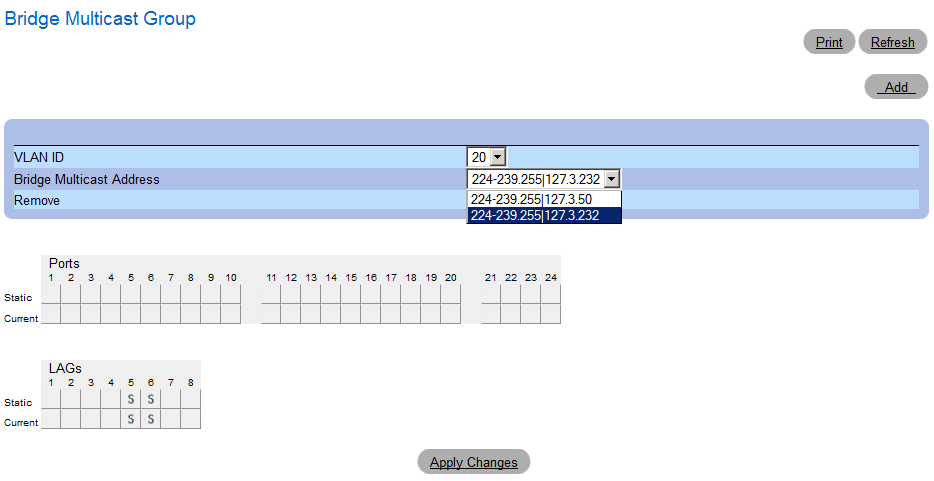
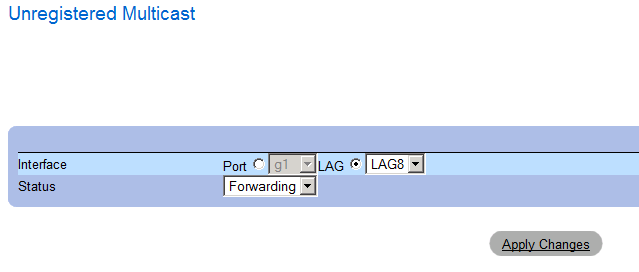
    This is your best option and even on older, commodity switches like a DELL PowerConnect 5424 or 5448 you can configure this. It was introduced in Windows Server 2003 (did not exist in NT4.0 or W2K). It’s my favorite (well, I’d rather use hardware load balancing) in a virtual environment. It works well with live migration, prevents switch flooding and with some ingenuity and good management we can get rid of other quirks.

    So Didier, tell us, how to we get our cookie and eat it to?

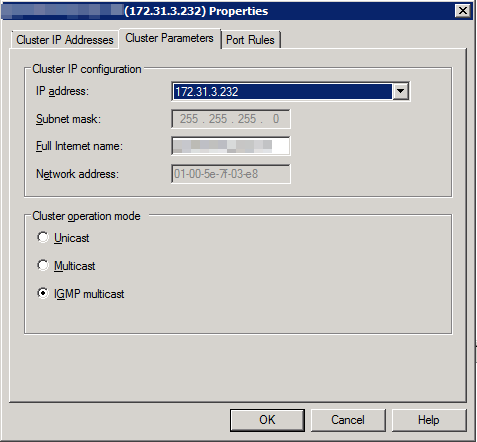
    Well, I will share the IGMP with Multicast solution with you in a next blog. Do note that as stated above there are some many permutations of Windows, teaming, WNL, switches  & firmware/drivers out there I give no support and no guarantees. Also, I want to avoid writing a  100 white paper on this subject?. If you insist you want my support on this I’ll charge at least a thousand Euro per hour, effort based only. Really. And chances are I’ll spend 10 hours on it for you. Which means you could have bought 2 (redundancy) KEMP hardware NLB appliances and still have money left to fly business class to the USA and tour some national parks. Get the message?

    But don’t be sad. In the next blog we’ll discuss some NIC teaming for the vSwitch, NLB configuration with IGMP with Multicast and show you a simple DELL PowerConnect 5424 switch example that make WNLB work on a W2K12R2 Hyper-V cluster with NIC teaming for the vSwitch and avoids following issues:

    • Messed up WNLB configuration after the simultaneous live migration of all or multiple NLB Nodes.
    • You avoid “false” duplicate IP address goof ups (at the cost of  IP address hygiene management).
    • You prevent switch port flooding.

    I’d show you on redundant Force10 S4810 but for that I need someone to ship me some of those with SFP+ modules for the lab, free of cost for me to keep Winking smile

    Conclusion

    It’s time to start saying goodbye to Windows NLB. The way the advanced networking features are moving towards layer 3 means that “useful hacks” like MAC spoofing for Windows NLB are going no longer going to work.  But until you have implement hardware load balancing I hope this blog has given you some ideas & tips to keep Windows NLB running smoothly for now. I’ve done quite few and while it takes some detective work & testing, so far I have come out victorious. Eat that Windows NLB!

  • Copy Cluster Roles Hyper-V Cluster Migration Fails at Final Step with error Virtual Machine Configuration ‘VM01’ failed to register the virtual machine with the virtual machine service

    I was working on a migration of a nice two node Windows Server 2012 Hyper-V cluster to Windows Server 2012 R2. The cluster consist out of 2 DELL R610 servers and a DELL  MD3200 shared SAS disk array for the shared storage. It runs all the virtual machines with infrastructure roles etc. It’s a Cluster In A Box like set up. This has been doing just fine for 18 months but the need for features in Windows Server 2012 R2 became too much to resists. As the hardware needs to be recuperated and we have a maintenance windows we use the copy cluster roles scenario that we have used so many times before with great success. It’s the Perform an in-place migration involving only two servers scenario documented on TechNet and as described in one of my previous blogs Migrating a Hyper-V Cluster to Windows 2012 R2 for your convenience.

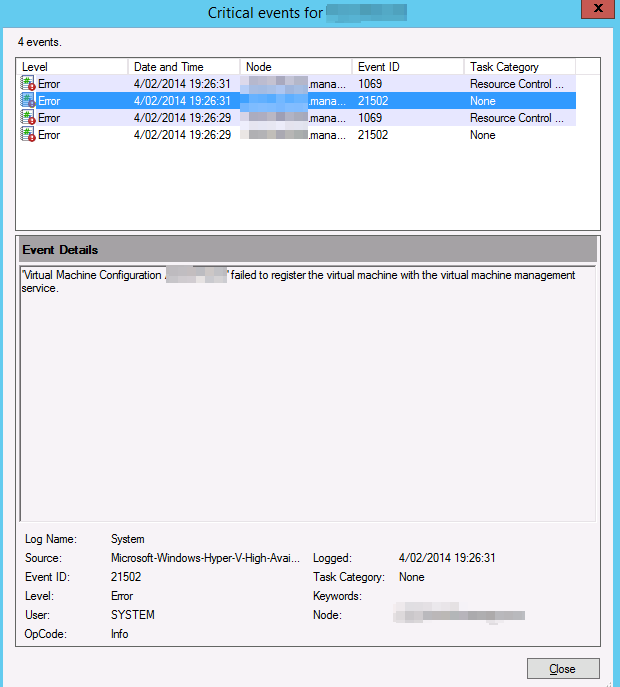
    Virtual Machine Configuration ‘VM01’ failed to register the virtual machine with the virtual machine service

    As the source host was running on Windows Server 2012 we could have done the live migration scenario but the down time would be minimal and there is a maintenance window. So we chose this path.

    So we performed a good health check. of the source cluster and made sure we had no snapshots left hanging around. Yes it’s supported now for this migration scenario but I like to have as few moving parts as possible during a migration.

    It all went smooth like silk. After shutting down the VMs on the source cluster node, bringing the CSV off line (and un-presenting the LUN from the source node for good measure), we present that LUN to the target host. We brought the CSV on line and when that was completed successfully we were ready to bring the virtual machines on line and that failed …

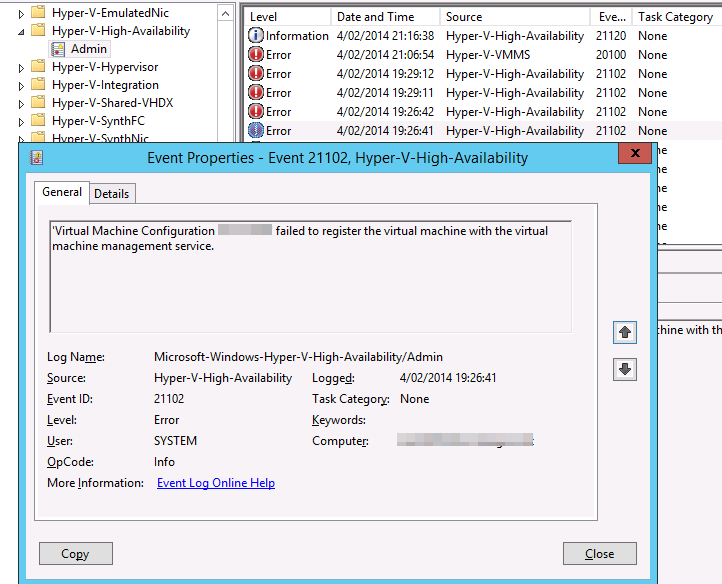
    Log Name:      Microsoft-Windows-Hyper-V-High-Availability-Admin
    Source:        Microsoft-Windows-Hyper-V-High-Availability
    Date:          4/02/2014 19:26:41
    Event ID:      21102
    Task Category: None
    Level:         Error
    Keywords:     
    User:          SYSTEM
    Computer:      VM01.domain.be
    Description:
    ‘Virtual Machine Configuration VM01’ failed to register the virtual machine with the virtual machine management service.

    image

    image


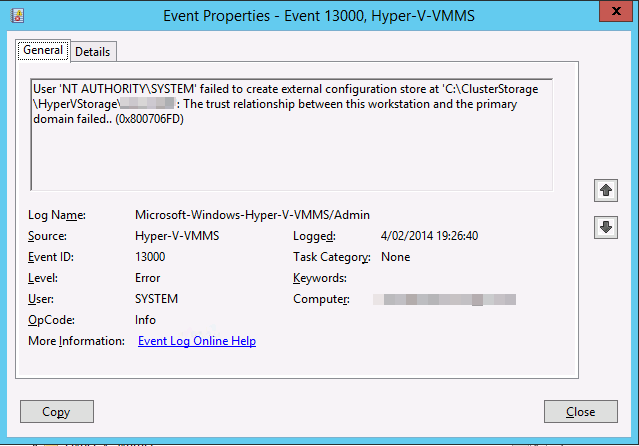
    Let’s dive into the other event logs. On the host the application security and system event log are squeaky clean. The Hyper-V event logs are pretty empty or clean to except for these events in the Hyper-V-VMMS Admin log.

    Log Name:      Microsoft-Windows-Hyper-V-VMMS-Admin
    Source:        Microsoft-Windows-Hyper-V-VMMS
    Date:          4/02/2014 19:26:40
    Event ID:      13000
    Task Category: None
    Level:         Error
    Keywords:     
    User:          SYSTEM
    Computer:      VM01.domain.be
    Description:
    User ‘NT AUTHORITYSYSTEM’ failed to create external configuration store at ‘C:ClusterStorageHyperVStorageVM01’: The trust relationship between this workstation and the primary domain failed.. (0x800706FD)


    image

    Bingo. It must be the fact that no domain controller is available. It’s completely self contained cluster and both domain controller virtual machines are highly available and reside on the CSV. Now the CSV does come on line without a DC since Windows Server 2012 so that’s not the issue. it’s the process of registering the VMs that fails without a DC in an Active Directory environment.

    Getting passed this issue

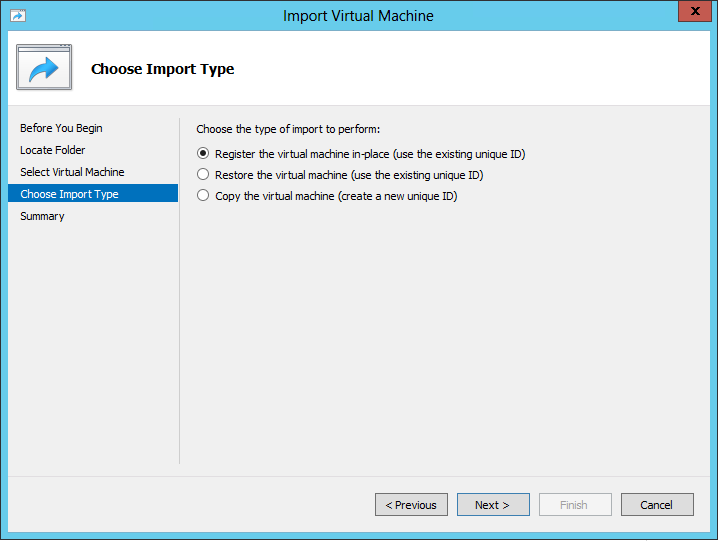
    There are multiple ways to resolve this and move ahead with our cluster migration. As the environment is still fully functional on the source cluster I just removed a DC virtual machine from high availability on the cluster. I shut it down and exported it. I than copied it over to the node of the new cluster  (we’re going to nuke the source host afterwards and install W2K12R2, so we moved it to the new host where it could stay) where I put it on local storage and imported it. For this is used the “Register the virtual machine in-place option”. I did not make it high available.

    image

    After verifying that we could ping the DC and it was up and running well we tried the final phase of the migration again. It went as smooth as we have come to expect!

    Other options would have been to host the DC virtual machine on a laptop or other server. If you could no longer get to the the DC for export & import or heck even a shared nothing migration depending on your environment can help you out of this pickle. A restore from backup would also work. But here in that 2 node all in one cluster our approach was fast and efficient.

    So there you go. Tip to remember. Virtualizing domain controllers is fully supported, no worries there but you need to make sure that if you have a dependency on a DC you don’t have the DC depending on that dependency. It’s chicken an egg thing.

    Conferences On My Roadmap For 2014

    Here’s a little roadmap of conferences on my radar screen for 2014. Some I can’t attend because of conflicts in my schedule and other priorities, but I list ‘m here for your consideration.

    DELL Enterprise Forum

    If you’re working with Dell technologies, either hardware or software this is for you. It very interactive and you get provide feedback to the product teams as well as briefings on what coming. Some are under NDA, some not.

    image

    TechEd North America 2014

    I’m attending, everything has been arranged. So if you’re a blog reader/twitter follower give us a ping.

    image

    E2EVC 2014 Brussels

    This is a non marketing event by experts in virtualization. So these people design, implement and support virtualization solutions for a living.  E2EVC Virtualization Conference is a non-commercial, it does not run a profit for the organizers or speakers. Everybody volunteers. The attendance fee covers the costs of the conference rooms, coffee breaks and such. The value is in the knowledge sharing and the networking.

    image

    See https://blog.workinghardinit.work/2014/02/03/e2evc-2014-brussels/

    OSCON 2014

    I love watching the OSCON presentations on line and it’s one of my never attended that on my must attend list. Whether that will happen this year remains to be seen.image

    TechEd Europe 2014

    It runs from October 27th to October 31st 2014 in Barcelona. I hope to meet you there and I hope they are ready at that time to talk about vNext Winking smile. It’s a great opportunity to network and talk shop with so many of my peers I’ll most definitely try to be there. Any vNext information would most certainly make it a not to miss event. They announced it a bit late and they already have lost some of the potential attendees to TechEd North America. Not their best move ever I must say.


    image

    E2EVC 2014 Barcelona

    Details have yet to be announced. But if my schedule allows I will attend and present!

    image

    Dell World 2014

    No details as of yet but for partners & customers this is a valuable opportunity to talk to the product teams, directors, marketing mangers and engage in some serious conversation about technology and where DELL fits in your road map.

    image

    Microsoft MVP Summit 2014

    I will NOT miss the MVP Summit Smile. No details as it’s all NDA.

    Hot Iron, Cold Steel & Cables Are Still Paramount In The Era Of The Cloud

    Cloud, virtualized, on premise, hosted … the people in the field offices need to connect to them and as such hardware is not dead yet Winking smile. Commodities don’t mean obsolete or “in the cloud” only.

    clip_image002

    Some nice DELL PowerConnect 5548P switches. We’ve been using this line of switches (since the 53XX series) for many years now and with great success for in the datacenter (before we switched to 10Gbps) and campus/client access. They’ve never let us down at a price/value point that make the economies of using them to good to ignore.

    Once in a while, we’re out in the field making sure the people can access their apps, services, servers in the cloud, the data center or at a hosting provider. Meaning we get to play with some hardware and we all enjoy that still Smile. Whilst at work at several sites I’m once again confronted with commodities being treated like specialties with the following results:

    • Overly expensive
    • Very little value & capabilities (under delivery)
    • Slow delivery
    • Churning

    To avoid wasting you money or allowing it to be wasted you need to use common sense. If you use advisors get a consigliore, not a racketeer.

    1Gbps to the desktop and get some extra ports

    I’ve talked about getting affordable 10Gbps without compromising capabilities before so here I’ll look at the access/campus side of the story. I still find many organizations rolling out 100Mbps to the desktop for cost reasons and counting ports in orders of one. Two things to keep in mind. Buy 1Gbps and buy some extra.

    Buying vast quantities of something you don’t use but does it power is not a good idea. But being a complete scrooge and not having some extra ports is ridiculous. I have seen many thousands of € wasted in meetings about 10 to 40 switch ports too few in new building projects that have > 5000 outlets. The only real saving I see in in electricity used, if that is a major concern where you are at. Organizations spend tens of thousands of  € discussing something that would be fixed by spending a few thousand which would give extra benefits on top. That’s churning people. Creating work and billable hours by overinflating issues & crying wolf to justify the expenditure that’s supposedly needed to stave of disaster.

    On top of that when you do ask those architects to do some modern designs like SMB Direct  & DCB they freak out & repeat the above ritual. Chances are you’ll spend 20.000 to 30.00 euro on a 6 month study that says it can’t be done because of cost & the probability the sky will fall on your head, leaving you empty handed an poorer. You should have taken the money and just done it. Their scams defer responsibilities to untraceable entities, lines the pocket of consulting houses and, as no one is going to take responsibility to stop this madness, it just goes on forever whilst on paper everything is done by the book and compliancy to the rules is achieved.  Until the day some joker, frustrated at the lack of a few ports, attached a cheapo 8 ports switch to the outlet, creates a loop and brings down the buildings network affecting many thousands. Because the design didn’t handle that to well … been there, seen it.

    I also disagree with the practice of dropping in 100Mbps unless you have really good reasons. Structural cabling is being put in at Cat6A specifications nowadays and CAT5E has been put I for many years. 1Gbps is not a luxury if you do lots of data transfers within an office and have image intensive needs (more and more that is all of us with video, images, all in high res). Google fiber is coming to residential homes … guess what that could mean to services that can be delivered … Heaven forbid you buy 100Mbps because those fancy overpriced VOIP phones only do 100Mbps & you can’t afford the replace them.

    With QoS for VOIP and other use cases some extra bandwidth comes in handy as well for. Also don’t forget software installations & automated rollouts of desktops & laptops. Last but not least it helps deal with crappy network behavior of way to many software packets.

    On the number of ports and the price per port. We buy the most minimal support on switches possible. They hardly ever die on you and if something goes bad it’s a port perhaps, and even that is rare. So don’t waste money on support contracts. Buy some extra ports. For one you need some wiggle room and you have spare capacity to deal with port or even switch failures. If you need 400 ports, by 10*48 port switches. You have spare capacity and can even afford to lose a switch. If one really fails you most have a “lifetime warranty”. You finance 1Gbps to the desktop by dumping support you won’t need, buying value commodity switches and avoiding the racketeers mentioned above. If you need a network engineer, hire one, a good one.

    Than inevitably the cry comes: “you’ll saturate the uplinks”! Not a big issue for the small office (+/- 60 people) setup we did recently but what about a bit larger environments? Todays commodity switches had dual fiber uplink port,10Gbps capable, for a redundant lag. If you build a star design and not a cascade to a more capable core/top switch & you’re golden. It’s also great future proofing as we use access switches for a long time, over 7 years is not an exception, so give yourself some wiggle room.

    Cost you say? Again, forgo the expensive market leaders and you’ll get better value for less money that get the job done very well. Cables, even OM3 fiber, is affordable compared to the labor, construction and maintenance of a  > 1000 employee building. Put in enough cabling to allow for 21st century network traffic and make sure working on it is easy. Good principles used at the wrong place in the wrong way are no good to anyone except for the ones making money of this scam.