
Imagine you get asked to implement a secure temporary data exchange solution for known and authenticated clients as fast as possible. You’re told to use what’s available already so no programming, buying products or using services. The data size can be a few KB to hundreds of megabytes, or even more. At that moment they already used FTP, both anonymous and with clear text authentication but obviously that’s very insecure. You’re told they need the solution a.s.a.p. meaning by the end of the week. So what do you? You turn to FTP over SSL in Windows 2008 (IIS 7.0, Release To Web -RTW- download) or Windows 2008 R2 (IIS 7.5, Integrated) as the one thing the company did allow for was the cost of a commercial SSL certificate and they had Windows 2008. If you want to read up on configuring that please have a look at the following entries http://learn.iis.net/page.aspx/304/using-ftp-over-ssl/ and http://learn.iis.net/page.aspx/309/configuring-ftp-firewall-settings/ where you’ll find lots of practical guidance.
You set it all up, test it, user folder isolation, NTFS permissions regulated with domain groups, virtual directories links are used for common data folders between users, etc. It all looks pretty good & is very cost effective. Customers start using it and if they have a problem they are helped out by the service desk. Good, mission accomplished you’d think. Except for someone who is not having any of that insecure firewall breaching FTP over SSL and starts kicking and screaming. The gross injustice of being forced into opening of some ports in their firewall is unacceptable. That same someone has been using clear text authentication for FTP downloads for many years and never even blinked at that has now discovered “security”.
FTP in a security Conscious World
We live, for all practical purposes, in a NAT/PAT & firewall world. These things became necessities of live after the FTP protocol was invented. You see, IPv4 has come a long way since its creation as have the protocols used over it. But originally, by design, it was not meant to provide security, just communications. Security in those early days was armed military personnel guarding physical buildings where you had access to the network and if you didn’t belong there they’d just shoot you. As a result TCP/IP is a lot like a flower power love child living a very secure universe where everyone loves everyone. Fast forward 30 years and that universe looks more like something out of a post-apocalyptic movie like Doomsday or Mad Max. If you don’t have security you become road kill and rather fast. So we built security on top of TCP/IP and we retrofitted it to the stack (a lot of the security in IPv6 was back ported to IPv4). We also invented firewalls acting like the walls of medieval castles. To add some more complexity there was not enough IPv4 love (i.e. public IP addresses) to go around which makes them expensive and/or unavailable. Network Address Translation came to the rescue. So we ended up where we are today with hundreds of millions of private IP range networks that are connected to the internet through NAT/PAT and are protected by firewalls. The size of these private networks ranges from huge corporate entities in the Fortune 500 list to all those *DSL & Cable Modem/Routers in our homes.
All of this makes the FTP protocol go “BOINK”. FTP needs two connections and quite liberal settings to work. But as the security story above indicates the internet world has moved from free love to the AIDS era so that doesn’t fly anymore. We need and have protection. But we also need to make FTP work.
Let’s first look at the basics. FTP client software needs two connections between the client and the server. One is the control channel (port 21 server side) the other is the data channel (port 20 server side). On the client side dynamic ports are used (1024-65535). These two connections present a problem for firewalls.
So port 21 needs to be allowed through the firewall on the FTP Server side. That’s pretty easy, but it’s not enough. Port 21 is the control channel that we use to connect, authenticate and even the delete and create directories if you have the correct file system permissions. To view and browse/traverse folders structures and to exchange data we need that data channel to pass through the firewall as well. That’s a dynamic port on the client that the server needs to connect to from port 20. Firewall admins and dynamic ports don’t get along very well. You can’t say “open range 1024 to 65553 for me will you?” to firewall administrators without being escorted out of the building by physical security people.
But still FTP seems to work, so how does this happen? For that purpose a lot of firewall/NAT devices make live a bit more secure and a lot easier by pro-actively looking at the network traffic for FTP packets and opening the required dynamic port automatically for the duration of the connection. This is called state full FTP. Now this is the default behavior with a lot of SOHO firewall/NAT devices so most people don’t even realize this is happening. You do not need to define rules that punch holes in the firewall. Instead the firewall punches them transparently when needed for FTP traffic. This is a risk as it happens without the users even being aware of this, let alone knowing what ports are being used. This isn’t very pretty but works quite well.
Here’s an illustration of Active FTP in action
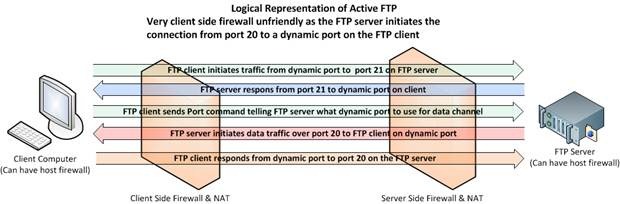
You see initially there was only Active FTP, which is very client side firewall unfriendly because it means opening up dynamic ports on client side for traffic initiated by a remote FTP server. This needed to be fixed. That fix is Passive FTP and is described in RFC 1579”Firewall Friendly FTP”. Here it is the server that listens passively on a dynamic port and the client connects actively to that port. So Passive FTP makes the automatic punching of holes for incoming FTP traffic in the firewall/NAT devices more secure on the client side. With passive FTP the server does not initiate the data connection, the client does. When the client contacts the FTP server on port 21 it gets a response, then the client asks for passive FTP using the PASV command. The FTP server responds by setting up a dynamic port to which the client can connect. The client is notified about this using the Port command. Outgoing traffic initiated on the client from a dynamic to a port on the FTP Server is more firewall friendly (i.e. more secure) for the clients and thus more easily accepted by the security administrators. On the server side it is somewhat less secure.
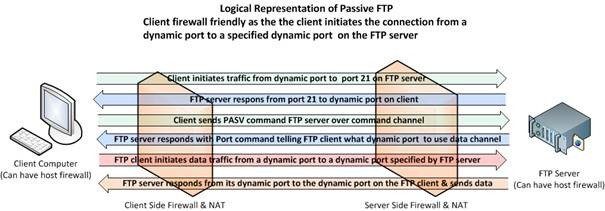
Be aware that there are FTP clients which you need to explicitly configure for passive FTP (Internet browsers, basic FTP Client software). Some old or crappy clients don’t even support it, but that should be rare nowadays. When the client software automatically tries both active /passive to connect the user often doesn’t even know what’s being used which can lead to some confusion. Also keep in mind that often multiple firewalls are involved, both on the host as on the edge of both client and FTP server networks, that all need the proper configuration.
As an example of client side stuff to keep in mind: Configuring Internet Explorer to use Passive FTP and making sure ftp can also be used in Windows Explorer.


Improving FTP Security
One of the ways to reduce the number of ports that are used and as a result must be opened on the firewalls involved is to use a small predefined range of dynamic ports. Good FTP servers allow for this and so do IIS 7 and IIS 7.5. This reduces the number of ports to be allowed through and thus the conflicts with the security people enormously.
Now when we use FTP over SSL it becomes a practical necessity to use a small pre-defined range of dynamic ports to use. Snooping around in the packets to see if it’s SSL traffic so as dynamic ports can be opened just doesn’t work anymore because the traffic is encrypted. Opening thousands of ports is not an option. Those would become targets of attacks. Another hic up you can trip over is that some firewalls by default block SSL/TLS traffic on any other port than port than 443 (HTTPS).
So what do we need for FTP over SSL/TLS:
· Use Passive FTP and port 21 (Explicit SSL) or 990 (Implicit SSL)
· Select a small range of dynamics ports to define on the firewall and communicate that with your clients. This range needs to be opened in their outgoing rules for the clients that want to connect and the incoming/outgoing rules on the server side. Both the FTP server and the FTP clients need to respect this range.
· Use a FTP client that supports FTP over TLS. I used passive FTP with Explicit SSL to maintain the default port 21 for the connection channel. If the client doesn’t negotiate data encryption we refuse the connection. See FTPS on http://en.wikipedia.org/wiki/FTPS for more information on this.
· Buy a commercial SSL from a trusted source (VeriSign, Comodo, GoDaddy, Thawte, Entrust, …)
By using a commercial SSL certificate that securely identifies and verifies the FTP server, by limiting the communication through the firewall to some well-defined ports and by only allowing that traffic between a limited number of hosts, the risks are reduced immensely. The risks avoided are connecting to falsified hosts, password sniffing and data theft. The traffic that is allowed is far less risky and dangerous than anonymous or, what they used to do and allow, clear text authentication to non-verified servers on the internet. But still some people insisted that the FTP over SSL solution was introducing a serious security risk. Really and this isn’t the case with passive FTP without SSL? Sure it is, you just don’t realize that it happens and allow FTP traffic to wide range of dynamic ports and unknown hosts. So frankly crying wolf about properly configured FTP over SSL is like using “coitus interuptus” for birth control because you’ve read that condoms are not 100% failsafe. You’ll end up pregnant and infected with aids. That kind of logic is pure gene pool pollution. It’s also proof of an old saying: “never argue with an idiot, they drag you down to their level and beat you with experience”
Beware of NAT/PAT
As we mentioned in the beginning NAT has its own issues to deal with, so we still have to touch on the subject of NAT/PAT with FTP servers. Let’s first look at what is needed to make this work. You have already seen how the basics of passive FTP data connection work. The client sends a PASV command and the server responds by entering passive mode and telling the client what port to use.
Now with NAT/PAT devices the IP address needs to be swapped around. To do this these devices sniff the network traffic for the PASV command to find what port is used and turns the FTP server response from “227 Ok, Entering Passive Mode (192,168,1,32,203,8)” into 227 Ok, Entering Passive Mode (193,211,10,27,203,8).
As you can see the private IP address (blue, the first 4 numbers) is swapped to the public IP address (green) on which the FTP server is reachable and retains the port to use (red). The last to numbers in red describe the port number as follows: 203*256+8 =51976. When the client connects the reverse process takes place, the public IP is swapped for the private one.
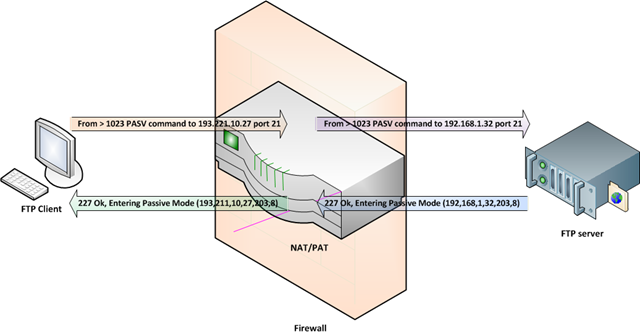
You can already see where this is going with SSL. The NAT/PAT device cannot sniff the traffic for the PASV & PORT commands to see what on what dynamic port the client should establish the data channel and also due to the encryption it cannot alter the PASV command to swap around the IP addresses.
The best solution to this is to specify a firewall helper address for passive FTP which we can set to the public IP address of our FTP Server. Your FTP Server must support this; you’ll find that IIS 7.0 and IIS 7.5 do.
Other possible solutions and workaround are:
· FTP Clients that “guess” the address to use when the IP address in the PASV command doesn’t work (that would be an internal private range IP address). They then try to use the public IP address to establish the connection, which can work as the change is it is the public IP address of the FTP server or the public IP address of the NAT/PAT device. No guarantees are given that this will work.
· NAT/PAT devices sometimes allow for specified ranges to be forwarded to a specific IP address. So you could configure this to be the case for the small range of dynamic ports you defined for Passive FTP.
· Some FTP servers support he EPSV command (Extended Passive Mode), which only sends the port and where the IP address is the one used for establishing the control connection.
Be Mindful of Load Balancing on Server and/or Client Side
If Load Balancers are in play we must make sure that the communication always goes via the same node and IP address when using SSL or you’ll break SSL. If multiple IP addresses are used to route certain traffic via a certain device you make sure the FTP client doesn’t switch to another IP address for the data connection as this will fail. Both control and data channels must use the same IP address or passive FTP will fail even without using SSL. Also don’t forget some customers uses load balancers to route traffic based on purpose, cost, redundancy, etc. So this is also a concern on the client side. In the IIS log you’ll see that it complains about IP addresses that do not match. I’ve had this happen at 2 customer sites, which were easily fixed, but took some intervention of by their IT staff. Luckily they both had a competent SMB IT consulting firm looking after their infrastructure.
Table with FTP risks and mitigations
| RISK | MITIGATION | RESULT |
| Server Connects to Client | Use passive FTP | Client initiates connection |
| Dynamic ports in use | Select smaller fixed range of ports | Less ports to open on firewall |
| Server not verified | Use commercial SSL Certificate | Server can be verified |
| Authentication not encrypted | Use SSL for authentication | Authentication encrypted |
| Data not encrypted | Use SSL for data transport | Data transport encrypted |
| Connections from & to unknown hosts | Allow only trusted clients and/or servers | No more FTP from/to any host. |