One of the many new features in Windows 8 is native NIC Teaming or Load Balancing and Fail Over (LBFO). This is, amongst many others, a most welcome and long awaited improvement. Now that Microsoft has published a great whitepaper (see the link at the end) on this it’s time to publish this post that has been simmering in my drafts for too long. Most of us dealing with NIC teaming in Windows have a lot of stories to tell about incompatible modes depending on the type of teaming, vendors and what other advanced networking features you use. Combined with the fact that this is a moving target due to a constant trickle of driver & firmware updates to rid of us bugs or add support for features. This means that what works and what doesn’t changes over time. So you have to keep an eye on this. And then we haven’t even mentioned whether it is supported or not and the hassle & risk involved with updating a driver 
When it works it rocks and provides great benefits (if not it would have been dead). But it has not always been a very nice story. Not for Microsoft, not for the NIC vendors and not for us IT Pros. Everyone wants things to be better and finally it has happened!
Windows 8 NIC Teaming
Windows 8 brings in box NIC Teaming, also know as Load Balancing and Fail Over (LBFO), with full Microsoft support. This makes me happy as a user. It makes the NIC vendors happy to get out of needing to supply & support LBOF. And it makes Microsoft happy because it was a long missing feature in Windows that made things more complex and error prone than they needed to be.
So what do we get form Windows NIC Teaming
- It works both in the parent & in the guest. This comes in handy, read on!
- No need for anything else but NICs and Windows 8, that’s it. No 3rd party drivers software needed.
- A nice and simple GUI to configure & mange it.
- Full PowerShell support for the above as well so you can automate it for rapid & consistent deployment.
- Different NIC vendors are supported in the same team. You can create teams with different NIC vendors in the same host. You can also use different NIC across hosts. This is important for Hyper-V clustering & you don’t want to be forced to use the same NICs everywhere. On top of that you can live migrate transparently between servers that have different NIC vendor setups. The fact that Windows 8 abstracts this all for you is just great and give us a lot more options & flexibility.
- Depending on the switches you have it supports a number of teaming modes:
- Switch Independent: This uses algorithms that do not require the switch to participate in the teaming. This means the switch doesn’t care about what NICs are involved in the teaming and that those teamed NICS can be connected to different switches. The benefit of this is that you can use multiple switches for fault tolerance without any special requirements like stacking.
- Switch Dependent: Here the switch is involved in the teaming. As a result this requires all the NICs in the team to be connected to the same switch unless you have stackable switches. In this mode network traffic travels at the combined bandwidth of the team members which acts as a as a single pipeline.There are two variations supported.
- Static (IEEE 802.3ad) or Generic: The configuration on the switch and on the server identify which links make up the team. This is a static configuration with no extra intelligence in the form of protocols assisting in the detection of problems (port down, bad cable or misconfigurations).
- LACP (IEEE 802.1ax, also known as dynamic teaming). This leverages the Link Aggregation Control Protocol on the switch to dynamically identify links between the computer and a specific switch. This can be useful to automatically reconfigure a team when issues arise with a port, cable or a team member.
- There are 2 load balancing options:
- Hyper-V Port: Virtual machines have independent MAC addresses which can be used to load balance traffic. The switch sees a specific source MAC addresses connected to only one connected network adapter, so it can and will balance the egress traffic (from the switch) to the computer over multiple links, based on the destination MAC address for the virtual machine. This is very useful when using Dynamic Virtual Machine Queues. However, this mode might not be specific enough to get a well-balanced distribution if you don’t have many virtual machines. It also limits a single virtual machine to the bandwidth that is available on a single network adapter. Windows Server 8 Beta uses the Hyper-V switch port as the identifier rather than the source MAC address. This is because a virtual machine might be using more than one MAC address on a switch port.
- Address Hash: A hash (there a different types, see the white paper mention at the end for details on this) is created based on components of the packet. All packets with that hash value are assigned to one of the available network adapters. The result is that all traffic from the same TCP stream stays on the same network adapter. Another stream will go to another NIC team member, and so on. So this is how you get load balancing. As of yet there is no smart or adaptive load balancing available that make sure the load balancing is optimized by monitoring distribution of traffic and reassigning streams when beneficial.
Here a nice overview table from the whitepaper:

Microsoft stated that this covers the most requested types of NIC teaming but that vendors are still capable & allowed to offer their own versions, like they have offered for many years, when they find that might have added value.
Side Note
I wonder how all this is relates/works with to Windows NLB, not just on a host but also in a virtual machine in combination with windows NIC teaming in the host (let alone the guest). I already noticed that Windows NLB doesn’t seem to work if you use Network Virtualization in Windows 8. That combined with the fact there is not much news on any improvements in WNLB (it sure could use some extra features and service monitoring intelligence) I can’t really advise customers to use it any more if they want to future proof their solutions. The Exchange team already went that path 2 years ago. Luckily there are some very affordable & quality solution out there. Kemp Technologies come to mind.
- Scalability.You can have up to 32 NIC in a single team. Yes those monster setups do exist and it provides for a nice margin to deal with future needs
- There is no THEORETICAL limit on how many virtual interfaces you can create on a team. This sounds reasonable as otherwise having an 8 or 16 member NIC team makes no sense. But let’s keep it real, there are other limits across the stack in Windows, but you should be able to get up to at least 64 interfaces generally. Use your common sense. If you couldn’t put 100 virtual machines in your environment on just two 1Gbps NICs due to bandwidth concerns & performance reasons you also shouldn’t do that on two teamed 1Gbps NICs either.
- You can mix NIC of different speeds in the same team. Mind you, this is not necessarily a good idea. The best option is to use NICs of the same speed. Due to failover and load balancing needs and the fact you’d like some predictability in a production environment. In the lab this can be handy when you need to test things out or when you’d rather have this than no redundancy.
Things to keep in mind
SR-IOV & NIC teaming
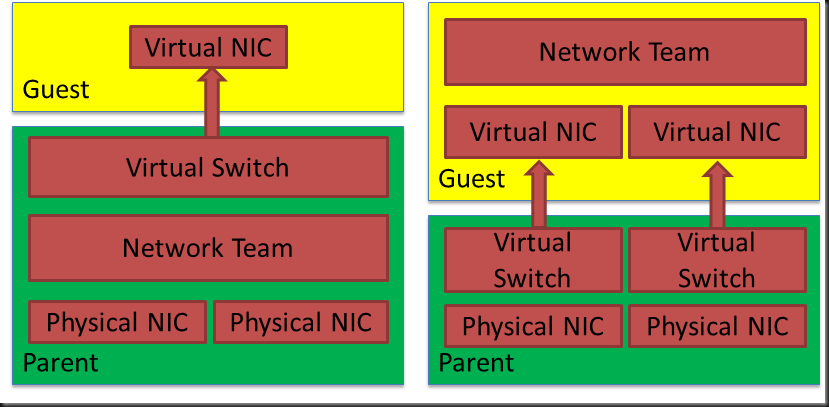
Once you team NICs they do not expose SR-IOV on top of that. Meaning that if you want to use SR-IOV and need resilience for your network you’ll need to do the teaming in the guest. See the drawing higher up. This is fully supported and works fine. It’s not the easiest option to manage as it’s on a per guest basis instead of just on the host but the tip here is using the NIC Teaming UI on a host to manage the VM teams at the same time. Just add the virtual machines to the list of managed servers.

Do note that teams created in a virtual machine can only run in Switch Independent configuration, Address Hash distribution mode. Only teams where each of the team members is connected to a different Hyper-V switch are supported. Which is very logical, as the picture below demonstrates, because you won’t have a redundant solution.

Security Features & Policies Break SR-IOV
Also note that any advanced feature like security policies on the (virtual) switch will disable SR-IOV, it has to or SR-IOV could be used as an effective security bypass mechanism. So beware of this when you notice that SR-IOV doesn’t seem to be working.
RDMA & NIC Teaming Do Not Mix
Now you need also to be aware of the fact that RDMA requires that each NIC has a unique IP addresses. This excludes NIC teaming being used with RDMA. So in order to get more bandwidth than one RDMA NIC can provide you’ll need to rely on Multichannel. But that’s not bad news.
TCP Chimney
TCP Chimney is not supported with network adapter teaming in Windows Server “8” Beta. This might change but I don’t know of any plans.
Don’t Go Overboard
Note that you can’t team teamed NIC whether it is in the host or parent or in virtual machines itself. There is also no support for using Windows NIC teaming to team two teams created with 3rd party (Intel or Broadcom) solutions. So don’t stack teams on top of each
Overview of Supported / Not Supported Features With Windows NIC Teaming

Conclusion
There is a lot more to talk about and a lot more to be tested and learned. I hope to get some more labs going and run some tests to see how things all fit together. The aim of my tests is to be ready for prime time when Windows 8 goes RTM. But buyer beware, this is still “just” Beta material.
For more information please download the excellent whitepaper NIC Teaming (LBFO) in Windows Server "8" Beta



 . One liners do not always fit in here. But to demonstrate I have nothing against them I’ll show you a real easy example for all you out there dealing with the jump to PowerShell. If you get hooked on one liners just be sure to use them with reason and go visit the blog of
  I included the agenda for you as well as the links to register.


![clip_image003[1]](https://blog.workinghardinit.work/wp-content/uploads/2012/04/clip_image0031.jpg "clip_image003[1]")