Windows Server Technical Preview delivers integration services updates through Windows Update

Benefits of delivering updates to the integration services via Windows Updates

In Windows Server  vNext aka the Technical Preview the integration services are being delivered through Windows Update (and as such the well know tools such a s WSUS, …). This is significant in reducing the operational burden to make sure they are up to date. Many of us turned to PowerShell scripting to handle this task. So did I and I still find myself tweaking the scripts once in a while for a condition I had not dealt with before or just to get better feedback or reporting. Did I ever tell you that story about the cluster where a 100VMs did not have a virtual DVD drive (they removed them to improve performance) … that was yet another improvement to my script => detect the absence of a virtual DVD drive. In this day and age, virtualization has both scaled up and out with ever more virtual machines per host and in total. The process of having to load an ISO in a virtual DVD drive inside a virtual machine to install upgrades to integration services seems arcane and it’s very timely that it has been replaced by an operation process more befitting a Cloud OS Winking smile.

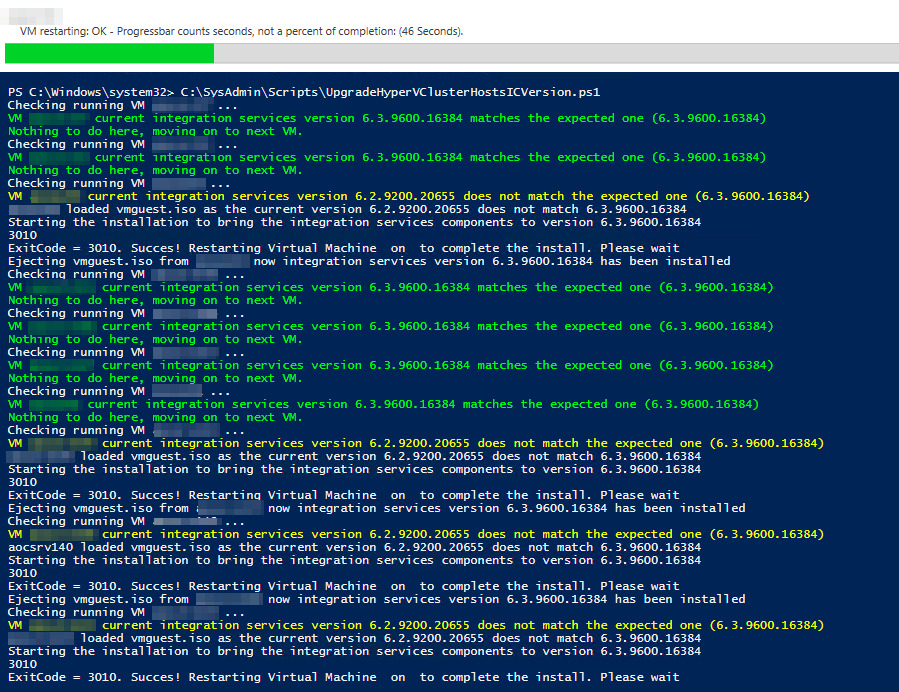
I have optimized this process with some PowerShell scripting and it wasn’t to painful anymore. The script upgrades all the VMs on the hosts and even puts them back in the state if found them in (Stopped, Saved, Running). A screenshot of the script in action below.

image

I’m glad that it’s now integrated through Windows Update and part of other routine maintenance that’s done on the guests anyway.

But is not only good news for us “on premises” system administrators and integrators. It’s also important for service/cloud providers and (hosted) private cloud hosters. This change means that the tenants  have control of updates to the integration services of their virtual machines. They update their Windows virtual machines with all updates during their normal patch cycles and now this includes the integration services. This provides operation ease (single method) and avoids some of the discussions about when to upgrade the integration services.

Legacy Operating Systems

Shortly after the release of the Windows Server Technical Preview, updates to integration services for Windows guests began being distributed through Windows Update. This means that on that version the vmguest.iso is no longer needed and as such it’s no longer included with Hyper-V.  This means that if you run an unsupported (most often legacy) version of Windows you’ll need to grab the latest possible vmguest.iso from an W2K12R2 Hyper-V host and try to install that and see if it works.

What about Linux and FreeBSD?

Well nothing has changed and how that’s taken care of you can read here: Linux and FreeBSD Virtual Machines on Hyper-V

Storage Replication – Server To Server Demo

I’ve discussed the efforts Microsoft is putting into enhancing the storage offerings (Storage Spaces, SOFS, SMB) in its OS since Windows Server 2012 (R2) before in previous articles. In my last blog post on this subject  Microsoft Keeps Investing In Storage Big Time I talked about their latest announcements around storage replica in the Windows Server Technical Preview.

In this post I’d like to show case how to set up server to server storage replication and demonstrate how to recover from certain events.  We are doing this asynchronously as the scenario is one were we replicate a backup target off site to another city. Not an uncommon scenario and one that gives copies off site without introducing the cost & operational overhead of portable media.clip_image002

The easiest way to show  this without writing elaborate white papers is a video. I’ll wait with more elaborate writings or demo videos as things are bound to change a lot prior to RTM. After all we still only have the more then 3 month old Technical Preview bits. It’s important to realize what we are now getting in box with Windows Server aka the Cloud OS that used to require 3rd party solutions.

I hope to be doing some talks & presentations on this subject and in good tradition make those presentations demo heavy as I like to really show how technology in action.

Hyper-V Technical Preview Live Migration & Changing Static Memory Size

I have played with  Hot Add & Remove Static Memory in a Hyper-V vNext Virtual Machine before and I love it. As I’m currently testing (actually sometimes abusing) the Technical Preview a bit to see what breaks I’m sometimes testing silly things. This is one of them.

I took a Technical Preview VM with 45GB of memory, running in a Technical Preview Hyper-V cluster and live migrate it.  I then tried to change the memory size up and down during live migration to see what happens, or at least nothing goes “BOINK”. Well, not much, we get a notification that we’re being silly. So no failed migrations, crashed or messed up VMs or, even worse hosts.

image

It’s early days yet but we’re getting a head start as there is a lot to test and that will only increase. The aim is to get a good understanding of the features, the capabilities and the behavior to make sure we can leverage our existing infrastructures and software assurance benefits as fast a possible. Rolling cluster upgrades should certainly help us do that faster, with more ease and less risk. What are your plans for vNext? Are you getting a feeling for it yet or waiting for a more recent test version?

Don’t tell me “It depends”! But it does!

Ah yes, the consultant’s answer. If you’ve been in working long enough you will have had it happen to you that opening an answer with “It depends” gets you an angry look, eyes being rolled in frustration and a short tempered “don’t give me that consultant crap” sneer. The injustice. First of all I’m not to blame for people hiring lousy “consultants” that hide their lack of skills behind that phrase. Sure you might have been conditioned into thinking it’s code for “I have no clue but I’ll bill you by the hour anyway” but that’s not my problem. Secondly I’m most probably not consulting for those people. There’s no point being a consigliere if they don’t want to listen, let alone if they won’t spend the time needed to explain their needs so I can listen. Most probably they can’t distinguish between valuable advice and expensive advice anyway. People who can’t see the difference are not observing very well as the distinction is crystal clear.

I’m always a bit disappointed when it happens. You’ll have to grow up an live with the fact that a lot of things are a bit more complex. If you don’t have the time to explain yourself or the intention to listen to someone you have asked to provide the best possible answer you have two options:

1. Do whatever you want to do (you have already decided)

2. Ask me to decide for you. In the absence of a clear cut answer I’ll just flip a coin for you and call it. As least that’s cheap and efficient.

When I tell you “it depends” I will gather as much information from you as I can.  I will also explain my answers and go into (great) detail as to the why, where, what and when of this. This can take some time and it can/will require effort due to complexities. It’s not code for “I don’t know” of “go away”. In my experience people who hate the “It depends” answer are the ones who don’t really want it. They quit at that opening sentence. Do engage and you might get the best possible advise from it in regards to your particular situation. With that in hand you can investigate further and work to the best possible solution for your needs in your environment.

Got it? Good.