Event ID: 11 From Microsoft-Windows-RPC-Events Are Indicating Possible Memory Leaks With MMC

After finishing putting some brand new servers in place with Windows 2008 R2, installing its rolls and leaving a happy client I’m usually very happy about a job well done. That feeling can last for a while when doing the paperwork involved with the project. It can also go away blazingly fast when you get a call that there is an “RPC memory leak or something no right” on the servers.  Not good. So you remotely access the server and start looking. Luckily for me this was to be a non issue. The event logged was the following:

Log Name:      Application

Source:        Microsoft-Windows-RPC-Events

Date:          06/01/2011 22:26:18

Event ID:      11

Task Category: None

Level:         Warning

Keywords:     

User:          BIGBillyTheServerAdmin

Computer:      infra01.big.corp

Description:

Possible Memory Leak.  Application ("C:Windowssystem32mmc.exe" "C:Windowssystem32dhcpmgmt.msc" ) (PID: 5000) has passed a non-NULL pointer to RPC for an [out] parameter marked [allocate(all_nodes)].  [allocate(all_nodes)] parameters are always reallocated; if the original pointer contained the address of valid memory, that memory will be leaked.  The call originated on the interface with UUID ({6bffd098-a112-3610-9833-46c3f874532d}), Method number (2).  User Action: Contact your application vendor for an updated version of the application.

If you do a search for this you’ll find several unresolved news group and support site questions but also a Microsoft knowledge base article http://support.microsoft.com/kb/974814. It states that when you run the Server Manager Snap-in (servermanager.msc) for extended periods of time, the application event log warning as seen above is logged. It also says it only happens on DHCP servers, which is exactly a roll these servers have and the warning entry we see in the application even log. As long as the UUID is {6bffd098-a112-3610-9833-46c3f874532d} and you have no other indications of a memory leak you’re good to go. Armed with the link we quickly put the owners mind at easy and all is well again. Back to the paperwork.

Windows 2008 R2 & Windows 7 SP1 RTM Today!!!!

UPDATE: The Russian TechNet blog retracted it’s statement about SP1 being RTM. We’ll see.

A quick heads up. According to WinRumors Microsoft has confirmed the release of Windows 7 / Windows 2008 R2 SP1. http://www.winrumors.com/microsoft-confirms-windows-7-sp1-rtm-released-to-oems-today/?utm_source=twitterfeed&utm_medium=twitter&utm_campaign=Feed%3A+WinRumors+%28WinRumors%29. My busy days just got busier. Cluster nodes with Hyper-V in the lab are being fired up already for final testing before wisely introducing it into production. My current workstation of cause is going to be updated faster than I can download the service pack Smile I’ll update this post with a download link when I get it.

DCDIAG.EXE Problem On Windows 2008(R2): VerifyEnterpriseReferences indicates problem “Missing Expected Value” & points to Knowledge Base Article: Q312862

I was preparing to replace some 5 year old DELL PE1850 servers running Active Directory with new DELL R610 servers when the DCDIAG.exe output showed a possible issue with SYSVOL FRS and some missing expected value.

Starting test: VerifyEnterpriseReferences

The following problems were found while verifying various important DN

references.  Note, that  these problems can be reported because of

latency in replication.  So follow up to resolve the following

problems, only if the same problem is reported on all DCs for a given

domain or if  the problem persists after replication has hadreasonable time to replicate changes.

[1] Problem: Missing Expected Value

Base Object: CN=DC1,OU=CITY,OU=Domain Controllers,DC=corp,DC=com

Base Object Description: "DC Account Object"

Value Object Attribute Name: msDFSR-ComputerReferenceBL

Value Object Description: "SYSVOL FRS Member Object"

Recommended Action: See Knowledge Base Article: Q312862

The log points to a knowledge base article at  but that has no relevance here.This is a phantom error when found under following circumstances. It occurs on Windows 2008 or Windows 2008 R2 when you are running in Windows 2008 or Windows 2008 R2 domain functional level. Since Windows 2008 the File Replication Service (FRS) that sysvol uses has been replaced with the  Distributed File Replication service (DFRS) as used by DFS. If you’re not yet running DFRS when you can (which is highly recommend  http://blogs.technet.com/b/askds/archive/2010/04/22/the-case-for-migrating-sysvol-to-dfsr.aspx but not required), you’ll see this error show up when running DCDIAG.exe, so no real issue at all.

There are lots of posts on the internet pointing to various possible issues or causes: http://social.technet.microsoft.com/Forums/en-US/winserverDS/thread/2ce07c3f-9956-4bec-ae46-055f311c5d96/  & http://social.technet.microsoft.com/Forums/en-IE/winserverDS/thread/3062d40a-b73e-42ea-b27a-e817ee29abc1. But before you worry to much I suggest you check that everything that has to do with replication is running well. Is so and you’re running in Windows 2008 or Windows 2008 R2 domain functional level you’ll see this error go way once you complete your migration to DFRS.

So, to recapture, if you have a well maintained & working Active Directory, do not panic when you see some warning or failures in diagnostic test results. Make sure things are indeed fine and if you conclude that you don’t have any lingering problems, do some further research on what the real reason might . This pahnatom error is a fine example of this.

There is an absolute brilliant step by step guide to get the move from FRS to DFRS completed without a problem in a series by the storage team at Microsoft . You can find the first of a 5 part blog series over here http://blogs.technet.com/b/filecab/archive/2008/02/08/sysvol-migration-series-part-1-introduction-to-the-sysvol-migration-process.aspx.

While you are at it. If your still running DFS in Windows 2000 native mode, you might want to upgrade that as well. More on that later Smile

Building A New Lab For 2011 And Beyond

Well with all this (Hyper-V) Clustering, Virtualization, System Center Suite, Exchange 2010 & Lync, SQL Servers, iSCSI demands on my lab network  I really need to refresh my hard ware. It sounds a bit like a paradox but such is life for the people building all this stuff. Yes, they still need some hardware, pretty beefy machines actually, to set it all up, test it, break it, fix it and keep learning. I’ve depleted my 4 years old lab material which in which I can’t put more than 4 GB RAM.  Now that I have finished all my infrastructure projects for 2010 I have time to focus on improving my old setup. Or at least I hope. Things are very busy. Thanks to W2K8R2 SP1 beta I could use Dynamic Memory which helped to keep churning away with these and various Exchange setups but now with Lync coming into the picture I want and need an upgrade.  A couple of SQL Servers in various high availability setups help eat any remaining resources resources . Add to that the fact that I want to do some private cloud testing so there it is. I need hosts with at least an Intel Quad Core  (i7) and at least 16 GB of DDR3 memory. They should have room for extra NIC cards. And I always try to get some speedy disks where it matters.  Now since Windows Server 2008 R2  added support for Second Level Address Translation (SLAT), which Intel calls Extended Page Tables (EPT) and which AMD calls Nested Page Tables (NPT) or Rapid Virtualization Indexing (RVI), we can make use of better graphics cards. Until now none of my processors had SLAT support.  With the Intel i7 (Nehalem) processor I’m good to go. As all machine in my lab are Intel so I’m sticking with them for Hyper-V migrations as that doesn’t work between brands.

So here’s an logical overview of my setup. This is what I already in place with my current hardware but have now drawn with my coveted hardware refreshment Smile Oh, yes the dual 1Gbps switches for iSCSI are new for this setup. I’m adding one so I can play with MPIO in the lab.
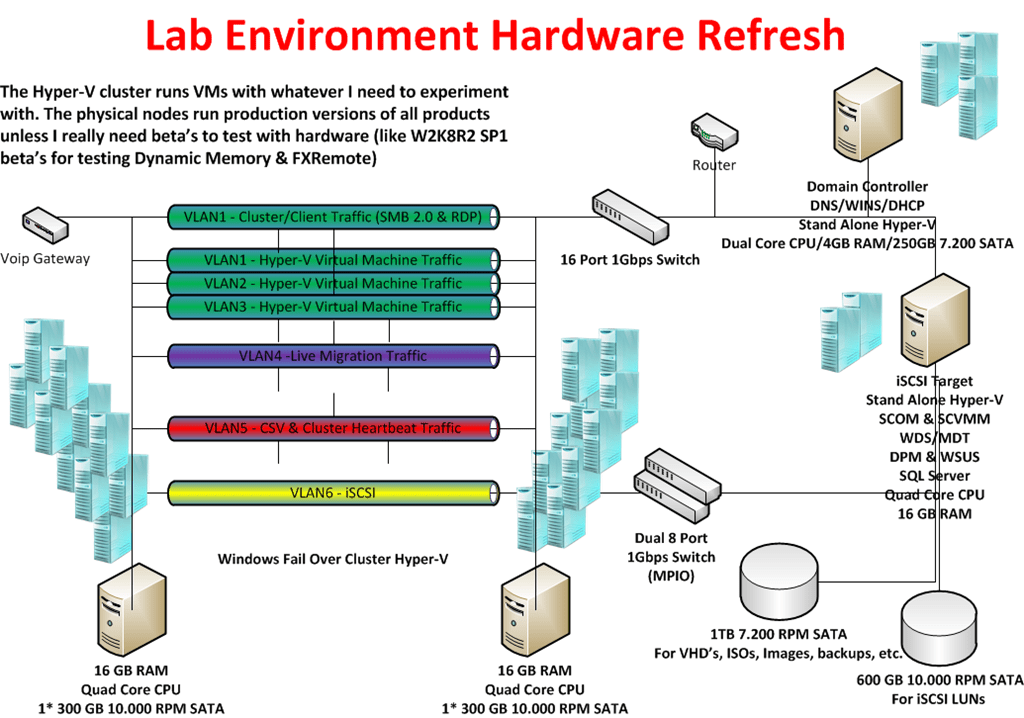
For disks I use 300GB – 16MB – 10.000 rpm and 600GB –32MB – 10.000rpm Raptors in combination with an external eSATA 1TB/2TB Western Digital Black Disk for storage of VHD’s, Images, backups etc.  I have to buy some extra now. The faster disks are expensive but a lab environment needs some performance as waiting around for servers & virtual machines becomes a major of annoyance when you need to get work done. The 10.000 rpm disks are great for iSCSI storage for which I use the iSCSI Target from Windows 2008 R2 Storage server via my TechNet subscription.

All this kit should keep me up and running from 2011 until the end of 2014. Is this expensive? Yes and no.  I can recuperate my 1 Gbps Intel NIC’s and most of my hard disks.  I already have my network switches, monitors and KVM switches. So in all it’s the new motherboards, CPU’s and memory that will eat the  most of the budget.  It’s a sum to put out but here’s a note to all IT Pro’s out there. You need to invest in yourself every now and then.

I’ve blogged about this before in https://blog.workinghardinit.work/2010/02/04/having-a-lab-using-it/. Self improvement and learning is a continuous process that never ends. Sure it does have some peak moments in financial costs when you need equipment. Remember you don’t need to buy it all at once. Talk to you employer about this if you’re not self employed. Look at how much a 5 day advanced course or a conference costs. You can use a lab to learn and experiment for many years to come. So basically the potential ROI is very good. In the end, what my employers and customers get out of this is knowledge, insight, skills and results. Think about it, it helps to put the investment in perspective. Sure, I invest more than just the hardware, my time which is very valuable to me. You can’t maker more time, everyone has the same 24 hours in a day. Now it really helps if you like this stuff and have fun whilst learning new technologies or setting up a proof of concept. In a way what people put into their job and knowledge is  an indicator of their professionalism. You do not become an expert by working 9 to 5 and only learning when a course is provided. It’s not going to happen. Even a genius who puts in the effort stands out amongst his or her peers. The same goes for you, but be smart about it. You can work yourself to death and not accomplish anything. So smart & hard is the way to go.
