Correcting the permissions on the folder with VHDS files & checkpoints for host level Hyper-V guest cluster backups

Introduction

It’s not a secret that while guest clustering with VHDSets works very well. We’ve had some struggles in regards to host level backups however. Right now I leverage Veeam Agent for Windows (VAW) to do in guest backups. The most recent versions of VAW support Windows Failover Clustering. I’d love to leverage host level backups but I was struggling to make this reliable for quite a while. As it turned out recently there are some virtual machine permission issues involved we need to fix. Both Microsoft and Veeam have published guidance on this in a KB article. We automated correcting the permissions on the folder with VHDS files & checkpoints for host level Hyper-V guest cluster backup

The KB articles

Early August Microsoft published KB article with all the tips when thins fail Errors when backing up VMs that belong to a guest cluster in Windows. Veeam also recapitulated on the needed conditions and setting to leverage guest clustering and performing host level backups. The Veeam article is Backing up Hyper-V guest cluster based on VHD set. Read these articles carefully and make sure all you need to do has been done.

For some reason another prerequisite is not mentioned in these articles. It is however discussed in ConfigStoreRootPath cluster parameter is not defined and here https://docs.microsoft.com/en-us/powershell/module/hyper-v/set-vmhostcluster?view=win10-ps You will need to set this to make proper Hyper-V collections needed for recovery checkpoints on VHD Sets. It is a very unknown setting with very little documentation.

But the big news here is fixing a permissions related issue!

The latest addition in the list of attention points is a permission issue. These permissions are not correct by default for the guest cluster VMs shared files. This leads to the hard to pin point error.

Error Event 19100 Hyper-V-VMMS 19100 ‘BackupVM’ background disk merge failed to complete: General access denied error (0x80070005). To fix this issue, the folder that holds the VHDS files and their snapshot files must be modified to give the VMMS process additional permissions. To do this, follow these steps for correcting the permissions on the folder with VHDS files & checkpoints for host level Hyper-V guest cluster backup.

Determine the GUIDS of all VMs that use the folder. To do this, start PowerShell as administrator, and then run the following command:

get-vm | fl name, id
Output example:
Name : BackupVM
Id : d3599536-222a-4d6e-bb10-a6019c3f2b9b

Name : BackupVM2
Id : a0af7903-94b4-4a2c-b3b3-16050d5f80f

For each VM GUID, assign the VMMS process full control by running the following command:
icacls <Folder with VHDS> /grant “NT VIRTUAL MACHINE\<VM GUID>”:(OI)F

Example:
icacls “c:\ClusterStorage\Volume1\SharedClusterDisk” /grant “NT VIRTUAL MACHINE\a0af7903-94b4-4a2c-b3b3-16050d5f80f2”:(OI)F
icacls “c:\ClusterStorage\Volume1\SharedClusterDisk” /grant “NT VIRTUAL MACHINE\d3599536-222a-4d6e-bb10-a6019c3f2b9b”:(OI)F

My little PowerShell script

As the above is tedious manual labor with a lot of copy pasting. This is time consuming and tedious at best. With larger guest clusters the probability of mistakes increases. To fix this we write a PowerShell script to handle this for us.

#Didier Van Hoye
#Twitter: @WorkingHardInIT 
#Blog: https://blog.Workinghardinit.work
#Correct shared VHD Set disk permissions for all nodes in guests cluster

$GuestCluster = "DemoGuestCluster"
$HostCluster = "LAB-CLUSTER"

$PathToGuestClusterSharedDisks = "C:\ClusterStorage\NTFS-03\GuestClustersSharedDisks"


$GuestClusterNodes = Get-ClusterNode -Cluster $GuestCluster

ForEach ($GuestClusterNode in $GuestClusterNodes)
{

#Passing the cluster name to -computername only works in W2K16 and up.
#As this is about VHDS you need to be running 2016, so no worries here.
$GuestClusterNodeGuid = (Get-VM -Name $GuestClusterNode.Name -ComputerName $HostCluster).id

Write-Host $GuestClusterNodeGuid "belongs to" $GuestClusterNode.Name

$IcalsExecute = """$PathToGuestClusterSharedDisks""" + " /grant " + """NT VIRTUAL MACHINE\"+ $GuestClusterNodeGuid + """:(OI)F"
write-Host "Executing " $IcalsExecute
CMD.EXE /C "icacls $IcalsExecute"

} 

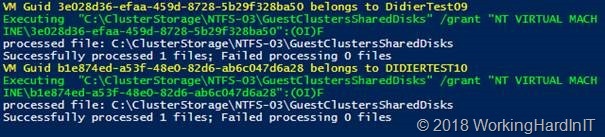
Below is an example of the output of this script. It provides some feedback on what is happening.
Correcting the permissions on the folder with VHDS files & checkpoints for host level Hyper-V guest cluster backup

Correcting the permissions on the folder with VHDS files & checkpoints for host level Hyper-V guest cluster backup

PowerShell for the win. This saves you some searching and typing and potentially making some mistakes along the way. Have fun. More testing is underway to make sure things are now predictable and stable. We’ll share our findings with you.
Installer to deploy Ubiquiti UniFi Controller as a Windows service

Introduction

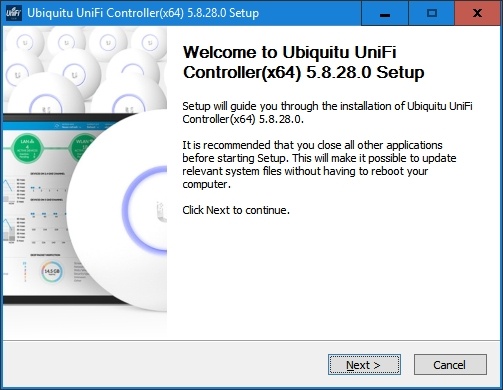
In my post Running the Ubiquiti UniFi Controller as a service I shared how I deploy Ubiquiti UniFi Controller as a Windows service. As I think this should be the default installation option I wrote an new installer  that does exactly that.

Installer to deploy Ubiquiti UniFi Controller as a Windows service

If this is of interest to you can download the Installer to deploy Ubiquiti UniFi Controller as a Windows service and play with is. This is NOT official software, it is for your convenience and at your own risk. I do not own the software, I just made a better installer for myself when I deploy this on a Windows server.

For now it only supports Windows Server with the Desktop experience. It does some checks for X64 bit, Java JRE, but it’s very much a first version. When I have time I’ll try to add support for Windows Server Core. That requires some extra tweaking to deal with that scenario.

The the installer does the following:

  • Checks if the Windows  OS is  x64 bit. If not it will quit.
  • Checks if you have JRE X64 installed and gives suggestions. It does not install it for you if it’s missing or wrong. It quits.
  • Deploys the application under %Program Files% where it belongs.
  • It creates all the original short cuts. This includes the one to the controller. but as this is installed as a service with this installer it’s a redundant. But is is there in case you need it – after you unconfigured it as a service for example (unlikely).
  • Creates an extra internet browser shortcut to the controller application itself.
  • I n my blog post Running the Ubiquiti UniFi Controller as a service on how to get the certificate installed and adopt this shortcut tor your FQDN.

I’m sending it off to some fellow MVPs to have some other eyes test it and find any issues.

Future ideas

I have some plans for future installer improvement (1st of all to reduce my repetitive manual labor):

  • Support for core
  • Leverage java JDK
  • Add an option to feed the installer a certificate so the installer will take care of KeyStore creation and configuration for you.

Do note that this is a spare time effort and I’m not able to cater to any and all needs on demand.


SC Series SCOS 7.3

Introduction

While I was on vacation the SC Series SCOS 7.3 was announced by DELL to the public at large. Finally, I would almost say as I really expected this to be a bigger thing at DELL World 2018. SCOS updates are free to people with a valid support contract. Bar bug fixes and feature enhancements or additions we really get a lot in this new version. As a matter of fact, we get so much I can only wonder what they have planned for 8.x! SCOS 7.3

clip_image001_thumb[1]

What’s new in SC Series SCOS 7.3

Let’s look very briefly at what is new in the SC Series SCOS 7.3 release:

  • Considerable performance gains for Hybrid or All Flash Arrays. I tend to use 70/30 read/write ratio and random IO for my base lines. So, it won’t be a magical doubling of speed. But hey IOPS/latency/bandwidth measurements are a sport by itself. As long as you can measure real and useful to significant progress for your workloads against a baseline you’re doing well!
  • Easy SC4020 upgrades: you can now migrate the storage enclosure to new controller units.
  • 25GbE &100GbE iSCSI support for SC5020, SC5020F, SC7020, SC7020F and SC9000.
  • CloudIQ support. CloudIQ is a free cloud-based analytics and monitoring tool for Unity that is now available for the SC Series.
  • Management with Unisphere :
    • “Unisphere for SC HTML5 Web UI” – the web UI is back & no more Java.
    • “Unisphere for SC” for managing a single array.
    • “Unisphere Central for SC” when you need to manage multiple arrays.
  • SCv2000 can now federate &replicates with other SC arrays models.
  • Capacity increases for many SC series models.
  • Distributed spares offer up to 500% faster rebuilds. On top of that all drives are now used instead of leaving assigned hot spare drives go to waste when not needed.
  • ALUA support for Live Volumes brings lower latency by reducing/optimizing network traffic
  • Increases the number of Live Volumes supported in the array.

My personal top favorite in SCOS 7.3 is distributed spares. First of all, this allows us to have way better performance overall as we don’t reserve hot spares physically anymore. It just reserves spaces, so all disks add to the total IOPS available.

clip_image003_thumb[1]

Secondly, the speed of rebuilds is now a lot faster due to “many to many” read/writes instead of many to one. Third, more disks help extend the life span of SSD, as do large SSD actually, so this is also an added benefit. With ever bigger SSD in our arrays, I am now leveraging All Flash Arrays (AFA)with 15TB SDDs the latter is very much needed and welcomed. If your read my blog post My first Dell SC7020(F) Array you know this was on my priority list!

Another great benefit to me is the inherent better performance SCOS 7.3 brings us. Even with AFA we can always use more especially at crunch time with transactional workloads, backups, data copies etc. VDI customers will also welcome this.

Conclusion

I really look forward to this SCOS version and I’ll share my upgrade experiences with you here. It fixes my main concern around rebuilds anno 2018. I’m still very happed with SCOS as far as general-purpose traditional SANs go for a variety of workloads. It is on my buy list and I am a repeat buyer. That is actually worth something and means they do things well. Now they should upgrade Replay Manager to really support and understand Windows Server 2016 and 2019 Hyper-V improvements. What they have now is works with (a la Windows Server 2012). I would not call that supported yet. Anyway, the SC Series SCOS 7.3 is definitely bringing a lot to the table. You can read more here.

My perspective on work and life

Introduction

What is so important about my perspective on work and life? Well, nothing at all unless you’re me. As an IT expert I spend way to much time in front of screens. It’s an occupational hazard. It’s not that I don’t talk to other people. I do, quite a lot. I do so for my work but also, a lot of the time, outside of my day job. That’s essential to prevent tunnel vision and echo chambers. But a big part of my time is spent working on projects (design, architecture, implementation). The remainder goes to assisting others, learning and experimenting or troubleshooting. That’s a never ending story, rinse and repeat. This never ending cycle which can lead to loss of perspective. Not just the loss of your professional perspective, but work & life wise. The rat race goes fast and in IT everything comes and goes faster than ever. You can work very hard and not get ahead. You might make lots of money but have no time to enjoy it. And it can all be over in a second.  You can spend you whole life working for something, just to have it taken away by illness, accident, natural or man made disaster or crime. Sobering thoughts, to say the least.

My perspective on work and life

While I love the IT business from silicon to the clouds I also adore the wonderful scenery that real clouds help create in the great outdoors.That’s why it’s good to take a break and go on a “walk about”. When looking out over the Grand Canyon, hiking in Yellow Stone valleys or in Great Basin with its 5000 year and older Bristlecone pines you can’t feel but insignificant. Both the big picture and over time. On a geological scale what’s a couple of million years any way, let alone less. So every now and then I get my proverbial behind out of the IT cloud, data center and out of the mind numbing open landscape offices. I go watch wild life, hike through landscapes formed by many hundreds of millions of years of natures forces at work.

image

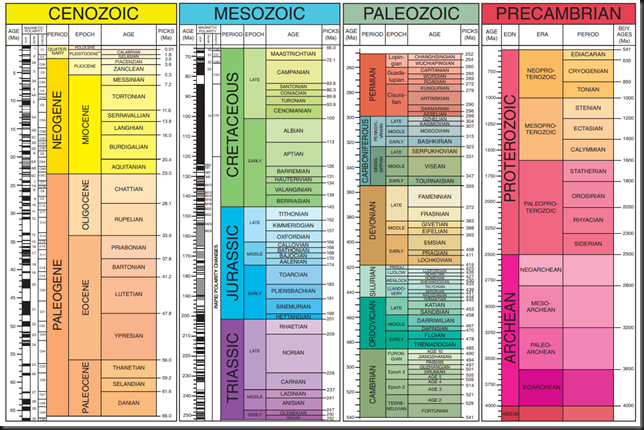
It’s a mind set where the little aid above, the GSA (American Geological Society) geologic time scale  becomes relevant to appreciate & try to understand the natural beauty around me.

Some advise

Don’t take life and work too serious, step out of the “rat race” now and then.  Changing my priorities and my perspective on work and life during time off is a good thing. During vacations it sure is a lot different during such periods. I love it. Seeing the Rocky Mountains scenery as you drive to a hike in a comfy Ford Explorer is a just magnificent.

My perspective on work and life

From the majestic Rockies & the Pacific North & South West, the views during a road trip are stunning. The hikes amazing & the serenity is soothing to the soul. I feel great when exploring them. Take a long week-end, go on a road trip, hike around and recharge your batteries. If you’re able to work remotely, do so and explore your local natural resources during your down time or breaks.

Get over that fear of missing out and realize that “promotions” or work are less important than yourself best interest. No one will pay you double  when you work twice as hard or give you back tour time. It’s a typical example of diminishing retruns. Remember that you don’t get a second life. Live this one. Don’t pointless rush through it from birth to death. You won’t be THAT rich and THAT famous (or infamous) enough to be remembered. You’ll probably be forgotten within one or two generations. So enjoy yourself a bit. Even when Rome does burn down during your absence, that’s were new empires can grow.