Understanding Virtual Machine Priority and Preemption Behavior

Introduction

By reading Aidan Finn his blog You Pause A Clustered Hyper-V Host And Low Priority VMs are QUICK MIGRATED! you will learn something about how virtual machine priorities work during the pausing and draining of a clustered Hyper-V host. They are either Live or quick migrated depending on the value of the MoveTypeThreshold cluster parameter for resources of the type “Virtual Machine”. By default it’s at 2000 and that happens to be the value of the virtual machine priority “Low”.

Changing this value can alter the default behavior. For example setting the MoveTypeThreshold value to 1000 using PowerShell

Get-ClusterResourceType “Virtual Machine” | Set-ClusterParameter MoveTypeThreshold 1000

makes sure that only VMs with a priority set to “No Auto Restart”  are quick migrated. The  low priority machines would than also live migrate where by default they quick migrate.

  • Virtual Machines with Priority equal to or higher than the value specified in MoveTypeThreshold will be moved using Live Migration.
  • Virtual Machines with Priority lower than the value specified in MoveTypeThreshold will be moved using Quick Migration.

Virtual Machine Priorities
3000 = High
2000 = Medium
1000 = Low
0 = Virtual machine does not restart automatically.

Another Scenario to be aware of  to avoid surprises

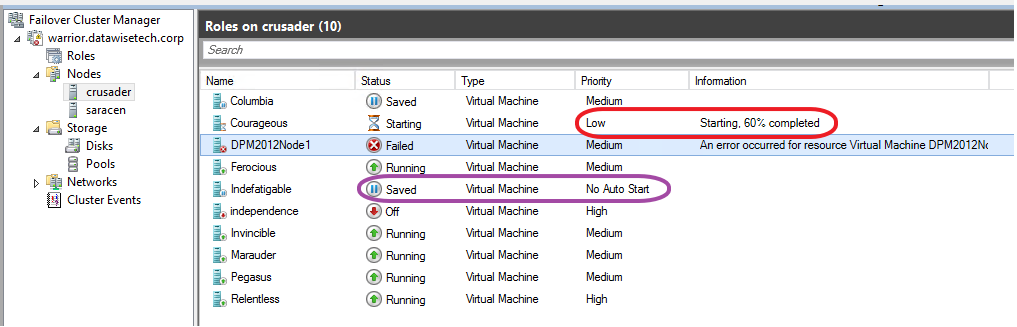
Note that al this also comes into play in other scenario’s. One of them is when you attempt to start a guest that requires more resources than available on the host. Preemption kicks in and the lower priority virtual machines go into a saved state.  If you didn’t plan for this it could be a bit of a surprise, causing service interruption. What’s also important to know is that preemption kicks in even when there is no chance that putting lower priority virtual machines into saved mode will free enough resources for (all) the VMs you’re trying to start. So that service interruption might do you no good. If this is the case the Low priority VMS come back up when there are sufficient resources left.  Do note however that the ones set top “No Auto Restart” remain in a saved state. Look below for an example on how this could happen.

How does this happen?

Let’s say you have a brand new VM that has gotten 16GB of RAM as requested by the business. When that large memory guest starts it will fail due to the fact that there are not enough memory resources available on the host that only has 16GB available. But as it attempts to start, the need for memory resources is detected and preemption comes into play. The guests with “Low” and “No Auto Restart” priorities are put into a saved state as the large memory VM has the default medium priority and the MoveTypeTreshold is at the default of 2000. You need to be ware of this behavior. Preemption kicks in and the machines are still saving while starting the large memory VM has already failed as they couldn’t free enough resources anyway.

image

The good new is that, as you can see below, is that the low priority guest starts again after starting the large memory guest has failed. No use keeping it saved as it can run and service customers. So the service interruption for this VM is limited but it does happen. Please also note that the guest set to No Auto Restart doesn’t come up again as it’s priority status says exactly that. So, this one becomes collateral damage.

image

As you can see it’s important to know how priorities and preemption work together and behave. It also good to know that changing the threshold come into play in more situations that just pausing & draining a host of during a fail over. While the cluster will try it’s best to keep as many VMs up and running you might have some unintended consequences under certain conditions. A good understanding of this can prevent you from being bitten here. So build a small cheap lab so you can play with stuff. This helps to gain a better understanding of how features work and behave. If you want to play some more, set the priority of the memory hungry VM to high you’ll see even more interesting things happen.

Are Data Tsunamis Inevitable Or Man Made Disasters?

What happens when people who have no real knowledge and context about how to handle data, infrastructure or applications insist on being in charge and need to be seen as taking strong decisive actions without ever being held responsible? It leads to real bad, often silly decisions with a bunch of unintended consequences. Storage vendors love this. More iron to sell. And yes, all this is predictable. When I’m able and allowed to poke around in storage and the data stored I often come to the following conclusion: there’s a bulk amount of data that is stored in an economical unsound fashion. Storage vendors & software vendors love this, as there are now data life cycle management tools & appliances to be sold.

The backlash of all this is? Cost cutting, which then leads to the data that has valid needs to be stored and protected not getting the resources it should. Why? Well who’s going to take responsibility to push the delete button to remove the other data? As we get ever better technology to store, transport and protect data we manage to do more with less money and personnel. But as is often the case, no good deed goes unpunished. Way to often these savings or efficiencies flow straight into the bottomless pit caused by that age old “horror vacui” principle in action in the world of data storage.

You get situations like this: “Can I have 60TB of storage?  It’s okay, I discussed this with your colleague last year, he said you’d have 60TB available at this time frame”

What is the use case? How do you need it? What applications or services will consume this storage? Do you really need this to be on a SAN or can we dump this in cost effective Windows Server Storage Spaces with ReFS? What are the economics involved around this data? Is it worth doing? What projects is this assigned to? Who’s the PM? Where is the functional analysis. Will this work? Has there been a POC? Was that POC sound? Was there a pilot? What the RTO? The RPO? Does it need to be replicated off site? What IOPS is required? How will it be accessed? What security is needed? Any encryption required? Any laws affecting the above? All you get is a lot of vacant blank stares and lot’s of “just get it done”. How can it be that with so many analysts and managers of all sorts running around to meeting after meeting, all in order to get companies running like a well oiled slick mean machine, we end up with this question at the desk of an operational systems administrator as a result? Basically what are you asking for? Why are you asking this and did you think this through?

waterjugs

Consider the following. What if you asked for 30 billion gallons of water at our desk and we say “sure” and just sent it to you. We did what you asked. Perhaps you meant bottled drinking water but below is what you’ll end up with. And yes it completely up to specifications, limited as they are.

vlcsnap-2013-01-12-10h49m42s238

The last words heard while drowning will be “Who ordered this? You can bet no one will be responsible, especially not when the bill arrives and when the resulting mess needs to be cleaned up. Data in the cloud will not solve this. Like the hosting business, who serve up massive amount of idle servers, the cloud will host massive amounts of idle data as in both situations it’s providing the service that generates revenue, not the real use of that service by you or it’s economic value to you.

Exploring Hyper-V Virtual Switch Port Mirroring

Windows Server 2012 brings us many new capabilities and one of those is port mirroring. You can now configure a virtual machine NIC (vNIC) who’s traffic you want to monitor as the source in the Advanced Features of the Network Adapter settings. The vNIC of the virtual machine where you’ll run a network sniffer, like Network Monitor or WireShark, against is set to “Destination”. It’s pretty much that simple to set up. Easy enough.

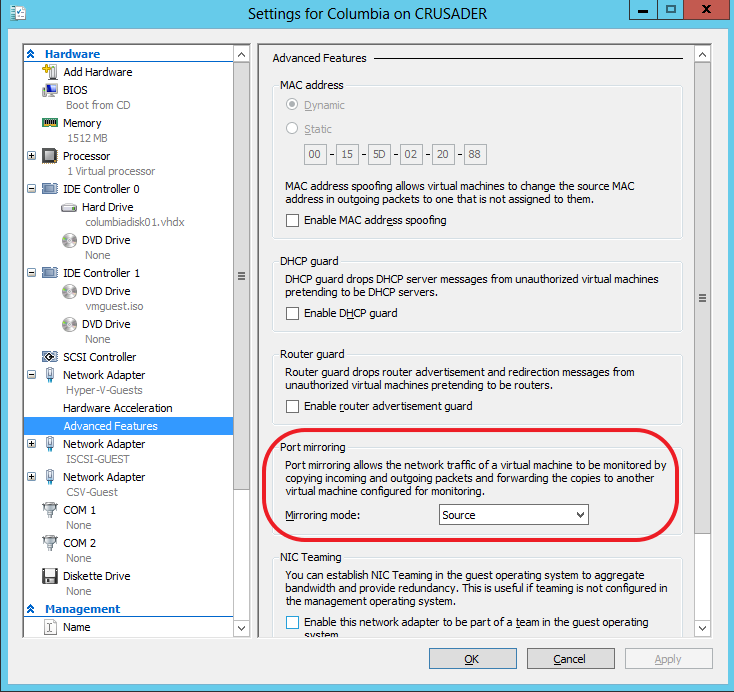
On the vNIC you want to monitor the traffic to and from the VM, under Settings, Network Adapter (choose the correct one), under Advanced Features you select “Source” as Mirroring mode. In this example we’re going to monitor data traffic to and from the guest Columbia.image

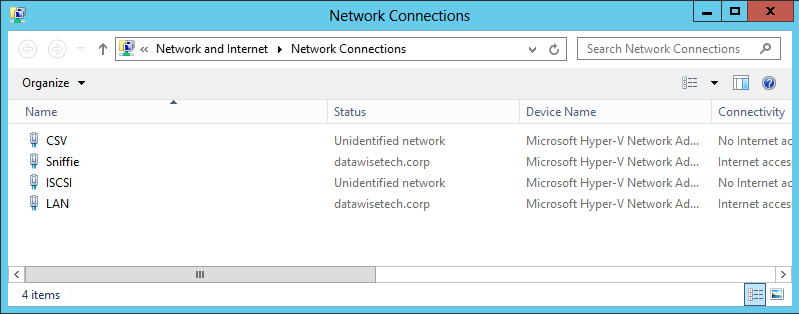
On the destination VM we have a dedicated vNIC set up called “Sniffie”image

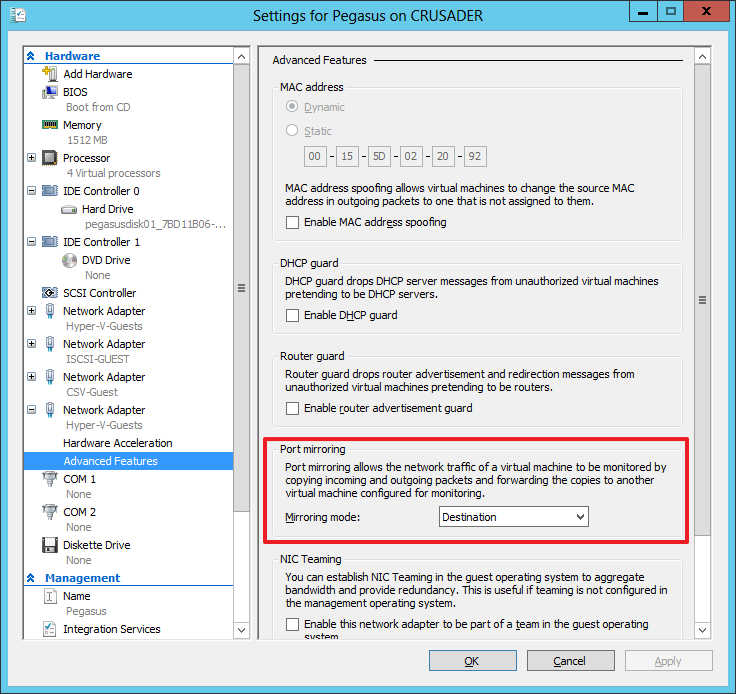
On the guest VM Pegasus, where we’ll capture the network traffic via a dedicated vNIC (“Sniffie”), we set that vNIC (virtual port) to “Destination” as Mirroring node:image

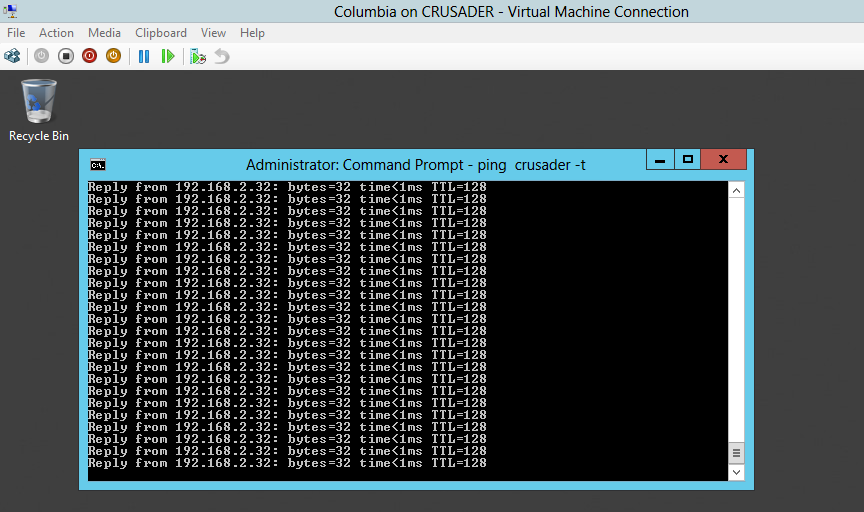
So now let’s start pinging a host (ping –t crusader)  on our Source VM  Columbiaimage

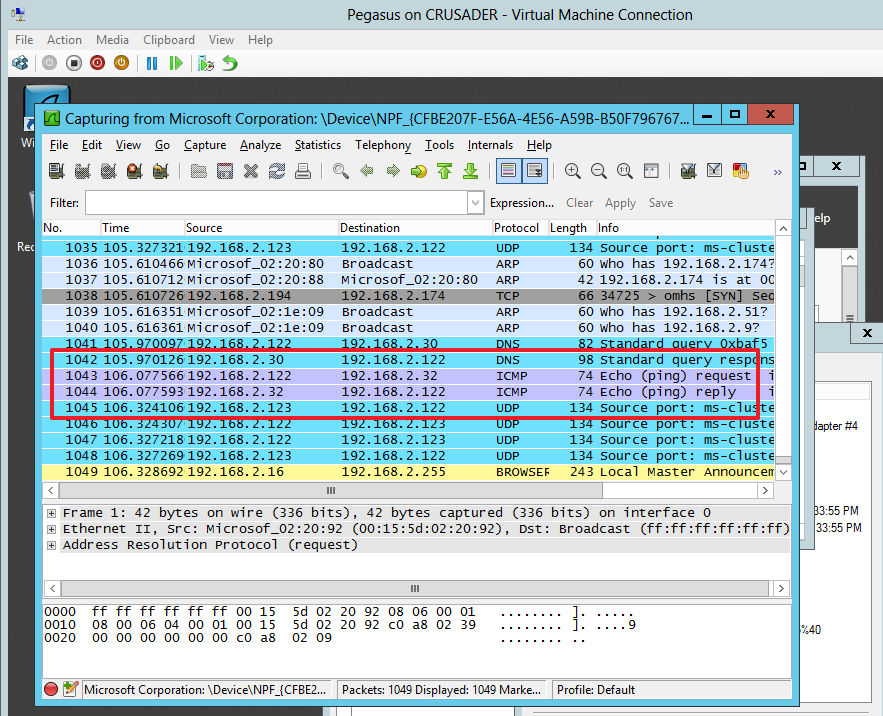
And take a look on the Destination vNIC on virtual machine Pegasus where we’re capturing the traffic. The “Sniffie” NIC there is set to destination as Mirror Mode. Look at the ICMP echo reply from form 192.168.2.32 (Crusader host). Columbia is at 192.168.2.122 sending out the ICMP echo request.image

Pretty cool!

Some Technicalities

So deep down under the hood, it’s the switch extension capabilities  of the Hyper-V virtual switch that are being leveraged to achieve port sniffing. This is just one of the many functionalities that the Hyper-V extensible switch enables. The Hyper-V extensible switch itself uses port ACLs to set a rule that forwards traffic from one  virtual port to another virtual port. For practical reasons translate virtual port to vNIC in a VM and this translates into what we shown above. While it’s good to know that port ACLs are what is used by the extensible switch to do enable all kinds of advances features like port mirroring but you don’t need to worry about the details to use it.

Things to note

Initially many of us made the assumption that we’d be able to sniff the traffic form a virtual port to a port on their physical switch. This is not the case. Basically, in box, it’s a source VM that mirrors it’s network traffic form one or more virtual ports (vNICs) to a destination VM’s one or more virtual ports (vNIC).

You can send many sources to one destination. That’s fine. You could also define more destinations on the same host but that’s not really wise and practical as far as I can see. All in all, you set it up on  when needed on the source VM and you keep a destination VM with a sniffer around for the sniffing.

Also keep in mind that all this works within the boundaries of the same host. Which means that if you want to monitor a VMs network traffic when it moves across nodes in a cluster you’ll have to have "destination” virtual machine on each host. This means that when a source VM is live migrated it will mirror the traffic to that local destination VM. That works.

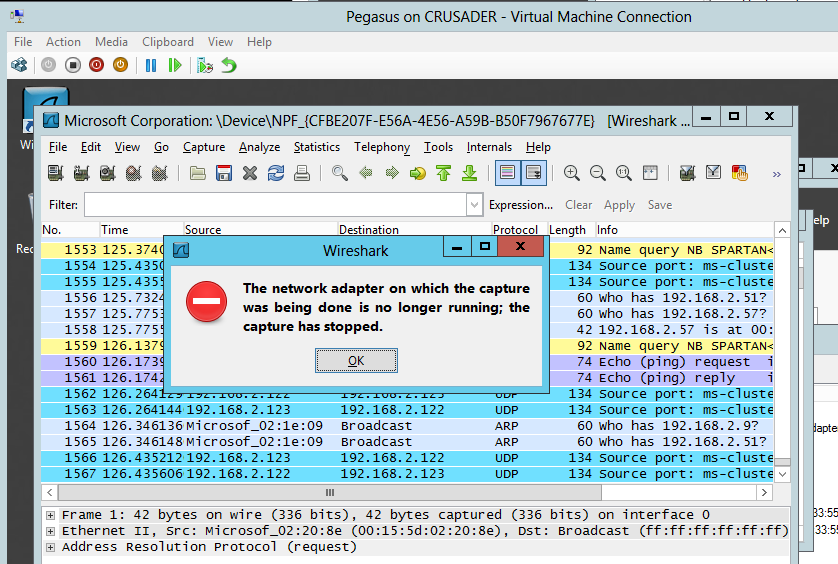
You could try and live migrate source & destination VMs to the same host but this is not feasible in real life. For one the capture doesn’t survive after a life migration as your sniffer loses connectivity to virtual Port / vNIC.image

Don’t be too disappointed about this. Port mirroring is not meant to be a permanent situation that you need to keep highly available anyway, bar some special environments/needs.

Whilst is it true that out of the box you can’t do stuff like sending the mirrored traffic form a guests vNIC/virtual port to a physical switch port where you attach your network sniffer laptop or so. If you throw on the CISCO Nexus 1000V it replaces the Microsoft in box “Forwarding Extensions” and than it’s up to CISCO’s implementation to determine what you can or can’t do. As this stuff is right up their sleeve they allow the Cisco Nexus 1000V mirrors traffic sent between virtual machines by sending ERSPAN to an external Cisco Catalyst switch. I have not had the pleasure of playing working with this.

Anyway, I hope this help to explain things a little. Happy sniffing and don’t get yourself into trouble, follow the rules.

Attending The Converged Infrastructure Think Tank At Dell Technology Camp 2013

I’m travelling to Amsterdam tomorrow to contribute in a “Think Thank on Converged Infrastructure” during the Dell Technology Camp 2013. The topic of this technology camp is the Evolution of the Data Center, hence the think tank on the converged infrastructure.

image

If you have any views on this subject, questions, or perhaps even “angsts” share them via twitter and we’ll see if we can discuss these. Don’t be shy! I’m pretty much a practical guys and for me any technology, no matter how much fun I have with them, is a means to an end. That means I think that a converged infrastructure can work for both the SMB/SME & large Enterprises if you do it right and at a good & affordable price level. Right sizing without getting stuck in that size, whilst not overpaying for future proofing is important. Long term in IT is a crap shoot Smile.

The biggest risks here is that the vendors don’t get what doing it right means & what is affordable. From the Microsoft community we’ve been discussing concepts like a Cluster in Box as a building block and other features that Windows Server 2012 enables for us. So far we’ve seen very low interest from the big vendors. From SMB to SME, we sometimes feel that OEMs look more at each other than at their customers needs and pursue agendas that fit only the bigger environments & pockets. Some partners look way to hard at their bottom line to be considered trusted advisors; They’ve lost the “VA” in Value Added Reseller. Serve your customers needs and you’ll have a business. Ignore us and you’ won’t ever have to deal with or worry about us again Winking smile.

On the other side I see the bigger players struggle with processes, methodologies and separation of roles that only hinder progress and prevent agile and dynamic IT.

We’ll see what the other attendees have to say, as I’m very interested in that. Looking at what other industries & roles think and do – and why – can be very educational. Vendors & Partners have a very different view on the matters than end customers have and the good ones know how to match both worlds to everyone’s benefit & satisfaction.

Follow the action on twitter via  #DellTechCamp, via live streams on http://www.fittotweet.com/events/techcamplive/ or https://www.etouches.com/ehome/index.php?eventid=53104&.