
Calling x64 CLI Tools in x86 Scripting Tools and Processes

Every now and then I get the same question from people who only recently decided to make the switch to x64 bit Windows operating systems. I’ve been running on x64 since Vista RTM and I’m very happy with it. When those people start scripting with their tools, which are 32 bit, calling some CLI tool in %windir%System32 they can run into an annoying issue that express itself in the correct yet somewhat misleading “WshShell.Exec: The system cannot find the file specified.”. But you know it’s there in %windir%System32, you checked and double checked!

When your scripting tool is 32 bit and you run your script it usually launches an 32 bit version of the CLI tool you’re calling. This behavior is a result of file redirection. This is a transparent process that’s part of the Windows-on-Windows 64-bit (WOW64) subsystem that is used to run 32 bit apps. When a 32 bit applications calls a CLI tool in the %windir%system32 directory it silently redirects this to the %windir%SysWOW64 where 32 bit apps can happily run without a worry on an x64 bit operating system. Yes, indeed %windir%system32 is for x64 code only and %windir%SysWOW64 is for 32 bit code.

What’s in a name 🙂 Some people argue they should have use system32 for 32 bit and system64 for x64 bit but I’m sure they had their reasons for what they did (i.e. it would have been hell for some reason I guess). Other suggestions have also been made by people who are far better qualified than I am. For example by Mark Russinovich, a hard core systems developer, in http://blogs.technet.com/b/markrussinovich/archive/2005/05/07/running-everyday-on-64-bit-windows.aspx.

Now all this can happen transparently for the user if the tools used have both an x64 and a x86 version. Cmd.exe and ping.exe are fine examples. If you run some VBScript in my favorite scripting tool for example (Sapiens PrimalScript) which is 32 bit it will launch a 32 bit cmd.exe, that launches the cscript.exe 32 bit version and which will launch ping.exe (using WScript.Shell) in %windir%SysWOW64 by silently redirecting your %windir%system32 path. No worries, you don’t know any better and the result is the same. So it’s usually not a problem if there is both a x64 and a x86 version to the CLI tool as you have seen in the ping.exe example. When a 32 bit process calls a tool in %windir%system32 it’s redirected to %windir%SysWOW64 and uses the 32 bit version. No harm done.

The proverbial shit hits the fan when you call a CLI tool that only has a x64 bit version. As the scripting tool is x86 it’s call is redirected to the WOW64 and the script fails miserably as the CLI tool can’t be found. This can be pretty annoying when writing and testing scripts. The CLI backup tool of Windows Backup is a prime example. It does not have a 32 bit version. Consider this little script for example:

Option Explicit

Dim oShell
Dim oExecShell
Dim sBackupCommandString
Dim sText

Set oShell = CreateObject("WScript.Shell")
'sBackupCommandString = "%windir%sysnativewbadmin get disks"
sBackupCommandString = "%windir%system32wbadmin get disks"

Set  oExecShell = oShell.Exec(sBackupCommandString)

Do While oExecShell.Status = 0
    Do While Not oExecShell.StdOut.AtEndOfStream
        sText = oExecShell.StdOut.ReadLine()
        Wscript.Echo sText 
    Loop    
Loop

Set oShell = Nothing
Set oExecShell = Nothing

There is a lot of File Redirection going on here to %windir%SysWOW64 when running this code in the 32 bit scripting tool. That tool launches the 32 bit cmd.exe and thus the 32 bit cscript.exe which then launches a 32 bit shell and tries to run "%windir%system32wbadmin get disks" which is also redirected to %windir%SysWOW64 where wbadmin cannot be found throwing the error: “WshShell.Exec: The system cannot find the file specified.”. If you don’t have a 32 bit code editor just launch the script manually from an 32 bit command prompt to see the error.

The solution as demonstrated here is to use as in “%windir%Sysnativewbadmin.exe get disks”. Uncomment that line and put the line with sBackupCommandString = "%windir%system32wbadmin get disks" in comment. Do the same test again and voila. It runs. So there you have it, you can easily test your script now. Just make sure that when the time comes to put it out in the wild you replace it with the real path if the calling process is x64 bit, which for example wscript.exe and cscript.exe are when you launch the form a x64 bit shell (explorer.exe or cmd.exe), which is the default on a x64 operating system. The x86 version runs when you launch them from a x86 shell. But remember the default on x64 bit operating systems is x64 bit and sysnative only functions when called from a 32 bit process (it’s a virtual directory that doesn’t really exists).

Sysnative was introduced in Vista/Windows2008 x64 bit. Not only 32 bit script editor users a affected by this, all 32 bit processes launching tools in "%windir%system32 are. See more on MSDN via this link http://msdn.microsoft.com/en-us/library/aa384187(VS.85).aspx.  For the folks running XP or Windows 2003 x64 bit it is perhaps time you consider upgrading to Windows 2008 R2 or v7 x64 bit? If you can’t, no need to worry, you’re in luck. Microsoft did create a hot fix for you (http://support.microsoft.com/?scid=kb;en-us;942589) that introduces sysnative on those platforms. So welcome to the x64 bit universe, beware of file redirection in WOW64 and happy scripting 🙂

The SP1 Béta Wave – E2K10 & W2K8R2

News from Tech Ed 2010 North America rolls in and we have the announcements of Windows 2008 R2 SP1 Béta for July 2010. Exchange 2010 SP1 Béta became available today! I’m grabbing it 🙂

I wouldn’t be surprised to see the the final releases of the products be announced at Tech Ed 2010 EMEA. Now I also wouldn’t mind if they came sooner due to the new and improved feature set both service packs offer, but I’m not really counting on that.

Bob Muglia’s live streamed keynote @ Tech Ed 2010 North America is nearing it’s end by now and he’s pretty up beat about lots of subjects Visual Studio 2010, Azure, System Center, Cloud, Exchange, OCS 14, Windows Phone 7, SQL Server 2008 R2, Office 2010, SharePoint 2010, Bing Maps & SDK, Avatar as a cloud case study & collaboration with Microsoft etc.

Cloud is omnipresent but they talk about hybrid. Making sure Hybrid is cost effective is important to me. I don’t need more work and costs but less.

Tech Ed 2010 Europe – Just registered

As a heads up people, I’m attending Tech Ed 2010 Europe from November 8th to November 12th in Berlin, Germany. Join me and thousands of hard core IT Professionals in learning, exchanging ideas, networking and preparing to design, plan and shape the future of ICT in the Microsoft space.

I’m looking forward to some 300/400 Level sessions on OCS14, System Center vNext, Exchange 2010 SP1, Windows 2008 R2 SP1, … etc. It’s always great an fun to meet up with old and new people from the IT community on line and off line. Engage in discussions with colleagues and Microsoft Employees, go out for dinner with fellow IT Pro’s & Devs.

Looking forward to it. Tech Ed is what you make of it. I might blog about that later. It takes some work & preparation to get the most out of it. Hope to see you there!

If you read my blog, follow me on twitter or know me and you’re going, sound of and we’ll arrange a meet & greet.

Exchange 2007-2010 Public Folders Issues “The Active Directory user wasn’t found.”

I was working on an Exchange 2007 to Exchange 2010 project when we ran into trouble creating our first public folder database on an Exchange 2010 server. Mind you, this was just creating the database. We did not even set up replication for this database yet. All mailboxes still resided in Exchange 2007 databases pointing to an Exchange 2007 public folder. Very soon after creating the database we got notified users could no longer send mails to mail enabled public folders. The exact error was this:

554 5.6.0 STOREDRV.Deliver.Exception:ObjectNotFoundException; Failed to process message due to a permanent exception with message The Active Directory user wasn’t found.

Also browsing of the public folders in Outlook was slow and the application froze/hung. These issues where fixed very fast by getting rid of the still unused public folder database all together. Now we could commence our search for the root cause. The error seemed related to the issue described in Public Folder Replication Fails Due To Empty Legacy Administrative Group which can be found @ http://msexchangeteam.com/archive/2010/05/05/454821.aspx  The blog describes this error during replication:

Log Name: Application

Source: MSExchange Store Driver

Event ID: 1020

Level: Error

Description:

The store driver couldn’t deliver the public folder replication message “Hierarchy ([email protected])” because the following error occurred: The Active Directory user wasn’t found.

But apart from replication not working there were other, more severe issues impacting end users who can still all be on Exchange 2007. The hanging of the outlook clients and mail enabled folders no longer being available. Dave Stork blogged about this in http://blogs.dirteam.com/blogs/davestork/archive/2010/03/16/mail-enabled-public-folder-recipient-not-found.aspx

Now the first mentions of the replication issue have been reported back in November 2009 (see http://get-exchange.blogspot.com/2009/11/public-folder-mayhem-exchange-2010.html) but still hasn’t been fixed. For the moment that fix is planned to be included in E2K10 RU5. Currently we’re at RU3, so that might well be august 2010.

The workaround described in above mentioned blog posts works & is effective immediately. Now they described the issue and the fix very well but I’ll add to tips.

Tip 1

“Practical End User Friendly Detection” of this issue can be done using exfolders.exe. You can read more about this tool here: “Exchange, meet ExFolders” (http://msexchangeteam.com/archive/2009/12/04/453399.aspx).The error only occurs when you create a public folder on Exchange 2010 and can be very annoying for the users so I’ll share this tip with you. Download the tool here http://msexchangeteam.com/files/12/attachments/entry453398.aspx and install it on an Exchange 2010 server in the bin directory (follow the readme.txt and don’t forget to merge the .reg file or the tool will crash). Running exfolders.exe and connect against any Exchange 2007 public folder. When you get this error …

—————————

ExFolders

—————————

An error occurred while trying to establish a connection to the Exchange server. Exception: The Active Directory user wasn’t found.

—————————

OK  

—————————

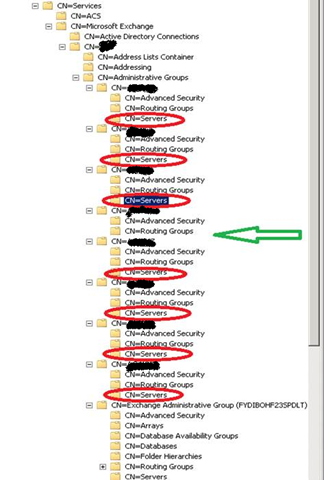
… you know you are affected. Deleting the empty Servers containers from ALL legacy Administrative Groups fixes the error. You then can connect successfully to a Exchange 2007 public folder with exfolder.exe. Which is a cool way to test for this issue and if the fix works as you don’t need to create a public folder and possibly hinder you users.

Tip 2

Also note that you need to delete  (using ADSIEDIT) every empty servers container out of every legacy Administrative Group, not just or only the one in the “First Administrative Group”. Don’t worry if you renamed that one to something more descriptive, that doesn’t matter at all. All the servers containers in the legacy Administrative Group should be empty I you have no more E2K3 servers left in your exchange organization. Feel free to leave comments on your experiences.