Do I really need 10Gbps fiber to the home?

Do I really need 10Gbps fiber to the home?

Do I really need 10 Gbps fiber to the home? The nerd in me would love 10 Gbps (or 25 Gbps) Internet connectivity to play with in my home lab. Online, you will see many people with 1Gbps or better. Quite often, these people earn good money or live in countries where prices are very low. More often than not, they are technical and enjoy playing with and testing this kind of network connectivity. So do I, but the question is whether I need it. Do you need it, or do you want it?

I would like it, but I do not need it

Yes, I’d like to have a 10Gbps Internet connection at home. Luckily, two things keep me in check. First, I was doing OK with VDSL at about 65 Mbps down and 16 Mbps up, based on my measurements. Now that I switched to fiber (they stopped offering VDSL), I pay 0.95 Euros more a month for 150 Mbps down and 50 Mbps up with a different provider. That is more than adequate for home use, IT lab work (learning and testing), and telecommuting with 2 to 3 people.

Do I really need 10Gbps fiber to the home?

Look, I don’t have IPTV or subscriptions to online streamers. I limit myself to what is free from all the TV networks, and that is about it. I am not a 16-year-old expert gamer with superhuman reflexes who needs the lowest possible latency, even when parents and siblings are streaming movies on their TVs. Also, telework video meetings do not require or use 4K for 99.99% of people. The most important factor is stability, and in that regard, fiber-to-the-home clearly beats VDSL.

What about my networking lab work

Most of my lab experiments and learning are on 1Gbps gear. If I need more, it is local connectivity and not to the Internet.

The moment you get more than 1 Gbps of Internet connectivity, you need the use cases and gear to leverage it and achieve your ROI. Bar the 2.5 Gbps NICs in PCs and prosumer switches; that leaves 10 Gbps or higher equipment. You need to acquire that kit, but for most lab experiments, it is overkill; it consumes more electricity, can be noisy, and produces heat. The latter is unwelcome in summer. The result is the bill goes up on different fronts, and how much more knowledge do I gain? 100Gbps RDMA testing is something I do in more suitable labs outside of the house. 10Gbps or higher at home is something I would use for local backups and secondary backups to a secondary site.

If not 10 Gbps Internet connectivity, why not 1Gbps?

Well, 1Gbps Internet connectivity sounds nice, but it is still mostly overkill for me today. Sure, if I were downloading 150GB+ virtual hard disks or uploading them to Azure all the time. That would saturate my bandwidth, leading to issues for other use cases at home, and my patience would be depleted very quickly.

But in reality, such situations are rare and can usually be planned. For those occasions, I practice my patience and enjoy the stability of my connection. The latter is better than at many companies, where zero-trust TLS inspection and mandatory VPNs like GlobalProtect make long-running uploads and downloads a game of chance. Once you have enough headroom, bandwidth is less important than stability, latency, and consistent throughput.

The most interesting use case I would have for 1Gbps (or better) would be off-site backups or archival storage when the target can ingest data at those speeds. Large backups can take a long time, limiting their usability and the ability to enable real-time backups. But since I need a local backup anyway, I can restrict the data sync to nighttime and the most essential data. And again, somewhere in the cloud, you need storage that can ingest the data, and that also comes at a cost. So rationally, I do not require higher bandwidth today. All cool, but why not go for it anyway?

Do I really need 10Gbps fiber to the home?

Cost is a factor

Sure, in the future I might get 1 Gbps or better, but not today, because we have arrived at the second reason: cost. Belgium is not a cheap country for internet connectivity compared to some other countries. And sure, if I spent 99.99 Euro per month instead of 34.95, I could get 8.5 Gbps down and 8 Gbps up. That’s about the best you can realistically expect from fiber-to-the-home via a shared GPON/XGS-PON, which is the model we have in Belgium. If I ever need more than my current 150Mbps down / 50Mbps up subscription, I can go to 500Mbps down / 100Mbps up or to 1000Mbps down / 500Mbps up to control costs.

Yes, I hear you, what is another 10 to 20 Euros per month? Well, think about the dozens of recurring expenses you have, each adding 10-20 Euros. That adds up every month. It is smart to control that and keep it low. Unemployment, illness, and economic hardship are always a possibility, and it is smart to control your budget. That way, you can weather a financial storm more easily, and you don’t have to rush to cut unnecessary spending. That holds, even when you make way more than average. Going from 150 Gbps down/50 Gbps up to 8.5 Gbps down and 8 Gbps up is a slight percentage increase in cost compared to the increase in bandwidth, but it does add to your fixed expenses. Frugal, sure, but also rational and realistic.

Now, Digi in Belgium offers Fiber To The Home for 10 euros per month, and I would jump on it. Unfortunately, it is only available in one town. Their expansion to the rest of the country seems at a standstill, and it would not surprise me if the powers that be (ISPs and politicians) have no urge to move this forward to protect (tax) revenue. But in due time, we might see the budget offerings move up the stack, and then you can move with them.

Speed is addictive

It is a fact that speed is addictive. Seeing that FTP or Windows ISO downloads are 10 times faster at first is very satisfying, and then that becomes your minimum acceptable speed. But that is the case whether you upgrade to 150 Mbps down/50 Mbps up, 2.5 Gbps down/2.5 Gbps up, or even higher. Don’t get me wrong, speed is also good. It provides a better experience for working from home or streaming a 4K movie. Just be sensible about it. They like to upsell bundles in Belgium, making you buy more than you need. On top of that, the relatively low price increase for ever more bandwidth is meant to lure you in: as you buy more bandwidth, the percentage increase in cost is low versus the gain in bandwidth, but the total cost still goes up.
But speed is not the biggest concern for many businesses when it comes to employee comfort. I see so many companies sharing 10Gbps among thousands of employees in their office buildings, and I realize I have it good at home.

If you go for 1Gbps or higher on purpose, fully knowing when and what you can use it for, have a blast. Many people have no idea what their bandwidth needs are, let alone when or how they consume bandwidth.

Conclusion

Do I really need 10Gbps fiber to the home? Today, that answer is definitely “no.” For work-from-home scenarios, 150 Mbps down and 50 Mbps up is perfect. You can comfortably work from home all they long with two or three people. The only issue you can encounter is when someone starts downloading or uploading a 150 GB virtual hard disk during video calls, if the telecommuters or your kids are torrenting 8K movies during office hours.

For me, unless I magically become very wealthy, I will keep things at home fiscally responsible. For educational purposes, such as learning about network technologies (switching, routing, firewalling, forward and reverse proxying, load balancing), 1 Gbps or less for Internet connectivity will suffice. 1 Gbps for your hardware needs is also good enough. It is also easier to obtain cheaply or for free via dumpster diving and asking for discarded hardware.

Sure, if you want to learn about 100Gbps networking and RDMA, that will not do it. The costs for hardware, electricity, and cooling are so high that you will need corporate sponsorship and a lab to make it feasible. And that is local or campus connectivity, rarely long-distance WAN networks.

So, start with 150 Mbps down and 50 Mbps up. Move to 500 Mbps down and 100 Mbps up if you notice a real need. That will be plenty for the vast majority. If not, rinse and repeat, but chances are you do not need it.
Transition from VDSL to fiber cabling

Introduction

When my ISP (Scarlet) told me I needed to switch to fiber, they didn’t have a suitable offering for my needs. In preparation, I pulled fiber and Cat6A from the ground-floor entry point to the first floor. Having that available, along with the existing phone line on the first floor, gave me all the flexibility I needed to choose an ISP that best suits my needs as I transition from VDSL to fiber.

Flexibility and creative transition from VDSL to fiber cabling

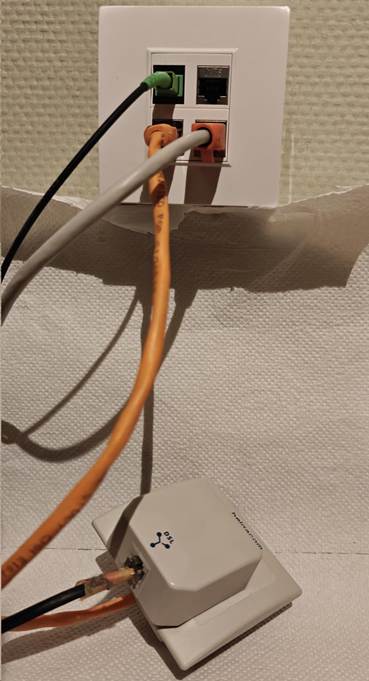
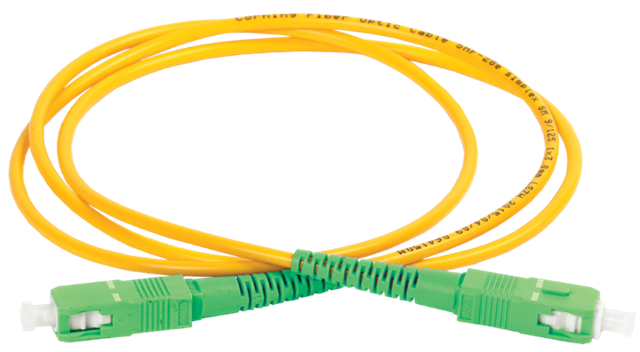
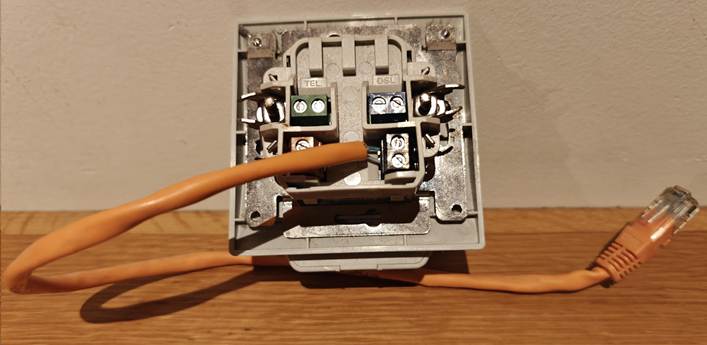
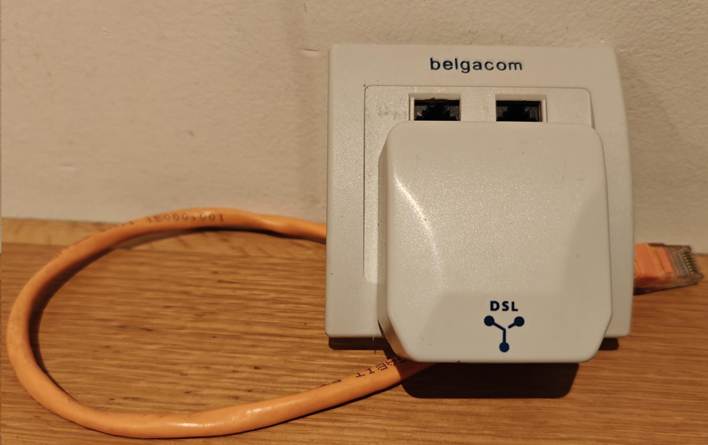
When I pulled the fiber cable (armored SC/APC, which has a better chance of surviving the stress of being pulled through the wall conduit) and the CAT6A S/FTP, I still had to keep the telco line I needed for the VDSL connection to my home office. As I wanted a decent finish on the wall, I had the fiber, CAT6A, and phone cable terminated into RJ45 connectors. As I still needed the splitter, which is an old-style 6-PIN, I improvised a go-between until I moved to a provider that offered “reasonably” priced fiber. The picture below was my temporary workaround. I connected the old Belgacom TF2007 to a UTP cable that terminates in an RJ45 connector. That way, I could plug it into the RJ45 socket at the back, which I connected to the existing phone line in the conduit. It also still has the splitter that connects the phone line to the VDSL modem for internet access.

Back view

Front view

Now. I no longer need the phone lines. Fiber comes from the ONTP on the ground floor to the first floor via the wall conduit. There, it connects to another fiber cable that runs into my home office. Here I can use the ONT or plug it into an XGS-PON/GPON SFP+ on my router/firewall. The CAT6A runs back down to provide wired Ethernet connectivity for devices I need there, including DECT telephony. At any time, I can have the fiber run to a router on the ground floor and use CAT6A to provide Ethernet on the first floor.

I can now disconnect this temporary solution.

What did I use

Well, to protect the cable during pulling through the conduit and later the run from the path box to my home office, where the OTN model lives, I used armored cabling. 10 meters to pull through the conduit and 15 meters to the home office.

Do an internet search for “Armoured Fibre Optic Cable Simplex Singlemode Armoured Fibre Optic Cable, 9/125µm OS2”.

This cable can also be used outdoors if needed, enabling fiber to run to a home office in the backyard or a similar setup. You can easily find these on Amazon.

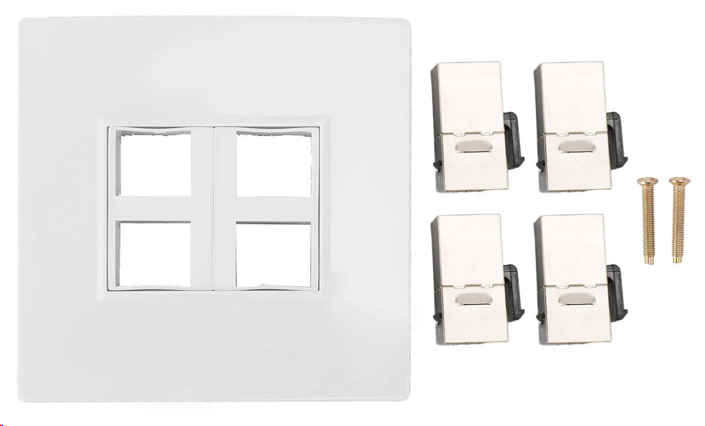
Next to the Ethernet faceplate with 4 ports, combined with 4 keystones. I chose 3 Cat6A keystone jacks, of which one is used for the phone cable in the wall I attached to an RJ45. I installed it in a wall-mounted junction box, drilling a hole through the back plate for the wires to pass through.

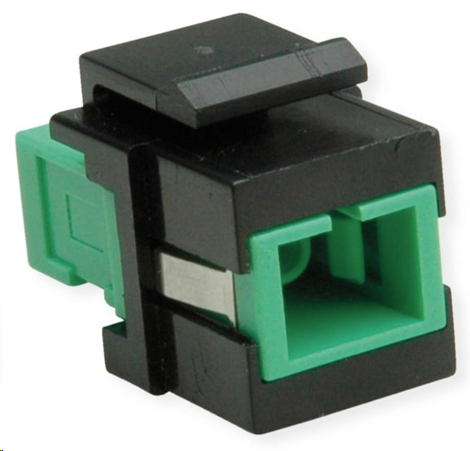
For the fiber cable, I used a Keystone SC/SC Simplex Fibre Optic Adapter Single Mode OS2 APC. Again, this can easily be found on Amazon or your shop of choice.

Conclusion

I had a hard time pulling the fiber through an angle in the conduit because the connector was attached, but the armor protected the fiber. The speed test is good.

So, be a bit creative during transitions, and you can deliver a flexible, solid solution, even in older houses.

The VeeamVanguard and Microsoft MVP Community is about more than the vendor programs

Introduction

I have been a Microsoft MVP and a Veeam Vanguard for quite some time now, which suggests that I share experiences, insights, knowledge, and feedback with the global IT community at large.

Community activities are as diverse as their members and their personalities. But in most cases, these activities involve adding something to the community they are part of. It is, or should not be, about what’s in it for me, even when that community will rise to help you should the need arise, but about us all. We all trip and fall at certain moments in our lives, both personally and professionally, meaning we all need help at times.

Helping those who need some assistance

One of the things I do is help where and when I can to ensure that the senior citizens I know or am aware of have their connectivity needs met as well as possible. That is particularly important for them if they rely on personal care and alarm systems, as well as some basic home automation, which makes living at home not only easier but also possible.

I don’t do such things through a non-profit organization; it’s simply a matter of rising to the occasion when the need and opportunity present themselves. Recently, a little “project” presented itself that required some network gear to complete.

Anyway, there was a need for excellent connectivity and a decent backup of any critical system(s). So, I offer my skills and time. I have some spare lab parts, but not all the items I need. This project required some wireless access points that can be easily and correctly configured and managed. So, what does one do? Ask for help from companies that might have surplus gear after hardware refreshes. I have used Aruba (IAP versions) and UniFi in the past. Any kit that works without expensive, high-end controller requirements and continues to function without requiring support contracts does the job. In some instances, flashing proprietary hardware with OpenWrt helps leverage hardware that does not work or cannot be maintained without a subscription.

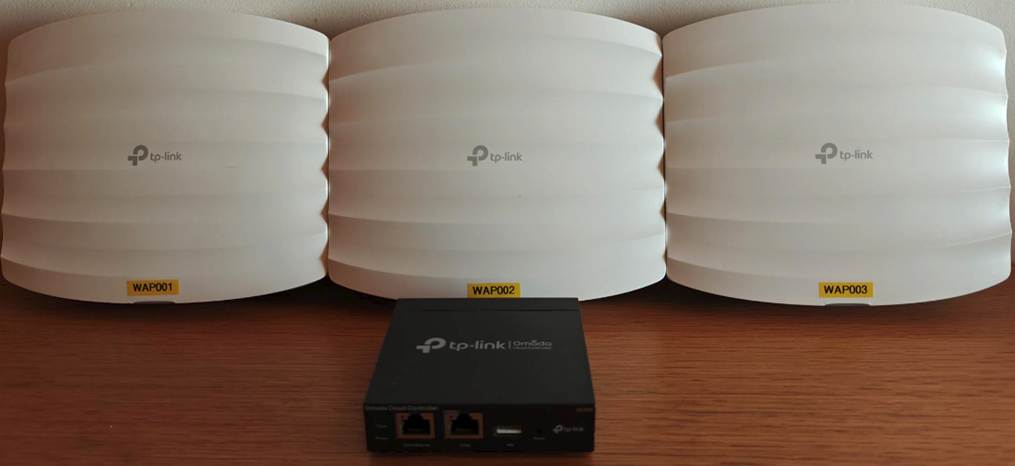
For this project, I acquired some donated TP-Link Omada gear that was perfect for the job at hand.

What also came in handy is the community edition or free software from Veeam, which is available without subscriptions or costs, provided it is not installed by consultants or for profit. Hence, I give some schooling and training to ensure that the most tech-savvy person can take care of it. I help, explain, and offer advice on some aspects, but they ultimately get the job done.

I also needed a gateway/router/firewall. While in this case, I might consider installing a TP-Link gateway if I ever get my hands on one, but for now, an older model proprietary firewall I recovered and flashed with OPNsense Community Edition fills that role.

Preaching

We live in a polarized world, where division hinders progress. Social media bombards us with a tsunami of bad news that can keep you doomscrolling 24/7 if you fall into that trap. Instead, apply your skills to do something that improves the lives of people who need some assistance. It doesn’t have to be big in terms of size or money. It does not have to make the news or require Herculean effort.

All it takes is some effort and some time on your part, but it can also be fun to do. Did I do this alone? The people themselves got involved; the business I asked to donate hardware delivered the gear. The cabling came from dumpster diving. The firewall is an “obsolete” proprietary firewall appliance flashed with OPNsense community edition. Is the setup perfect? Nope, but it is excellent and does a fantastic job, way better than ever before!

You also have some skills, time, or materials to help out people. Just do it.

How to fix locking yourself out of OPNsense

Introduction

Eventually, we all make the mistake of locking ourselves out of our firewalls. Let’s look at how to fix locking yourself out of OPNsense. Let’s look at how to fix locking yourself out of OPNsense.

How to fix locking yourself out of OPNsense

With OPNsense, this is mainly due to an error in Interface configuration and firewall rules. You know, when we are too “strict” and deny traffic from private networks on the interface we use for management.

How to fix locking yourself out of OPNsense

Cause 1: Firewall rules are blocking you

These can be user-treated rules or the rules added when you select to block private address ranges on an interface.

There is an easy solution, but it requires console access. If OPNsense runs in a virtual machine, that is relatively easy, especially in the lab or when you are the hypervisor administrator. Now, if OPNsense is running on an appliance, you’ll probably need physical access to that device. Bring a keyboard and a monitor with whatever cable (VGA/DVI/HDMI/DisplayPort/USB-C) is required, or connect a physical console cable to connect to the device. This can only be done remotely if the console port is available over ethernet.

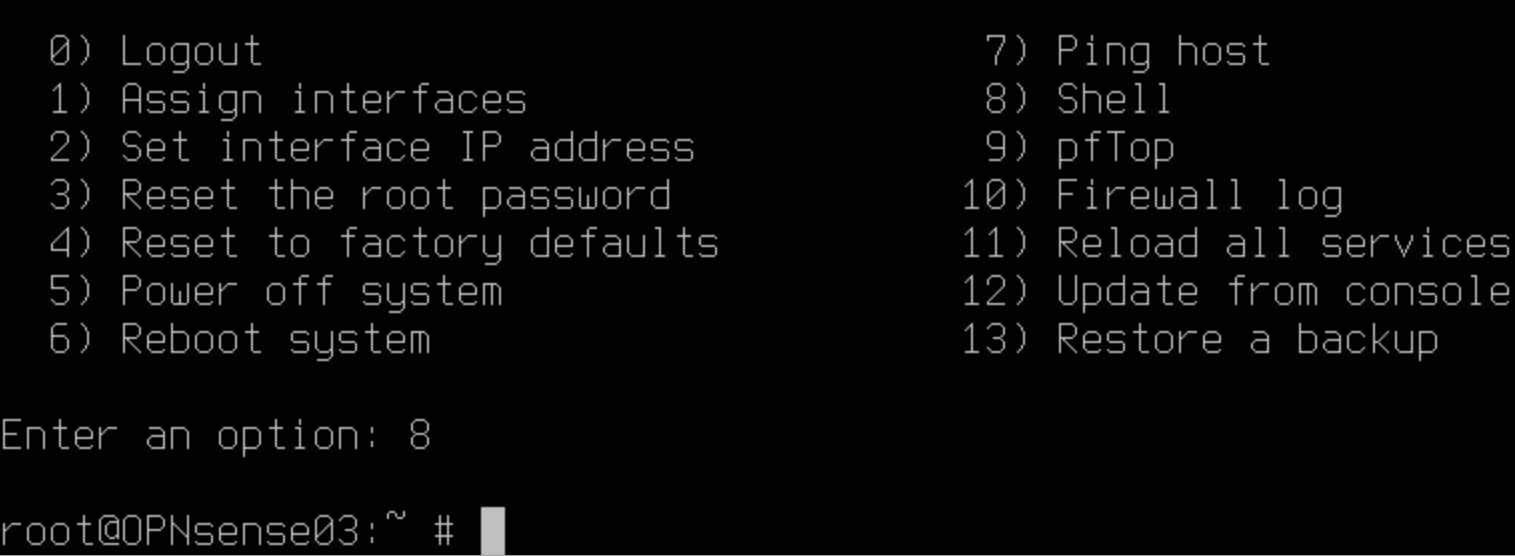
Log in with an account with sufficient rights and drop into the shell by selecting option 8.

How to fix locking yourself out of OPNsense

Type:

pfctl -d

Hit “Enter”. This turns the OPNsense device into a router only by disabling the firewall. That means you now have access again via HTTPS or SSH on the interfaces you list for administration despite the error you made in the firewall rules for those interfaces.

Connect via the Web GUI and fix that mistake. When done, turn the firewall back on. To do so type:

pfctl -e

Hit “Enter”. The firewall is now enabled again.

Test whether you still have Web GUI or SSH access. If so, mission accomplished.

Cause 2: You no longer have HTTPS/SSH listening on the interface you have access to

By default, you listen to all non WAN interfaces. You might have reduced this to one or more but accidentally forgot to select the one(s) you need.

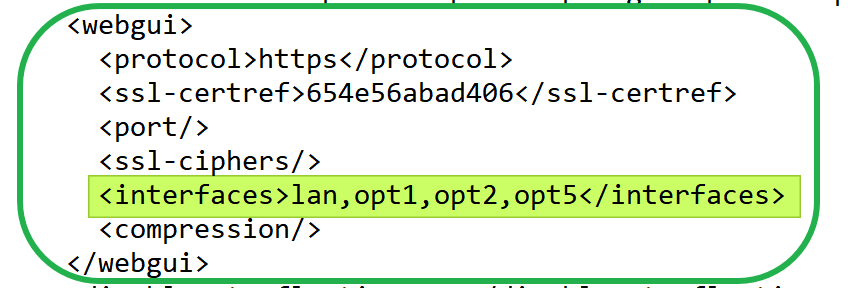
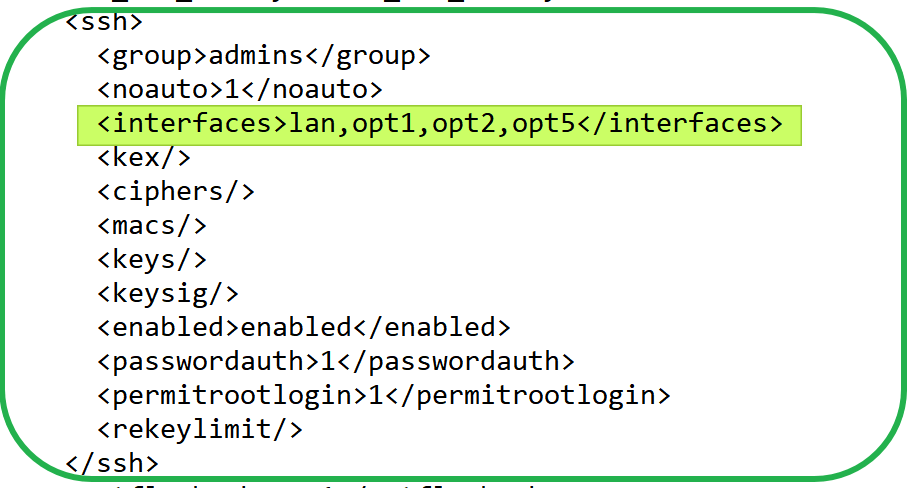
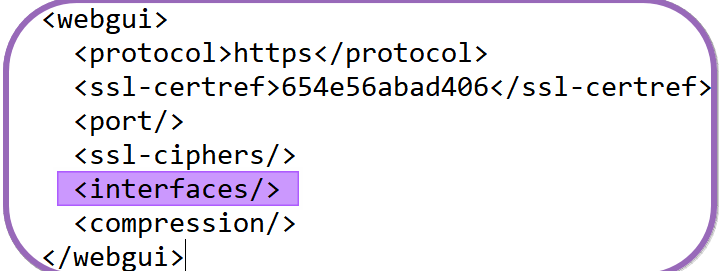
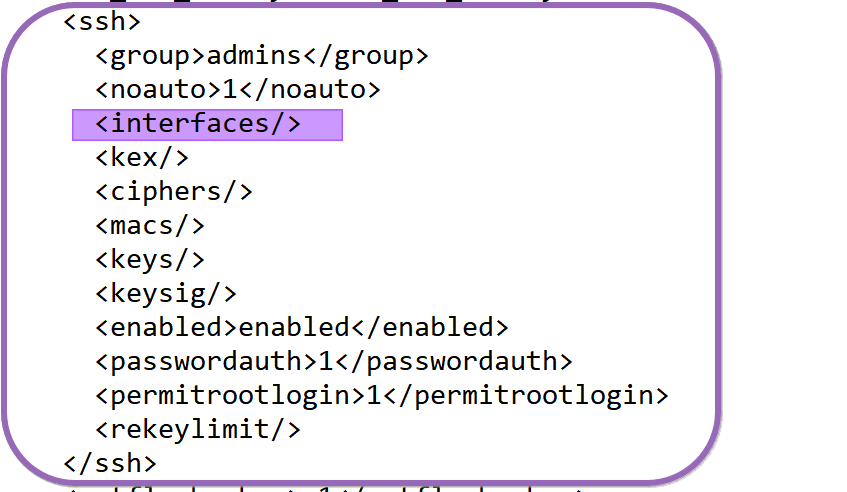
No fear, under /conf/conf.xml, you can edit the administrative webgui and ssh settings. In the example below, I have customized those settings (via the WebGUI) to listen to the specified ports.

WebGUI

SSH

How to fix locking yourself out of OPNsense

Add the missing interface(s) or allow the WebGUI and SSH to listen to all of them again by reverting the settings back to default and not specifying any interfaces, as in the example below.

WebGUI

How to fix locking yourself out of OPNsense

SSH

To edit these files, you can use vi, which is available by default. If you prefer Nano or such, you can install it via the FreeBSD package manager:

pkg install nano

Voila, those are the most common ways to get out of a pickle when you have locked yourself out of OPNsense.