The Veeam 100 Summit 2026 is taking place in Lisbon, Portugal, as I write. On day one, I attended the Object First track. Object First was acquired by Veeam in Q1 2026. While I cannot disclose anything discussed here, I can share that these people are (very) ambitious. It was a technical, no-nonsense experience where I voiced my enthusiasm, wishes, and concerns in my usual feedback style. Direct, unapologetic but polite, with the occasional strong “force multiplier” wording.
That led to some interesting discussions with lead architect Alexey Vasilev and Anthony Cusimano at the evening networking event. The level of interaction didn’t disappoint, as we have come to expect at the Veeam 100 Summit 2026. Great first day.
The release of Veeam Backup & Replication v13.1 introduces a significant new capability: the Application Backup Repository (ABR). Positioned as a secure landing zone for application‑generated backups, ABR brings hardened storage, snapshot lifecycle management, and immutability to workloads that generate backups of data or configurations to an NFS share. Databases and network devices come to mind and are mentioned in the documentation here: Application Backup Repositories – Veeam Backup & Replication User Guide.
“Configuration data of network devices: firewall or switch configurations.”
These “backups” or exports traditionally operate outside Veeam’s agent‑based or hypervisor‑based protection models. But while ABR is a powerful addition, it’s important to understand where it truly fits and where it doesn’t. When I first read the blog posts from Michael Cade and Anthony Spiteri, my first use case were network and IoT devices as they both mention it.
In particular, the idea that “network devices and IoT systems” can directly use ABR is more theoretical than realistic for most devices. The majority of those devices do not have an NFS client to write to an NFS share directly. That said, we can leverage the Application Backup Repository to improve backup and recovery services to our (internal) customers.
This post gives you a clear, realistic overview.
What ABR Actually Is
ABR is a feature of the Veeam Hardened Repository appliance. It exposes managed NFS volumes that applications can write their own backup files to. Each application receives its own isolated NFS export, and Veeam handles:
Snapshot creation and retention
Immutability enforcement
Instant rollback to any snapshot
Backup copy to secondary storage
Secure access control (Kerberos optional)
This allows application teams to continue using their native backup tools, such as RMAN, Backint, pg_dump, MongoDB dump, MySQL dump, custom scripts, while gaining Veeam’s hardened storage and recovery workflows.
Where ABR Shines
ABR is ideal for workloads that already support writing backup files to NFS:
Oracle RMAN Incremental Merge
SAP HANA Backint or file-based backups
PostgreSQL (pg_dump, WAL archiving)
MongoDB / MySQL / MariaDB dumps
Linux-based application exports
DevOps pipelines writing artifacts to NFS
These workloads benefit from ABR’s snapshot rollback, immutability, and backup copy integration without changing their native backup processes.
Network appliances and IoT device limitation
When it comes to most network appliances and IoT devices we are confronted with the limitation that they cannot write to NFS as they lack:
an NFS client
POSIX-compliant file handling
kernel-level NFS support
secure session handling (Kerberos, AUTH_SYS)
Typical network gear supports:
TFTP
FTP / FTPS
SFTP / SCP
HTTPS API upload
Proprietary backup formats
Typical IoT devices support:
local flash storage
MQTT / HTTP upload
cloud sync
proprietary export formats
NFS is almost never supported. So while ABR can technically accept NFS writes from any capable device, the practical reality is that network and IoT devices will not use ABR directly. This is something to keep in mind.
A Practical Workaround: How to Still Protect Network & IoT Backups with ABR
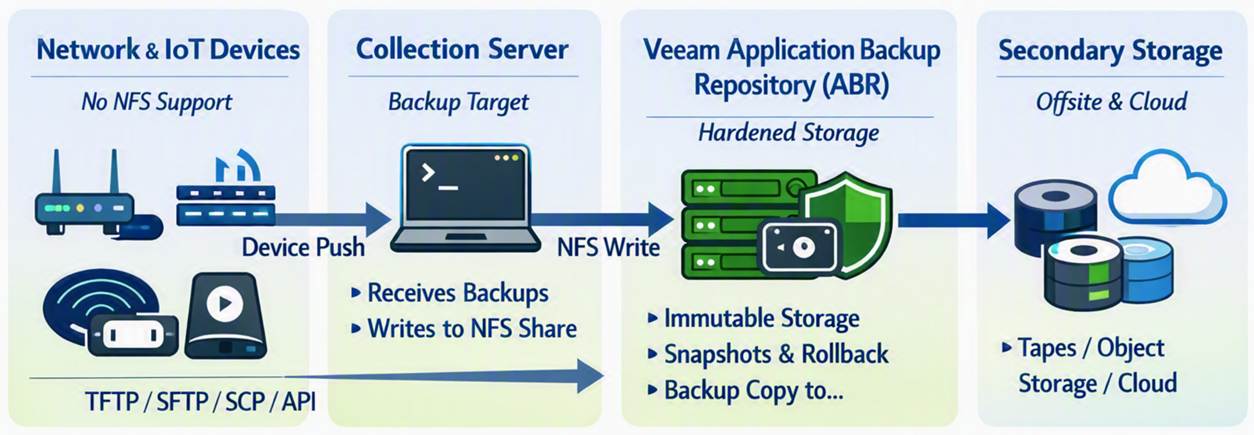
Even though network/IoT devices cannot write directly to NFS, you can still protect their backups using ABR by introducing a simple intermediary.
Workflow
Network/IoT device exports its backup (TFTP, SFTP, SCP, API, etc.)
A Linux server or automation node collects these backups
That server or servers write(s) the collected files into the ABR NFS share
Veeam handles snapshots, immutability, and backup copy from ABR
Benefits
Hardened storage for device backups
Snapshot rollback
Immutability
Backup copy to secondary storage
No unprotected local storage
This is the realistic way to use ABR for network gear and IoT systems.
Pricing
Well, it could work out to be cheaper than a NAS license for Veeam, but maybe not if you only store config file backups on there. I mean 1TB goes a long way for config backups only.
That said, in both cases you pay some money to have additional Veeam capabilities and immutability with granular and backup admin-managed recovery options. That might be the reason you want it over just backing up one or more virtual machines with the network appliance and IoT device backups on it. Think about it, a backup admin can provide a network engineer with a secured download of an encrypted zip at zero-dark-thirty in the morning without needing to restore files from a virtual machine, which might require a recovery key etc. Does that fit your security rules? Maybe, maybe not. But that is up to management to decide when they are down an extra 6 hours waiting for the file(s) from inside the Virtual Machine to be restored.
Conclusion
The Application Backup Repository is one of the most interestingl additions to Veeam v13.1, especially for enterprise databases and Linux-based applications that already support NFS. It brings hardened storage, immutability, and snapshot-driven recovery to workloads that previously lived outside Veeam’s ecosystem.
However, ABR is not a direct backup target for most network devices or IoT as far as I can see. These devices simply do not support NFS. The good news: with a lightweight collection server acting as an intermediary, you can still bring their backups into ABR and benefit from its security and lifecycle management.
ABR is powerful — but only when used where it actually fits. All this is lab and theory, it is early days yet and I am sharing my thinking process out loud with you. Nothing more, nothing less.
Yes, Windows Server 2012 R2. Me, the most vocal proponent of keeping your environments up to date, to the level I barely have a Windows Server 2022 under my care anymore.
So what gives? Some people spun up a brand-new Windows Server 2025 Hyper-V cluster and migrated a truckload of their virtual machines over. I love modern infrastructure, so this all sounds very good until they reach out with a little issue. About a dozen of their virtual machines do not boot properly, but into the recovery console. My first question was what is the OS on those virtual machines? When the answer is Windows Server 2012 R2, maybe some Windows Server 2016, I had heard all I needed to know to help “fix” this. The real solution is not running those old out-of-support OS versions anymore, but we can “fix” it so your apps keep running while you upgrade or migrate.
Symptoms
Their older but business-critical Windows Server 2012 R2 VMs—and these were Generation 2, UEFI VMs, no less, but did not boot on their shiny new Hyper-V cluster. The migration itself went smoothly, they said, but when they started the virtual machines, the apps did not come up. So they checked the console logs of those virtual machines and saw STOP 0x0000007B: INACCESSIBLE_BOOT_DEVICE errors and recovery consoles. Rebooting did not help at all. This was a solid, reproducible crash loop, exactly at the point where the OS should hand off the bootloader to the kernel and find its disk. If you’ve been in the game for a while, you know that this usually spells one thing: a fundamental storage or bus driver issue. But why now?
The ACPI Identity Crisis
Windows Server 2012 (R2) and Windows Server 2016 are not supported on Windows Server 2025 Hyper-V. Upgrade or migrate before you move them.
This wasn’t just some random corruption. We were looking at a fundamental compatibility issue. To understand why, you need to understand how Hyper-V and the Guest OS communicate during the boot process.
Server 2012 R2 came out in 2013. Hyper-V 2025 is the latest of the greatest at the time of writing. In the decade between those releases, the “hardware signatures” (Hardware IDs, or HWIDs) that Hyper-V presents to a virtual machine have evolved.
In Gen 2 VMs, Windows relies heavily on the ACPI (Advanced Configuration and Power Interface) tables to find its critical components, especially the virtual machine bus (VMBus) and the storage controllers that attach to it.
When 2012 R2 boots, the kernel says, “Okay, ACPI, show me my storage bus.”
The Hyper-V 2025 host says, “Here is your storage bus, its ID is MSFT1000.”
The 2012 R2 kernel looks in its driver database and goes, “MSFT1000? I have no idea who that is. I’m looking for VMBus or nothing.”
Boom. It can’t see the bus, it can’t load the disk driver, and it can’t find itself so it suffers an Inaccessible Boot Device crash. As the guest has no clue what to do.
The “fix” is in some offline registry editing
Since the VM was in a crash loop and couldn’t boot to Windows, we had to perform some offline registry surgery. Luckily for them, the virtual machines could boot into their recovery environments, so they did not have to boot from an ISO to reach a command prompt and access the offline system hive.
We used a combination of reg load to “mount” the system registry from the VM’s disk onto our repair environment, and then some strategic reg copy commands to “spoof” the IDs.
Step by step
Mounting the Hive: Code snippet reg load HKLM\TempHive c:\Windows\system32\config\SYSTEM
(This assumes c: is where the VM’s Windows volume is mounted.)
Map the VMBus to MSFT1000 Code snippet reg copy HKLM\TempHive\ControlSet001\Enum\ACPI\VMBus HKLM\TempHive\ControlSet001\Enum\ACPI\MSFT1000 /s
This is the core fix. We are telling the 2012 R2 system: “Look, if you ever see a device calling itself MSFT1000, don’t ignore it. Duplicate every single setting, driver binding, and service permission you have for ‘VMBus’ and apply it to this new ‘MSFT1000’ identity.” This essentially links the modern host’s ID to the older OS’s native VMBus driver stack.
Mapping the Generation Counter to MSFT1002 Code snippet reg copy HKLM\TempHive\ControlSet001\Enum\ACPI\Hyper_V_Gen_Counter_V1 HKLM\TempHive\ControlSet001\Enum\ACPI\MSFT1002 /s This maps the older Hyper_V_Gen_Counter_V1 identity—used for snapshots and consistency—to its modern equivalent on the 2025 host, MSFT1002. This is crucial for making sure integration services load properly.
After these commands, we had to run reg unload HKLM\TempHive to save our changes. We removed the ISO, rebooted, and… Bingo. The Server 2012 R2 boot screen appeared, and the login prompt followed shortly after.
This works because Server 2012 R2 has the necessary VMBus and storage drivers; it just doesn’t know they are compatible with the hardware IDs reported by Hyper-V 2025. This registry trick just creates that necessary driver-to-hardware binding.
But remember that this is an “unsupported” hack! While this gets the VM booting, moving 2012 R2 to newer hosts often means features might be degraded. Microsoft deprecated official support for 2012 R2 guests on modern hosts a while ago. Windows Server 2016 RTM without modern patching will suffer from the same issue, by the way.
Below is a complete script you can copy and paste into CMD.exe in your recovery environment to fix a virtual machine with this issue.
@echo off
echo.
echo ============================================================
echo   Hyper-V 2025 ACPI Fix for Windows Server 2012 R2 / 2016 RTM
echo   - Adds MSFT1000 (VMBus) and MSFT1002 (GenCounter)
echo   - Auto-detects ControlSet
echo   - Creates SYSTEM hive backup
echo ============================================================
echo.

:: --- Step 1: Detect Windows drive ---
echo Detecting Windows installation drive...
set WINDRV=

for %%d in (C D E F G H I J K L M N O P Q R S T U V W X Y Z) do (
    if exist %%d:\Windows\System32\Config\SYSTEM (
        set WINDRV=%%d:
    )
)

if "%WINDRV%"=="" (
    echo ERROR: Could not find Windows installation drive.
    echo Aborting.
    exit /b 1
)

echo Windows installation found on %WINDRV%
echo.

:: --- Step 2: Backup SYSTEM hive ---
echo Creating SYSTEM hive backup...
copy "%WINDRV%\Windows\System32\Config\SYSTEM" "%WINDRV%\Windows\System32\Config\SYSTEM.bak"
if errorlevel 1 (
    echo ERROR: Backup failed. Aborting.
    exit /b 1
)
echo Backup created: SYSTEM.bak
echo.

:: --- Step 3: Load SYSTEM hive ---
echo Loading SYSTEM hive into HKLM\TempHive...
reg load HKLM\TempHive "%WINDRV%\Windows\System32\Config\SYSTEM"
if errorlevel 1 (
    echo ERROR: Failed to load SYSTEM hive. Aborting.
    exit /b 1
)
echo Hive loaded.
echo.

:: --- Step 4: Detect active ControlSet ---
echo Detecting active ControlSet...
for /f "tokens=3" %%a in ('reg query HKLM\TempHive\Select /v Current') do set CS=ControlSet00%%a

if "%CS%"=="" (
    echo ERROR: Could not determine active ControlSet.
    reg unload HKLM\TempHive
    exit /b 1
)

echo Active ControlSet: %CS%
echo.

:: --- Step 5: Apply ACPI fixes ---
echo Applying ACPI fixes...

echo - Cloning VMBus -> MSFT1000
reg copy HKLM\TempHive\%CS%\Enum\ACPI\VMBus HKLM\TempHive\%CS%\Enum\ACPI\MSFT1000 /s /f

echo - Cloning Hyper_V_Gen_Counter_V1 -> MSFT1002
reg copy HKLM\TempHive\%CS%\Enum\ACPI\Hyper_V_Gen_Counter_V1 HKLM\TempHive\%CS%\Enum\ACPI\MSFT1002 /s /f

echo ACPI fixes applied.
echo.

:: --- Step 6: Unload hive ---
echo Unloading SYSTEM hive...
reg unload HKLM\TempHive
echo Hive unloaded.
echo.

echo ============================================================
echo   FIX COMPLETE
echo   You may now reboot the VM.
echo ============================================================
echo.
pause
Better to do this proactively; I have a PowerShell solution on GitHub that also includes the above .cmd script. The Invoke-TestAndFixHyperV2025ReadinessForLegacyVMs.ps1 script can handle virtual machines that are online, before you move them to Hyper-V 2025. https://github.com/WorkingHardInIT/Invoke-TestAndFixHyperV2025ReadinessForLegacyVMs
But I cannot migrate or upgrade yet!
I call bull shit on most of these in 99% of cases. And if it is not bullshit you really need to get your act together and work on fixing your apps/vendors to never allow getting into such a mess in the first place.
Conclusion
Tech debt. You know that thing every IT manager and department is preventing or solving for the last 30 years is still very much around. Despite all that ITIL, risk and change management, or maybe even due to all that talk and very little action.
Sometimes, saving the day isn’t about deploying the latest and greatest tech; it’s about diving into the deepest, darkest corners of the OS and tricking it into working just one more time. There are no guarantees, and this is a ticking time bomb.
I bought these people some time. Now they need to get working! I also kindly suggested they should read their backup vendors’ support statements 😉.
Do I really need 10 Gbps fiber to the home? The nerd in me would love 10 Gbps (or 25 Gbps) Internet connectivity to play with in my home lab. Online, you will see many people with 1Gbps or better. Quite often, these people earn good money or live in countries where prices are very low. More often than not, they are technical and enjoy playing with and testing this kind of network connectivity. So do I, but the question is whether I need it. Do you need it, or do you want it?
I would like it, but I do not need it
Yes, I’d like to have a 10Gbps Internet connection at home. Luckily, two things keep me in check. First, I was doing OK with VDSL at about 65 Mbps down and 16 Mbps up, based on my measurements. Now that I switched to fiber (they stopped offering VDSL), I pay 0.95 Euros more a month for 150 Mbps down and 50 Mbps up with a different provider. That is more than adequate for home use, IT lab work (learning and testing), and telecommuting with 2 to 3 people.
Look, I don’t have IPTV or subscriptions to online streamers. I limit myself to what is free from all the TV networks, and that is about it. I am not a 16-year-old expert gamer with superhuman reflexes who needs the lowest possible latency, even when parents and siblings are streaming movies on their TVs. Also, telework video meetings do not require or use 4K for 99.99% of people. The most important factor is stability, and in that regard, fiber-to-the-home clearly beats VDSL.
What about my networking lab work
Most of my lab experiments and learning are on 1Gbps gear. If I need more, it is local connectivity and not to the Internet.
The moment you get more than 1 Gbps of Internet connectivity, you need the use cases and gear to leverage it and achieve your ROI. Bar the 2.5 Gbps NICs in PCs and prosumer switches; that leaves 10 Gbps or higher equipment. You need to acquire that kit, but for most lab experiments, it is overkill; it consumes more electricity, can be noisy, and produces heat. The latter is unwelcome in summer. The result is the bill goes up on different fronts, and how much more knowledge do I gain? 100Gbps RDMA testing is something I do in more suitable labs outside of the house. 10Gbps or higher at home is something I would use for local backups and secondary backups to a secondary site.
If not 10 Gbps Internet connectivity, why not 1Gbps?
Well, 1Gbps Internet connectivity sounds nice, but it is still mostly overkill for me today. Sure, if I were downloading 150GB+ virtual hard disks or uploading them to Azure all the time. That would saturate my bandwidth, leading to issues for other use cases at home, and my patience would be depleted very quickly.
But in reality, such situations are rare and can usually be planned. For those occasions, I practice my patience and enjoy the stability of my connection. The latter is better than at many companies, where zero-trust TLS inspection and mandatory VPNs like GlobalProtect make long-running uploads and downloads a game of chance. Once you have enough headroom, bandwidth is less important than stability, latency, and consistent throughput.
The most interesting use case I would have for 1Gbps (or better) would be off-site backups or archival storage when the target can ingest data at those speeds. Large backups can take a long time, limiting their usability and the ability to enable real-time backups. But since I need a local backup anyway, I can restrict the data sync to nighttime and the most essential data. And again, somewhere in the cloud, you need storage that can ingest the data, and that also comes at a cost. So rationally, I do not require higher bandwidth today. All cool, but why not go for it anyway?
Cost is a factor
Sure, in the future I might get 1 Gbps or better, but not today, because we have arrived at the second reason: cost. Belgium is not a cheap country for internet connectivity compared to some other countries. And sure, if I spent 99.99 Euro per month instead of 34.95, I could get 8.5 Gbps down and 8 Gbps up. That’s about the best you can realistically expect from fiber-to-the-home via a shared GPON/XGS-PON, which is the model we have in Belgium. If I ever need more than my current 150Mbps down / 50Mbps up subscription, I can go to 500Mbps down / 100Mbps up or to 1000Mbps down / 500Mbps up to control costs.
Yes, I hear you, what is another 10 to 20 Euros per month? Well, think about the dozens of recurring expenses you have, each adding 10-20 Euros. That adds up every month. It is smart to control that and keep it low. Unemployment, illness, and economic hardship are always a possibility, and it is smart to control your budget. That way, you can weather a financial storm more easily, and you don’t have to rush to cut unnecessary spending. That holds, even when you make way more than average. Going from 150 Gbps down/50 Gbps up to 8.5 Gbps down and 8 Gbps up is a slight percentage increase in cost compared to the increase in bandwidth, but it does add to your fixed expenses. Frugal, sure, but also rational and realistic.
Now, Digi in Belgium offers Fiber To The Home for 10 euros per month, and I would jump on it. Unfortunately, it is only available in one town. Their expansion to the rest of the country seems at a standstill, and it would not surprise me if the powers that be (ISPs and politicians) have no urge to move this forward to protect (tax) revenue. But in due time, we might see the budget offerings move up the stack, and then you can move with them.
Speed is addictive
It is a fact that speed is addictive. Seeing that FTP or Windows ISO downloads are 10 times faster at first is very satisfying, and then that becomes your minimum acceptable speed. But that is the case whether you upgrade to 150 Mbps down/50 Mbps up, 2.5 Gbps down/2.5 Gbps up, or even higher. Don’t get me wrong, speed is also good. It provides a better experience for working from home or streaming a 4K movie. Just be sensible about it. They like to upsell bundles in Belgium, making you buy more than you need. On top of that, the relatively low price increase for ever more bandwidth is meant to lure you in: as you buy more bandwidth, the percentage increase in cost is low versus the gain in bandwidth, but the total cost still goes up.
But speed is not the biggest concern for many businesses when it comes to employee comfort. I see so many companies sharing 10Gbps among thousands of employees in their office buildings, and I realize I have it good at home.
If you go for 1Gbps or higher on purpose, fully knowing when and what you can use it for, have a blast. Many people have no idea what their bandwidth needs are, let alone when or how they consume bandwidth.
Conclusion
Do I really need 10Gbps fiber to the home? Today, that answer is definitely “no.” For work-from-home scenarios, 150 Mbps down and 50 Mbps up is perfect. You can comfortably work from home all they long with two or three people. The only issue you can encounter is when someone starts downloading or uploading a 150 GB virtual hard disk during video calls, if the telecommuters or your kids are torrenting 8K movies during office hours.
For me, unless I magically become very wealthy, I will keep things at home fiscally responsible. For educational purposes, such as learning about network technologies (switching, routing, firewalling, forward and reverse proxying, load balancing), 1 Gbps or less for Internet connectivity will suffice. 1 Gbps for your hardware needs is also good enough. It is also easier to obtain cheaply or for free via dumpster diving and asking for discarded hardware.
Sure, if you want to learn about 100Gbps networking and RDMA, that will not do it. The costs for hardware, electricity, and cooling are so high that you will need corporate sponsorship and a lab to make it feasible. And that is local or campus connectivity, rarely long-distance WAN networks.
So, start with 150 Mbps down and 50 Mbps up. Move to 500 Mbps down and 100 Mbps up if you notice a real need. That will be plenty for the vast majority. If not, rinse and repeat, but chances are you do not need it.