
Introduction
The release of Veeam Backup & Replication v13.1 introduces a significant new capability: the Application Backup Repository (ABR). Positioned as a secure landing zone for application‑generated backups, ABR brings hardened storage, snapshot lifecycle management, and immutability to workloads that generate backups of data or configurations to an NFS share. Databases and network devices come to mind and are mentioned in the documentation here: Application Backup Repositories – Veeam Backup & Replication User Guide.
“Configuration data of network devices: firewall or switch configurations.”
These “backups” or exports traditionally operate outside Veeam’s agent‑based or hypervisor‑based protection models. But while ABR is a powerful addition, it’s important to understand where it truly fits and where it doesn’t. When I first read the blog posts from Michael Cade and Anthony Spiteri, my first use case were network and IoT devices as they both mention it.
In particular, the idea that “network devices and IoT systems” can directly use ABR is more theoretical than realistic for most devices. The majority of those devices do not have an NFS client to write to an NFS share directly. That said, we can leverage the Application Backup Repository to improve backup and recovery services to our (internal) customers.
This post gives you a clear, realistic overview.
What ABR Actually Is
ABR is a feature of the Veeam Hardened Repository appliance. It exposes managed NFS volumes that applications can write their own backup files to. Each application receives its own isolated NFS export, and Veeam handles:
- Snapshot creation and retention
- Immutability enforcement
- Instant rollback to any snapshot
- Backup copy to secondary storage
- Secure access control (Kerberos optional)
This allows application teams to continue using their native backup tools, such as RMAN, Backint, pg_dump, MongoDB dump, MySQL dump, custom scripts, while gaining Veeam’s hardened storage and recovery workflows.
Where ABR Shines
ABR is ideal for workloads that already support writing backup files to NFS:
- Oracle RMAN Incremental Merge
- SAP HANA Backint or file-based backups
- PostgreSQL (pg_dump, WAL archiving)
- MongoDB / MySQL / MariaDB dumps
- Linux-based application exports
- DevOps pipelines writing artifacts to NFS
These workloads benefit from ABR’s snapshot rollback, immutability, and backup copy integration without changing their native backup processes.
Network appliances and IoT device limitation
When it comes to most network appliances and IoT devices we are confronted with the limitation that they cannot write to NFS as they lack:
- an NFS client
- POSIX-compliant file handling
- kernel-level NFS support
- secure session handling (Kerberos, AUTH_SYS)
Typical network gear supports:
- TFTP
- FTP / FTPS
- SFTP / SCP
- HTTPS API upload
- Proprietary backup formats
Typical IoT devices support:
- local flash storage
- MQTT / HTTP upload
- cloud sync
- proprietary export formats
NFS is almost never supported. So while ABR can technically accept NFS writes from any capable device, the practical reality is that network and IoT devices will not use ABR directly. This is something to keep in mind.
A Practical Workaround: How to Still Protect Network & IoT Backups with ABR
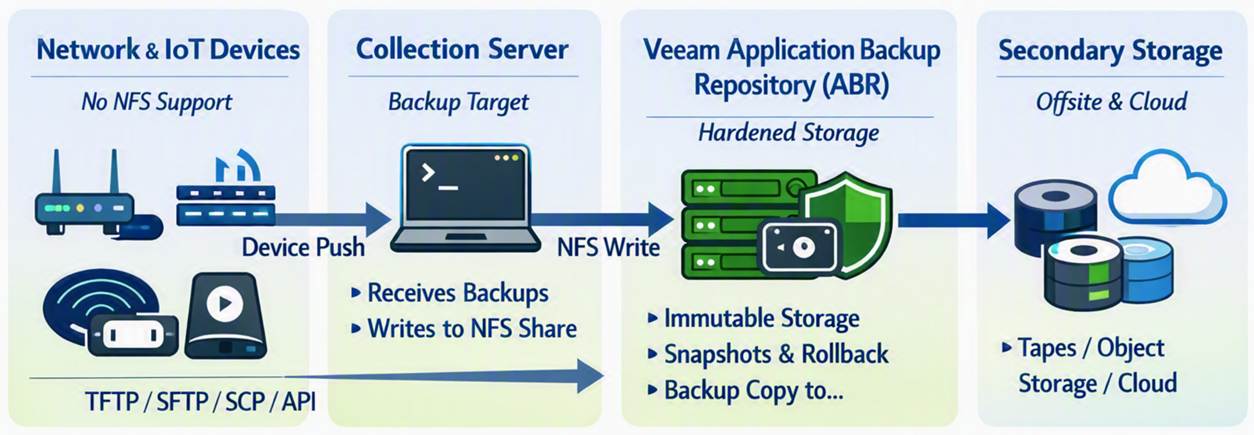
Even though network/IoT devices cannot write directly to NFS, you can still protect their backups using ABR by introducing a simple intermediary.
Workflow
- Network/IoT device exports its backup (TFTP, SFTP, SCP, API, etc.)
- A Linux server or automation node collects these backups
- That server or servers write(s) the collected files into the ABR NFS share
- Veeam handles snapshots, immutability, and backup copy from ABR
Benefits
- Hardened storage for device backups
- Snapshot rollback
- Immutability
- Backup copy to secondary storage
- No unprotected local storage
- This is the realistic way to use ABR for network gear and IoT systems.
Pricing
Well, it could work out to be cheaper than a NAS license for Veeam, but maybe not if you only store config file backups on there. I mean 1TB goes a long way for config backups only.

That said, in both cases you pay some money to have additional Veeam capabilities and immutability with granular and backup admin-managed recovery options. That might be the reason you want it over just backing up one or more virtual machines with the network appliance and IoT device backups on it. Think about it, a backup admin can provide a network engineer with a secured download of an encrypted zip at zero-dark-thirty in the morning without needing to restore files from a virtual machine, which might require a recovery key etc. Does that fit your security rules? Maybe, maybe not. But that is up to management to decide when they are down an extra 6 hours waiting for the file(s) from inside the Virtual Machine to be restored.
Conclusion
The Application Backup Repository is one of the most interestingl additions to Veeam v13.1, especially for enterprise databases and Linux-based applications that already support NFS. It brings hardened storage, immutability, and snapshot-driven recovery to workloads that previously lived outside Veeam’s ecosystem.
However, ABR is not a direct backup target for most network devices or IoT as far as I can see. These devices simply do not support NFS. The good news: with a lightweight collection server acting as an intermediary, you can still bring their backups into ABR and benefit from its security and lifecycle management.
ABR is powerful — but only when used where it actually fits. All this is lab and theory, it is early days yet and I am sharing my thinking process out loud with you. Nothing more, nothing less.