SMB Direct: Choosing A Flavor

I often get asked what to buy for implementing SMB Direct. It’s a non trivial question actually and I’m not an expert, nor do I play one on TV.  All joking aside, it’s a classical consulting answer: it depends. I don’t do free consulting in a blog post, even if that was possible, as there are many factors such as the characteristics and futures of your organization. There’s also a lot of FUD & marketing flying around. Basically in real life you only have two vendors: Cheslio (iWarp) and Mellanox (Roce/Infiniband). Hard to say which one is best. You make the best choice for your company and you live with it.

There is talk about other vendors joining the SMB Direct market. But it seems to be taking a while. This is not that strange. I’ve understood that in the early days of this century iWarp got a pretty bad reputation due to the many issues around it. Apparently offloading the TCP/IP stack to the NIC, which is what iWarp does is not an easy endeavor. Intel had some old Net card a couple of years ago but has gotten out of the game. Perhaps they’ll step back in but that might very well take a couple of years.

Other vendors like Broadcom, Emulex & QLogic might be working on solutions but I’m not holding my breath. Broadcom has DCB and has been hinting at RDMA in it’s NICs for many years but as of the writing of this post there is nothing functional out there yet. But bar the slowness (is complexity slowing the process?) it will be very interesting to see what they’ll choose: RoCE or iWarp. That choice might be the most public statement we’ll ever see about what technology seems like the best bet for these companies. But be careful, I have seen technology choices based on working/living with design choices at at another level due to constrictions in hardware & software that are no longer true today. So don’t just do blindly what others do.

Infiniband will remain a bit more of a niche I think and my guess is that RoCE is the big bet of Mellanox for the long term. 10Gbps and higher Ethernet switches are sold to everyone in the world. Infiniband, not so much. Does that make it a bad choice? Nope, it all depends. Just like FC is not a bad choice for everyone today, it depends.

Your options today

The options you have today to do SMB Direct are rather limited and bound to the different flavors and their vendor. Yes vendor not vendors.

  1. iWarp: Chelsio
  2. RoCE: Mellanox (v2 of RoCE has brought routability into the game, which counters one of iWarps biggest advantages, next to operational ease but the no fuss about DCB story might not be 100% correct, the question is if this matters, after all many people do well with iSCSI which is easy but has performance limits).
  3. Infiniband: Mellanox (Qlogic was the only other remaining one, but Intel bought it form them. I have never ever seen Intel Infiniband in the wild.

Note: You can do iWarp (and even RoCE in theory) without DCB but in all realistic high traffic situations you’ll want to implement PFC to keep the experience and results good under load. Especially the ports connecting to the SOFS nodes could other wise potentially drop packets. iWarp, being TCP/IP, will handle dropped packets but possibly at the cost of deteriorated performance. With RoCE you’re basically toast if you lose packets, it should be losses. I’m not too convinced that pure offloaded TCP/IP scales. Let’s face it, what was the big deal about lossless iSCSI => DCB Smile I would really love to see Demartek testing these things out for us.

If you have a smaller environment, no need for routing and minimal politics I have seen companies select Infiniband which per Gbps is very cheap. Lots of people have chosen iWarp due to it simplicity (which they heavily market) and routability. The popularity however has dropped due to prices hikes that came with increased demand and no competition. RoCE  is popular (I see it the most) and affordable but for this one you MUST do at least PFC. DCB support on switches is not an issue, even budget friendly DELL PowerConnect N4000 series supports it as did it’s predecessor the PC8100 series. Meaning if you have bought switches in the past 24 months and did your home work you’re good to go. Are routability and distance important? Well perhaps not that much today but as the trend in networking is heading for layer 3 down to the rack which will be more acceptable when we see a lot of the workload goodness in hypervisors (Live Migration, vMotion,yes there is work being done on that) being lit up in layer 3 it might become a key feature.

More Tips On Dealing With Removing Short File Names When Migrating To a SMB3 Transparent Failover File Server Cluster

You might have read my blog posts on the capabilities and the process of migrating to a Transparent Failover File Server. If not, here they are:

These are a good read with some advice from real world experience and in this post I’ll offer some more tips. I’ve discussed the need to disable and get rid of short file names in my blog and offered other tips to prepare for your migration and get your file share LUNs in tip top, modern shape. But what if you run into short file name issues where you can seem to get rid of them?

Well here’s 3 more things to check:

1) Get rid of the shadow copies used for Previous Versions

The reason you’d better get rid of them is that they can also contain short files names & way to long path or file names. We don’t want them to ruin the party so we remove them all by disabling shadow copies on the LUNs to be copied. We can enable them again once the LUN is up and running in the new file cluster.

2) The logs indicate there are short file names you don’t have access to

If the NFTS permissions on the folder & file structure are OK you should not have to much problems bar some files being locked by being in use. Rerunning the fsutil command prior to migrating with the server service stopped will prevent any connectivity and use of file shares by people ignoring the request to log of or shut down their clients or automated jobs that otherwise keep accessing them.

But you might still get some indications in the log file(s) that state you can remove certain file names.

image

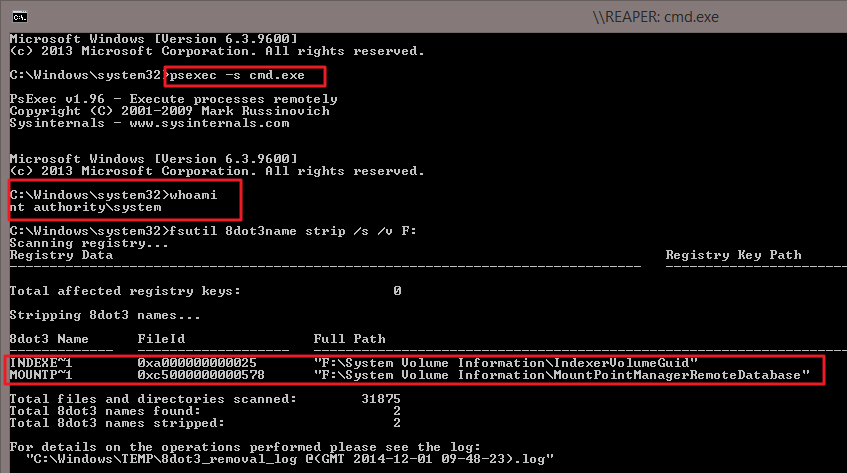
There is the good old trick of running your command under SYSTEM. That those the job! That helps get rid of short file name instances of folders where you normally don’t get access to. If system has rights you’ll be fine whether it’s a system folder or not.To do this the Sysinternals tools come in handy once again. You can launch a command prompt running under the NT AUTHORITYSYSTEM account using psexec.exe by running the following from a elevated command prompt:

psexec -i -s cmd.exe or psexec  -s cmd.exe

image

The-s switch runs the remote process in the System account. Psexec temporarily installs a service "psexec running psexesvc.exe" on the remote computer (or locally if that’s what you doing) which is removed when the app or process that’s running is closed. It’s obvious now I hope why you need an elevated command prompt to run this command.

Now should you do this by default? Nope. Just when you need to and as always have a realistic backup plan, a way to recover when things go south.

3) Anti virus sometime prevents the removal of short file names

Disable Anti-Virus, sometimes it holds a temporary entry in the registry for the file involved. At least that’s what I’ve seen as a transient issue in some of the large number of logs I gathered. Yeah, I ran a lot of fsutil against large NTFS volumes. What can I say. Due diligence pays off!

4) Run ChkDsk

Just make sure the volume is healthy and no repairs are needed. If your migrating from and older file server there might be outstanding issues and a check disk on volumes with lot’s of files take time. Some of the ones I’ve dealt with had more that 2 million files on a 2TB LUN and it it can take 24 hours. Fun when you have 10 LUNs :-/

VEEAM Invests in Faster & More Efficient Data Protection With Backup & Replication 8

Ever more data to protect without breaking the systems or the bank

One of my major concerns today in IT, weather it is on premises or in the cloud, is the cost, time, reliability and feasibility of backup and restores. This true for most of us. Due to the environments in which I deliver my services my main issue with backups is the quantity of data. The amount of data is staggering and growth is not showing a downward trend.

The big four: CPU, Memory, Network & Storage

Over the years we have seen a vast increase in compute, memory, network and storage capabilities and pricing. CPUs are up to 18 cores per socket as I write this. DDR4 memory is here and the cost is relatively low. We have affordable 10Gbps networking to throw at the problem as well or in some case 8 to 16Gbps Fibre Channel. So when it comes to CPU, memory and network we’re pretty well served.

Storage is evolving as well and we’re getting ever bigger and, if you have the budget that is, faster storage arrays in different flavors. But it remains a challenge. First of all to get the right amount of IOPS and storage capacity at an affordable price point is a balancing act. Secondly when dealing with backups we need to manage the source IOPS & latency against the target. But that’s not all, while you might want to squeeze every last IOPS & 1ms latency out of your backup target you can’t carelessly do that to your source storage. If you do, this might constitute a Denial Of Service attack against your applications and services. Even today storage QoS is either non existent, in it’s infancy or at best limited to particular workloads on storage solutions.

The force multiplier: Backup software capabilities & approaches

If you’ve made sure the above 4 resources are not your killer bottle neck the backup software, methods algorithms and the approach used will be either your biggest problem or you best friends. You need your backup software to be:

  • Capable
  • Scalable
  • Fast
  • Configurable
  • Scale Out

There are some challenging environments out there. To deal with this backup software should be able to leverage the wealth of capabilities compute, network, memory & storage are offering to protect large amounts of data reliable and fast. This should be done smart and in an operationally supportable manner. VEEAM has been working on this for a long time and they keep getting better at this with every release and it allows for scale out designs in regards to backups targets.

VEEAM Backup & Replication 8.0

There are many improvements in v8 but a couple stand out.

image

Consistency groups (Hyper-V)

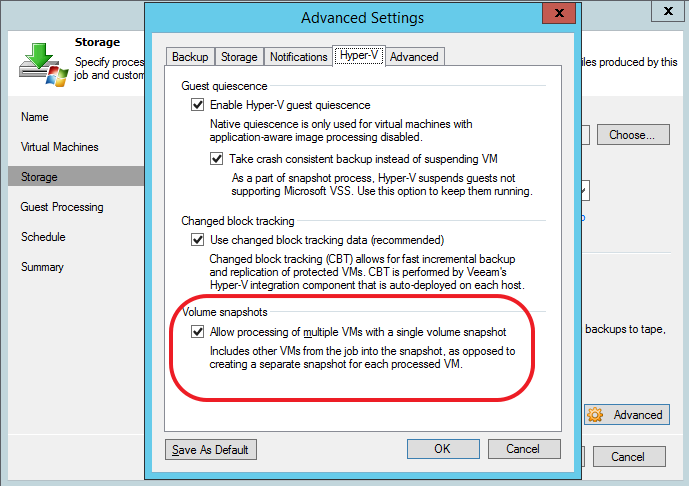
Backup jobs can execute more than one VM backup task simultaneously from the same volume snapshot with “Allow Processing of Multiple VMs with a single volume snapshot”.

image

This means you can reduce the number of snapshots significantly where in the past you needed a volume snapshot per VM. VEEAM limits the the maximum amount of VMs you can backup per snapshot to 4 when using software VSS and to eight with hardware VSS. They do this because under heavy load VSS/CSV sometimes has issues. This number can be tweaked to fit your needs (no all environments are created equally) with 2 registry values under HKLMSOFTWAREVeeamVeeam Backup and Replication key:

  • MaxVmCountOnHvSoftSnapshot (DWORD)
  • MaxVmCountOnHvHardSnapshot (DWORD) registry values

Reducing the number of snapshots to be taken is good as it saves resources, speeds up things & as VSS can be finicky, not needing more than absolutely necessary is a good thing.

Backup I/O Control.

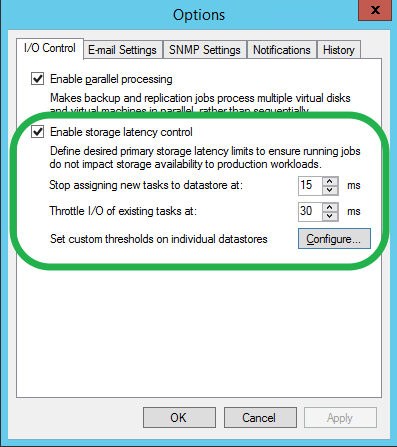
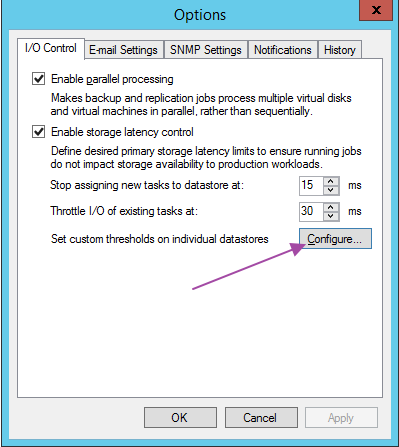
Another improvement is backup I/O Control which delivers capability to dynamically adjust the number of backup tasks based on IOPS latency. Under Options you’ll find a new Tabbed sheet, I/O Control. It contains the parallel processing option that used to be under “Advanced” tab in Veeam B&R 7.

image

The idea is to move to a more “policy driven” approach for handling the load backups can put on the storage. Until now we’d configure a number of X amounts of tasks to run against the source storage in order to keep IOPS/Latency in check. But this is very static and in a dynamic / elastic “cloud” world this isn’t very flexible nor is it feasible to keep tuned to the best number for the current workload.

I/O Control let’s you set limits on how much latency is acceptable for your data stores. Removing or adding VMs to the data store won’t invalidate your carefully set number of tasks allowed as it’s now the latency that’s used to dynamically tune that number for you.

I/O control has two settings:

 “Stop assigning new tasks to datastore at: X ms” :VEEAM looks at the latency (IOPS) before assigning a proxy (backup target) to a virtual disk or won’t launch the task until the load has dropped.  This prevents the depletion of IOPS by launching to many backups.

“Throttle I/O of existing tasks at: Y ms”: This will throttle the IO of already running  backup jobs when needed due to some application workloads in the VMs running on the source storage kicking in. The backups will be throttled so they’ll take longer but they won’t kill the performance of the applications while they are running.

These two setting allow for the dynamic and on the fly tweaking of the number of backups tasks running as well as their impact on the storage performance. Once you have determined what latency values are acceptable to you you’re done, VEEAM handles the tweaking for you. The default values seems to reflect industry best practices (sustained > 20 ms is considered problematic)

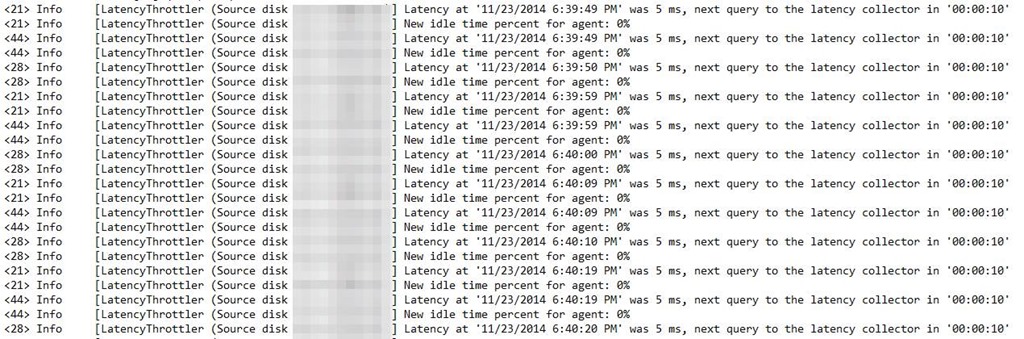
The below screenshot is for the backup job log and shows latency being monitoredclip_image002

With VEEMA B&R v8 Enterprise + You can even do this per data store, meaning you can optimize this per backup source. This recognizes that is no “one sizes fits all perfectly” and allows for differentiation. Yet it does so in a way that does not compromise on the simplicity of use that VEEAM offers. This sounds easy but from experience I know this isn’t. VEEAM manages to offer a great balance between simplicity and functionality for companies of all sizes.

Select “Configure”

image

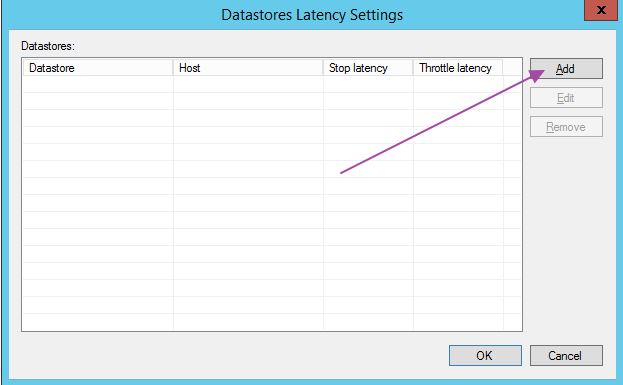
In the “Datastore Latency Settings” you can add one, more or all data store you are protecting with VEEAM. This allows for differentiation when you have CSV that are used for SQL Server VMs versus stateless web servers of or other workloads that are not storage I/O intensive.

image

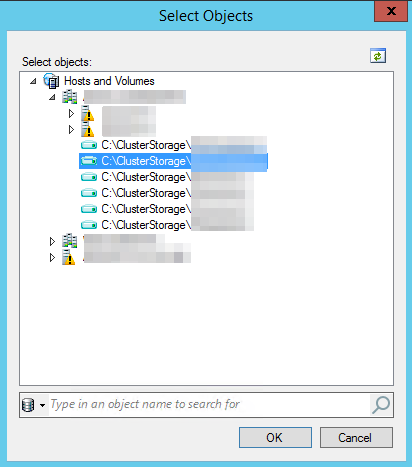
Select the datastore (in our case the CSV volumes in Hyper-V Cluster)

image

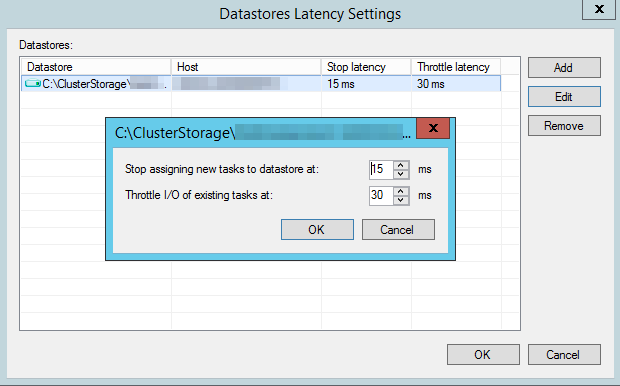
By selecting the desired datastore and clicking “Edit”  you can individually adjust the settings for that datastore.

image

Conclusion

It looks like we have some great additional capabilities in an already very good solution. I’ll be using these new capabilities in real life scenarios to see how these work out for us and optimize the backups of the virtualized environment under my care. Hardware VSS Providers, SANs, CSV’s normally need some tweaking and care to make them run well, so that’s what we’ll be doing.

Concluding My Summit, Conference & Community Engagements for 2014

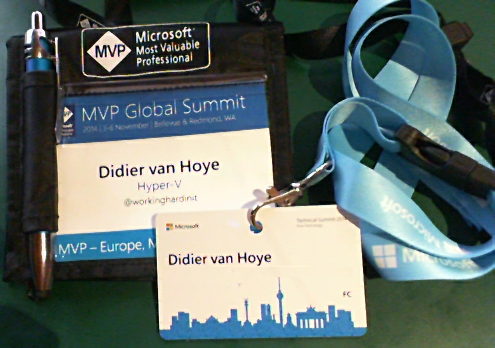
After Redmond (MVP Global Summit 2014), which was a great experience I flew to Berlin to attend and speak at the Microsoft Technical Summit 2014 on “What’s New In Windows Server 2012 R2 Clustering”. Germany has a seriously engaged ITPro & Dev scene, that’s for sure, and the session room was packed! Afterwards some interesting questions popped up in the hallways. That’s great as question really make us think about technologies and solutions from other view points and perspectives.

image

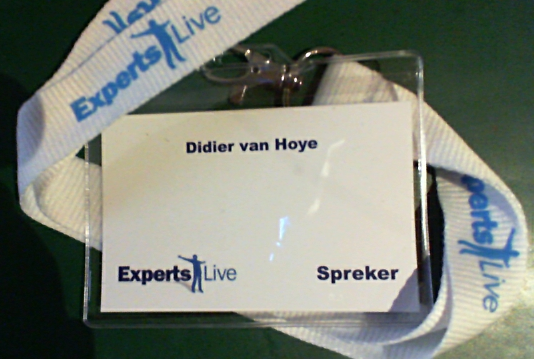
After Berlin I was off to Experts Live 2014 in Ede (The Netherlands) where I presented on “The capable & Scalable Cloud OS”. The talk went well and I had a great crowd attending with whom I had some great chats after the session.

image

That concluded the third leg of my international road tour where I invest in myself, the community & the people I work with. Never ever stop learning Smile. Normally this also concludes my traveling schedule for 2014 unless I’m needed/requested somewhere to help out. Being an MVP is about sharing in the community. The only way to prosper is to share the knowledge, experience and the wealth. It provides for a healthy ecosystem from which we all reap the benefits. This should be promoted and facilitated. There is too much expertise & knowledge not being leveraged due to the fact it’s economically unfeasible, and that’s a waste when people are screaming for IT skills. In a war for talent, any waste is surely very counter productive?