Windows Deduplication And Mysterious Folder & File Sizes

There was a brief moment of “this can’t be good” the sys admin looked at the file size of the backup folders and compared it to the size reported for the files. Sure I had told him that Windows inbox deduplication rocked but this had to be too good to be true or deduplication had just eaten all the backup files and he was “toast”. It was neither. But that requires some explanation. The good news is that Windows Data Deduplication combined with a backup product that supports it like VEEAM will save you a ton of money on deduplication licenses some charge and storage costs.

This is what he saw, and what caused the raised eye brow. 12.4TB reduced to 285GB.

image

Deduplication can’t be that great, right? Did something go wrong? Checking the properties of ALL selected files themselves did not report anything else but compared to the volume info for used space something seems very wrong. That’s supposed to be 5.34 TB.

image

The volume properties report the effective spaces consumed on the volume, so that reflects the true deduplication results. You can confirm this with PowerShell

image
A savings rate of 57% and  5.34 TB of actually consumes space (5880575557632 bytes) and an unoptimized size of 12.4 TB.  Just as server manager reports.

image

So what is explorer up to at the folder and file level? Nothing, it just can’t show you the complete picture. Windows Data Deduplication stores duplicated chunks into the System Volume Information folder. Windows explorer runs under your account and has no access to that folder and doesn’t report the size of all chunks in there. The only thing it does reports are the non duplicated bits that are left in the source folder. In our case where the backups reside. The result is, as said, raised eyebrows.

The same is true for any other tool actually, like WinDirStat in the blow screenshot.

image

When we run this tools as system we get a different picture and you can navigate to the actual ChunkStore and learn more about the internals.

image

Help! Active Directory cannot read forest and domain functional level anymore or much ado about nothing

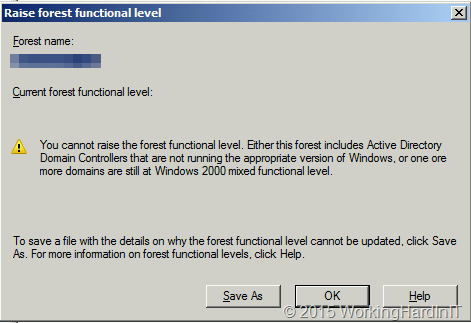
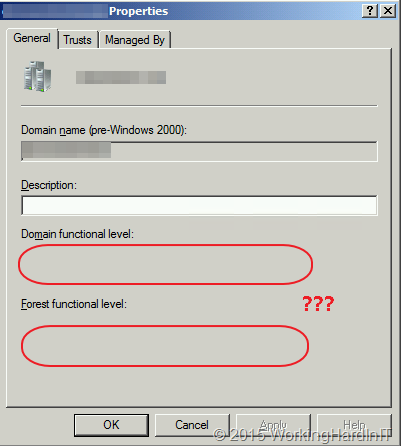
The other day I got a very worried request for support. Apparently the Forest and domain functional level of a Active Directory deployment could no longer be read. Nothing else was wrong, everything was working just fine. If I could have a quick look? So they shared the screen with me and this is what I saw.

image

And this …

image

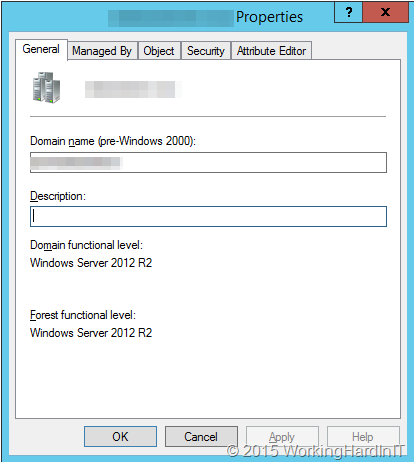
Well that didn’t surprise me, they are supposed to be already on domain and forest functional level 2012 R2 as all their domain controllers where already on Windows 202 R2 for over a year. That error message is not right!  After being puzzled for a moment when it hit me. This was a Windows 2008 R2 host without updated tools!

Once they used the correct version of RSAT or checking on a Windows 2012 R2 host all was show to be well and the scare was over.

image

Nothing so see here, move along.

Presenting at ITProceed 2015 & E2EVC 2015 Berlin on SMB Direct

You cannot afford to ignore SMB3 and it’s capabilities related to storage traffic such as multichannel, RDMA and encryption. SMB Direct over RoCE seems to have a bright future as it continuous to evolve and improve in Windows Server 2106. The need for DCB (PFC and optionally ETS) intimidates some people. But it should not.

I’ll be putting SMB Direct & RoCE into perspective at ITPROCEED | Welcome to THE IT Pro Event of the year! and #E2EVC E2EVC 2015 Berlin, June 12-14, 2015 Berlin, Germany, sharing experiences, tips and demos!  Come see PFC & ETS in action and learn what it can do for you. Storage vendors should most certainly consider supporting all features of SMB 3 natively as a competitive advantage. So Join me for the talk “SMB Direct – The Secret Decoder Ring”.

All these talks are at extremely affordable community driven events to make sure you can attend. The sessions are given by speakers who do this for the community (speakers and attendees do this in their own time and pay for their our own travel/expenses) and who work with these technology in real life and provide feedback to vendors on the issues or opportunities we see. This makes the sessions very interesting and anything but marketing, slide ware or sales pitches. See you there!

Jumbo Frame Settings & Slow or Failing Live Migrations over SMB Direct

The Problem

I recently had to trouble shoot a Windows Server 2012 R2 Hyper-V cluster where SMB Direct is leveraged for live migration. It seemed to work, sometime perfectly but at times it but it was in “slow” motion. The VMs got queued for live migration, it took some time for it started and sometimes it would finish or it would fail. This did not happen between all the nodes. I diligently checked out the SMB Direct network but that was OK on all nodes. Basically the LM network was perfectly fine.

To me this indicated that the hosts potentially had issues communicating with each other to coordinate the live migration. But pings and such looked good, there was connectivity, on the surface all seemed well.  In the event log details we saw indications that this was indeed the case. Unfortunately I did not get the opportunity to take screenshots or copies of the events in this particular situation.

The nodes had a separate 2*1Gbps native team LAN access and backups. But diving deeper I noticed that they had set Jumbo Frames on some of those member NICs and not on others. So these setting differed from node to node and that was leading to the symptoms we described above.

Conclusion

You can use Jumbo Frames on your live migration network. Testing has shown this to be beneficial. When you’re doing SMB direct it won’t make such a big difference but it doen not hurt. When SMB Direct fails you’ll fall back to SMB with Multichannel and there it helps more! See Live Migration Can Benefit From Jumbo Frames. While SMB Direct (infiniband, RoCE & iWarp) know Jumbo frames the limited testing I have ever done there indicates only a small increase (2%) in throughput so I’m not sure it’s even worthwhile when doing RDMA.

When you can use Jumbo Frames on you host LAN NIC or team of NICs (handy is you use it to do backups as well)  you need to be consistent end to end. Meaning ALL hosts, ALL NICS & all switches/ switch ports. Being inconsistent in this on the cluster nodes  was what cause the slow to failing live migrations. You need to have good communications between the hosts themselves and AD. Just unplug the LAN from a Hyper-V cluster host to demo this => live migration from to that node and the rest of the cluster won’t work. Mismatching Jumbo Frames or potentially other network settings make this less obvious.  Another “fun” example to trouble shoot is a NIC team where the member NICs are in different VLANs.