Windows Server 2012 Supports Data Center Bridging (DCB)

Data Center Bridging (DCB) is a collection of standards-based end-to-end networking technologies that allow Ethernet to act as the unified fabric for multiple types of traffic in the data center. You cannot put a bunch of traffic types / protocols on the same physical pipes if you have no way of guaranteeing that they will each get what they need when they need it based on priority and impact. Even with ludicrous over provisioning you could still run into issues and even if that’s not the case that’s a very expensive option. When you think about iSCSI, Remote Direct Memory Access (RDMA) and Fibre Channel over Ethernet (FCoE) you can see where the benefits are to be found. We just can keep adding network after network infrastructure for all these applications on a large scale.

  • Integrates with the standard Ethernet networks
  • Prevents congestion in NIC & network by reserving bandwidth for particular traffic types giving better performance for all
  • Windows 2012 provides support & control for DCB and allows to tags packets by traffic type
  • Provides lossless transport for mission critical workloads

You can see why this can be handy in a virtualized world evolving in to * cloud infrastructure. By enabling multiple traffic types to use an Ethernet fabric you can simplify & reduce the  network infrastructure (hardware & cabling).  In some environments this is a big deal. Imagine that a cloud provider does storage traffic over Ethernet on the same hardware infrastructure as the rest of the Ethernet traffic. You can get rid of the isolated storage-specific switches and HBAs reducing complexity, and operational costs. Potentially even equipment costs, I say potentially because I’ve seen the cost of some unified fabric switches and think your mileage may vary depending on the scale and nature of your operations.

Requirements for Data Center Bridging

DCB is based on 4 specifications by the DCB Task Group

  1. Enhanced Transmission Selection (IEEE 802.1Qaz)
  2. Priority Flow Control (IEEE 802.1Qbb)
  3. Datacenter Bridging Exchange protocol
  4. Congestion Notification (IEEE 802.1Qau)

3. & 4. are not strictly required but optional (and beneficial) if I understand things correctly. If you want to dive a little deeper have a look here at the DCB Capability Exchange Protocol Specification and have a chat with your network people on what you want to achieve.

You also need support for DCB in the switches and in the network adaptors. 

Finally don’t forget to run Windows Server 2012 as the operating systems Winking smile. You can find some more information on TechNet  Data Center Bridging (DCB) Overview but it is incomplete. More information is coming!

Understanding what it is and does

So, in the same metaphor of a traffic situation like we used with Data Center TCP  we can illustrate the situation & solution with traffic lanes for emergency services and the like. Instead of having your mission critical traffic stuck in grid lock like the fire department trucks below

image

You could assign an reserved lane, QOS, guaranteed minimal bandwidth, for that mission critical service.  Whilst you at it you might do the same for some less critical services that none the less provide a big benefit to the entire situation as well.

image

Windows Server 2012 Release Candidate Available For Download!

Update:The downloads are now available for TechNet and MSDN subscribers as well.
Excellent news. Windows Server 2012 Release Candidate is available for download at http://technet.microsoft.com/en-us/evalcenter/hh670538.aspx?wt.mc_id=TEC_108_1_3

image

I’m downloading it as I write this blog post Smile

image

I did not see it yet on the downloads for subscribers of TechNet or MSDN but I’m sure they will be available there soon as well.

Start your lab servers, we’re in for some serious upgrading and testing the next couple of days.  I’ve been looking forward to this.

Update 2012/05/31 21:00 :The downloads are now available for TechNet and MSDN subscribers as well.

image

Windows Server 2012 Supports Data Center TCP (DCTCP)

In the grand effort to make Windows Server 2012 scale above and beyond the call of duty Microsoft has been addressing (potential) bottle necks all over the stack. CPU, NUMA, Memory, storage and networking.

Data Center TCP (DCTCP) is one of the many improvements by which Microsoft aims to deliver a lot better network throughput with affordable switches. Switches that can mange large amounts of network traffic tend to have large buffers and those push up the prices a lot. The idea here is that a large buffer creates the ability to deal with burst and prevents congestions. Call it over provisioning if you want.  While this helps it is far from ideal. Let’s say it a blunt instrument.

To mitigate this issue Windows Server 2012 is now capable dealing with network congestion in  a more intelligent way. It does so by reacting to the degree & not merely the presence of congestion using DCTCP. The goals are:

  • Achieve low latency, high burst tolerance, and high throughput, with small buffer switches (read cheaper).
  • Requires Explicit Congestion Notification (ECN, RFC 3168) capable switches. This should be no showstopper you’d think as it’s probably pretty common on most data center / rack switches but that doesn’t seem to be the case for the real cheap ones where this would shine … Sad smile
  • Algorithm enables when it makes sense to do so (low round trip times, i.e. it will be used inside the data center where it makes sense, not over a world wide WAN or internet). 

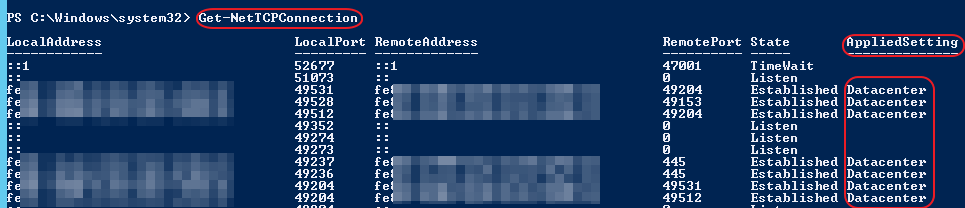
To see if it is applied run Get-NetTcpConnection:

image

As you can see this is applied here on a DELL PC8024F switch for the CSV and LM networks. The internet connected NIC (connection of the RDP session) shows:

image

Yup, it’s East-West traffic only, not North-South where it makes no sense.

When I was prepping a slide deck for a presentation on what this is, does and means I compared it to the green wave traffic light control. The space between consecutive traffic lights is the buffer and the red light are stops the traffic has to deal with due congestion. This leaves room for a lot of improvement and the way to achieve this is traffic control that intelligently manages the incoming flow so that at every hop there is a green light and the buffer isn’t saturated.

image

Windows Server 2012 in combination with Explicit Congestion Notification (ECN) provides the intelligent traffic control to realize the green wave.

image

The result is very smooth low latency traffic with high burst tolerance and high throughput with cheaper small buffer switches. To see the difference look at the picture   below (from Microsoft BUILD)of what this achieves. Pretty impressive. Here’s a paper by Microsoft Research on the subject

image

Upcoming Speaking Engagements

Here’s a quick overview of my speaking engagements in the next two months. I encourage everyone to attend the smaller and often les expensive or even free events as they provide a fast way to get up to speed with new technologies. Don’t be shy. Everyone is welcome and we’re all there to learn. It will not surprise you that all the sessions I’ll be presenting are on Windows Server 2012 & Hyper-V.

Experts2Experts Virtualization Conference (E2EVC) –Vienna 2012

I’ll be doing a session on Saturday 26th on the advanced networking features in Windows Server 2012 Hyper-V. At this small scale conference interactive “chalk & talk” sessions never stop. They just go on and on at breakfast, lunch, dinner, the bar until we need to get some sleep to repeat this process the day after. If you’re very lucky there might still be an spot open for which you can register.

Continued Education Day for IT Coordinators & Teachers in Education

At the end of May I’ll be presenting a session on what’s new in Windows Server 2012 Hyper-V targeted at this audience. I’m convinced that the combination of the tremendous licensing efforts Microsoft does in education and simply the best virtualization & cloud platform in existence, will provide them with the right solution to get the job done.

TechNet BeLux Experience Days

On June 7th I’ll be presenting a session at the “Experience Days”. That session is called “Windows Server 2012 Storage Evolved For Hyper-V” in the Experience Windows Server 2012 track. You can register here for this track or, if you think another track is more of interest to you go to the links above to register for those. All tracks are free and open to all.

More to come

During the summer I’ll be doing a large storage migration project. That means I’ll be getting my hands on SMI-S support for System Center Virtual Machine Manager 2012 and ODX to use with Windows Sever 2012 & Hyper-V.  So I’ll be putting my money where my mouth is so to speak.  I’m looking forward to that for the learning experience alone and it’s time to find me my “No, I will not fix your computer” T-shirt as I won’t have time for that Smile. But rest assured, I will share my experiences through blogging, tweets, presentations & with my fellow community members for all man kind.