Goodbye 2017, welcome 2018!

Professional

We’re back at work for a couple of day now in 2018. Another year flew by. In 2017 we’ve been busy with letting Windows Server 2016 and Azure based solutions shine across the entire stack of compute, storage and networking. This allow various services and applications to deliver the best possible results on-premises and in the (hybrid) cloud / IAAS. In other words, pretty much what you’d expect a Microsoft Cloud & Datacenter MVP to be doing. The amount of time and money saved by having context, a goal and a plan to evolve your IT environment incrementally and keep it current cannot be ignored. It is significant.

Cloud wise, that word seems to have become whatever vendors / consultants / businesses want it to mean. Very convenient. There are (too) many ways in which cloud solutions are defined the various forms of cloud in an ever-bigger set of permutations. In the end it’s about the best possible solution for the needs at hand at the time you make the decision. Things change fast and we just try to make reasonable future proofed decisions. Sometimes that will be pure “serverless” such as Azure Function. Sometimes it is still very much some form of on-premises virtualization and anything in between. It doesn’t matter. All you need to do is support the organization to deliver what’s needed cost effectively and efficiently. In reality today, that means a lot of options are available. As long as you have a plan, don’t paint your business into a corner in any way and can manage the governance of what you’re doing it’s not too shabby. Especially not when compared too so many that are just being sold to and are just “doing” stuff in a copy / paste effort to avoid looking like they’re not on board with the buzz of “digital transformation”.

When I wear my CTO but perhaps even more the CEO/CIO/CFO role I really do like “serverless”. The big risk to manage today is the utter and gigantic lock-in this is and will remain for a while. That needs to be managed and can be managed as long as the benefits are there. Interestingly enough, many CxO still haven’t woken up to the biggest potential benefit but I almost never see mentioned. Too often people have blinders on. Whether this is due corporate inertia, political pressure or the tyranny of action driving them so seek out point solutions, it is a widely spread issue, a challenge we all face and one that will be with us for quite a while.

Anyway, the world is getting more and more mixed and diverse than ever and guiding organizations through that ever faster changing landscape is part of the job. Telling management what they need to hear over what they want to hear is part of that. Sometimes that works out well, sometimes not. The advice is always solid. But while I can lead the horse to water, I cannot make it drink. One is thing is for sure you cannot build standards, frameworks or platforms to success. Success cannot be bought either. Those are tools the manage past success more efficiently and hopefully more effectively.

Personal

My blog is still growing and, at well over 1 million views in 2017, according to my various WordPress statistics it’s doing better than ever in helping out the community at large. I’m quite happy about that. That’s what being a Microsoft MVP, a Veeam Vanguard, a Dell Community Rockstar and a Microsoft Extended Experts Team member is all about. Sharing and learning via blogging and community activities. I was able to present and attend various conferences to share experiences and knowledge. In return I got the opportunity to learn a lot and gain some insights into technical and market trends and developments. As part of those community activities I had more “practical” and “informal” strategy talks with various CIO/CTO role holders than before and that gave me a lot of insights in how businesses are dealing with IT anno 2017. It fluctuates between struggling and thriving, quite often in the same organization. My strength in those talks is that I don’t sell anything. No products, no company, not my time. It’s just a conversation based on insights, ideas and interests and community activity.

I’ve helped out a lot of colleagues & community buddies this year. That’s good. It helps look beyond the blinders of one own environment and that is always great learning experience. This helps to keep working interesting and fun while being productive. It’s a win-win situation.

Real Personal

Once in a while I raise toast to absent friends and fallen comrades. That list got a bit longer again this year as I lost my father. He had been through many personal health related challenges for many decades. That means I have taken more and longer care of my father than he did of me. That’s OK, one does what’s needed when and where needed even when one often feels that can never be enough. Life is not just about personal choices that are 100% under our own control, no matter how much people like to pretend it is. He doesn’t have to be afraid and in pain anymore. In that knowledge I have found solace. Keep in mind life is short and you don’t choose how you’ll end up. So, enjoy all your vacation days and learn to unwind once in a while. The world will keep turning despite you being out of office now and then.

Work

One thing was also a trend in 2017. More and more the recognition of my skills, value and abilities come from ever more diverse and globally dispersed directions. I can speculate on why that is, but I won’t. For now, I’m happy to know I’ve managed to stay employable. 2017 was also the year in which recruiters were more active than ever as the war for talent is on. The job market for skilled IT personnel is on fire it seems. A few recruiters did a good job by at least presenting themselves as having a clue, but many were literally so out of touch with reality it seemed that they can be replaced by AI at the current state of that technology in a heartbeat.

A few tips to all recruiters:

  • Read my Linkedin profile & blogs etc. It’s all out there. No, I’m not a Java programmer or a helpdesk jockey. The canned intros of “I read your profile and found you to be a great fit …” for a complete mismatch functions are way too often laughable and give me a very poor impression of the recruiter right from the start.
  • Give a good impression of the job role so I can evaluate quickly if it’s something I’d even consider. When that info is on the internet and you won’t share it, this is not making you look good.
  • Include a realistic minimum / maximum level of pay, secondary benefits, ability to telecommute … If that’s not even possible how can that role ever hold the status of an “opportunity of a live time” and why would I waste my time on figuring out if I’d be earning less, losing primary and/or secondary benefits. Be real people. Really, no one is looking to be worse off.
  • Don’t get mad at me if you contact me unsolicited and don’t get an answer when you don’t even have the courtesy to provide the above. I never asked you anything, remember that please. And if I do I hope I’ll be more to the point and direct I what I expect and need. I really dislike wasting my and your time.

Really, seriously, I mean this, the silly games that are way too often played are not worth my time. In a war for talent it seems this is a complete waste and indicates that the job market is (still) very much broken. Long commutes and fixed office hours that require long public transport commutes or being stuck in traffic, even in a salary or company car, are a waste of time and money. I don’t consider that a benefit. That being said, we all can hit bad times and I might need to take a pay cut, commute s long way, lose benefits etc. in my life time. But no one does this voluntarily. I have seen many of my peers grow into to better paid, interesting roles in 2017 on their own. Word of mouth & a network are key.

Looking forward to 2018

I have storage related projects, both on-premises and in the cloud or a mix of both in 2018. The combine high availability with data protection, scalability and accessibility in the best possible way I can find given the circumstances. I’m busy with strategies and mapping. By doing so I keep learning to help transition IT between the world of yesterday, today and tomorrow. Step by step. I also hope to attend and speak at 2 or 3 international conferences and learn even more form my peers.

So, goodbye 2017, welcome 2018! The new year is at our doorstep and we’ll let it in with a smile. I wish you all a great, fun, healthy and prosperous 2018.

Veeam Availability Suite 9.5 Update 3 Released

Veeam Availability Suite 9.5 Update 3 was released just in time to put under the X-Mas tree of you IT staff. It’s a major release and they’ve gone above and beyond what’’ you’d expect from an update. Also read this post to see all the goodness it offers. It’s clear Veeam has the intent to become the backup provider for even more environments whether these are physical, virtual or containers and whether these are on-premises or in private, hybrid or public clouds. Read up on some details in this blog post by Rick Vanover on the Veeam web site.

image

As a Veeam Vanguard I did not waste time and downloaded the updates to test the deployment in the lab and that went fine. From there it went to the proving grounds (real life hardware & labs) before deploying it in production. All of these deployments went super smooth.

I’m happy to report Veeam Backup & Replication 9.5 and Veeam One 9.5 Update 3 is running very well in production and I have not seen any issues yet. In case you’re wondering or nervous about it the SAN deployments with Off Host Proxies didn’t miss a beat. That’s the quality and smooth experience of Veeam that we have come to rely on. I’m still impressed, even after many updates, with how smooth it goes and how streamlined the update process is.

Two more things. You only have a few days left to enter for a chance to win a fully paid trip to a VeeamON 2018 Event in your region. So act now if you’d like to attend for free. You have 2 days left!

image

It’s also still possible to nominate your self or some one else for the Veeam Vanguard program. Don’t delay! You have until December 29th!

Veeam Vanguard Program


That’s it. Time for some down time for the end of year & new year festivities.

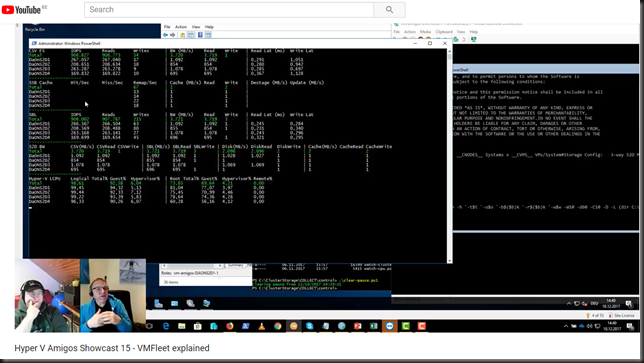
Hyper V Amigos Showcast 15 – VMFleet explained

After a short break in broadcasts, due to extremely busy times, the Hyper-V Amigos ride again! Yes, fellow Microsoft MVP Carsten Rachfahl (@hypervserver) from Rachfahl IT Solutions and yours truly are back in the saddle!

In episode 15 of the Hyper-V Amigos Showcast we look at VMFleet. VMFleet is a free Microsoft test suite to show/test and help analyze the performance of a Hyper-converged Storage Spaces Direct Setup.

image

In this episode Hyper V Amigos Showcast 15 – VMFleet explained we show you how to set it up, how it works and how to measure and evaluate your S2D deployment with it. We also share some real life tips with you. All this in just around 2 hours. So stick around for the long haul!

Cluster Shared Volumes without Active Directory

Introduction

Cluster Shared Volumes without Active Directory will come online if certain conditions are met. Basically, when the cluster can form. That’s what we’ll talk about here. There are a lot of things to consider when virtualizing your Active Directory environment, partially or completely. Too much for this blog post alone and much of it has been discussed before. Here I’ll discuss when people count on their Cluster Shared Volumes coming online when active directory is not available but are disappointed and think that it’s a bug or a broken promise. It is not! We know that since Windows Server 2012 the CSVs coming online do not depend on Active Directory being available (thanks to the local CLIUSR account being used for cluster starts).

Cluster Shared Volumes without Active Directory

So, let’s address getting your Cluster Shared Volumes online when AD is not available. The things to realize is that not having Active Directory has been taken care off. The thing that still can go wrong is that the cluster doesn’t come on line properly and that means that the CSV LUNs won’t be online as those are cluster resource. Hyper-V can boot the VMs without the cluster being formed but as the VMs reside on a CSV and those are not available, that’s what’s causing the problem. That means that getting your cluster to come up is the real issue.

Getting your cluster to come up is the real issue.

If cluster shared volumes can come up without a domain controller / AD being available since Windows Server 2012 (Failover Clustering and Active Directory Integration) how is it that some many people still have issues with it? How do you make this work for you? You can use a disk witness to protect you in most cases. When you have a file share or cloud witness you can take some step to avoid running into this issue.

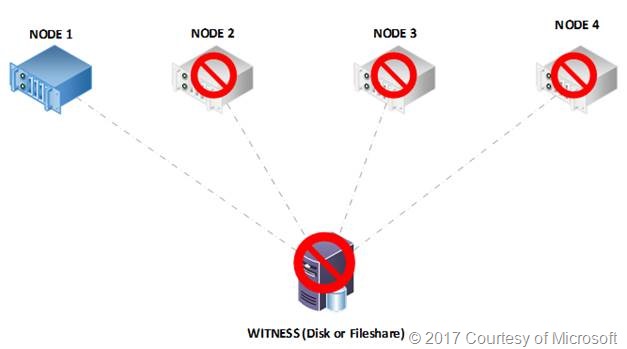
There is a great article on cluster behavior here: Failover Cluster Node Startup Order in Windows Server 2012 R2 (the same rules apply for Windows Server 2016). Read it and you’ll notice that the behavior differs depending on whether you have a witness defined and whether that witness is a witness disk or a file share or cloud witness. The disk witness has a copy of the cluster database and if available will help you out of any situation where the paxos on the disk witness (if it’s available) is more recent then the one on the cluster node as the node will download the cluster database info from the disk witness. But a file share or cloud witness don’t have a copy, so they have a small disadvantage under certain scenarios. CSV’s that won’t come up is when booting the nodes in the wrong order when using a file share or cloud witness is one of those scenarios but not having AD isn’t the root cause of this.

Some people will never notice this issue at all, especially not when they have disk witness, but when they do, it might be at a very inconvenient moment in time. Examples of where this situation can occur are a single cluster environment where the domain controllers are running on CSV and high available in that cluster that was shut down completely, the cluster has a file share witness and the nodes are started in the wrong order.

Making sure your CSVs come online = clustering being formed

Well for one make sure you are using Windows Server 2012 or higher for your cluster. That’s a given.

Beyond that you basically just need to know what to do in what scenario to get your cluster up and running so you won’t have issues with getting the CSV to come up. You just have to follow some rules of thumb and you’ll be fine. Also, there’s almost always a way to get out of pickle, just don’t panic. But also remember that you can make your live easier when you design your solutions with failure in mind and by knowing your options so you can act correctly. I my example I’ll be using Hyper-V cluster with CSVs but the same goes for SOFS, SQL Server clusters leveraging CSVs etc.

Planned down time

If you’re shutting down a complete cluster you have two options to make sure things go a smooth as possible.

Option 1 – A clean cluster shutdown by the book

  • Shut down the workload, i.e. the VMs.
  • Stop the cluster
  • Shutdown the Cluster nodes.
  • Boot the cluster nodes. You can start with any you like. The CSVs will come on line. You will be able to start the VMs. Do start with the domain controllers and wait for them to come on line before starting the others.

During this you’ll see some “collateral” events, errors, warnings due to Active Directory not being available. The cluster name has issues without Active Directory but that a management connection point, it doesn’t mean the cluster doesn’t work. Once Active Directory is available the cluster name will come on line automatically when the default failure policy restarts it. You can also manage the cluster via RDP or console by connection to “.” locally on that node or use the running node name. You can also try to bring cluster name on line manually when Active Directory is up and running.

Option 2 – A clean cluster shutdown as it happens most of the times in real life

Which is one a lot of people do to keep part of the work load running as long as possible.

  • Shut down the no critical workload, i.e. the VMs.
  • Pause a node so the critical workloads live migrate to other nodes
  • When the node is paused, shut down the node.
  • You rinse and repeat this until the last node is left with only the most critical VMs

clip_image002

  • Finally, you stop the workload on that last cluster node and shut it down as well.
  • Now comes the critical part: Remember what node you shut down last. You have to start that one first and you’ll see that your CSV will come on line. If you boot another node, you might panic as the CSV will not come on line.

Now I need to correct this a little bit. With a disk witness you are OK whatever node you boot. When the paxos numbers on the first node to boot and the disk witness are compared the most recent copy will be used. Either the local one on the node will be used directly or after it has been updated with the data form the disk witness. To make things simple for the ops team I always tell them to note the last node they shut down anyway no matter what type of witness they have. It’s good info to have.

With a file share or cloud witness the shutdown/startup order really comes into play. The reason this happens is that by shutting down node by node we end up with a one node cluster (last man standing).  When that’s shut down that’s the only node that knows about the last (potential) changes in the cluster as it holds a copy of the cluster database. Remember that a files hare or a cloud witness has no copy of the cluster database. That’s why the last node to be shut down has to come on line first when comparing the paxos numbers with the witness as that node can form a cluster. If the node that boots first does not hold the most recent paxos number it cannot download the cluster databases info from the file share or cloud witness. Such a node cannot form a cluster and bring the CSVs online. If the first node to boot was the last one to shut down, it can form a cluster and the CSVs will come on line. This is the big difference with option one where you shut down the entire cluster and then take the nodes of line.

You might not know or remember the order. If that’s the case you still have options like starting the cluster node with the -fixquorum option (net.exe start clussvc /forcequorum) at the risk of loosing some cluster changes that are not in the local cluster database.

No need to go to immediately backups, extract the domain controller VMs from SAN snapshots or mount a LUN to a different machine to extract the VM files for the DC or so. Don’t panic!

One or more failed nodes

Well as long as the cluster survives your domain controller VMs should fail over. Keep ‘m on separate node (anti-affinity), separate CSV LUNs, if possible separate clusters if all domain controller virtual machines are going to be running high available on a cluster node and that cluster is still functional after all. No issues here.

Total cluster failure

The cluster nodes all show due to a “global” BSOD or are turned off due to a power failure or a storage array crash. This is more the realm of bad dreams I know, it does happen. Often things will recover and you’ll be fine but you can do your part. The same rules apply, get the cluster to form and you’ll have your CSVs on line. In a bad case -fixquorum is your friend but normally it’s not your first option. In the worst case you’ll need recovery from backup of the cluster or rebuild it. It’s a very bad day if it comes to that. And cluster recovery is not the subject of this post.

Conclusion

Don’t blame Active Directory and start troubleshooting or fixing the wrong problem. So yes, CSV will come on line when certain conditions are met and you can work yourself out of a pickle if needed. But during a disaster that’s only extra work and stress you might not want to worry about if you can avoid it. It’s good to know how to resolve issues around CSVs not coming online when the shit hits the fan as even the best laid out plans tend to get side tracked by reality when disaster strikes.

If you cannot guarantee control over all the prerequisites and might not have the skills in please when needed, you might consider other options. Some of these are actually the best practices of the past when a CSV would indeed not come on line without active directory in any way. This is great for AD related issues but not for you offline CSVs, they need the cluster to form properly!

Sure, you can run the domain controller virtual machines on local storage, and not made high available. This cloud be on one of the cluster nodes (*) or on a stand-alone Hyper-V host. Having a physical domain controller is also a possibility. This helps avoid issues with AD in virtualized environments as many other services are very dependent on them and it’s good to have on one available all of the time and get them back on line a.s.a.p..

I’ll leave you with the fact that virtualizing domain controllers can be done but it pays to study up on how to do it well and test your assumptions in the lab. There is a lot of information on virtualizing domain controllers for a reason. Read it and process what you’ve learned from it. You might find that this CCV thingies is not the most complex subject to deal with.

(*) Please note that some cluster deployments like HCI based on S2D do not support running other (local) storage in addition to the boot OS and the S2D storage pool volumes.