When my ISP (Scarlet) told me I needed to switch to fiber, they didn’t have a suitable offering for my needs. In preparation, I pulled fiber and Cat6A from the ground-floor entry point to the first floor. Having that available, along with the existing phone line on the first floor, gave me all the flexibility I needed to choose an ISP that best suits my needs as I transition from VDSL to fiber.
Flexibility and creative transition from VDSL to fiber cabling
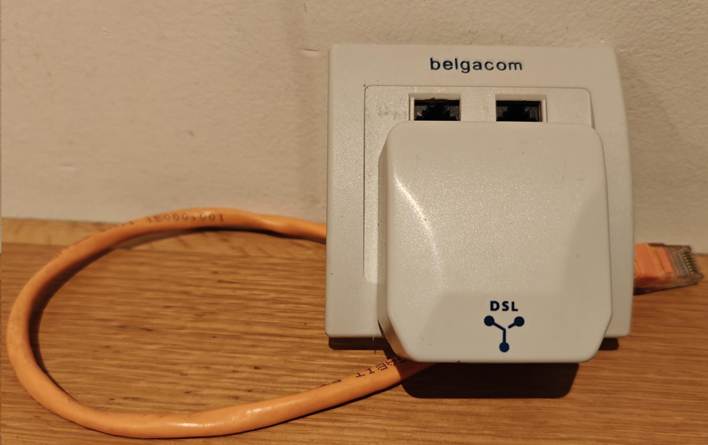
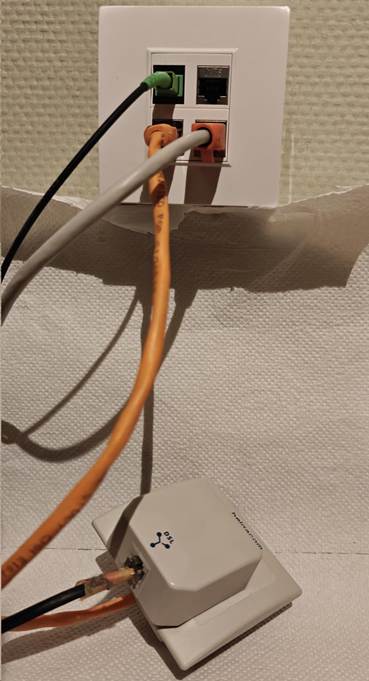
When I pulled the fiber cable (armored SC/APC, which has a better chance of surviving the stress of being pulled through the wall conduit) and the CAT6A S/FTP, I still had to keep the telco line I needed for the VDSL connection to my home office. As I wanted a decent finish on the wall, I had the fiber, CAT6A, and phone cable terminated into RJ45 connectors. As I still needed the splitter, which is an old-style 6-PIN, I improvised a go-between until I moved to a provider that offered “reasonably” priced fiber. The picture below was my temporary workaround. I connected the old Belgacom TF2007 to a UTP cable that terminates in an RJ45 connector. That way, I could plug it into the RJ45 socket at the back, which I connected to the existing phone line in the conduit. It also still has the splitter that connects the phone line to the VDSL modem for internet access.
Back view
Front view
Now. I no longer need the phone lines. Fiber comes from the ONTP on the ground floor to the first floor via the wall conduit. There, it connects to another fiber cable that runs into my home office. Here I can use the ONT or plug it into an XGS-PON/GPON SFP+ on my router/firewall. The CAT6A runs back down to provide wired Ethernet connectivity for devices I need there, including DECT telephony. At any time, I can have the fiber run to a router on the ground floor and use CAT6A to provide Ethernet on the first floor.
I can now disconnect this temporary solution.
What did I use
Well, to protect the cable during pulling through the conduit and later the run from the path box to my home office, where the OTN model lives, I used armored cabling. 10 meters to pull through the conduit and 15 meters to the home office.
Do an internet search for “Armoured Fibre Optic Cable Simplex Singlemode Armoured Fibre Optic Cable, 9/125µm OS2”.
This cable can also be used outdoors if needed, enabling fiber to run to a home office in the backyard or a similar setup. You can easily find these on Amazon.
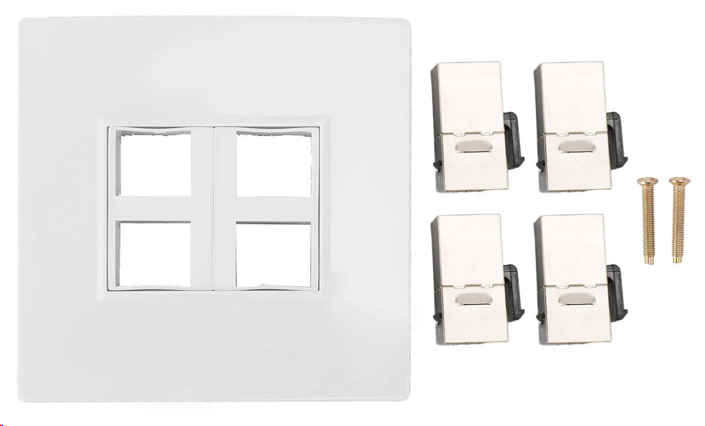
Next to the Ethernet faceplate with 4 ports, combined with 4 keystones. I chose 3 Cat6A keystone jacks, of which one is used for the phone cable in the wall I attached to an RJ45. I installed it in a wall-mounted junction box, drilling a hole through the back plate for the wires to pass through.
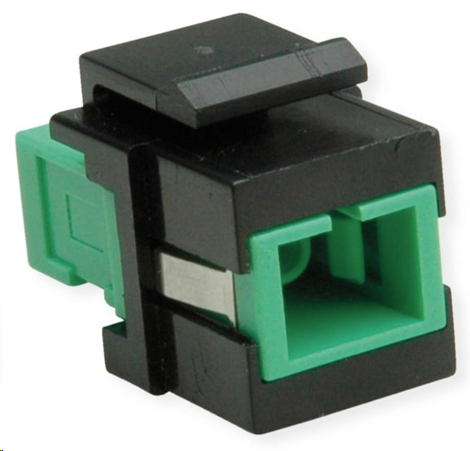
For the fiber cable, I used a Keystone SC/SC Simplex Fibre Optic Adapter Single Mode OS2 APC. Again, this can easily be found on Amazon or your shop of choice.
Conclusion
I had a hard time pulling the fiber through an angle in the conduit because the connector was attached, but the armor protected the fiber. The speed test is good.
So, be a bit creative during transitions, and you can deliver a flexible, solid solution, even in older houses.
Occasionally, I hear comments like “Veeam is too expensive.” Sometimes, when combined with the remark, it has become overly complex. In this blog I will discuss why Veeam V13 delivers for everyone.
I understand and accept those remarks. I do not fully agree, though I sympathize with the fact that businesses face more threats and challenges than ever before. The cost of living and doing business has not declined in the last five years. But beyond bar inflation, supply chain issues, and political turmoil, there are other factors driving rising costs and a perception of greater complexity. The world is different, and you need to critically evaluate your own perception if that is your view.
I will discuss here why Veeam V13 isn’t only for the Fortune 500, their needs, and their pockets. It’s for any seized SMB that can’t afford a single day of downtime.
Complexity and Cost
While many products today include compliance checkboxes that vendors must complete to be selected, most items have a far better reason for their existence. They are necessary.
The visceral reaction that it has become too complex and/or expensive is dead wrong. A statement like “My small business running a few dozen virtual machines doesn’t need this complexity or cost” is easy to make but ignores some realities.
It’s an infrastructure-blind perspective that fails to factor in the modern operational risk profile. The technical advancements in the Veeam Data Platform (VDP V13) are fundamentally about addressing the need for operational simplification and providing (mandatory) cyber resilience (GDPR, NIS2, DORA). From that perspective, it is precisely what an SMB (like an enterprise) requires.
When budgets are tight, you need solutions that aggressively reduce TCO by minimizing administrative overhead and guaranteeing recovery. If you cannot guarantee recovery, you are just window dressing and cosplaying at data protection. And while I have seen that happen even in large organizations and with partners, that is a recipe for disaster. Veeam V13 delivers what you need to guarantee recovery, the very thing that you buy and implement it for.
Minimizing configuration complexity and OPEX
The high cost of software isn’t just the license fee; it’s the weekly administrative hours and the price of the OS and database licenses required to run it. V13 tackles both.
The Veeam Software Appliance (VSA) is a Game Changer
The Veeam Software Appliance is the most significant gift to small and medium businesses. The VSA is a hardened, Just Enough OS (JeOS) based on Linux.
No Windows License Tax: You immediately eliminate the Windows Server OS license required for your backup repository server. That’s a direct, measurable savings on perpetual or subscription licensing. The same applies to the database: PostgreSQL incurs no license fee.
Reduced Patching Cycle: The VSA is purpose-built. It automatically updates the core Veeam components, reducing required Linux OS maintenance. For a small team, this is an immediate, significant reduction in the security and patching OpEx drain. We are shifting from managing a full Windows Server install to managing a streamlined appliance.
Immutability Baseline: It enforces immutability by default, providing an air-tight technical barrier against ransomware that could delete your backups. That isn’t a premium feature; it’s essential data-integrityengineering. You can’t afford to secure and audit a Windows repository to this standard manually.
VUL is protecting the infrastructure investment and adds flexibility
The Veeam Universal License (VUL) isn’t just flexible; it’s a TCO defense mechanism.
Infrastructure Agnostic: Your license protects a VM, a Physical Server (via Agent), a Cloud VM (AWS/Azure), or even an M365 user.
Future-Proofing the Budget: If you decide to ditch VMware for Hyper-V or move 10 VMs to Azure next year, your license stack does not change. You avoid the capital expense of acquiring new platform-specific licenses and maintain vendor leverage. VUL protects your budget against unforeseen architectural changes. You can switch between hypervisors and on-prem/hybrid/cloud at your discretion.
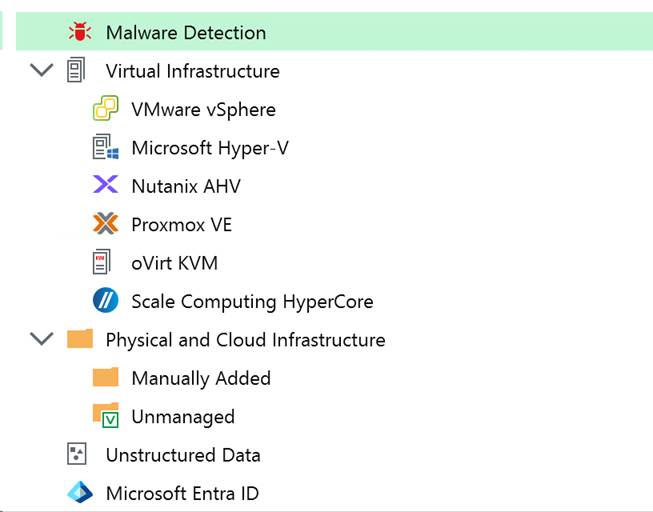
You can migrate to a hypervisor of your choice or to the cloud and continue using your existing licenses. Veeam has been adding support for additional providers as the market has become more volatile again.
Risk Mitigation
Backups must be restorable to justify the time and effort you invest.
The cost of VDP Essentials is insurance against the cost of failure. A single ransomware event or hardware failure can bankrupt an SME, even if it results in only a multi-day outage. Veeam focuses on assuring recoverability and crushing the RTO (Recovery Time Objective).
Instant VM Recovery: This technology means your RTO can be minutes, not hours, even for large VMs. You boot the VM directly from the deduplicated backup file while the permanent restoration occurs in the background. If you can’t afford to be down for four hours, this feature is worth its weight in gold.
SureBackup Validation: No professional IT operation should ever expect its backups to work. SureBackup automatically verifies the image file’s integrity and restorability, validating RPO/RTO goals with no administrative effort. It provides the definitive technical proof that your backup chain is good.
There is free functionality via Community Editions
For the absolute tightest budgets, the Community Editions are a technical lifeline, providing the production-grade core engine at zero cost.
Product
Capacity Constraint
Essential Technical Functionality
VBR Community Edition
10 Instances (VMs, Servers, or 3 Workstations per instance).
Full Instant VM Recovery, Veeam Explorers (granular recovery for AD/Exchange/SQL), Scheduled Jobs, Backup Copy support (for 3-2-1 rule).
Veeam Backup for M365 CE
10 Users / 10 Teams / 1TB SharePoint.
Granular recovery for all M365 workloads. Essential for closing the M365 retention gap and protecting against rogue admins/ransomware.
Cloud-Native Editions
10 Instances per cloud (AWS, Azure, Google Cloud).
Policy-based, native snapshot management and data protection for cloud-resident workloads.
The Bottom Line
Veeam designed V13 for maximum security and minimal operational overhead. At an SMB, you don’t have the resources to secure complex systems manually. The VDP Essentials product, paired with the VSA, delivers a hardened, low-maintenance, recovery-guaranteed system that significantly lowers your operational risk profile, making it a sound, justifiable technical investment. Veeam hides the complexity of its deployment; the simplicity you experience daily comes from adopting and running it. Once you have that base, you can enhance and expand your cyber resilience as your needs demand and budgets allow. But if you do not get the basics right, you are not in a good place to begin with.
Why are we at this point?
It isn’t 2015 anymore. The amount, diversity, and sophistication of threats are staggering. Moving from basic “set and forget” backups to a Zero Trust Data Resilience (ZTDR) architecture isn’t free. There are financial and engineering efforts to make it happen. That comes at a cost.
Transitioning from a simple backup job to a hardened, ransomware-proof posture involves more moving parts. You’re dealing with hardened repositories, MFA for everything, service account isolation, automated verification, and early-detection capabilities. If anyone tells you that adding immutability and Zero Trust doesn’t increase your operational footprint, they are paper architects who never have to live with their grand designs, let alone that they have never managed a production environment in the past few decades.
However, we need to distinguish between complex overhead and necessary engineering to keep you safe and keep it operationally manageable. Let’s discuss this a little bit more, without going into too much detail.
Hardware and storage costs
People will spend money on hyperconverged storage solutions with 25/50/100 Gbps networking, often all-flash, and with relatively low net usable capacity, yet then complain about having to use one or more dedicated storage servers to store and protect their backups. That is nothing new. Will have to invest in sufficient storage on a dedicated box as a backup target and/or use Veeam Data Cloud Vault, keeping it hardened and protected from other workloads.
That comes at a cost, especially if you need the performance to run Instant VM Recovery effectively. You should run your VBR Server on a VM on a different host, but most mini servers running a hypervisor can handle that for you. While you end up with a slightly higher BOM (Bill of Materials), you do get a backup fabric that can actually survive a scorched-earth ransomware attack.
The Configuration Burden
Implementing Zero Trust means keeping your backup fabric isolated, separate, and independent of the production workloads it protects, with only the minimal connectivity required to function. That means authentication and authorization must be performed securely (MFA, certificates), with immutability and hardened hosts. That used to be a lot of work and required extra effort, as it involves additional layers that complicate setup and configuration. But the payoff is a secured fabric that prevents a single compromised credential from wiping out your entire company’s history. And guess what? The Veeam VSA/JeOS handles most of that complexity for you. It is actually a complete TCO win that provides a level of protection many would never achieve on their own! You can automate restore testing and sleep easier: your backups are not a soft target, and you actually know restores work!
Conclusion
Yes, V13 requires a more disciplined approach to IT operations. Yes, there is some “overhead” in terms of ensuring your architecture follows the 3-2-1-1-0 rule. But that is no different than it was in V12, V11, … In an era where an SME is just as likely to be targeted as a global bank. Veeam designed V13 not only for “enterprise requirements and budgets”; they aim for professional-grade survival, no matter what size of business, so your company doesn’t close down for good in the event of a cybersecurity incident.
Veeam has opened the Veeam Vanguard Applications for the 2026 class. That means that new applications are now being accepted. If you work with Veeam products, as a customer, consultant, partner in any shape or form, and contribute to the success and advancement of Veeam deployments and usage in the world by sharing your experience and insights, this might be something for you.
The Essence of the Veeam Vanguard Program
The Veeam Vanguard Program is Veeam’s premier, long‑running community initiative that recognizes the most dedicated, knowledgeable, and influential Veeam experts around the world. It sits at the top of the Veeam100 community structure and offers members unparalleled access to Veeam’s product teams, early releases, strategy discussions, and exclusive events. Vanguards aren’t just users or partners — they are trusted voices who help shape Veeam’s future.
What the Veeam Vanguard Program Is
A global community of top Veeam experts who deeply understand Veeam technologies and actively share that expertise.
Part of the Veeam100, alongside Veeam Legends and Veeam MVPs.
A highly exclusive program offering:
Early access to beta products and the ability to influence product development.
Direct interaction with Veeam’s product strategy and management teams.
Monthly deep‑dive sessions with Veeam technologists.
Free access to VeeamON events and the annual Veeam100 Summit.
A platform that amplifies members’ voices, featuring their work through newsletters, spotlights, and community channels.
What Makes a Great Veeam Vanguard
A strong Veeam Vanguard embodies both technical mastery and community impact. The best candidates typically:
Demonstrate deep Veeam expertise. They understand Veeam products at a high level and stay engaged with new features, releases, and best practices.
Create consistent, original content. Blog posts, videos, guides, labs, or technical write‑ups — not just social posts. Vanguards contribute knowledge that helps the entire community grow.
Actively engage with the Veeam ecosystem. They participate in forums, discussions, user groups, and community hubs, helping others solve problems and learn.
Share openly and generously. Vanguards are known for lifting others up, not gatekeeping expertise.
Show passion for Veeam and its community. They’re enthusiastic advocates who genuinely enjoy working with Veeam technologies and contributing to the community’s success.
Call to action
If you recognize yourself in this profile, why not apply to become a Veeam Vanguard? You will interact, meet, and mingle with many like-minded experts. That will expand your reach to a global network where you can learn and grow. You will receive recognition for your expertise, and Veeam runs a strong community program that, over the years, has consistently been among the best in the industry. I have written about that here Veeam 100 Summit 2025 – Prague: Trust, Resilience, and Community in Action – Working Hard In IT
Really, do apply! Veeam is offering you a fantastic opportunity to join a dynamic and supportive community. They and we, your fellow Veeam community members, would love to welcome new faces in the 2026 class! You can find the announcement by Veeam here: Apply to the 2026 Veeam Vanguard Program. Apply using the big apply button at the top left of the article) Or use this direct link: Veeam Vanguard 2026 Application | SurveyPlanet. The application process is open until January 9th.
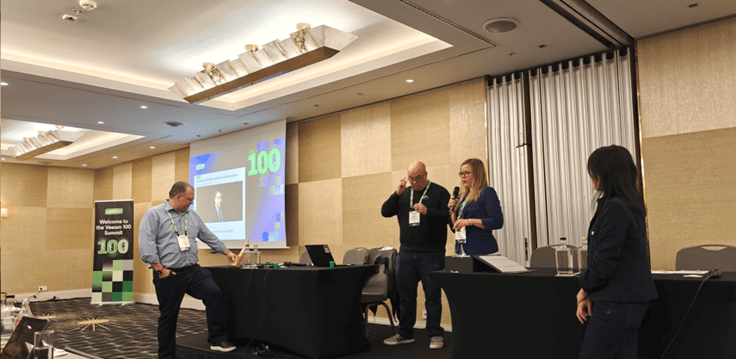
On November 3rd to 6th, 2025, I attended the Veeam 100 Summit in Prague. That summit is not just another IT conference. It is a global gathering of an innovative company, Veeam, expert practitioners, and community leaders. Next to the organizing Veeam employees (R&D, product strategy, community managers), there are three “profiles” invited to attend the Veeam 100 Summit.
Veeam MVPs are top Veeam employees with a customer-facing technical role who share and engage above and beyond the call of duty, i.e., when it is not part of their job.
Veeam Legends, who are top engagers on Veeam properties, like the R&D Forums, the Veeam Community Hub, and Veeam User Groups.
Veeam Vanguards, like myself, who are top influencers in their own external identities and properties. I am an inaugural Veeam Vanguard since the program was established in 2015.
What makes Veeam and the community special?
Veeam stands out because it puts its money where its mouth is. They not only talk the talk, but they also walk the walk. While it sounds a bit like the Microsoft MVP summit, which is also a conference you can attend only by invitation, it is much smaller, more direct, and more inclusive by design.
For one, very unlike the Microsoft MVP Summit, Veeam still believes in enabling any member of their community to attend the Veeam 100 Summit by providing travel and accommodation to the invited Veeam 100 members. That means that others and I can attend when our employers have no appetite and budget for such advanced skills development or community efforts. In a world where trillion-dollar companies save dollars on the backs of the very communities that support them, Veeam still very much believes in sponsoring the global community that helps them, their partners, and customers excel. For that alone, Veeam should get some recognition!
Secondly, it is much smaller, which means more direct opportunities for extended discussion, interaction, and networking. That also means you get to interact with people from very different walks of life, very different roles and backgrounds from all over the globe. That is where a better understanding happens, where different opinions and tales merge and lead to a better understanding of why we have different opinions. It makes for very lively, passionate discussions at the dinner table.
In the end, we are all united by the common goal we all share. We have to strengthen our customers and businesses’ resilience in the face of evolving digital threats. This year’s summit blended deep technical sessions, cultural immersion, and authentic collaboration, creating an atmosphere that was both professional and personal.
Prague as the Perfect Backdrop for the summit
Prague has become a recurring host city for the summit, and for good reason. It’s a beautiful city, Veeam has an office there, and most people like to visit it. The town provides a welcoming environment where conversations flow as easily in the conference halls as at dinners around town.
I could describe the event as part training, countless discussions, part reunion.
Face‑to‑face collaboration: Meeting peers in person reinforced bonds that go beyond online forums.
Shared learning: Technical sessions were enriched by practitioners’ real‑world experiences.
Friendships and trust: Informal conversations and social events created lasting connections.
It is a summit where we can discuss the good, the bad, and the ugly. We all know how bad the IT security landscape has gotten. The proof of that is in zero-trust environments, where everything and everyone is a risk that needs mitigating. It wreaks havoc op speed, agility, and the ability to get things done, and, last but not least, on the work joy of employees and colleagues.
You will not find me calling a company or an employer family. Family is not a business. But the Veeam 100 community does care for one another. We have seen that in words and in deeds. Sometimes words and small gestures are all that is left when we comfort each other while remembering our deceased fellow Vanguard. It also shows in deeds, when the community helps its members find great new opportunities when others end.
.
We remembered our friend Brad Jervis, a valued member of the community, who we lost this year. In his honor, the Brad Jervis Memorial Award, for outstanding community spirit, was awarded for the very first time to Jim Jones. A moment where a lot of us shed a tear. It was a moment to remember our absent friend and appreciate his contributions to our community.
Trust or zero trust as the Central Theme
Trust, or rather the lack of it in zero-trust environments, emerged as a defining theme of the summit. In an era where ransomware and cyber threats dominate headlines, trust in your tools, your processes, and your peers is critical. The summit emphasized that resilience requires more than backups; it requires confidence in the systems and communities that support them. We will need a lot more automation to protect ourselves, as we need constant monitoring and early detection of anything amiss.
The content
There was a lot of content. The pace at which new capabilities arrive and existing ones improve is mind-boggling. Especially as data resilience is only one part of the puzzle for IT professionals.
Content is color-coded (red = NDA, yellow = OK after a given date or go ahead, green = free to talk about), so I will not be sharing much to stay on the safe side. Also, in reality, it is way too much.
We discussed the GA of Veeam Data Platform v13: Yes, v13 was presented as a significant leap forward in data protection, with an emphasis on resilience, automation, and monitoring, early detection, and cyber‑recovery.
As the tidal wave of information to analyze to make it all happen keeps growing, Veeam also turns to AI to stay ahead. New AI-driven capabilities include the Deep Data Analysis Agent for conversational reporting, anomaly detection to flag unusual backup patterns, and interactive dashboards surfacing health, performance, and risk metrics.
The enhanced security posture in VDP v13 integrates stronger ransomware defense, hardened repositories, and orchestration improvements to ensure faster, more reliable recovery. And on top of it, it becomes easier to achieve for all types of partners and clients. We all need help staying ahead in this threat landscape.
We also discussed additional strategic matters, such as Veeam’s acquisition of Securiti AI. This should allow Veeam to combine resilience with data security posture management, privacy, and zero trust principles, giving enterprises a single command center for governance and recovery. AI will be a big part of making all that feasible.
And last but not least, the Veeam Cloud Platform enables unified resilience across hybrid and SaaS workloads.
Unified experience: The Cloud Platform is designed to provide a single pane of glass for managing workloads across on‑premises, hybrid, and multi‑cloud environments.
Integration with VDP v13: The new features in Veeam Data Platform v13 — such as AI‑driven anomaly detection, guided reporting, and interactive dashboards — are surfaced through the Cloud Platform, making them accessible across distributed infrastructures.
SaaS and IaaS coverage: The Cloud Platform extends protection to Microsoft 365, Salesforce, Kubernetes, and public cloud workloads, ensuring that resilience isn’t limited to traditional VMs.
Security posture management: With the acquisition of Securiti AI, the Cloud Platform gains DSPM (Data Security Posture Management) capabilities, allowing enterprises to understand, secure, recover, and govern data across all environments.
Cloud‑native orchestration: Automated recovery workflows and orchestration are embedded, reducing manual intervention and accelerating time‑to‑restore.
Scalability and flexibility: Enterprises can scale protection seamlessly as workloads grow, without needing separate tools for each environment.
The Veeam Cloud Platform represents Veeam’s evolution from a backup vendor into a comprehensive resilience and security platform. By combining VDP v13’s AI‑driven intelligence with cloud‑native orchestration and Securiti AI’s governance capabilities, Veeam is delivering a solution that:
Protects any workload, anywhere.
Provides real‑time visibility into health, performance, and risk.
Ensures compliance and trust across hybrid and multi‑cloud infrastructures.
An overview
That was already a lot. And I have not gone into any single detail yet! Here is my attempt to provide an overview of the 3 significant endeavors Veeam is engaged in.
Pillar
Core Focus
Key Features
Strategic Value
Veeam Data Platform v13
Operational resilience
– AI‑powered help/search for guided troubleshooting – Anomaly detection for backup patterns – Interactive dashboards for health, performance, and risk – Hardened repositories & orchestration
Smarter day‑to‑day operations, faster recovery, proactive defense against ransomware
Veeam Cloud Platform
Unified management
– Single pane of glass for hybrid/multi‑cloud – SaaS/IaaS protection (Microsoft 365, Salesforce, Kubernetes, public cloud) – Cloud‑native orchestration – Scalable workload protection
Extends resilience across any workload, anywhere, ensuring visibility and control in distributed infrastructures
Securiti AI acquisition
Security & governance
– Data Security Posture Management (DSPM) – Privacy & compliance frameworks – AI trust integration – Leadership expansion with Rehan Jalil
Embeds security and governance into resilience, unifying protection with compliance and proactive risk management
I hope that helps a bit to put it all together.
Roasting leadership
The summit always concludes with an infamous “Ask Me Anything” session with the Veeam leadership. That’s when we all line them up on stage and take turns roasting them over a slow fire by asking our most direct questions on complex topics.
You know what’s great about it? You get honest answers, most of the time, but there are limits to what they can talk about and say. But it is not the pre-canned, HR-, marketing-, and CFO-approved answers you usually get from leadership. Hence, I cannot share anything here, but it sure was interesting!
Why the Summit Matters
The Veeam 100 Summit is unique because it acts as a feedback loop. Anyone who is invited and wants to come can come. Veeam makes sure of that! Attendees gain early visibility into product roadmaps, while Veeam benefits from authentic insights provided by practitioners. This dynamic ensures that future releases are shaped by real‑world needs rather than theoretical design.
Looking Ahead
As the summit wrapped up, one theme stood out: protecting data isn’t just about stronger locks anymore; it’s about more innovative ways to guard environments and data protection fabrics, so we can rely on our recovery capabilities when we need them. The digital landscape we operate in has grown tangled, and success now depends on how quickly we adapt. True resilience goes beyond hardware and software. It comes from the trust we build and maintain in a zero-trust world, the collaborations we deliver, and the people who make it all happen. The Veeam 100 Summit in 2025 drove home the message that we don’t just have to keep pace with change, but also build infrastructures ready to adapt and survive in the face of whatever comes next. And like it or not, at this break neck pace we will need AI to stay on top of things. With change, we build infrastructures ready to adapt and survive whatever comes next. And like it or not, at this breakneck pace, we will need AI to stay on top of things.