Shameless Plug For Mastering Hyper-V Deployment By Aidan Finn

In October 2010 Aidan Finn (MVP) his book “Mastering Hyper-V Deployment” was released and in November three copies of this book landed on my desk. I bought them (pre order) via Amazon. Nope I did not get them as a gift or anything. Why Three? Well that’s the number of people I wanted to get up to speed about Hyper-V and virtualization management and operations in a Microsoft environment.

His book takes you along a journey through a Hyper-V project that will teach you about virtualization in all it’s aspects. It also touches on many supporting technologies and products such as System Center Virtual Machine Manager 2008 R2, System Center Essentials 2010, Data Protection manager 2010 and System Center Operations Manager 2007 R2. No one book can be the only source of knowledge and understanding, but using this book as a start for both new and experienced IT Pros to learn about virtualization with Hyper-V will give you the best possible start. Consider it going to an Ivy league college on a scholarship paid for by Aidan’s experience and hard work. The subsidized tuition fee is the price of the book.

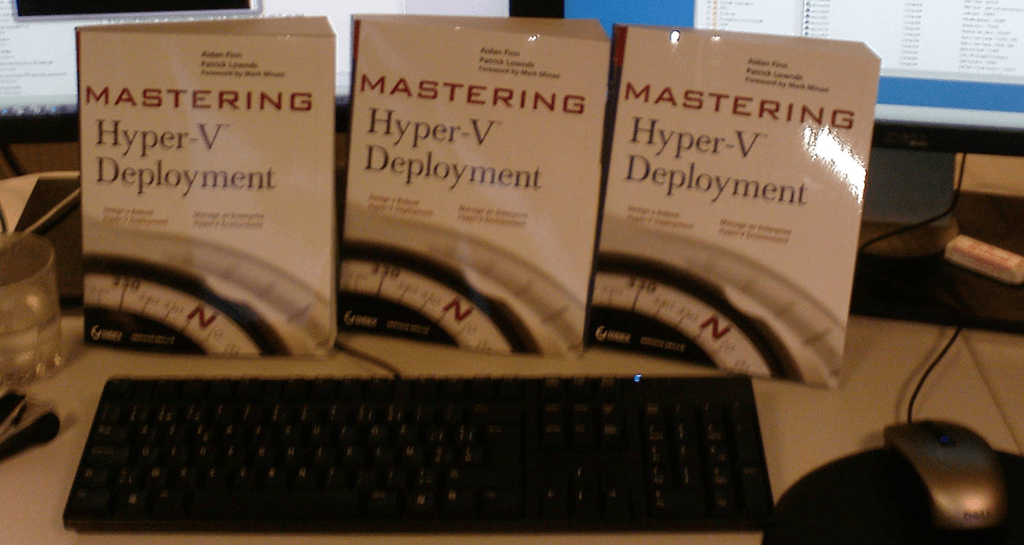
We feel a bit sorry that Aidan only got one copy so we made a group picture of the gang of three on the desk of our newest team member. He got a copy of the book together with 4 recycled PC’s and a TechNet subscription to build a lab.

If you know people who want or need to learn about Hyper-V, you’d do well to make sure they get this book and have them set up a lab to play with the technologies. Those efforts will pay off big time when they implement their solutions in the wild. If Ireland is doomed it won’t be because of smart & hardworking Irish IT professionals like Aidan. You see when you design, build and support IT solutions that your customers depend on 24/7 you can not hide behind false promises, you can’t fake away from the fact when “stuff” doesn’t work or hide behind vast amounts of papers & documents void of any substance. Nope, you are responsible for everything and anything you build. Aidan backed and supported by some very knowledgeable colleagues has made that burden a bit lighter for you to bear with this book. Aidan’s blog lives here: http://www.aidanfinn.com/

A Hardware Load Balancing Exercise With A Kemp Loadmaster 2200

I recently had the opportunity to get my hands on a hardware load balancer for a project where, due to limitations in the configuration of the software, Windows Network Load Balancing could not be used. The piece of kit we got was a LoadMaster 2200 by Kemp Technologies. A GPS network/software services solution (NTRIP Caster) for surveyors needed load balancing, not only for distributing the load, but also to help with high availability. The software could not be configured to use a Virtual IP address of a Windows Load Balancer cluster. That meant when had to take the load balancing of the Windows server nodes. I had been interested in Kemp gear for a while now (in function of some Exchange implementations) but until recently I did not get my hands on a LoadMaster.
We have two networks involved. One the 192.1683.2.0/24 network serves as a management, back-office network to which the dial access calls are routed and load-balanced to 2 separate servers WebSurvey01 and WebSurvey02 (running VMs running on Hyper-V). The Other network is 192.168.1.0/24 and that serves the internet traffic for the web site and the NTRIP data for the surveyors, which is also load balanced to WebSurvey01 and WebSurvey02. The application needs to see the IP addresses of the clients so we want transparency. To achieve this we need to use the gateway of the VIP on the Kemp load balancer as the gateway. That means we can’t connect to those apps from the same subnet, but this is not required. The clients dial in or come in from the internet. A logical illustration (it’s not a complete overview or an exact network diagram) of such a surveyor’s network configuration is shown below.
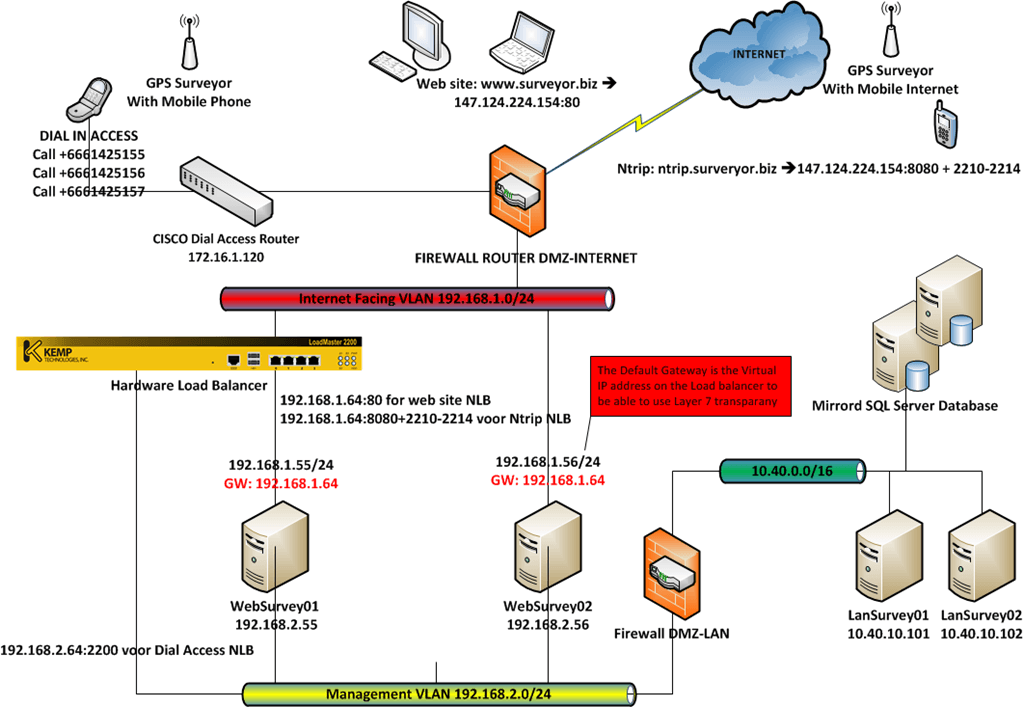
Why am I using layer 7 load balancing? Well, layer 4 is a transport layer (which is transparent but not very intelligent) and as such is not protocol aware while layer 7 is an application layer and is protocol aware. I want the latter as this gives me the possibility to check the health of the underlying service, filter on content, do funky stuff with headers (which allows us to give the clients IP to the destination server => X-Forwarded-For header when using layer 7), load balance traffic based on server load or service etc. Layer 7 not as fast as layer 4, as there is more things to do, code to run, but when you don’t overload the device that not a problem as it has plenty of processing power.

The documentation for the KEMP LoadMaster is OK. But I really do advise you to get one, install it in a lab and play with all the options to test it as much as you can. Doing so will give you a pretty good feel for the product, how it functions, and what you can achieve with it. They will provide you with a system to do just that when you want. If you like it and decide to keep it, you can pay for it and it’s yours. Otherwise, you can just return it. I had an issue in the lab due to a bad switch and my local dealer was very fast to offer help and support. I’m a happy customer so far. It’s good to see more affordable yet very capable devices on the market. Smaller projects and organizations might not have the vast amount of server nodes and traffic volume to warrant high-end load balancers but they have needs that need to be served, so there is a market for this. Just don’t get in a “mine is bigger than yours” contest about products. Get one that is the best bang for the buck considering your needs.

One thing I would like to see in the lower end models is a redundant hot-swappable power supply. It would make it more complete.  One silly issue they should also fix in the next software update is that you can’t have a terminal connection running until 60 seconds after booting or the appliance might get stuck at 100% CPU load. Your own DOS attack at your fingertips. Update: I was contacted by KEMP and informed that they checked this issue out. The warning that you should not have the vt100 connected during a reboot is an issue the used to exist in the past but is no longer true. This myth persists as it is listed on the sheet of paper that states “important” and which is the first thing you see when you open the box. They told me they will remove it from the “important”-sheet to help put the myth to rest and your mind at ease when you unbox your brand new KEMP equipment. I appreciate their follow up and very open communication. From my experience, they seem to make sure their resellers are off the same mindset as they also provided speedy and correct information. As a customer, I appreciate that level of service.

The next step would be to make this he setup redundant. At least that’s my advice to the project team. Geographically redundant load balancing seems to be based on DNS. Unfortunately, a lot of surveying gear seems to accept only IP addresses so I’ll still have to see what possibilities we have to achieve that. No rush, getting that disaster recovery and business continuity site designed and setup will take some time anyway.

They have virtual load balancers available for both VMware and Hyper-V but not for their DR or Geo versions. Those are only on VMware still. The reason we used an appliance here is the need to make the load balancer as independent as possible of any hardware (storage, networking, host servers) used by the virtualization environment.

Microsoft Listens To Customers & Adds UDP Notification Support Back to Exchange 2010

Well, after almost 14 months of deploying Exchange 2010 and tweaking the Outlook 2003 settings via GPO’s to give users an acceptable experience Microsoft adds support for User Datagram Protocol (UDP) notification functionality back into Microsoft Exchange Server 2010. By doing so they recognize that a lot of businesses & organizations will be using Outlook 2003 for a while and that not all of them where happy to deal with the way Outlook 2003 functions with Exchange 2010. More information on the UDP issue can be found here http://support.microsoft.com/kb/2009942 (In Outlook 2003, e-mail messages take a long time to send and receive when you use an Exchange 2010 mailbox). Now most my customers use cached mode where possible and a GPO Setting to reduce the Maximum Polling Frequency registry entry to 5 seconds helped. But there are places where cached mode is not an option (Terminal Services) or people don’t accept this change in behavior and go with Outlook 2007 instead of 2010  or even choose to deploy Exchange 2007 over 2010. All because of this dropping of the UDP notification support.

Now this functionality will be back with in Exchange Server 2010 Service Pack 1 Roll-Up 3 (SP1 RU3).  Good news for people dealing with Outlook 2003 and Exchange 2010. Less good news for the people dealing with the GUI bug that Exchange 2010 SP1 introduced where the Exchange Management Console does not show all database copies after upgrading to Exchange 2010 SP1. This is set to be fixed in Roll-Up 3 but to get the UDP support back they adjusted the release schedule for the E2K10 Sp1 Roll-Up 3, which is now expect to be released in March 2011. So we’ll have to wait a bit longer for that fix. As you noted you need to be running Exchange 2010 SP1 to get this backward compatibility support for outlook 2003.

Read this announcement on the Exchange Team Blog: UDP Notification Support Re-added to Exchange 2010

Event ID: 11 From Microsoft-Windows-RPC-Events Are Indicating Possible Memory Leaks With MMC

After finishing putting some brand new servers in place with Windows 2008 R2, installing its rolls and leaving a happy client I’m usually very happy about a job well done. That feeling can last for a while when doing the paperwork involved with the project. It can also go away blazingly fast when you get a call that there is an “RPC memory leak or something no right” on the servers.  Not good. So you remotely access the server and start looking. Luckily for me this was to be a non issue. The event logged was the following:

Log Name:      Application

Source:        Microsoft-Windows-RPC-Events

Date:          06/01/2011 22:26:18

Event ID:      11

Task Category: None

Level:         Warning

Keywords:     

User:          BIGBillyTheServerAdmin

Computer:      infra01.big.corp

Description:

Possible Memory Leak.  Application ("C:Windowssystem32mmc.exe" "C:Windowssystem32dhcpmgmt.msc" ) (PID: 5000) has passed a non-NULL pointer to RPC for an [out] parameter marked [allocate(all_nodes)].  [allocate(all_nodes)] parameters are always reallocated; if the original pointer contained the address of valid memory, that memory will be leaked.  The call originated on the interface with UUID ({6bffd098-a112-3610-9833-46c3f874532d}), Method number (2).  User Action: Contact your application vendor for an updated version of the application.

If you do a search for this you’ll find several unresolved news group and support site questions but also a Microsoft knowledge base article http://support.microsoft.com/kb/974814. It states that when you run the Server Manager Snap-in (servermanager.msc) for extended periods of time, the application event log warning as seen above is logged. It also says it only happens on DHCP servers, which is exactly a roll these servers have and the warning entry we see in the application even log. As long as the UUID is {6bffd098-a112-3610-9833-46c3f874532d} and you have no other indications of a memory leak you’re good to go. Armed with the link we quickly put the owners mind at easy and all is well again. Back to the paperwork.