
Cloud & Datacenter Conference Germany 2018

Cloud & Datacenter Conference Germany 2018

The Cloud & Datacenter Conference Germany 2018 is a shining beacon of light in a sea of marketing driven IT events. It is organized by Carsten Rachfahl via his company Rachfahl IT Solutions. Carsten is a Microsoft MVP and Regional Director whose commitment to excellence has show for many years in his community engagements. I think his integrity and style is a driving force behind this conferences ability to attract the quality of attendees, speakers and sponsors.

clip_image002[4]

Cloud & Datacenter welcomes top expert speakers from the community and the industry. They deliver high quality sessions and share their combined experience and knowledge with attendees that are truly interested in working with those technologies. That combination delivers high value interactions and knowledge sharing. The sessions in combination with the interaction between everyone there is works very well due to the size of the conference. Its big enough to have the breath of topics needed I todays IT landscape while it is small enough to allow people to dive in deeper and discuss architecture, design, implementation and visions.

Some extra information

The Cloud & Datacenter Conference Germany 2018 is being held on May 15-16 2018 in the Congress Park Hanau, Scholes Plats 1, Hanau, 63450 Germany. That’s close to Frankfurt and as such has good travel accommodations. Topics of interest will be Azure, Azure Stack, Hybrid Cloud, Private Cloud, Software Defined Datacenter, System Center & O365. The conference is a real-life technology event so no one is pretending that the esoteric future is already here. We are working on that future by building it in our daily job and helping organizations move forward in an efficient and effective manner.

This is a great conference by technologists, for technologists. The opportunities to learn, network and exchange information are great. The speakers are approachable and all of them together are there both share and learn themselves. From my past experiences the organization outstanding and the feedback from attendees was outstanding.

I’ll be speaking on RDMA to give a roadmap on this ever more important technology. On top of that I’ll be around to discuss high availability, clustering, data protection both on premises as in (hybrid) cloud scenarios.

Do your self a favor and register for the Cloud & Datacenter Conference Germany in 2018.

All I can say is that you should really consider attending. It’s most definitely worthwhile. The quality of the attendees, the speakers and the absolute top-notch organization of the conference have been proven in the previous years. The Cloud & Datacenter Conference is a testimony to the professionalism, integrity and quality my fellow MVP and friend Carsten Rachfahl delivers with his company Rachfahl IT solution on a daily basis to his customers. So, help yourself out in your career and register right here. I hope to see you there.

Note: The CDC is German spoken conference but as some speakers are from around the globe you’ll have to listen to some of them speaking in English. If you’ve ever heard my German, I’m sure you’ll prefer me speaking English anyway.
Set the preferred site for a CSV in a site-aware stretched failover cluster

Introduction

I have presented many time over the past tears on the new and enhanced capabilities of Microsoft Failover Clustering in Windows Server 2016 (Experts Live, Cloud & Datacenter Conference Germany, MicroWarehouse’s Windows Server 2016 Launch Event etc.) Feedback has shown me that there is still a lot of need for good failover cluster design and implementation guidance.

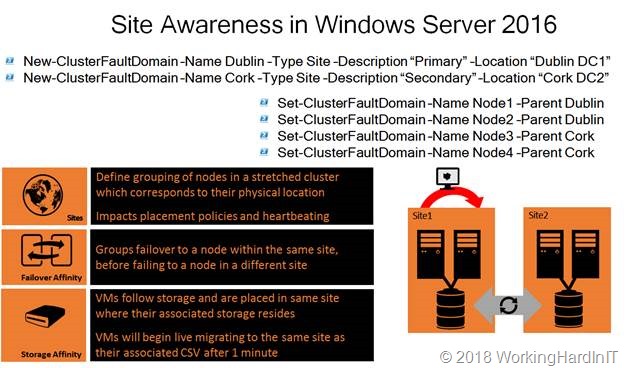
One area of enhancement is that you now have site-aware failover clusters in Windows Server 2016. That helps optimize the, availability, behavior and performance of the workload. It leveraged cluster fault domains and in this case those fault domains are the sites where the cluster nodes reside.

clip_image002

Set the preferred site for a CSV in a site-aware stretched failover cluster

You can leverage the site awareness to do all kind of configuration optimizations. You can set a preferred site creating a primary and a DRC site. The cluster behavior will optimize for that scenario. It will also help with situation like quorum split more easily and elegantly. You can create an “Active-Active” site configuration because a cluster groups, such as virtual machines can have their own preferred site.

As you can see in the picture above there is a thing called Storage Affinity. That means that VMs follow storage and are placed in same site where their associated storage resides. As such VMs will begin live migrating to the same site as their associated CSV after 1 minute. The CSV load balancer will distribute within the preferred site. That’s cool. But when setting a preferred site at the cluster group level like for virtual machines, how does one do this for a CSV?

It’s actually quite simple. A CSV is a cluster group, just like a VM is. So, for every CSV you can set that preferred site. You just grab the cluster group a bit differently. Let’s look at an example.

For a VM you’d do this: (Get-ClusterGroup -Name DidierTest01).PreferredSite = ‘Dublin’

Now for a CSV we go about it as follows:

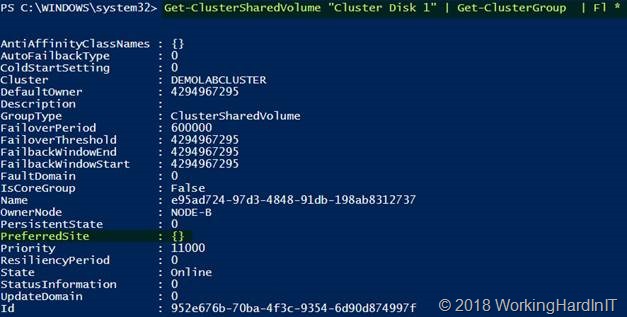
Get-ClusterSharedVolume “Cluster Disk 1” | Get-ClusterGroup | Fl *

clip_image004

The preferred site has not been set yet. To set the preferred site for a CSV you can do the following:

$NTFS01 = Get-ClusterSharedVolume “Cluster Disk 1” | Get-ClusterGroup $NTFS01.PreferredSite = “Dublin”
$NTFS01.PreferredSite

clip_image005

You can remove a preferred site by setting it to $Null:

$NTFS01.PreferredSite = $Null

That was not to hard was it? There is one other thing to keep in mind. Do not forget to set up your site fault domains first and set the site for your cluster nodes before you start configuring preferred sites at the cluster group level or it will throw an error. That’s the minimal setup of a site-aware cluster you need to have in place before you can do more fine-grained configurations.

New-ClusterFaultDomain –Name Dublin –Type Site –Description “Primary” –Location “Dublin DC1”
New-ClusterFaultDomain –Name Cork –Type Site –Description “Secondary” –Location “Cork DC2″
Set-ClusterFaultDomain –Name Node-A –Parent Dublin
Set-ClusterFaultDomain –Name Node-B –Parent Dublin
Set-ClusterFaultDomain –Name Node-C –Parent Cork
Set-ClusterFaultDomain –Name Node-D –Parent Cork


If you don’t do this and try to set preferred sites at the cluster group level you’ll get an error like:

Exception setting “PreferredSite”: “Unable to save property changes for ‘e95ad724-97d3-4848-91db-198ab8312737’.
The parameter is incorrect”
At line:1 char:1
+ $NTFS01.PreferredSite = “Dublin”
+ ~~~~~~~~~~~~~~~~~~~~~~~~~~~~~~~~
+ CategoryInfo : NotSpecified: (:) [], SetValueInvocationException
+ FullyQualifiedErrorId : ExceptionWhenSetting


There is a lot more to say about site-aware stretched clusters but how to deal with setting a preferred site for a CSV must be the most common question I get on this subject. Well, now it’s published to help you all out. I hope it helps.
