
EMC Does Not Show All Database Copies After Upgrade To Exchange 2010 SP1– Still Investigating

LATEST UPDATE March 9th 2011: I have installed Exchange 2010 SP1 Rollup 3 at customer and this did indeed fix this issue finally.

Updates to this post are being added as we get them below. Last update was October 13th 2010. The have identified the cause of the issue. It’s a case sensitivity bug. The fix is WILL be contained in Exchange 2010 Sp1 Roll Up 3? But they ARE working on a incremental update in between. See below for more details and the link to the Microsoft blog entry.

At a customer we have a 3 node geographically dispersed DAG. This DAG has two nodes in the main data center and one in the recovery site in another city, but it is in the same AD Site. This works but is not ideal as DAC in Exchange 2010 RTM presumes that the node will be in another Active Directory site. As you can imagine at that location we’re very interested in Exchange 2010 SP1 since that adds support for the DAC to be used with a geographically dispersed DAG node in the same Active Directory site.

We did an upgrade to SP1 following the guidelines as published in http://technet.microsoft.com/en-us/library/bb629560.aspx and we made sure all prerequisites where satisfied. We upgraded the backup software to a version that supported Exchange 2010 SP1 and made sure no services that hold a lock on Exchange resources are running. The entire process went extremely well actually. We did have to reconfigure redirection for OWA as the SP1 installation resets the settings on the Default Web Site on the CAS Servers. But apart from that we had no major issues apart from one very annoying GUI problem. Everything was fully functional, which we verified using EMS and by testing failovers. But in the EMC GUI we had the problem under Organization / Mailbox / Database Management we only see the database copies listed on one server and not on all tree.
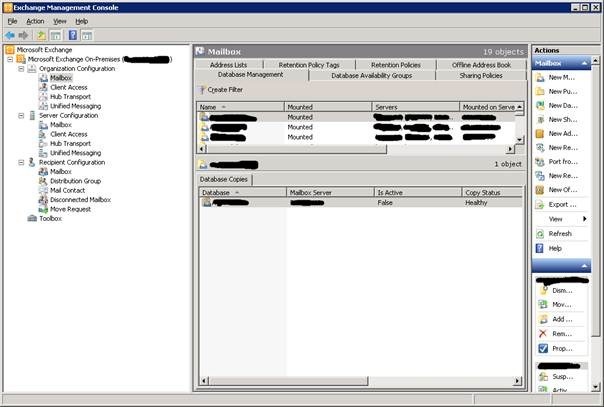
When you check the properties of the databases shows all three servers that are hosting copies. We used EMS commands to test for problems but it all checks out and works. Failing over a server works, both in the GUI and in PowerShell, just like activating a database.

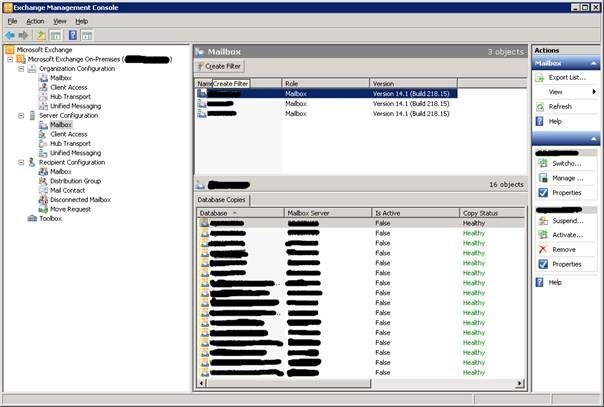
The same issue can be seen in Server Configuration /Database Copies as demonstrated in the screenshots below. In the first figure you we selected the mailbox server where the database copies are visible.
But on the other two nodes nothing shows up, just “There are no items to show in this view”.
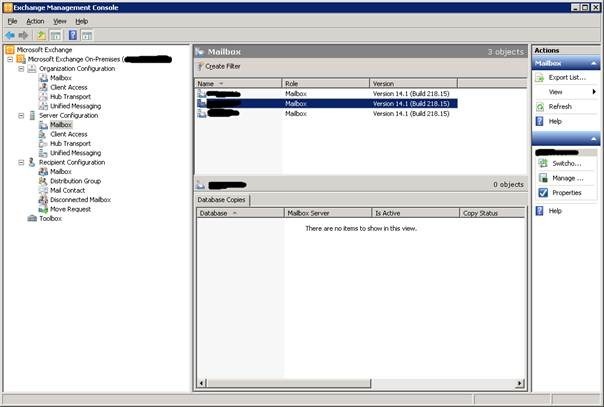
No errors in the vent logs or installation logs. All is working fine. So what gives? We tried all the usual suspects like throwing away any user related MMC cache information and cleaning out the Exchange specific information in the user profile up to deleting the profile etc. But nothing worked.

Running the script below, which is given to you by Microsoft to check your DAG before upgrading to SP1, confirms all is well.

(Get-DatabaseAvailabilityGroup -Identity (Get-MailboxServer -Identity $env:computername).DatabaseAvailabilityGroup).Servers | Test-MapiConnectivity | Sort Database | Format-Table -AutoSize

Get-MailboxDatabase | Sort Name | Get-MailboxDatabaseCopyStatus | Format-Table -AutoSize

function CopyCount

{

$DatabaseList = Get-MailboxDatabase | Sort Name

$DatabaseList | % {

$Results = $_ | Get-MailboxDatabaseCopyStatus

$Good = $Results | where { ($_.Status -eq "Mounted") -or ($_.Status -eq "Healthy") }

$_ | add-member NoteProperty "CopiesTotal" $Results.Count

$_ | add-member NoteProperty "CopiesFailed" ($Results.Count-$Good.Count)

}

$DatabaseList | sort copiesfailed -Descending | ft name,copiesTotal,copiesFailed -AutoSize

}

CopyCount

Searching the internet we find some folks who have the same problem. Also with a 3 node DAG that is geographically distributed. Is this a coincidence or is this related? http://social.technet.microsoft.com/Forums/en-US/exchange2010/thread/37d96c3d-433e-4447-b696-c0c00e257765/#5071f470-13cb-4256-8aa7-ade05bb4d67d. At first I taught it might have been related to the issue described in the following blog post http://blogs.technet.com/b/timmcmic/archive/2010/08/29/exchange-2010-sp1-error-when-adding-or-removing-a-mailbox-database-copy.aspx but in the lab we could not reproduce this. The only thing we managed to confirm is that you can delete the Dumpsterinfo registry key without any problem or nasty side effects. I’m still looking into this, but I’ll need to get Microsoft involved on this one.

Updates:

  • As an other test we created a new mailbox database and by the time we got the copies set up to the 3 nodes that brand new database and its copies showed the same behavior. For that new database the registry key Dumpsterinfo doesn’t even exist (yet?). So  That’s another nail in the coffin of the idea that behavior being related to the Dumpsterinfo key I guess.
  • Next test was that I added two static IP addresses to the DAG. One for each subnet in use. Until now we had a DCHP address and I noticed it was an address for the subnet of the node that is showing the database copies. I might as well give it a try right? But nope, that didn’t make a difference either. Still waiting for that call back from Microsoft Support.
  • Meanwhile I’m thinking, hey this DAG is only showing the database copies with the lowest preference (3). So I change the preference on a test database to 1 and refresh the EMC. No joy. This must really be just a GUI hiccup or bug. Now what would prevent the EMC GUI from displaying that information?
  • Some one on the newsgroup has the same issue with a 2 node DAG in the same subnet. So not related to a 3 Node geographically dispersed DAG.
  • MS Support got in touch. They have heard it before. But unless it was related to net logon errors they don’t have a cause or solutions. There are other cases and they will escalate my support call.

On September 27th 2010:

  • After a call from an MS support engineer to confirm the issue and pass on more feedback last week, we got an update via e-mail. After completing a code review and analysis they believe to have identified the problem.  They have also been able to reproduce the issue. More information is being gathered with reference customers to confirm the findings. More updates will follow hen they have more information on how to proceed. Indeed all is well with Exchange 2010 SP1 and PowerShell is your friend 🙂 Well progress is being made. That’s good.

On October 4th 2010:

We requested feedback today and tonight we got an e-mail with a link to a blog post confirming the issue and the cause. When the Exchange Management Console draws the database copies pane, it compares the host server name of a database copy to the server name of a database copy status.  This comparison is case sensitive and if they do not match up like in DAG-SERVER-1 <> Dag-Server-1 the database copies are not shown in the GUI. Again in EMS all works just fine. A fix is still in the make. You can find the Microsoft bug here: http://blogs.technet.com/b/timmcmic/archive/2010/10/04/database-copies-fail-to-display-after-upgrading-to-exchange-2010-service-pack-1.aspx

On October 10th:

I received another mail from Microsoft support just now. They expect this issue to be fully resolved in Exchange 2010 Service Pack 1 Rollup Update 3.  At this time they also intend to release an incremental update that corrects the issue. But this has some caveats.

1)  The incremental update would have to be applied to all servers where administrators would be utilizing the Exchange Management Console.  I think this is expected, like with most updates.

2) The incremental update cannot be applied with other incremental updates – for example if later an issue is encountered that is fixed in a different incremental update one would have to be removed prior to installing the second.  This can be a problem for people in that situation, so pick what is most important to you

3) The incremental update would only be valid for a particular Rollup Update.  For example, if the incremental update is installed for Exchange 2010 SP1 RU1, and you desire to go to Exchange 2010 SP1 RU2, you would have to contact Microsoft to have the incremental update built and released for Exchange 2010 SP1 RU2.  This may inadvertently delay the application of a rollup update.  Nothing new here, we’ve seen this before with interim fixes.

The workaround for customers not desiring to install an incremental update would be to continue using the Exchange Management Shell with the Get-MailboxDatabaseCopyStatus command. Nothing new here Smile

They have also updated their blog: http://blogs.technet.com/b/timmcmic/archive/2010/10/04/database-copies-fail-to-display-after-upgrading-to-exchange-2010-service-pack-1.aspx

I’m planning on keeping the case open in order to get my hands on the fix to test in the lab and have it for customers who so desire.

October 13th:

The fix WILL be included in Exchange 2010 SP1 Roll Up 3. They ARE working on the interim updates but this will take several weeks or longer.
 

Heads Up! Serious Issue With Exchange 2010 SP1 When Using TMG and Edge Transport Role on Same Server = TMG in Mail Protection Role

Just a quick blog post to help spread the word and prevent some problems. http://blogs.technet.com/b/isablog/archive/2010/09/01/problems-when-installing-exchange-2010-service-pack-1-on-a-tmg-configured-for-mail-protection.aspx 

The root cause is the removal of the get-antispamupdates cmdlet in SP1. Microsoft is on the case and working hard to get a fix out as soon as possible. If you are effected be sure that Microsoft support will help you fast and efficient.

So please beware and hold of an upgrade to SP1 when your using this setup. A fix from the TMG team is forthcoming.

Microsoft Project 2007-2010 Default Format When Saving Group Policy

For a roll out of Office 2010 we needed to set the default format when saving to Microsoft Project 2007 and not Microsoft Project 2010. This was the prevent any accidental file format issues with people still using Microsoft Project 2007. The rest of the Office 2007 formats such as Word, Excel, Visio, … have remained the same as in 2007 (in the case of Visio even the same as 2003).

We had already loaded the ADMX GPO templates for Office 2010 some and intend to set the default to Microsoft Project 2007. So we navigate to User Configuration => Policies => Administrative Templates: Policy definitions (ADMX files) retrieved from central store => Microsoft Project 2010

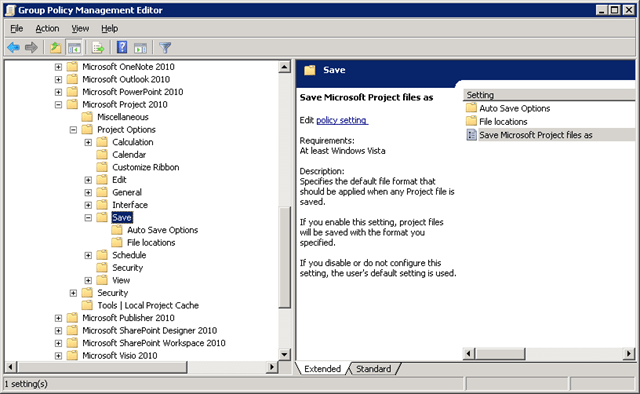
Where we find following options:

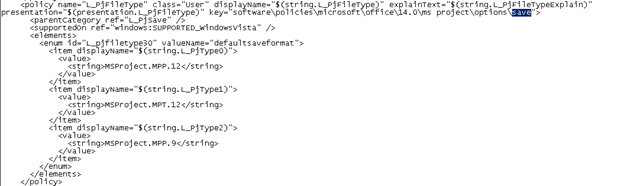
Funny we thought we’d find three options: Project 2010, Project 2007 and Project 2000-2003. Now what mpp format would that “Project” setting refer to? Microsoft Project 2007 or 2010? Well we checked the contents of the ADMX file proj14.admx which can be found, when using the central store that is, at:

\blog.demoSYSVOLblog.demoPoliciesPolicyDefinitionsproj14.admx

There we see the following:

Aha it’s the mpp format of Microsoft Project 2007 as indicated by MSProject.MPP.12. An entry for Microsoft Project 2010 doesn’t even exist. We quickly had a look at the proj12.admx (Microsoft Project 2007) and there the entries are exactly the same for that setting for “Save” policy.

It seems that even when the file formats is different between Microsoft Project 2007 and Microsoft Project 2010 they offer no way to easily identify what mpp format you’re setting it to in the GPO. Why they don’t offer Microsoft Project 2010 I don’t know. I guess their take is that you could leave it disabled in the GPO. Which is true but GPO setting are normally very unambiguous and you can explicitly set every option when you enable it, even the default when disabled. Perhaps they just forgot as they did not need this for the other office products in the Office 2010 release. I don’t know.

Anyway we tested this and indeed it set the default format for saving to Microsoft Project 2007. So all is well. Tip of the day: check the content of the ADMX file when in doubt.

The fallacy of High & Continuous Availability without a Vision – Cloud to the rescue?

A lot of people today are obsessed with uptime, high availability or even continuous availability without having a clue about what it is and why or when to use it. Sometimes rightly so, as some systems must be up and running as much as humanly possible. But often this is not necessary. Sometimes it’s even used to fix issues it can’t fix, at best only mitigate. An example of this is using software that has some very bad design issues. An example is software that parses vast amounts of data 24/7 and that, if a network connection or a database connection is unavailable for a short time, loses all the work already done. So they need to start over, parsing data again for many days. The GIS/CAD world is rifled with this kind of custom build crap software. Investing a lot in making the database or network more redundant is cost prohibitive, it doesn’t happen all that much that these fail and it doesn’t address the real issue, the bad software “design”. Other examples are software that renders services 24/7 and that’s designed to run interactively. This is so bad in so many ways I won’t even begin to address all the issues with automation, security, usability, stability and availability this causes. I only bring it up because sometime people ask for an IT infrastructure fix to these problems.

Sometimes the services can be made highly available but it is not profitable to do so. Always make a cost versus benefits analysis before deciding to putting down your money. I know that nowadays people are becoming more and more demanding as everyone seems to be on line 24/7 and expect services to always run. They even do so when these services are free like Hotmail/Gmail, twitter, instant messaging and various social media. People are becoming more and more dependent on them just like they are on electricity and water, and just like such services they demand ‘m at low ball prices. Yes the same people that balk at the price of a cubic meter of drinkable water (a resource we’ll go at war over in the future I’m afraid) and who will happily put down 750 € for a Smartphone. Cloud will make us consume very valuable resources at low prices and we will forget what they mean to us. Pure consumption … nope, the cloud will not be green I’m afraid. We’re are spoiled rotten and in the future will be even more so.

Now before we think that the always on Walhalla will be achieved by cloud computing I’ll make some reservations about that subject or at least temper your enthusiasm. Utilities like water and electricity are only high available because they are very standardized and highly controlled. You can get what you can get and that’s it. A lot of our IT is way too specialized to reach that level of service at commodity costs. We’re only at the very beginning of that evolution in IT. So for your specialized IT needs be realistic. Does it matter the database is down for maintenance between 02:00-04:00 (rebuilding indexes)? Does it matter that the intranet server with the company mess ordering site and the holiday request form is being updated at night. That the switch is being reconfigured or gets its firmware updated at night? In a lot of cases it just doesn’t matter and causes no issues what so ever with decent software solutions. Also think about less frequent issues like a server being down due to motherboard failure. So you are down for 24 hours? Is that bad? It depends on your needs, what service and who needs it. But face the fact that we’re not all running a nuclear power plant, a hospital, the emergency services communication network or the air traffic control system. Do you need to operate in such a critical endeavor to try and improve availability? No, if you can get high availability cheaply, why not. At that moment the cost /benefit balance tips in your favor. Just look at clustering today versus 10 years ago.

Take a long hard look at a couple of considerations before deciding to invest in high availability.

  • Do you really need it or do you have processes and software that are of such “questionable” quality that it fails to deliver unless the universe in which the software runs is perfect? Do you think you need it because it sounds professional and perhaps you think it will help you be more productive?
  • Do you realize most business systems do not require 24/7 uptime? A lot of their stuff can be down for even a days with only a small impact on the business. Does this happen a lot? This depends on a lot of factors but most of the time it doesn’t no. Can and will it happen? Oh yes. Everything breaks. Everything, only sales people, idiots and complete raving mad lunatics think that it can’t. Don’t be offended but apart from properly set up redundant systems completely failing the biggest factor is human inadequacies. One big Bio Carbon Unit error and major downtime materializes.
  • If some businesses need it they’ll have to accept it’s going to cost them a lot. They’ll spend a lot of time, money, and Bio Carbon Units on it – continually. It’s a never ending effort. Yes High availability has become a lot more affordable, but in comparison “normal” systems have become so cheap there is still a big cost gap! And the human skill set and effort required comes at a cost. A big one.
  • Do high availability right or you’ll pay for it in more problems than you had before. Instead of improving your “not so perfect” operations you’ve just flushed it availability down the drain. Yes, you’ll be worse off than before you had high availability gear in place. Stuff breaks. Unbreakable does not exist. And broken high available stuff is harder to troubleshoot than “ordinary” stuff.
  • Beware of people in charge who have no competencies about what they are in charge about. No one likes to come over as incompetent so they buy stuff and hire people to take care of that. A lot of the time that doesn’t work and costs a bundle. They buy into the commercials and by equipment thinking it will deliver high availability out of the box, like the vendor said. People in charge with no context and knowledge combined with salesmen without scruples seldom deliver results.

Never underestimate how lucky you are if you have dedicated and skilled personnel to keep your high availability systems running. The amount of effort, time and money needed to be able to react to problems are tremendous. It’s a serious investment due to the nature of high availability and complexity involved. It has been said before; and by many people: complexity is the enemy of availability. You should only insert complexity when you know you can manage it and when the benefits outweigh the investment and costs it incurs. Fail to do so and you will pay dearly by actually reducing your availability.

There are times that you need realistic high availability. When you virtualized all your systems and you did that on one single point of failure you’re not daring Murphy, you’re requesting him to come over and let the full weight of his law come down on your business. But even then do so with reason. When a continuous availability systems drains your monetary and human resources without ever living up to its promises you’re in a very bad place. You will be a lot cheaper and better off with a failover system that gives you solid performance when need, even when it means 30 minutes of downtime. Remember that you can’t control everything. Spending a million € on continuous availability when (external) factors out of your control bring the entire process down for one day two times a year causing 50.000 Euro’s in damages is silly. Accept 4 days of down time a year and eat the 100.000 Euro’s. Perhaps a 100.000 € investment in a solution that lasts for 4 to 5 years can reduce the yearly loss to 50.000 € and is the wiser choice. As always, it depends.