Introduction
This project configures a Windows SMTP relay for infrastructure devices that cannot conveniently authenticate via modern auth to an external mail provider. This SMTP relay replaces what I used to build for many years using the Windows built-in SMTP feature. But in Windows Server 2025 and beyond that is gone, as Microsoft is not going to modernize it and it depended on the legacy IIS 6.0 web server components. But in many environments we still need SMTP relays, as many devices remain that can do only basic auth via STARTTLS or even unauthenticated mail. So I needed another SMTP relay solution, preferably one I can automate. I finally settled on hMailServer as it is open source, free, and has a COM API to automate it. Below you will find the design, setup, and configuration information to help you automate it yourself. It can install, maintain, and repair a deployment, as well as secure your SMTP service as well as possible to ensure it cannot be abused easily.
Design and mail flow
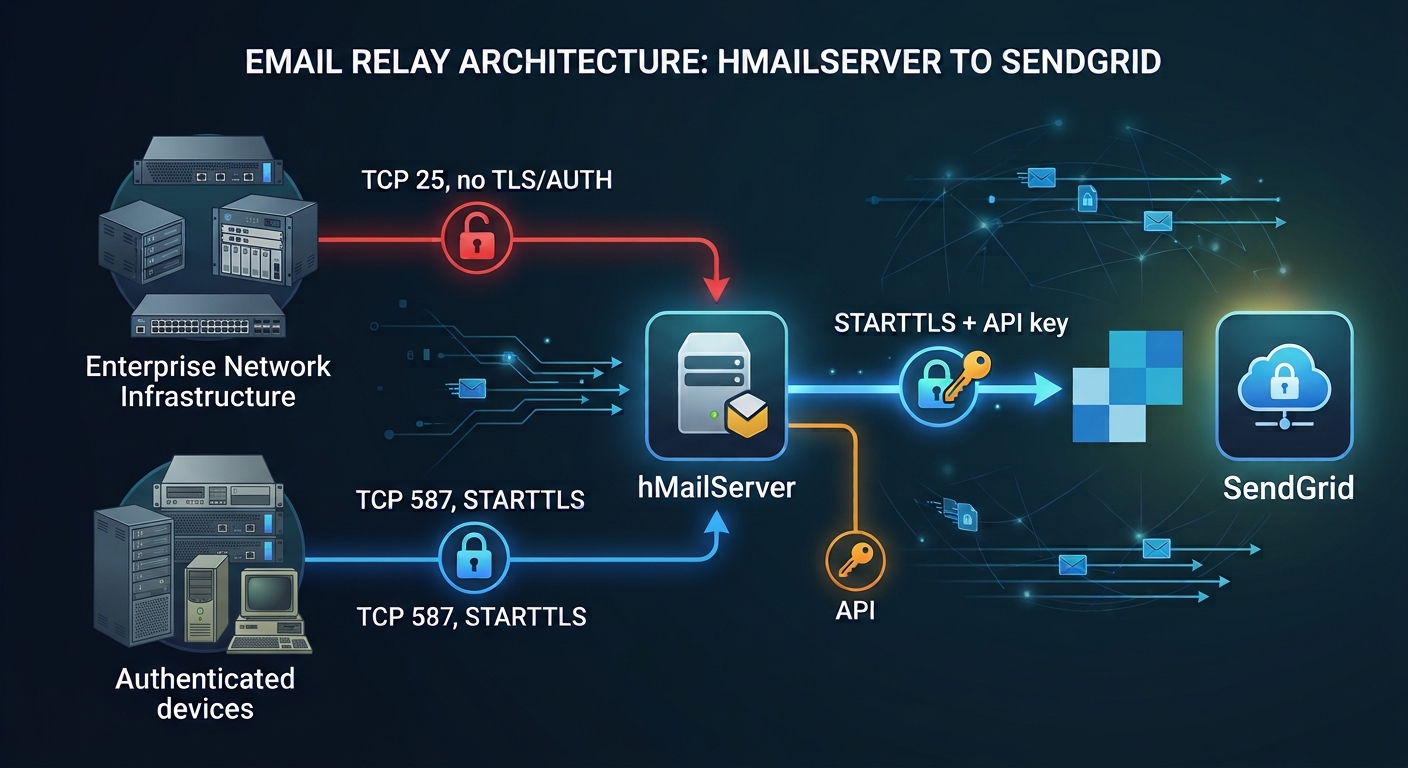
The internal relay has two separate submission paths. Sources without
requireSmtpAuth: true use TCP 25 without authentication or TLS. Sources marked
true are excluded from TCP 25 and use TCP 587 with SMTP AUTH and STARTTLS
required. Windows Firewall and the matching hMailServer IP ranges enforce this
separation. Both paths relay onward through SendGrid using required STARTTLS and
the apikey account. You can change the port or add one easily for a device
that might require it. hMailServer treats domains configured locally as local
sender/recipient domains. The script creates the internal domain and the
authorized sending domain when missing. Managed device ranges permit
local-to-external delivery only. Whether that direction requires SMTP AUTH
is configured per device with requireSmtpAuth; the other three local/external
delivery combinations remain denied. Configure device senders accordingly.
The global rewrite rule changes the From header to authorizedFrom when
that header contains internalDomain. This is not an envelope-sender rewrite,
an exact domain match, or a general sender-identity enforcement mechanism. If
possible, use the public domain(s) SendGrid trusts.
High availability design
In real life I normally make the SMTP solution highly available behind a load balancer.
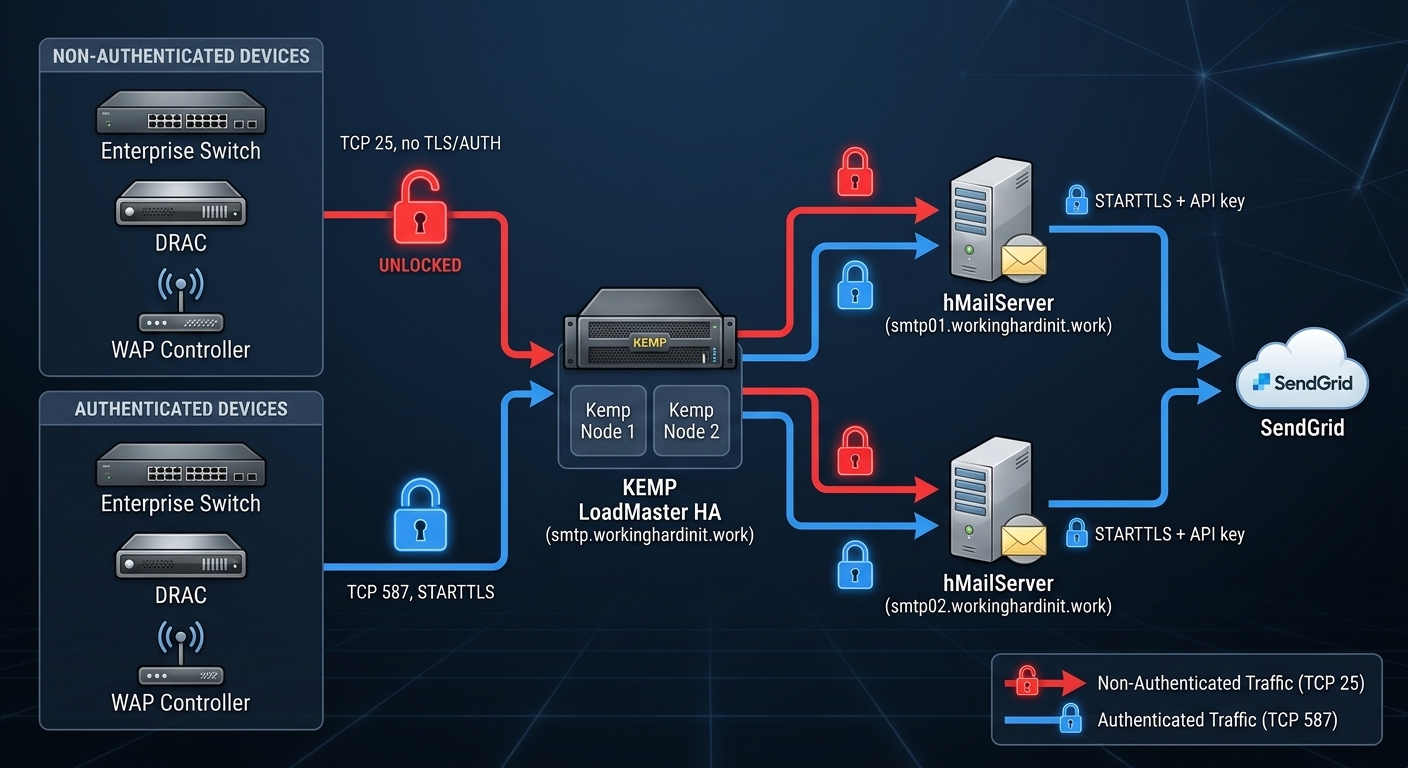
The diagram shows a proposed HA topology, not an HA deployment created by
this script. A Kemp LoadMaster HA pair presents a shared SMTP virtual IP and
hostname (smtp.workinghardinit.work). Devices connect to that endpoint; the
load balancer forwards connections to either smtp01.workinghardinit.work or
smtp02.workinghardinit.work. Each hMailServer node independently sends mail to
SendGrid using STARTTLS and its configured API key. The pictured hostnames are
examples and differ from the single-server hostname in the supplied JSON.
The red path represents unauthenticated, unencrypted SMTP on TCP 25. The blue path represents SMTP AUTH with STARTTLS on TCP 587. Keep the two paths separate at the load balancer and relay nodes, and restrict TCP 25 to trusted network segments. HA does not make unauthenticated or unencrypted SMTP secure.
Planning and configuration
- Deploy two independent hMailServer nodes and a supported Kemp HA pair. Configure separate TCP 25 and TCP 587 virtual services on the shared virtual IP, with both relay nodes as backends. Configure and test node and virtual service health checks; do not assume that a TCP-open check proves delivery.
- Provide DNS for the shared endpoint and both node hostnames. Run the configuration script on each relay with the appropriate node hostname, consistent relay policies, device inventory, sender settings, and upstream configuration. The script configures one local server at a time; it does not configure Kemp, synchronize the nodes, or provision shared DNS.
- Decide whether Kemp preserves client source IPs or uses source NAT. The relay’s Windows Firewall and hMailServer ranges use the source address actually seen by the backend. If multiple clients are NATed to the same address, backend per-device restrictions no longer distinguish them: enforce the intended per-device and per-port access at Kemp or upstream, and design backend rules accordingly. In particular, do not assume backend IP ranges can distinguish authenticated from unauthenticated clients sharing one NAT address. Verify the observed source addresses on both nodes and during Kemp failover before enabling access.
- Configure TLS and SMTP AUTH end-to-end for TCP 587. If using TCP pass-through, each backend must present a certificate trusted by clients and valid for the shared hostname clients connect to, in addition to satisfying any node-specific requirements. A certificate containing only a node hostname will not validate for the shared name. If terminating TLS at Kemp, separately design and protect the Kemp-to-relay leg; STARTTLS is an SMTP protocol upgrade, so confirm the chosen Kemp configuration supports the intended behavior rather than assuming ordinary HTTPS termination applies.
- Provision consistent SMTP AUTH credentials and SendGrid access on both nodes using secure procedures. Reapplying authenticated submission resets the shared account password on the node being configured; coordinate changes across both nodes and devices. Keep certificate private keys and credentials protected on each system. Demo self-signed certificates require client trust and are not a production certificate strategy.
- Configure independent monitoring and backups for both relay nodes, Kemp, DNS, and SendGrid connectivity. The relays have independent queues: failover does not automatically transfer messages already accepted by a failed node. Recover that node and its queue to deliver pending messages; avoid replaying messages without considering possible duplicates. SendGrid, DNS, networking, power, and any shared credentials or infrastructure remain common dependencies.
Validate failover
From representative allowed and denied source addresses, test TCP 25 and 587 against the shared hostname. Verify authentication, certificate trust and hostname, and actual message delivery through each backend. Then test one relay node unavailable, Kemp node failover, recovery, and queued-message handling. Review load-balancer, hMailServer, firewall, and SendGrid logs; SMTP acceptance alone does not confirm delivery. Capture evidence and repeat tests after changes.
Files
All files you need are at https://github.com/WorkingHardInIT/SMTPRelayThroughhMailServerAndSendgrid
Requirements and preparation
- Windows with Windows PowerShell 5.1; regression tests also run in PowerShell 7.
- Administrator rights for installation and Windows Firewall changes. The script requests UAC and relaunches when necessary.
- Standard hMailServer installation layout and working COM registration.
- An outbound connection to the configured SendGrid host and port, normally
smtp.sendgrid.net:587, plus DNS and HTTPS for installer downloads if needed. - A SendGrid API key with Mail Send permission and an appropriately verified sender/domain. Configure provider-required DNS separately.
- Native Windows
New-SelfSignedCertificatesupport when demo-certificate generation is enabled and either TLS output file is missing. No external certificate utility is downloaded or installed. - An internal DNS record for the relay FQDN pointing to the relay server.
- Back up existing hMailServer configuration/data and record existing firewall settings before applying to an established server.
Review the supplied addresses: they are examples, not discovered allocations. The inventory contains 18 data switches, 5 Omada/UniFi devices, 4 storage switches, 12 OOB switches, 4 proposed iDRAC9 addresses, 4 Kemp LoadMasters, and 2 OPNsense firewalls. Reserve and verify every proposed address, routing, and the source IP actually seen by the relay before applying.
JSON configuration
Edit HMailServerRelay.json, not the script, for routine device and mail-setting changes.
| Setting | Meaning |
|---|---|
smtpHostname |
Relay’s FQDN, currently smtp01.datawisetech.corp; used for hMailServer’s host identity. Not the SendGrid hostname. |
internalDomain |
Domain created in hMailServer and used by the From-header rewrite condition. |
authorizedDomain |
Sending domain created in hMailServer; authorizedFrom must belong to it. |
authorizedFrom |
Replacement From header address. |
sendGrid.host / sendGrid.port |
Upstream SMTP endpoint; STARTTLS and authentication remain required by code. |
tls.preferServerCipherOrder |
Boolean controlling the server’s cipher preference; the supplied config enables it. |
tls.prioritizeChaCha20 |
Boolean prioritizing ChaCha20 when the client prefers it; the supplied config enables it. Requires tls.preferServerCipherOrder: true. |
smtpAuthentication.enabled |
Enables provisioning of the shared account, certificate/listener, and authenticated TCP 587 path. The checked-in demo config enables it. |
smtpAuthentication.generateDemoCertificate |
When true, generate a 3072-bit, one-year self-signed certificate only when both configured TLS files are missing. It never replaces existing files. |
smtpAuthentication.accountAddress |
Shared account created under authorizedDomain; default [email protected]. |
smtpAuthentication.port |
Fixed at 587. |
smtpAuthentication.certificateName |
hMailServer certificate entry name. The certificate must identify smtpHostname. |
smtpAuthentication.certificateFile / privateKeyFile |
PEM certificate and unencrypted PEM private-key paths under C:\hMailServerFiles\Certs; the private-key ACL is limited to SYSTEM, Administrators, and the hMailServer service identity when known. |
devices |
Complete desired list of named IPv4 /32 devices. |
devices[].requireSmtpAuth |
Optional boolean; true requires authenticated submission on TCP 587, while omitted/false selects unauthenticated TCP 25. |
devices[].description |
Optional inventory annotation only; not written to hMailServer IP ranges. |
Device example:
{
  "name": "DataSwitch-1",
  "cidr": "172.16.10.11/32",
  "description": "First data switch",
  "requireSmtpAuth": false
}
Demo certificate and authenticated submission
The checked-in configuration enables authenticated submission and opts into demo
certificate generation. The certificate paths and generation setting are already
set in JSON; the installer defaults to C:\hMailServerFiles\Installer.
Installer and certificate files are kept under C:\hMailServerFiles.
- On apply, if both configured TLS files are missing, native Windows PowerShell
creates a one-year RSA-3072 self-signed certificate with a DNS SAN for
smtpHostname, exports the certificate and unencrypted RSA private key as PEM, then removes its temporary certificate-store entry. The.crtand.keysuffixes are just filenames; both files contain PEM data. hMailServer requires the private key to have no passphrase, and a CA-issued certificate file should include its trust chain. If both files exist, they are reused. If only one exists, the script stops rather than replacing either file. - This self-signed certificate is for demonstrations, not production trust. Clients must be configured to trust this exact certificate (or use a properly trusted internal/public CA certificate instead). Until clients trust it, STARTTLS encrypts the connection but does not reliably authenticate the relay identity. The script checks the generated cert/key match and DNS identity; it does not manage client trust. See the hMailServer SSL certificate documentation for certificate-chain and unencrypted-key requirements.
- Apply the script. It prompts securely for the shared account password, provisions the account, configures a STARTTLS-required port 587 listener, updates firewall allowlists, restarts hMailServer, and checks that its process owns a listener on port 587.
- Configure each selected device for
smtpHostname, port 587, STARTTLS (not implicit SSL), SMTP AUTH, and the provisioned account credentials.
Reapplying with authentication enabled resets the shared account password to the
newly prompted value; update the devices to match. Generated files are never
overwritten automatically. Do not use -SkipWindowsFirewall while authenticated
submission is enabled. On a firewall-managed run with authentication disabled,
TCP 587 is explicitly blocked.
Names and addresses must be unique. Do not list 127.0.0.1: the script always
adds its managed loopback entry. An explicit "devices": [] removes managed
device entries while retaining loopback. Missing/invalid settings fail rather
than falling back to defaults. Use exact property spelling; no comments,
trailing commas, passwords, or API keys belong in this file.
The script configures the FQDN but does not rename Windows or create DNS records. For this internal relay, the name can resolve internally; SendGrid handles onward Internet delivery. A public receiving MX record or inbound port forwarding is not required for this outbound-only design.
Run and maintain
From the project directory:
# Safe preview: no UAC, credential prompts, or configuration changes.
.\Configure-HMailServerRelay.ps1 -WhatIf

# Apply: review the confirmation, then enter credentials in PowerShell.
.\Configure-HMailServerRelay.ps1

# Select an alternate authoritative configuration.
.\Configure-HMailServerRelay.ps1 -ConfigPath 'C:\SysAdmin\Relay.json' -WhatIf
If elevation is required, approve UAC and finish in the new PowerShell window. The parent returns after launching it; launch success is not configuration success. Parameters, explicit switch values, and the working directory are forwarded. Credentials are requested only after confirmation in the target run.
Other parameters:
-HMailAdminUser: administrator username; defaultAdministrator.-InstallerPath: installer file path; defaultC:\hMailServerFiles\Installer\hMailServer-5.7.1-B3116-x64.exe.-SkipWindowsFirewall: leaves firewall rules untouched, including obsolete addresses. hMailServer device reconciliation still happens.-KeepInternetRange: leaves the existing Internet range unchanged. This is an exception to the normal hardening behavior, not a way to restore previously disabled settings.-Confirm:$false: bypasses the configuration confirmation, not UAC or credential prompts; use intentionally.
To add/remove a device, edit its JSON entry, preview, and reapply. To change its IP, keep the stable name. Renaming creates the new managed range and removes the old. The JSON list is not an incremental list of additions.
Which IP ranges are changed or removed?
The script does not remove every hMailServer IP range that is absent from the JSON:
- Script-managed ranges: Names starting with
SendGrid relayare reserved for the script. It creates or updates the ranges for JSON devices and127.0.0.1, and removes other ranges with that prefix. Do not use the prefix for manual ranges. - Recognized older ranges: Unprefixed names matching current device names or the script’s older device-name patterns can be removed or migrated if they are single-IP ranges and their settings match the script’s relay settings. A matching current device gets a prefixed replacement. Recognized entries whose settings differ are left unchanged with a warning.
- Other manual ranges: Generally left unchanged, even if they are absent from JSON. Previously removed custom unprefixed device names may no longer be recognizable, so review them manually.
- Default and old broad ranges: The script disables SMTP on
My computerand, unless-KeepInternetRangeis used, disables SMTP and delivery onInternet. It also disables SMTP on the originalDataSwitches,StorageSwitchesandOutOfBandSwitchesbroad ranges when their IP bounds match the original defaults. These ranges are not deleted by those actions. You can use your own naming convention for your devices. These are just examples.
An hMailServer range left intact is not necessarily reachable: the managed Windows Firewall rules independently block sources outside the configured TCP 25 and 587 allowlists. Review other hMailServer ranges and firewall rules before applying changes.
Installation and repair
Readiness requires a standard-location interop DLL, the hMailServer service,
and the COM ProgID registration. A DLL alone is not proof of installation.
When setup is needed, the script:
- Obtains the pinned official hMailServer 5.7.1 Build 3116 x64 installer.
- Uses an existing matching file or downloads it when absent; verifies SHA-256.
- Reports download failures with the official download URL and the exact
-InstallerPathdestination. It never silently accepts a mismatched installer. - Runs unattended setup with the built-in database option, suppressed dialogs, and no automatic restart.
- Checks the exit code, installation readiness again, and the service’s running state before proceeding.
The installer is pinned, not dynamically updated to the latest release. When repairing, supply the existing administrator password. Setup currently rejects passwords shorter than six characters or containing whitespace/double quotes because of installer/database-setup limitations. A service present without a standard-location interop DLL stops with an explicit error rather than risking an unintended install over a custom layout.
Security controls and boundaries
| Control | Purpose and limitations |
|---|---|
Individual IPv4 /32 allowlist |
Avoids trusting every device in a subnet. Trust is source-IP based, not user/device authentication. |
| Managed hMailServer ranges at priority 1000 | Allow SMTP and local-to-external delivery only; deny POP3/IMAP connections for these ranges. Review other equal/higher-priority ranges manually. |
| Internet range disabled by default | Disables SMTP and all delivery combinations on the default IPv4 catch-all. Does not control outbound SendGrid traffic. |
| My computer SMTP disabled | Removes a permissive fallback while retaining the managed 127.0.0.1 relay. Other My computer settings remain unchanged. |
| Managed firewall rules | TCP 25 permits only unauthenticated IPv4 sources plus loopback; TCP 587 permits only authenticated sources when enabled. IPv4 complements and all IPv6 are blocked on both ports. |
| TLS protocol policy | The script enables TLS 1.2/1.3 and disables TLS 1.0/1.1 in hMailServer. If a legacy client truly requires TLS 1.0/1.1, an administrator must re-enable it manually; a later script run restores this policy. |
| Cipher-order options | The JSON controls “Prefer server cipher order” and “Prioritize ChaCha20-Poly1305 when the client prefers it”; both are enabled in the supplied config. These control selection order, not the set of allowed ciphers. |
| Required upstream STARTTLS | Protects SMTP transport to SendGrid; certificate verification remains hMailServer’s responsibility. |
| Prompted credentials | No secrets in JSON/source; SendGrid credential is stored through hMailServer’s settings API. Plaintext is temporarily required by COM/setup APIs. |
TLS versions and cipher-order options
hMailServer 5.7.1 exposes settings for each TLS version. The script sets TLS 1.2 and 1.3 on and TLS 1.0 and 1.1 off, restarting the service when that policy changes. This does not force TLS on unauthenticated TCP 25; it controls protocol versions whenever a TLS handshake occurs. SMTP AUTH on TCP 587 still requires STARTTLS.
For authenticated submission, the device and hMailServer negotiate a TLS version and cipher when establishing STARTTLS on TCP 587. The TLS version settings also apply when hMailServer connects to a remote server such as SendGrid. Cipher compatibility matters in both directions; server cipher preference applies to incoming connections where hMailServer is the server.
The two cipher options are controlled by the required tls JSON settings:
- Prefer server cipher order makes the server choose according to its configured cipher order instead of the client’s order. It is a useful control when the server’s cipher list is deliberately strong, but does not itself remove weak ciphers.
- Prioritize ChaCha20-Poly1305 when the client prefers it favors ChaCha20 for clients that advertise it first, often improving performance on mobile devices without AES hardware acceleration. This is a performance preference, not an additional security layer, and OpenSSL requires server cipher preference to be enabled for it to take effect.
An alternate configuration file must include both boolean tls settings; the
ChaCha option requires server cipher preference to be enabled. OpenSSL documents
the server-preference and ChaCha
options.
You can manually remove weaker ciphers from Settings > Advanced > Security > SSL/TLS ciphers after confirming that no required device or remote mail server needs them. Save the original list first, then test STARTTLS with all relevant devices and delivery to SendGrid; incompatible peers may no longer connect. The script does not change this cipher list.
Remote server certificate verification
Keep Verify remote server SSL/TLS certificates enabled. It checks the identity of servers hMailServer connects to, such as SendGrid, including certificate trust, hostname and validity. This setting does not verify connecting devices and does not make devices trust the relay’s self-signed certificate. Each device that validates the relay’s certificate needs to trust it separately and connect using its matching hostname. The script leaves remote-server certificate verification unchanged.
The firewall rules are named:
HMailServer-SMTP25-Trusted-AllowHMailServer-SMTP25-Untrusted-IPv4-BlockHMailServer-SMTP25-Untrusted-IPv6-BlockHMailServer-SMTP587-Trusted-AllowHMailServer-SMTP587-Untrusted-IPv4-BlockHMailServer-SMTP587-Untrusted-IPv6-Block
The TCP 25 and 587 IPv4 blocks are calculated independently from the same
authoritative device list; they are not manually maintained or SendGrid
destination-IP lists. IPv6 uses ::/1 and 8000::/1 because ::/0 was
rejected by the tested Windows Firewall. Rules apply to all profiles and are
updated in place, block rules first. Windows Firewall must be enabled and
effective policy must permit these local rules; Group Policy and unrelated
explicit block rules can affect results.
Important boundaries:
- Any application on the relay host can use its unauthenticated loopback relay.
- A compromised allowlisted device can abuse its relay permission. Recipient restrictions and rate limiting are not implemented here. SMTP AUTH protects the credentials/transport but is shared across authenticated devices.
- If NAT combines clients behind an allowed source IP, they share its trust.
- The script does not globally disable POP3/IMAP services, close every installer listener, or harden every pre-existing hMailServer range or firewall rule.
- Unattended setup requires the administrator password on a process command
line. Local process inspection/monitoring may expose it;
SecureStringdoes not eliminate that installer requirement. - Changes are not transactional. A failure can leave partial changes, including firewall rules installed before setup. Correct the cause and reconcile again.
These controls are a scoped relay design, not proof of comprehensive hardening.
Testing and troubleshooting
Regression tests (mocked management APIs; no mail is sent):
powershell.exe -NoProfile -File .\Configure-HMailServerRelay.Tests.ps1
pwsh.exe -NoProfile -File .\Configure-HMailServerRelay.Tests.ps1
Network-only check from the actual relay server:
Test-NetConnection smtp.sendgrid.net -Port 587
A successful result proves TCP reachability only, not STARTTLS, authentication, SendGrid acceptance, or inbox delivery. UniFi policies, IDS/IPS, routing, or other network controls can block traffic; inspect their logs rather than assuming. Do not add inbound port forwarding to solve an outbound SMTP problem.
To send a real message, substitute an address you control and explicitly set the sender and recipient instead of relying on script defaults:
.\Test-SmtpRelay.ps1 -SmtpServer '127.0.0.1' `
  -From '[email protected]' -To '[email protected]'
Run from the relay host for loopback, or from an allowed device/IP against the relay’s FQDN to test the network path. Local SMTP acceptance is not final delivery: inspect hMailServer’s queue/SMTP/error logs, SendGrid activity, and the recipient mailbox (including spam). Handle logs as sensitive; redact credentials and message data before sharing.
For 80040154 / Class not registered, inspect service, binaries, COM
registration, and process architecture. The updated detection schedules setup
for missing COM registration, but registry presence alone does not guarantee COM
activation. Do not delete the database or blindly reinstall over a custom
installation. But we do detect leftovers from a previous installation so as not
to mistake them for a properly installed hMailServer.
Conclusion
This script provides me with an automated, reproducible way of deploying and maintaining an internal SMTP relay on Windows Server for various devices that still require one. It can be made highly available when required. I am happy with the results, and it helps me deliver value in niche environments that the big companies no longer serve.